

HypeShare
HypeShare lets you securely send large files up to 10GB instantly with end-to-end encryption and no signup required.
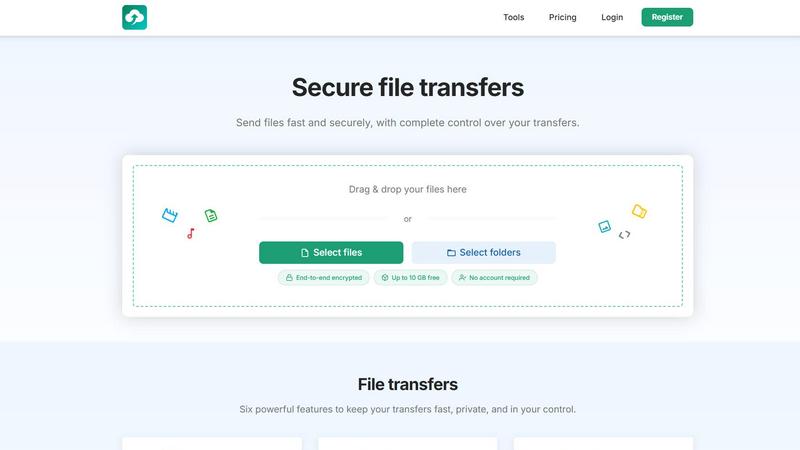
About HypeShare
HypeShare is a secure file transfer platform designed for individuals and teams who value both speed and privacy in their digital workflows. What makes HypeShare particularly intriguing is its ability to let you send files up to 10GB without ever needing to create an account, offering a frictionless experience for quick, one-off transfers. For those who require a more persistent solution, signing up for a free account unlocks 20GB of storage, encrypted transfers, custom expiry links, and the unique ability to create file request pages. These request pages allow anyone to upload files directly to you, without requiring them to log in or sign up, which is a game-changer for collaboration with clients or colleagues. The platform is built on the principle of giving you complete control over your transfers. You can set expiration dates, limit the number of downloads, add password protection, and rely on end-to-end encryption for every file you send. HypeShare is a direct challenge to bloated, traditional file-sharing tools, offering a no-friction alternative that prioritizes a clean, fast, and secure user experience. It is designed for freelancers, agencies, and teams who need to move large files quickly without compromising on security or getting bogged down by unnecessary features.
Features of HypeShare
Secure File Transfers with End-to-End Encryption
HypeShare ensures that every file you send is protected with end-to-end encryption. This means your data is scrambled on your device and only unscrambled on the recipient's device, making it unreadable to anyone in between, including HypeShare itself. This foundational feature provides peace of mind for sensitive documents, creative assets, and personal files, ensuring that your privacy is never an afterthought but a core part of the transfer process.
File Requests for Effortless Receiving
The File Requests feature transforms how you collect files from others. You create a unique, shareable link that leads to a personal upload page. Anyone with this link can upload files directly to your HypeShare dashboard, and they do not need an account to do so. This is perfect for gathering client feedback, receiving large portfolios, or collecting submissions from a group, turning a potentially cumbersome process into a simple, one-click action for the sender.
Customizable Transfer Controls
HypeShare gives you granular control over every transfer you initiate. You can set an automatic expiration date for your links, ensuring files are not accessible indefinitely. You can also define the maximum number of downloads allowed, preventing unauthorized access after the intended recipient has retrieved the file. Additionally, you can add a password to your transfers for an extra layer of security, giving you complete authority over who can access your shared content and for how long.
High Transfer Limits and No Account Required
One of HypeShare's most compelling features is its generous free tier. You can send files up to 10GB in size without ever creating an account, making it an ideal tool for quick, ad-hoc sharing. For registered users, the free plan offers 20GB of storage, while Pro plans unlock even larger transfer capacities of up to 200GB per transfer. This focus on high limits removes the common frustration of file size restrictions found in other services.
Use Cases of HypeShare
Freelancers Sending Final Deliverables
A graphic designer can use HypeShare to send a 5GB video file of a final commercial to a client. They can set a password to ensure only the client can view it, and an expiration date of seven days to ensure the file is not left accessible indefinitely. The client receives a simple link and can download the file without needing to sign up for anything, creating a smooth and professional handoff experience.
Agencies Collecting Assets from Clients
A marketing agency can create a dedicated File Request page for a client named "Acme Corp Rebrand." They share the link with the client, who then uploads their logo files, brand guidelines, and product images directly to the agency's dashboard. This eliminates the back-and-forth of email attachments and provides a single, organized drop point for all incoming assets, streamlining the entire project intake process.
Teams Collaborating on Large Projects
A remote software development team can use HypeShare to share large build files, debug logs, or video recordings of bugs. With the free account, they get 20GB of shared storage and can set download limits for each file to ensure only the relevant team members access them. The encrypted nature of the transfers ensures sensitive code or internal data remains secure during the collaboration.
Individuals Sharing Personal Files
A user can quickly share a folder of vacation photos (up to 10GB) with family members without needing to compress them or create an account. They simply drag and drop the files, get a link, and share it. The link can be set to expire after a week, providing a temporary and secure way to share large personal memories without cluttering anyone's email inbox or requiring a subscription.
Frequently Asked Questions
Do I need to create an account to send a file?
No, you do not. HypeShare allows you to send files up to 10GB in size without creating an account. This guest option is perfect for quick, one-time transfers. However, creating a free account gives you additional benefits like 20GB of storage, file request pages, and the ability to track your transfer history.
How does the File Request feature work?
You create a request page from your HypeShare dashboard, give it a name (like "Wedding Photos"), and get a unique link. You share this link with anyone you want to receive files from. When they click the link, they see an upload page where they can drag and drop files directly to you. They do not need an account, and you receive an email notification when files are uploaded.
What kind of security is used for my transfers?
All transfers on HypeShare are protected with end-to-end encryption. This means your files are encrypted on your device before they are uploaded and can only be decrypted by the intended recipient. Additionally, you can add password protection to your transfers and set limits on the number of downloads and the link's expiration date for further control.
What are the main differences between the Free and Pro plans?
The Free plan offers 10 transfers per month, 10GB per transfer, 20GB of storage, and 30 days of data retention. The Pro plan, at $8.99 per month, unlocks unlimited transfers, 200GB per transfer, 1000GB of storage, unlimited data retention, download notifications, and priority support. Pro is designed for users who need higher volume and more advanced control.
Pricing of HypeShare
HypeShare offers a tiered pricing structure to accommodate different needs, from casual users to power users. You can choose between monthly and yearly billing.
Guest (No Account): This is a free, no-commitment option. You get 5 transfers per month, with 10 files per transfer and a maximum of 10GB per transfer. There is no storage, and data is retained for 7 days. It includes file encryption and custom aliases.
Free: This is a free account tier that unlocks more features. You get 10 transfers per month, 10 files per transfer, 20GB of storage, and 10GB per transfer. Data is retained for 30 days. It includes file encryption, custom aliases, download notifications, and no ads.
Pro (Most Popular): Priced at $8.99 per month. This plan is for heavy users. It offers unlimited transfers and files, 1000GB of storage, and 200GB per transfer. You get unlimited download controls, 50 emails per transfer, and unlimited data retention. It includes all Free features plus priority support, branded downloads, and transfer analytics.
Similar to HypeShare

Product Launch Checklist
A free launch checklist for SaaS, apps, AI tools and more. Every step says why it matters and when you can skip it.

Whop Trends
Discover winning products early with live market data to scale your income.

Blueberry
Blueberry is an AI-native Mac workspace that combines your editor, terminal, and browser for seamless product building.

Shrinkpad
Shrinkpad quickly compresses images and videos in bulk on Mac, saving time and optimizing your creative assets.

Skene
Skene transforms your codebase into a promptable growth engine you fully own.

Yellow Systems
Yellow Systems crafts bespoke AI and software to drive innovation for startups and enterprises.

MVPable
Discover the perfect tools and plan to turn your idea into a real, buildable MVP.

Agenta
Discover how Agenta's open-source platform helps teams build and manage reliable LLM applications together.