

Shrinkpad
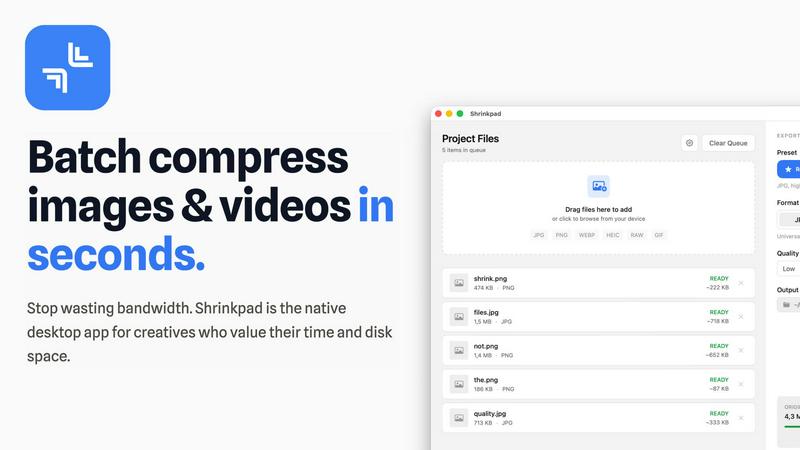
Shrinkpad quickly compresses images and videos in bulk on Mac, saving time and optimizing your creative assets.
About Shrinkpad
Shrinkpad is an innovative desktop application tailored for macOS users seeking a powerful yet user-friendly solution for batch compressing images and videos. This versatile tool is perfect for photographers, designers, and content creators who need to optimize media files without compromising on visual quality. Shrinkpad streamlines the process of reducing file sizes, allowing users to compress hundreds of files or entire folders in mere seconds. Its main value proposition lies in its ability to process files locally, ensuring that your data remains private and secure on your device. With support for over 50 file formats, Shrinkpad can handle a variety of media types, from high-resolution images to 4K videos, enabling professionals to maintain the quality necessary for their work while significantly improving efficiency. Whether you are looking to enhance website load times or reduce app bundle sizes, Shrinkpad is designed to meet the demands of modern creatives.
Features of Shrinkpad
Automatic Compression Settings
Shrinkpad takes the guesswork out of image and video compression by automatically analyzing visual complexity. It applies the optimal compression ratio to each file, ensuring that you achieve excellent results without introducing artifacts, making it an essential tool for maintaining visual integrity.
Unlimited Batch Processing
With Shrinkpad, you can process thousands of assets simultaneously without the fear of crashing. Unlike web-based tools, this desktop application is built to handle massive queues effortlessly, allowing you to save time and focus on what really matters—your creative projects.
One-Drop Import Functionality
Gone are the days of dragging files in one by one. Shrinkpad allows you to drop an entire folder containing images and videos, automatically identifying and adding all supported media files to your batch list. This feature simplifies the workflow, making it seamless and efficient.
Privacy-Focused Design
All processing with Shrinkpad occurs locally on your machine, meaning your sensitive assets are never uploaded to the cloud. This privacy-first approach ensures that your data remains secure and confidential, providing peace of mind for users who prioritize data protection.
Use Cases of Shrinkpad
Photographers
Photographers can benefit immensely from Shrinkpad's ability to batch compress high-resolution images without losing quality. This feature saves time during the editing process and ensures that their portfolios and websites load quickly, enhancing user experience.
Graphic Designers
For graphic designers working with large image files, Shrinkpad streamlines the workflow by allowing for bulk processing. This means they can export multiple assets from design software and optimize them in one go, reducing the hassle of manual adjustments.
Content Creators
Content creators, especially those producing videos, can utilize Shrinkpad to compress 4K video files efficiently. The application ensures that videos maintain their visual quality while significantly reducing file sizes, making it easier to upload to various platforms.
Web Developers
Web developers can leverage Shrinkpad to optimize images and videos for websites, improving load times and overall site performance. By using Shrinkpad, they can ensure that their media assets are web-friendly, ultimately enhancing user engagement and satisfaction.
Frequently Asked Questions
Can I use Shrinkpad for free?
Yes, Shrinkpad offers a Free Starter plan that includes essential tools for casual use, allowing you to batch compress up to 10 files at a time.
What file formats does Shrinkpad support?
Shrinkpad supports over 50 file formats, including common image formats like JPG, PNG, WEBP, and advanced formats like RAW and HEIC, as well as major video formats such as MP4 and MOV.
Does Shrinkpad support video compression?
Absolutely! Shrinkpad is designed to handle video compression along with image files, allowing you to process both types of media together in a single batch for optimal efficiency.
How many files can I process at once?
With the Free Starter plan, you can process up to 10 files at a time. However, in the Personal and Team plans, there are no limits on the number of files you can batch compress, enabling you to work on large projects seamlessly.
Explore more in this category:
Similar to Shrinkpad

GPT Image 2 API
Generate and edit production-ready images with GPT Image 2 API using detailed prompts, references, clear text rendering, and developer-friendly workfl

Clawra AI
The ultimate AI Girlfriend experience: roleplay with images and videos.

Imagine2
Private browser-based AI image generation and editing with text-to-image, targeted edits, and multi-image references.

NodeStory
One-click UGC videos, product photo sets, and reusable AI workflows, with 30+ image and video models in one studio.

IsThisAIImage
Free AI image checker: upload a photo for AI-generated and deepfake scores, a clear verdict, and optional generator hints.


Best Face Swap
Best Face Swap lets you explore frame-consistent face replacement for photos, videos, and GIFs with dedicated workflows for free, NSFW, and multiple.

SALBCALC Crack Analyzer
Snap a photo of any concrete crack and discover instantly if it's a simple DIY fix or a call-your-engineer emergency.