
Shrinkpad vs Whop Trends
Side-by-side comparison to help you choose the right AI tool.

Shrinkpad
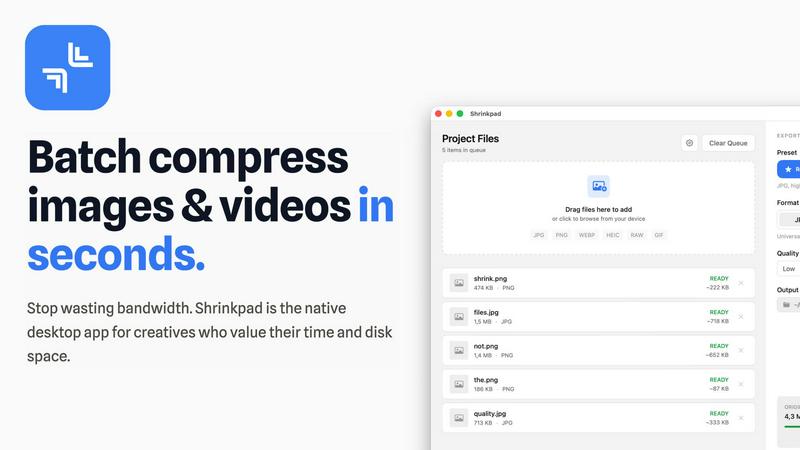
Shrinkpad quickly compresses images and videos in bulk on Mac, saving time and optimizing your creative assets.
Last updated: February 28, 2026

Whop Trends
Discover winning products early with live market data to scale your income.
Last updated: February 28, 2026
Visual Comparison
Shrinkpad
Whop Trends

Feature Comparison
Shrinkpad
Automatic Compression Settings
Shrinkpad takes the guesswork out of image and video compression by automatically analyzing visual complexity. It applies the optimal compression ratio to each file, ensuring that you achieve excellent results without introducing artifacts, making it an essential tool for maintaining visual integrity.
Unlimited Batch Processing
With Shrinkpad, you can process thousands of assets simultaneously without the fear of crashing. Unlike web-based tools, this desktop application is built to handle massive queues effortlessly, allowing you to save time and focus on what really matters—your creative projects.
One-Drop Import Functionality
Gone are the days of dragging files in one by one. Shrinkpad allows you to drop an entire folder containing images and videos, automatically identifying and adding all supported media files to your batch list. This feature simplifies the workflow, making it seamless and efficient.
Privacy-Focused Design
All processing with Shrinkpad occurs locally on your machine, meaning your sensitive assets are never uploaded to the cloud. This privacy-first approach ensures that your data remains secure and confidential, providing peace of mind for users who prioritize data protection.
Whop Trends
Live Market Data Feed
Dive into a constantly updated database tracking over 197.3k Whop products every 24 hours. This live feed presents key metrics like monthly revenue, affiliate commission rates, product age, user ratings, and review counts in a sortable table. This daily ingestion ensures you're working with the freshest signals, allowing you to spot emerging trends and momentum shifts as they happen, not weeks later.
Deep Product Analysis & Validation Tools
Move beyond surface-level data with deep-dive product pages. Access four historical charts and timelines that show a product's growth trajectory, review velocity, and revenue trends over time. This feature provides crucial market context, helping you distinguish between fleeting fads and products with sustainable, validated demand before you invest your time or resources.
Integrated Affiliate & Revenue Intelligence
Whop Trends uniquely combines two critical data points: estimated revenue and affiliate program details. Filter products offering 30% or higher commissions to instantly identify profitable distribution opportunities. This dual lens allows you to find winning products not just to build, but also to promote, maximizing your potential revenue streams from a single discovery platform.
Curated Whop Apps & Free Analysis Tools
Explore a directory of 323+ indexed apps, including hidden gems and niche tools. Complementing this are free-to-use tools like the Product Checker, which gives any Whop product an instant grade and growth assessment, and the Revenue Calculator, which helps you estimate earning potential based on benchmark data. These resources empower your research from initial curiosity to final validation.
Use Cases
Shrinkpad
Photographers
Photographers can benefit immensely from Shrinkpad's ability to batch compress high-resolution images without losing quality. This feature saves time during the editing process and ensures that their portfolios and websites load quickly, enhancing user experience.
Graphic Designers
For graphic designers working with large image files, Shrinkpad streamlines the workflow by allowing for bulk processing. This means they can export multiple assets from design software and optimize them in one go, reducing the hassle of manual adjustments.
Content Creators
Content creators, especially those producing videos, can utilize Shrinkpad to compress 4K video files efficiently. The application ensures that videos maintain their visual quality while significantly reducing file sizes, making it easier to upload to various platforms.
Web Developers
Web developers can leverage Shrinkpad to optimize images and videos for websites, improving load times and overall site performance. By using Shrinkpad, they can ensure that their media assets are web-friendly, ultimately enhancing user engagement and satisfaction.
Whop Trends
For Builders: Identifying Profitable Niches
A developer looking to create a new digital product can use Whop Trends to discover underserved markets. By filtering for high-revenue products in specific categories with relatively low competition scores, a builder can identify a validated customer need and benchmark pricing and features, significantly de-risking the product development process before writing a single line of code.
For Affiliates: Discovering High-Commission Programs
An affiliate marketer seeking to maximize earnings can leverage the platform to filter the entire product database for programs offering 50% or 30% commissions. By combining this with filters for high user ratings and strong recent revenue growth, an affiliate can quickly build a curated list of reputable, high-converting products to promote, ensuring their efforts are focused on the most lucrative opportunities.
For Operators & Investors: Conducting Market Research
A community operator or investor can use Whop Trends to perform thorough market analysis. By examining category-level benchmarks, historical performance charts of competing products, and overall trend curves, they can assess market saturation, identify emerging verticals, and make data-driven decisions about where to allocate capital or focus community growth efforts for maximum impact.
For Content Creators: Generating Data-Backed Ideas
A content creator or analyst can utilize the platform's vast dataset to generate insightful reports, videos, or social media content. Whether it's highlighting "top 10 trending products this month" or creating a case study on a product's growth journey, the real, updated data provides a credible foundation for engaging content that attracts an audience interested in digital market trends.
Overview
About Shrinkpad
Shrinkpad is an innovative desktop application tailored for macOS users seeking a powerful yet user-friendly solution for batch compressing images and videos. This versatile tool is perfect for photographers, designers, and content creators who need to optimize media files without compromising on visual quality. Shrinkpad streamlines the process of reducing file sizes, allowing users to compress hundreds of files or entire folders in mere seconds. Its main value proposition lies in its ability to process files locally, ensuring that your data remains private and secure on your device. With support for over 50 file formats, Shrinkpad can handle a variety of media types, from high-resolution images to 4K videos, enabling professionals to maintain the quality necessary for their work while significantly improving efficiency. Whether you are looking to enhance website load times or reduce app bundle sizes, Shrinkpad is designed to meet the demands of modern creatives.
About Whop Trends
Ever wonder how some creators and entrepreneurs seem to spot the next big digital product before anyone else? Whop Trends is your backstage pass to that discovery process. It's an innovative intelligence platform that tracks over 197,000 products within the Whop ecosystem daily, giving you a live feed of market momentum. The core mission is to help you uncover trending, high-revenue products and low-competition niches before they become saturated. Designed for a curious and strategic audience—builders developing new offers, affiliates seeking lucrative programs, and operators analyzing the market—it transforms random guessing into a repeatable workflow. By combining real revenue estimates with affiliate intelligence, Whop Trends provides the data-backed insights needed to validate demand, benchmark performance, and execute strategies with confidence. It’s more than just a list; it’s a decision engine for anyone looking to make smarter, more informed bets in the fast-paced digital marketplace.
Frequently Asked Questions
Shrinkpad FAQ
Can I use Shrinkpad for free?
Yes, Shrinkpad offers a Free Starter plan that includes essential tools for casual use, allowing you to batch compress up to 10 files at a time.
What file formats does Shrinkpad support?
Shrinkpad supports over 50 file formats, including common image formats like JPG, PNG, WEBP, and advanced formats like RAW and HEIC, as well as major video formats such as MP4 and MOV.
Does Shrinkpad support video compression?
Absolutely! Shrinkpad is designed to handle video compression along with image files, allowing you to process both types of media together in a single batch for optimal efficiency.
How many files can I process at once?
With the Free Starter plan, you can process up to 10 files at a time. However, in the Personal and Team plans, there are no limits on the number of files you can batch compress, enabling you to work on large projects seamlessly.
Whop Trends FAQ
What kind of data does Whop Trends track?
Whop Trends tracks a comprehensive suite of data points for over 197,000 products on Whop. This includes key metrics like estimated monthly revenue, affiliate commission percentage, product age, pricing, user rating, number of reviews, and total users. The platform also calculates growth signals and mixed percentages, with all data updated daily to reflect the live market.
How can I validate if a niche is worth pursuing?
The platform provides multiple validation tools. You can examine a product's historical performance charts to see consistent growth, check review velocity for recent member satisfaction, and use category benchmarks to compare its performance against peers. This multi-angle analysis helps you pressure-test demand and avoid niches that are declining or already oversaturated.
Is there a free version or trial available?
Yes, Whop Trends offers a Free Preview tier. This allows you to browse the full database of 197.3k+ product listings and use the free, public tools like the Product Checker and Revenue Calculator. This gives you a hands-on feel for the data and workflow before deciding to unlock the full suite of advanced filters, deep analytics, and export capabilities.
What does "one-time payment" mean for access?
Whop Trends operates on a one-time payment model for lifetime access to the platform, as opposed to a monthly subscription. This means you pay a single fee to unlock the full database, intelligence features, and all current and future tools, allowing you to maintain your market edge without an ongoing software bill.
Alternatives
Shrinkpad Alternatives
Shrinkpad is an innovative desktop application tailored for macOS users who need a robust yet user-friendly solution for batch compressing images and videos. As a vital tool in the realms of photography, design, and content creation, it streamlines the process of reducing file sizes while preserving visual quality. Users often seek alternatives to Shrinkpad for reasons such as pricing, specific features, or compatibility with different platforms, which may not align with their unique needs or workflows. When exploring alternatives, it's essential to consider factors such as ease of use, processing speed, file format support, and privacy measures. A strong alternative should provide efficient batch processing capabilities, maintain high-quality outputs, and ensure that your data remains secure. Identifying these essential features will help you find the right tool that best fits your requirements.
Whop Trends Alternatives
Whop Trends is a specialized market intelligence platform within the product discovery and affiliate marketing category. It scans the Whop ecosystem to surface high-revenue, trending products, giving users a data-driven edge to validate opportunities and scale their income. Users often explore alternatives for various reasons. They might seek different pricing models, a broader market scope beyond a single platform, or specific feature sets like deeper analytics or integration capabilities. The search is typically driven by a need to find the perfect tool that aligns with their unique workflow and business goals. When evaluating other options, key considerations include the depth and freshness of data, the specificity of the niches covered, and the actionable insights provided. The ideal tool should not only identify trends but also empower you to act on them confidently with clear validation and strategy guidance.