
Proofapp vs RGB to CMYK Converter
Side-by-side comparison to help you choose the right AI tool.

Proofapp
Transform feedback into visual comments on your website, streamlining collaboration and reducing miscommunication.
Last updated: March 4, 2026

RGB to CMYK Converter
Transform RGB images into print-ready CMYK with precision using our seamless online converter, no downloads required.
Last updated: February 28, 2026
Visual Comparison
Proofapp

RGB to CMYK Converter
Feature Comparison
Proofapp
Visual Commenting
With Proofapp, users can click anywhere on a screenshot to leave contextual feedback. This eliminates confusion over vague comments like "top left, under the nav," allowing for precise communication regarding design adjustments.
Multi-Breakpoint Testing
Proofapp automatically captures screenshots at both desktop and mobile breakpoints. This feature ensures that all aspects of a website are reviewed, providing a comprehensive understanding of how the design performs across devices.
Real-time Collaboration
Experience seamless teamwork as comments from your team appear in real-time. This feature enables users to reply, resolve issues, and track progress collectively, fostering an efficient and responsive workflow.
Secure Share Links
Generate secure, expirable links to share projects with clients easily. While clients can view and comment on designs, they do not need to create an account, making it straightforward for everyone involved in the project.
RGB to CMYK Converter
Professional-Grade Color Conversion
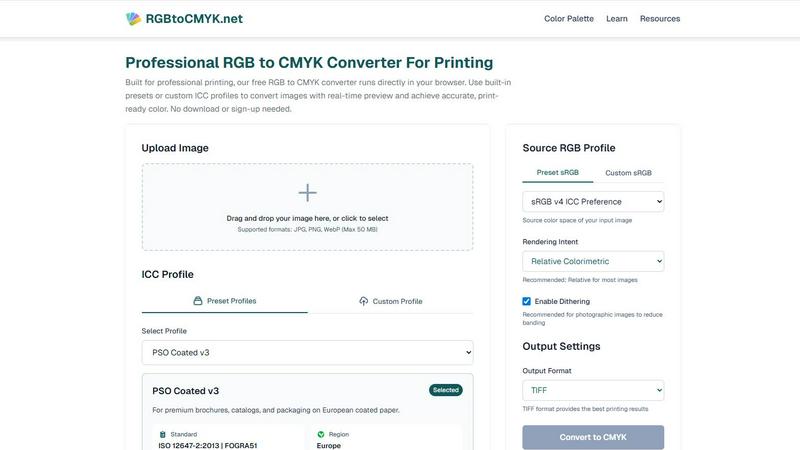
The RGB to CMYK Converter utilizes industry-standard color conversion engines and ICC color management, similar to those employed in professional software like Photoshop and GIMP. This ensures that the conversion results are highly accurate and reliable for any printing application.
Extensive ICC Profile Support
With a wide range of built-in ICC profiles, users can select from various sources for both RGB and CMYK color spaces. Additionally, the feature allows for custom profile uploads, ensuring that the specific needs of different print providers are met, which is crucial for achieving precise color reproduction.
Real-time Preview Functionality
The tool offers a real-time preview that allows users to see the converted CMYK file in their browser. This feature includes a before-and-after comparison, helping users avoid costly print proofs and ensuring that the final output matches their expectations.
Flexible Output Format Options
Users can choose their desired output format from several options, including TIFF, JPG, and PNG. The TIFF format is recommended for the best printing results, while the other formats provide flexibility depending on the user's specific needs for digital use.
Use Cases
Proofapp
Freelancers
Freelancers can leverage Proofapp to present their work professionally while efficiently collecting feedback from clients. By utilizing visual comments, they can save time on revisions and focus on delivering high-quality projects.
Small Development Teams
For small dev teams, Proofapp streamlines the client approval process without the burden of enterprise pricing. This allows teams to maintain productivity and keep projects moving forward with clear and actionable feedback.
Design Teams
Design teams benefit from precise visual feedback pinned right where it matters. This organized method of communication helps to reduce design revisions and enhances the overall quality of the final product.
Marketing Teams
Marketing teams can visually review landing pages and campaigns with their entire team. By using Proofapp, they ensure that all members are aligned on project goals and can provide instant feedback on visual elements.
RGB to CMYK Converter
Graphic Design Projects
Graphic designers can use the RGB to CMYK Converter to ensure that their creative designs transition flawlessly from digital screens to printed materials. This tool allows them to achieve the desired color accuracy in branding, packaging, and marketing collateral.
Photography for Fine Art Prints
Photographers preparing images for fine art prints or gallery exhibitions can rely on this converter to maintain the integrity of their work. By ensuring accurate color representation, this tool helps preserve the depth and detail of their photographic creations.
Prepress Preparation for Print Shops
Print shops and service bureaus can utilize this converter to streamline the file preparation process for their clients. The reliable RGB to CMYK conversion allows them to deliver high-quality print-ready files efficiently, minimizing the risk of color discrepancies.
Marketing Material Production
Whether producing brochures, catalogs, or other marketing materials, businesses can count on the RGB to CMYK Converter to ensure that the colors in their printed materials match their digital designs. This helps maintain brand consistency across all mediums.
Overview
About Proofapp
Proofapp is an innovative visual feedback and website review platform designed to streamline collaboration among designers, developers, and their clients. By enabling users to upload any website URL, Proof automatically captures high-quality screenshots for both desktop and mobile views. This intuitive tool allows reviewers to pin comments directly on the design, engage in threaded discussions, attach necessary files, and mark feedback as resolved—all without requiring an account. Proofapp stands out with features like real-time notifications, Slack integration, and support for multiple pages, making it ideal for freelancers gathering client input or agencies managing numerous projects. By transforming feedback into a visual and organized format, Proofapp eliminates the chaos of scattered emails and ambiguous revision notes, enhancing productivity and ensuring actionable insights.
About RGB to CMYK Converter
The RGB to CMYK Converter is an essential online tool tailored for graphic designers, photographers, and print professionals who require accurate color conversion for high-quality printing. This powerful converter facilitates the transformation of RGB colors, optimized for digital displays, into CMYK colors, which are vital for the printing process. By using this tool, users can ensure that their digital artwork preserves its vibrancy and integrity when printed. The converter allows for direct image uploads from any browser, making it convenient and user-friendly. With access to built-in presets and the option to use custom ICC profiles, users can enhance color accuracy significantly. This tool helps mitigate the risk of unexpected color shifts, providing users with complete manual control over the conversion process. Whether working on marketing materials, packaging, or fine art prints, the RGB to CMYK Converter guarantees print-ready colors that align seamlessly with the user's creative vision, streamlining the transition from screen to print.
Frequently Asked Questions
Proofapp FAQ
How does Proofapp improve feedback communication?
Proofapp enhances feedback communication by allowing users to leave visual comments directly on screenshots. This ensures that all feedback is contextual and eliminates misunderstandings that often arise from written communication.
Do clients need an account to provide feedback?
No, clients can provide feedback through secure share links without needing to create an account. This simplifies the feedback process and encourages more timely input from clients.
What security features does Proofapp offer?
Proofapp includes enterprise-level security features, such as role-based permissions and audit logs. This ensures that sensitive data is handled securely, giving users peace of mind while collaborating with clients.
Is there a free trial available for Proofapp?
Yes, Proofapp offers a generous free trial that allows users full access for 60 days without a credit card required. This trial enables potential users to explore the platform's capabilities before committing to a subscription.
RGB to CMYK Converter FAQ
How does the RGB to CMYK Converter work?
The converter transforms colors from the RGB color space, typically used for digital displays, into the CMYK color space, which is essential for printing. Users can upload images, select profiles, and preview the results in real-time, ensuring accurate conversion.
What formats can I upload to the RGB to CMYK Converter?
The RGB to CMYK Converter supports various image formats, including JPG, PNG, and WebP, with a maximum file size of 50 MB. This flexibility makes it easy for users to work with different types of images.
Is there a cost associated with using the RGB to CMYK Converter?
The RGB to CMYK Converter is a free tool that operates directly in your browser. No downloads or sign-ups are required, making it accessible and convenient for all users.
What is an ICC profile, and why is it important?
An ICC profile is a set of data that characterizes a color input or output device, providing a standardized way to ensure accurate color reproduction across different devices. Using ICC profiles in the conversion process helps achieve more reliable and consistent color results.
Alternatives
Proofapp Alternatives
Proofapp is a visual feedback and website review platform designed to enhance collaboration between designers, developers, and their clients. By capturing screenshots of both desktop and mobile views, it allows users to provide targeted feedback directly on the designs. This tool falls under the category of design tools, enabling teams to streamline their review processes and manage feedback effectively. Users often seek alternatives to Proofapp for various reasons, including pricing structures, specific feature sets, or platform compatibility. When exploring alternatives, it's essential to consider factors such as ease of use, integration capabilities, and the ability to handle multi-page projects. Finding a solution that meets your unique workflow needs can significantly enhance your design review process and improve overall efficiency.
RGB to CMYK Converter Alternatives
The RGB to CMYK Converter is an innovative online tool that falls under the category of design tools, specifically tailored for graphic designers, photographers, and print professionals. It allows users to convert RGB images, which are designed for digital displays, into CMYK colors that are essential for high-quality printing. Users often seek alternatives to such converters for a variety of reasons, including pricing, specific feature sets, and compatibility with their preferred platforms. When exploring alternatives, it's crucial to consider factors such as ease of use, the accuracy of color conversions, available presets or profiles, and the flexibility of rendering options. Ultimately, the goal is to find a solution that meets your unique design requirements and enhances your creative workflow.