

RGB to CMYK Converter
Transform RGB images into print-ready CMYK with precision using our seamless online converter, no downloads required.
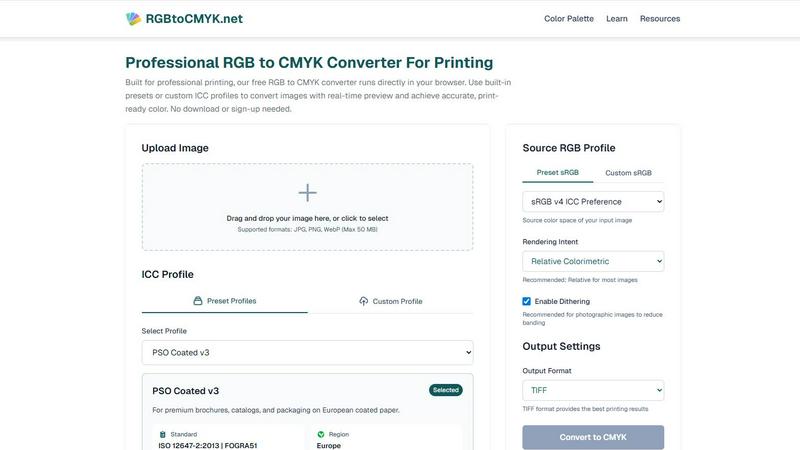
About RGB to CMYK Converter
The RGB to CMYK Converter is an essential online tool tailored for graphic designers, photographers, and print professionals who require accurate color conversion for high-quality printing. This powerful converter facilitates the transformation of RGB colors, optimized for digital displays, into CMYK colors, which are vital for the printing process. By using this tool, users can ensure that their digital artwork preserves its vibrancy and integrity when printed. The converter allows for direct image uploads from any browser, making it convenient and user-friendly. With access to built-in presets and the option to use custom ICC profiles, users can enhance color accuracy significantly. This tool helps mitigate the risk of unexpected color shifts, providing users with complete manual control over the conversion process. Whether working on marketing materials, packaging, or fine art prints, the RGB to CMYK Converter guarantees print-ready colors that align seamlessly with the user's creative vision, streamlining the transition from screen to print.
Features of RGB to CMYK Converter
Professional-Grade Color Conversion
The RGB to CMYK Converter utilizes industry-standard color conversion engines and ICC color management, similar to those employed in professional software like Photoshop and GIMP. This ensures that the conversion results are highly accurate and reliable for any printing application.
Extensive ICC Profile Support
With a wide range of built-in ICC profiles, users can select from various sources for both RGB and CMYK color spaces. Additionally, the feature allows for custom profile uploads, ensuring that the specific needs of different print providers are met, which is crucial for achieving precise color reproduction.
Real-time Preview Functionality
The tool offers a real-time preview that allows users to see the converted CMYK file in their browser. This feature includes a before-and-after comparison, helping users avoid costly print proofs and ensuring that the final output matches their expectations.
Flexible Output Format Options
Users can choose their desired output format from several options, including TIFF, JPG, and PNG. The TIFF format is recommended for the best printing results, while the other formats provide flexibility depending on the user's specific needs for digital use.
Use Cases of RGB to CMYK Converter
Graphic Design Projects
Graphic designers can use the RGB to CMYK Converter to ensure that their creative designs transition flawlessly from digital screens to printed materials. This tool allows them to achieve the desired color accuracy in branding, packaging, and marketing collateral.
Photography for Fine Art Prints
Photographers preparing images for fine art prints or gallery exhibitions can rely on this converter to maintain the integrity of their work. By ensuring accurate color representation, this tool helps preserve the depth and detail of their photographic creations.
Prepress Preparation for Print Shops
Print shops and service bureaus can utilize this converter to streamline the file preparation process for their clients. The reliable RGB to CMYK conversion allows them to deliver high-quality print-ready files efficiently, minimizing the risk of color discrepancies.
Marketing Material Production
Whether producing brochures, catalogs, or other marketing materials, businesses can count on the RGB to CMYK Converter to ensure that the colors in their printed materials match their digital designs. This helps maintain brand consistency across all mediums.
Frequently Asked Questions
How does the RGB to CMYK Converter work?
The converter transforms colors from the RGB color space, typically used for digital displays, into the CMYK color space, which is essential for printing. Users can upload images, select profiles, and preview the results in real-time, ensuring accurate conversion.
What formats can I upload to the RGB to CMYK Converter?
The RGB to CMYK Converter supports various image formats, including JPG, PNG, and WebP, with a maximum file size of 50 MB. This flexibility makes it easy for users to work with different types of images.
Is there a cost associated with using the RGB to CMYK Converter?
The RGB to CMYK Converter is a free tool that operates directly in your browser. No downloads or sign-ups are required, making it accessible and convenient for all users.
What is an ICC profile, and why is it important?
An ICC profile is a set of data that characterizes a color input or output device, providing a standardized way to ensure accurate color reproduction across different devices. Using ICC profiles in the conversion process helps achieve more reliable and consistent color results.
Explore more in this category:
Similar to RGB to CMYK Converter

GPT Image 2 API
Generate and edit production-ready images with GPT Image 2 API using detailed prompts, references, clear text rendering, and developer-friendly workfl

Clawra AI
The ultimate AI Girlfriend experience: roleplay with images and videos.

Imagine2
Private browser-based AI image generation and editing with text-to-image, targeted edits, and multi-image references.


StopScroll
AI YouTube thumbnail maker that generates multiple thumbnail concepts from a URL, title, or prompt.

NodeStory
One-click UGC videos, product photo sets, and reusable AI workflows, with 30+ image and video models in one studio.

IsThisAIImage
Free AI image checker: upload a photo for AI-generated and deepfake scores, a clear verdict, and optional generator hints.