
Octopods vs Playwriter
Side-by-side comparison to help you choose the right AI tool.

Octopods
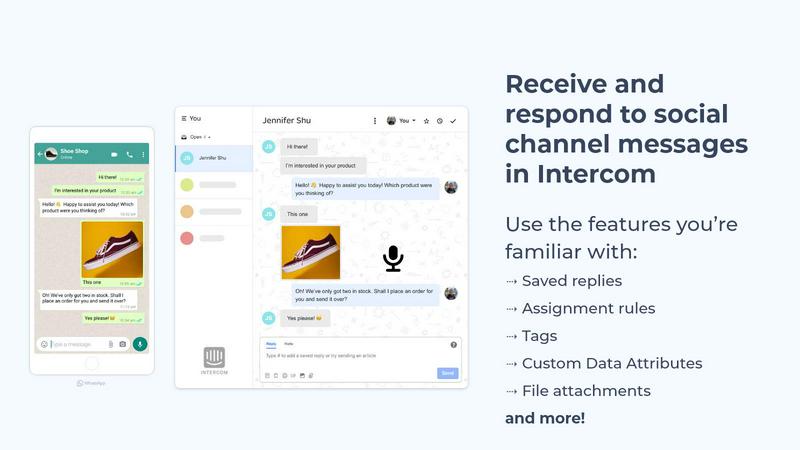
Octopods unifies WhatsApp, Telegram, and more into one inbox for seamless customer conversations across 15+ channels.
Last updated: February 28, 2026

Playwriter
Playwriter empowers agents to control your existing Chrome browser seamlessly with full access to extensions, logins, and Playwright capabilities.
Last updated: March 18, 2026
Visual Comparison
Octopods
Playwriter

Feature Comparison
Octopods
Native Conversation Integration
Octopods offers a unique capability of creating native conversations within Intercom and HubSpot. This means your team can utilize familiar tools like tags, saved replies, and assignment rules without any disruption, ensuring a smooth workflow.
Rich Media Support
With Octopods, your team can send and receive rich media formats, including images, videos, audio files, documents, and GIFs. This feature enhances engagement by allowing for more dynamic and visually appealing communications with customers.
Proactive Messaging Templates
The proactive outbound messaging feature enables your team to use pre-defined templates for outreach. This functionality streamlines communication efforts and helps maintain consistent messaging, which is particularly useful in sales and marketing campaigns.
Automatic Contact Matching
To enhance customer relationship management, Octopods includes an automatic contact matching feature. This prevents duplicate entries in your database, ensuring that your team can focus on engaging with unique contacts and providing tailored responses.
Playwriter
Existing Browser Session
Playwriter uniquely connects your agents to your actual browser session, including all logins, extensions, and cookies. This eliminates the need for fresh browser instances that come with bot detection and performance limitations, allowing agents to work as if they are you.
Full Playwright API Access
With Playwriter, agents gain access to the complete Playwright API through a single execute tool. This means they can perform any Playwright action without the constraints of predefined tools, offering a flexible and powerful automation experience.
Real-Time Collaboration
Playwriter fosters collaboration by allowing you to see exactly what your agent is doing in real-time. If the agent encounters obstacles like captchas or consent walls, you can step in, solve the issues, and then let the agent resume, ensuring a smooth workflow.
Comprehensive Debugger and Editor
The built-in debugger features breakpoints and live code editing capabilities, enabling you to troubleshoot and refine agent behavior on the fly. Network interception allows for detailed monitoring and manipulation of requests, giving you greater control over the automation process.
Use Cases
Octopods
Customer Support Excellence
Support teams can utilize Octopods to manage inquiries from multiple channels in a centralized interface. This integration helps them respond efficiently, reducing resolution times and improving customer satisfaction.
Sales Outreach
Sales teams can leverage Octopods to initiate conversations across various messaging platforms using templates. This proactive approach helps in capturing leads and nurturing relationships with potential customers directly where they communicate.
Marketing Campaigns
Marketers can create visually engaging campaigns by sending rich media through Octopods. This enables them to share promotional content and updates effectively, driving higher engagement rates across different messaging platforms.
Team Collaboration
For operations teams, Octopods enhances collaboration by allowing team members to tag conversations, assign tasks, and utilize workflows within their existing Intercom or HubSpot systems. This streamlined process boosts productivity and ensures that no customer query goes unanswered.
Playwriter
Automated Testing
Playwriter is perfect for developers looking to automate testing processes. By allowing agents to operate within the existing browser session, you can significantly reduce setup time and ensure tests reflect real user interactions.
Data Scraping
For data analysts and researchers, Playwriter makes web scraping more efficient. Agents can navigate websites with existing logins and cookies, bypassing common barriers and collecting data seamlessly while avoiding detection.
Workflow Automation
Businesses aiming to streamline operations can utilize Playwriter to automate repetitive tasks. From filling out forms to data entry, agents can handle mundane tasks while humans focus on higher-value activities.
Educational Tools
Educators and learners can benefit from Playwriter by using it to create interactive learning tools. By enabling real-time collaboration, it allows students to explore web technologies while receiving guidance from instructors or peers.
Overview
About Octopods
Octopods is an innovative messaging integration tool designed to seamlessly connect over 18 messaging channels, including WhatsApp, Telegram, Instagram, LINE, Viber, SMS, WeChat, and more, directly to your Intercom or HubSpot inbox. Unlike basic integrations that simply funnel messages through to your systems, Octopods creates native conversations within these platforms, allowing your team to engage with customers without having to switch contexts. This integration empowers support, sales, and operations teams to interact with customers in their preferred environments, ensuring a more personalized experience. With a quick setup process that takes just minutes, Octopods prioritizes user privacy by not retaining conversation data while being an official partner of Intercom and HubSpot, enhancing trust and reliability in your communication processes.
About Playwriter
Playwriter is an innovative tool designed to bridge the gap between AI agents and real-world web interactions. Unlike traditional AI agents that operate in isolated environments, often with limited functionality and high risk of bot detection, Playwriter empowers agents to leverage your actual browser session. This means your agents can work seamlessly within your logged-in environment, complete with extensions and cookies, making them far more effective for automation tasks. Ideal for developers, testers, and anyone looking to streamline web interactions, Playwriter provides a robust automation API through a single Chrome extension and CLI. With features like live debugging, network interception, and accessibility snapshots, it redefines how agents can interact with web applications, transforming repetitive tasks into efficient workflows. Whether you are automating tests, scraping data, or simply enhancing productivity, Playwriter is the tool that enhances agent capabilities while ensuring a smooth collaborative experience.
Frequently Asked Questions
Octopods FAQ
What messaging channels does Octopods support?
Octopods connects over 18 messaging channels, including popular platforms like WhatsApp, Telegram, Instagram, LINE, Viber, SMS, and WeChat, allowing for comprehensive customer engagement.
How does Octopods ensure data privacy?
Octopods prioritizes user privacy by not retaining any conversation data. This commitment to data protection ensures that your customers' interactions remain confidential and secure.
Is setup complicated?
No, setup with Octopods is designed to be quick and straightforward, taking only a few minutes. This allows your team to get started without extensive technical knowledge or training.
Can Octopods be used for automated messaging?
Yes, Octopods supports proactive outbound messaging through templates, making it an excellent tool for automating communications and ensuring consistent outreach to customers.
Playwriter FAQ
How does Playwriter ensure security?
Playwriter operates entirely on your local machine, meaning no data is sent to remote servers. This design prioritizes your privacy and security, allowing agents to interact with your browser without exposing sensitive information.
Is Playwriter compatible with other tools?
Yes, Playwriter works seamlessly with various MCP clients, including Cursor, Claude, and VS Code. This flexibility allows you to integrate it into your existing workflow without hassle.
Can multiple agents use Playwriter simultaneously?
Absolutely! The relay multiplexes sessions, meaning multiple agents or CLI instances can work with the same browser session concurrently. This makes it an excellent choice for collaborative environments.
What are the system requirements for Playwriter?
Playwriter requires a Chrome browser and a local setup for the extension and CLI. As it utilizes your existing browser session, the only requirement is that you have Chrome installed and configured with your necessary logins and extensions.
Alternatives
Octopods Alternatives
Octopods is an innovative tool designed to streamline customer communication by connecting multiple messaging channels, including WhatsApp, Telegram, Instagram, and SMS, directly to your Intercom or HubSpot inbox. As a customer support solution, it enables teams to manage conversations seamlessly without switching contexts, allowing for a more efficient workflow. Users often seek alternatives to Octopods for various reasons, including pricing, the need for specific features, or integration capabilities with other platforms. When exploring alternatives, consider what is most important for your team’s communication needs. Look for features that enhance collaboration, such as rich media support and automation tools, as well as the ease of setup and data security. Understanding the unique requirements of your organization will guide you in selecting a solution that not only meets your current demands but also scales with your growth.
Playwriter Alternatives
Playwriter is an innovative tool that falls within the automation category, designed to give AI agents the ability to control Chrome via a command-line interface (CLI) or a more user-friendly MCP. Unlike traditional AI models that struggle with web browsing due to restrictions on access and functionality, Playwriter provides a seamless experience by allowing agents to operate within your actual browser session. Users often seek alternatives to Playwriter for various reasons, such as pricing considerations, the need for specific features, or compatibility with different platforms. When exploring alternatives, it's essential to focus on key factors that align with your automation needs. Look for tools that offer robust features, ease of integration with current workflows, and an accessible user interface. Additionally, consider the level of community support and documentation available, as these aspects can significantly impact your overall experience and efficiency in automation tasks.