
MeetingMind vs Never Drop
Side-by-side comparison to help you choose the right AI tool.

MeetingMind
Capture every detail of your Zoom meetings effortlessly with MeetingMind's automatic recordings and intelligent.
Last updated: March 1, 2026

Never Drop
NeverDrop transforms every handshake into a deal by capturing contacts and drafting personalized follow-ups instantly.
Last updated: February 28, 2026
Visual Comparison
MeetingMind
Never Drop

Feature Comparison
MeetingMind
Automatic Detection
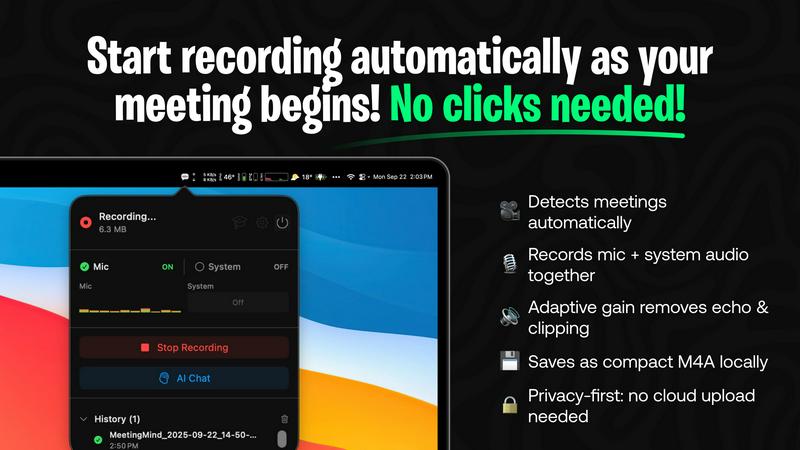
MeetingMind automatically identifies when you are in a Zoom meeting, eliminating the need for manual clicks to start recording. This feature ensures that you can seamlessly engage in discussions without worrying about missing important details or forgetting to initiate the recording.
Records Everything
With the capability to capture both microphone and system audio, MeetingMind records every nuance of your meetings. The adaptive gain feature adjusts the audio levels, ensuring that voices are clear and distinct, which enhances the overall quality of the meeting notes and transcripts.
AI Assistant
MeetingMind offers a choice between local Ollama models or cloud-based OpenRouter for generating summaries and insights. This flexibility allows users to leverage powerful AI tools tailored to their specific needs, providing valuable context and analysis of the discussions held in meetings.
Markdown Export
Upon completion of a meeting, MeetingMind generates AI-driven summaries and transcripts that are formatted as markdown files. This feature not only facilitates easy sharing and organization but also allows users to quickly reference key points and action items, enhancing overall productivity.
Never Drop
AI-Powered Business Card Scanning
Never Drop allows users to scan any business card in seconds. The app utilizes advanced AI-powered optical character recognition (OCR) technology to extract all pertinent details, including name, company, title, phone number, and email, instantly. This feature eliminates the need for manual data entry and helps prevent the loss of business cards.
Automatic Email Enrichment
With Never Drop, business cards often contain generic emails or none at all. The app automatically enriches contact profiles by finding verified work emails based on the name and company details provided. This feature saves time and reduces the effort associated with manual searches on platforms like LinkedIn.
Personalized AI Drafting of Follow-Ups
Once you have scanned a business card and added context about your conversation, Never Drop generates a personalized follow-up email based on your notes and conversation context. This feature ensures that follow-ups are not generic templates but tailored messages that resonate with the lead, ready to be reviewed and sent in under two minutes.
Team Collaboration and Dashboard
Never Drop provides a comprehensive dashboard where sales teams can organize scans by event, reassign leads between team members, and track overall activity. This collaborative workspace ensures that everyone remains aligned, and no lead falls through the cracks, enhancing teamwork and efficiency.
Use Cases
MeetingMind
Efficient Meeting Summaries
MeetingMind is perfect for professionals who need quick access to meeting summaries. By providing clear, concise AI-generated notes, users can save time when reviewing discussions and decisions made during meetings, allowing for quicker follow-ups and actions.
Action Item Tracking
Project managers can utilize MeetingMind to track action items discussed in meetings effectively. The tool highlights key takeaways and assigns tasks, ensuring that all team members are aware of their responsibilities, which promotes accountability and enhances project management.
Enhanced Collaboration
For teams that work remotely or in hybrid environments, MeetingMind fosters collaboration by ensuring that all members have access to the same information. With searchable transcripts, team members can easily revisit discussions, making collaboration more efficient and informed.
Training and Onboarding
MeetingMind is an invaluable resource for training new employees. By recording onboarding sessions and team meetings, organizations can provide new hires with access to past discussions and decisions, facilitating a smoother integration into the company culture and processes.
Never Drop
Trade Shows and Conferences
Sales teams attending trade shows and conferences can leverage Never Drop to capture leads efficiently. The ability to scan business cards on the spot and send personalized follow-ups within minutes helps in maintaining the momentum of warm leads.
Networking Events
At networking events, professionals often meet numerous potential clients and partners. Never Drop enables users to quickly scan and manage contacts, ensuring that essential details and follow-up actions are captured right after the initial meeting, improving conversion rates.
Business Dinners and Meetings
During business dinners or meetings, capturing leads can be challenging. With Never Drop, users can easily scan business cards and add voice notes about their discussions, ensuring that important insights are not lost, paving the way for effective follow-ups.
Team Management and Coordination
Sales managers can utilize Never Drop to oversee their team's lead management activities. The app's dashboard allows for tracking performance, organizing leads by event, and facilitating reassignment of leads, thus promoting a cohesive team strategy for closing deals.
Overview
About MeetingMind
MeetingMind is an innovative intelligent meeting assistant that redefines how professionals engage with virtual meetings. Designed specifically for users of Zoom, it automatically detects and records meetings without any manual intervention, allowing participants to focus on the discussion rather than on taking notes. The tool captures both microphone and system audio, ensuring that every detail is documented accurately. With its advanced AI capabilities, MeetingMind transforms recorded content into searchable, interactive notes, providing real-time, speaker-attributed transcripts in an easy-to-read markdown format. This powerful assistant is ideal for busy executives, project managers, and team members who value productivity and collaboration, ensuring that no crucial information is ever overlooked. Furthermore, MeetingMind prioritizes user privacy with local processing architecture, while offering integration options for enhanced processing capabilities, making it a reliable choice in today's fast-paced professional environment.
About Never Drop
Never Drop is an innovative lead-capture app specifically tailored for sales teams navigating the fast-paced environments of trade shows, conferences, and networking events. This powerful tool transforms the often chaotic process of collecting and managing leads into a seamless experience. With Never Drop, users can quickly scan business cards using their smartphones, eliminating the tedious task of manual data entry. Once a card is scanned, users can enrich the captured information with voice notes or text that capture the essence of their conversations. This not only enhances the quality of lead data but also ensures that sales professionals remember vital details. The app leverages advanced AI technology to draft personalized follow-up emails within two minutes, ensuring timely communication and preventing leads from slipping through the cracks. By integrating smoothly with popular CRM systems like HubSpot, Never Drop keeps your sales pipeline clean, organized, and primed for action. Say goodbye to lost leads and embrace a streamlined follow-up process that transforms potential connections into closed deals.
Frequently Asked Questions
MeetingMind FAQ
How does MeetingMind ensure privacy?
MeetingMind prioritizes user privacy by processing all data locally on the user's Mac. This means that your meetings, notes, and recordings never leave your device, ensuring that sensitive information remains confidential.
What types of meetings can MeetingMind capture?
MeetingMind is specifically designed to detect and record Zoom meetings automatically. It is tailored for virtual environments, making it an excellent tool for remote work and online collaboration.
Can I access my meeting notes after the meeting?
Yes, after your meeting concludes, MeetingMind provides you with transcripts, summaries, and action items in markdown format. You can easily access and review these notes at any time.
Is there a limit to how long I can record meetings?
The free version of MeetingMind allows for 60 minutes of recording per day. However, users can upgrade to the unlimited version with a one-time purchase for more extensive recording capabilities without time restrictions.
Never Drop FAQ
What is Never Drop?
Never Drop is a lead-capture app designed for sales teams at events. It allows users to scan business cards, add voice or text context about conversations, and generates a personalized follow-up email in under two minutes. The app also enriches contacts with verified work emails and syncs everything to your CRM.
How does business card scanning work?
Users can take a photo of any business card using the Never Drop mobile app. The app employs AI-powered OCR technology to swiftly extract the contact's name, company, title, phone number, and email. For those who prefer, there is also an option to enter contact details manually.
What types of events is Never Drop suitable for?
Never Drop is ideal for trade shows, conferences, networking events, meetups, and business dinners. It is specifically designed for situations where professionals need to meet new contacts and follow up quickly, allowing users to organize scans by event for better lead tracking.
Do I need the mobile app?
Yes, the mobile app is essential for scanning business cards, recording voice context, and triggering follow-ups while on the go. Additionally, the web dashboard allows users to manage their team, review scans, configure settings, and handle billing, providing a seamless experience between the two platforms.
Alternatives
MeetingMind Alternatives
MeetingMind is an innovative intelligent meeting assistant that falls under the productivity and management category. It is designed to enhance workplace collaboration by automatically capturing meeting content and transforming it into searchable notes. Users often seek alternatives to MeetingMind for various reasons, including pricing structures, specific feature sets, or compatibility with different platforms. Finding the right alternative involves considering factors such as audio quality, transcription accuracy, user interface, and integration capabilities with existing tools, ensuring that the new solution meets unique workflow requirements. --- [{"question": "What is MeetingMind?", "answer": "MeetingMind is an on-device AI assistant that automatically records meetings and creates searchable, interactive notes."}, {"question": "Who is MeetingMind for?", "answer": "MeetingMind is designed for busy professionals, including executives, project managers, and team members who frequently attend virtual meetings."}, {"question": "Is MeetingMind free?", "answer": "The pricing details for MeetingMind are not specified in the provided content; users should check the official website for current pricing information."}, {"question": "What are the main features of MeetingMind?", "answer": "The main features of MeetingMind include automatic meeting detection, dual-source audio capture, WhisperKit-powered transcription, and an AI assistant with smart templates."}]
Never Drop Alternatives
Never Drop is an innovative lead-capture app tailored for sales teams navigating the dynamic environments of trade shows, conferences, and networking events. As part of the Productivity & Management category, it streamlines the process of collecting and managing leads by allowing users to effortlessly scan business cards and enrich them with contextual details. Users often seek alternatives to Never Drop due to various factors such as pricing, specific feature requirements, or the need for compatibility with different platforms. When searching for an alternative, it's essential to consider aspects like ease of use, integration capabilities with existing systems, and the ability to enhance lead management processes effectively. A good alternative should not only fill the gaps left by another tool but also elevate your overall sales strategy.