

MeetingMind
Capture every detail of your Zoom meetings effortlessly with MeetingMind's automatic recordings and intelligent.
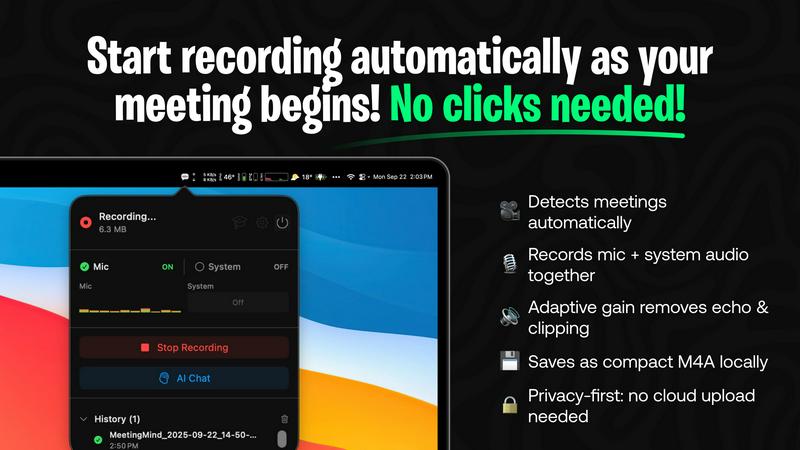
About MeetingMind
MeetingMind is an innovative intelligent meeting assistant that redefines how professionals engage with virtual meetings. Designed specifically for users of Zoom, it automatically detects and records meetings without any manual intervention, allowing participants to focus on the discussion rather than on taking notes. The tool captures both microphone and system audio, ensuring that every detail is documented accurately. With its advanced AI capabilities, MeetingMind transforms recorded content into searchable, interactive notes, providing real-time, speaker-attributed transcripts in an easy-to-read markdown format. This powerful assistant is ideal for busy executives, project managers, and team members who value productivity and collaboration, ensuring that no crucial information is ever overlooked. Furthermore, MeetingMind prioritizes user privacy with local processing architecture, while offering integration options for enhanced processing capabilities, making it a reliable choice in today's fast-paced professional environment.
Features of MeetingMind
Automatic Detection
MeetingMind automatically identifies when you are in a Zoom meeting, eliminating the need for manual clicks to start recording. This feature ensures that you can seamlessly engage in discussions without worrying about missing important details or forgetting to initiate the recording.
Records Everything
With the capability to capture both microphone and system audio, MeetingMind records every nuance of your meetings. The adaptive gain feature adjusts the audio levels, ensuring that voices are clear and distinct, which enhances the overall quality of the meeting notes and transcripts.
AI Assistant
MeetingMind offers a choice between local Ollama models or cloud-based OpenRouter for generating summaries and insights. This flexibility allows users to leverage powerful AI tools tailored to their specific needs, providing valuable context and analysis of the discussions held in meetings.
Markdown Export
Upon completion of a meeting, MeetingMind generates AI-driven summaries and transcripts that are formatted as markdown files. This feature not only facilitates easy sharing and organization but also allows users to quickly reference key points and action items, enhancing overall productivity.
Use Cases of MeetingMind
Efficient Meeting Summaries
MeetingMind is perfect for professionals who need quick access to meeting summaries. By providing clear, concise AI-generated notes, users can save time when reviewing discussions and decisions made during meetings, allowing for quicker follow-ups and actions.
Action Item Tracking
Project managers can utilize MeetingMind to track action items discussed in meetings effectively. The tool highlights key takeaways and assigns tasks, ensuring that all team members are aware of their responsibilities, which promotes accountability and enhances project management.
Enhanced Collaboration
For teams that work remotely or in hybrid environments, MeetingMind fosters collaboration by ensuring that all members have access to the same information. With searchable transcripts, team members can easily revisit discussions, making collaboration more efficient and informed.
Training and Onboarding
MeetingMind is an invaluable resource for training new employees. By recording onboarding sessions and team meetings, organizations can provide new hires with access to past discussions and decisions, facilitating a smoother integration into the company culture and processes.
Frequently Asked Questions
How does MeetingMind ensure privacy?
MeetingMind prioritizes user privacy by processing all data locally on the user's Mac. This means that your meetings, notes, and recordings never leave your device, ensuring that sensitive information remains confidential.
What types of meetings can MeetingMind capture?
MeetingMind is specifically designed to detect and record Zoom meetings automatically. It is tailored for virtual environments, making it an excellent tool for remote work and online collaboration.
Can I access my meeting notes after the meeting?
Yes, after your meeting concludes, MeetingMind provides you with transcripts, summaries, and action items in markdown format. You can easily access and review these notes at any time.
Is there a limit to how long I can record meetings?
The free version of MeetingMind allows for 60 minutes of recording per day. However, users can upgrade to the unlimited version with a one-time purchase for more extensive recording capabilities without time restrictions.
Explore more in this category:
Similar to MeetingMind

GetYouTubeTranscript
Free YouTube transcripts on the web, a Chrome extension, and an API + MCP server so AI assistants can read YouTube.

stackledge
A human-vetted discovery directory for practical AI tools, SaaS apps, and custom n8n workflows, free from bot-scraped spam and dead links.

Kody Tools
Free collection of online developer utilities, code formatters, and digital converters designed to streamline your daily workflow.


What's on the menu
Smart translate any restaurant menu

Forms Plugin
The #1 Native Form Builder Plugin for Framer - No Code, No Embeds, No External Platforms.

Product Launch Checklist
A free launch checklist for SaaS, apps, AI tools and more. Every step says why it matters and when you can skip it.