
AI Formatter vs Never Drop
Side-by-side comparison to help you choose the right AI tool.
AI Formatter
Discover how AI effortlessly transforms your raw text into polished, professional documents.
Last updated: March 1, 2026

Never Drop
NeverDrop transforms every handshake into a deal by capturing contacts and drafting personalized follow-ups instantly.
Last updated: February 28, 2026
Visual Comparison
AI Formatter
Never Drop

Feature Comparison
AI Formatter
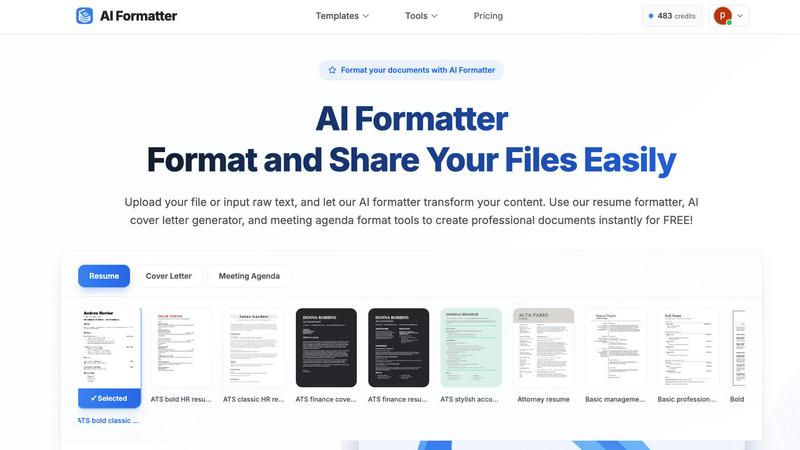
Intelligent One-Click Formatting
Imagine uploading a plain text file or a messy draft and, with a single action, seeing it reborn as a professionally structured document. AI Formatter's core engine intelligently analyzes your content's context and structure, applying perfect formatting, consistent styling, and logical organization automatically. This eliminates guesswork and manual adjustments, allowing you to focus purely on your message while the tool handles the visual presentation.
Vast Library of ATS-Optimized Templates
Dive into a curated collection of over 162 professional templates designed not just to look good, but to perform. Each template is engineered to be compatible with Applicant Tracking Systems (ATS), ensuring your resume or cover letter passes automated screenings. Explore categories for resumes, cover letters, meeting agendas, and invoices, giving you a strong, stylish foundation for any professional need, ready for your personal touch.
Multi-Format Input and Output Flexibility
Your content journey shouldn't be limited by file types. AI Formatter welcomes your documents as they are, supporting uploads in PDF, DOC, DOCX, and TXT formats. Once the AI has worked its magic, you retain full control. Download your newly polished document in multiple formats including Word and PDF, making it easy to share, print, or submit exactly as required, all from one seamless platform.
Real-Time Editing and Customization Suite
The transformation doesn't end with AI. After your content is formatted, an intuitive, in-browser editor awaits. This is where your discovery becomes truly personal. Tweak text, adjust layouts, change fonts and colors, and fine-tune every detail in real-time. This powerful suite ensures the final document is not just professionally formatted, but uniquely and authentically yours before you download or share it.
Never Drop
AI-Powered Business Card Scanning
Never Drop allows users to scan any business card in seconds. The app utilizes advanced AI-powered optical character recognition (OCR) technology to extract all pertinent details, including name, company, title, phone number, and email, instantly. This feature eliminates the need for manual data entry and helps prevent the loss of business cards.
Automatic Email Enrichment
With Never Drop, business cards often contain generic emails or none at all. The app automatically enriches contact profiles by finding verified work emails based on the name and company details provided. This feature saves time and reduces the effort associated with manual searches on platforms like LinkedIn.
Personalized AI Drafting of Follow-Ups
Once you have scanned a business card and added context about your conversation, Never Drop generates a personalized follow-up email based on your notes and conversation context. This feature ensures that follow-ups are not generic templates but tailored messages that resonate with the lead, ready to be reviewed and sent in under two minutes.
Team Collaboration and Dashboard
Never Drop provides a comprehensive dashboard where sales teams can organize scans by event, reassign leads between team members, and track overall activity. This collaborative workspace ensures that everyone remains aligned, and no lead falls through the cracks, enhancing teamwork and efficiency.
Use Cases
AI Formatter
The Job Seeker's Advantage
For anyone navigating the modern job market, first impressions are digital. A job seeker can upload an existing resume or paste raw bullet points into AI Formatter. By selecting an ATS-optimized resume template, they instantly transform their experience into a visually compelling narrative that is far more likely to pass automated filters and catch a recruiter's eye, turning anxiety into confident action.
Streamlining Professional Communications
Busy professionals constantly create documents like meeting agendas, project briefs, and internal reports. Instead of starting from a blank page, they can input their rough notes. AI Formatter structures the information into a clear, professional agenda format or report layout, saving significant time and ensuring consistency and polish in all internal and external communications.
Academic and Research Presentation
Students and academics often have brilliant content trapped in unstructured drafts. By using AI Formatter, they can take raw research notes, essay drafts, or thesis chapters and format them according to professional academic standards. This allows them to present their work more effectively, whether for a university submission, a conference paper, or a publication draft.
Small Business Administration
Entrepreneurs and small business owners wear many hats, including that of an administrator. Generating professional invoices, receipts, or client proposals can be time-consuming. AI Formatter's invoice and receipt generators allow them to input client and service data quickly, producing polished, brand-appropriate business documents instantly, enhancing their professional image without the overhead.
Never Drop
Trade Shows and Conferences
Sales teams attending trade shows and conferences can leverage Never Drop to capture leads efficiently. The ability to scan business cards on the spot and send personalized follow-ups within minutes helps in maintaining the momentum of warm leads.
Networking Events
At networking events, professionals often meet numerous potential clients and partners. Never Drop enables users to quickly scan and manage contacts, ensuring that essential details and follow-up actions are captured right after the initial meeting, improving conversion rates.
Business Dinners and Meetings
During business dinners or meetings, capturing leads can be challenging. With Never Drop, users can easily scan business cards and add voice notes about their discussions, ensuring that important insights are not lost, paving the way for effective follow-ups.
Team Management and Coordination
Sales managers can utilize Never Drop to oversee their team's lead management activities. The app's dashboard allows for tracking performance, organizing leads by event, and facilitating reassignment of leads, thus promoting a cohesive team strategy for closing deals.
Overview
About AI Formatter
What if the barrier between a rough idea and a polished, professional document was just a single click away? AI Formatter, developed by Sun Sky LLC, is your invitation to discover exactly that. This innovative, cloud-based platform is designed to transform the tedious chore of manual formatting into an effortless, almost magical, act of creation. At its heart, AI Formatter is an intelligent document transformation engine. It empowers a wide spectrum of users—from the ambitious job seeker crafting their first resume to the busy executive preparing a critical report, from academics structuring research to small businesses generating invoices—to simply upload raw text or existing files. Watch with curiosity as the AI instantly restructures your content into visually stunning, ATS-optimized layouts tailored for success. The promise is compelling: achieve a 95%+ pass rate with automated applicant tracking systems while reclaiming precious hours lost to formatting drudgery. With a discovery-driven approach, the tool encourages you to experiment with over 100 professional templates for resumes, cover letters, meeting agendas, and more, each fully customizable in a real-time editor. Starting with a generous free tier, AI Formatter demystifies professional document creation, turning what was once a daunting chore into an accessible and exciting discovery of what your content can truly become.
About Never Drop
Never Drop is an innovative lead-capture app specifically tailored for sales teams navigating the fast-paced environments of trade shows, conferences, and networking events. This powerful tool transforms the often chaotic process of collecting and managing leads into a seamless experience. With Never Drop, users can quickly scan business cards using their smartphones, eliminating the tedious task of manual data entry. Once a card is scanned, users can enrich the captured information with voice notes or text that capture the essence of their conversations. This not only enhances the quality of lead data but also ensures that sales professionals remember vital details. The app leverages advanced AI technology to draft personalized follow-up emails within two minutes, ensuring timely communication and preventing leads from slipping through the cracks. By integrating smoothly with popular CRM systems like HubSpot, Never Drop keeps your sales pipeline clean, organized, and primed for action. Say goodbye to lost leads and embrace a streamlined follow-up process that transforms potential connections into closed deals.
Frequently Asked Questions
AI Formatter FAQ
What file formats can I upload to AI Formatter?
AI Formatter is designed for flexibility. You can upload your existing documents in several common formats, including PDF, DOC (Microsoft Word), DOCX, and plain TXT files. This allows you to start the formatting process from almost any document you already have, making the transition to a polished version seamless and straightforward.
How does the ATS optimization for resumes work?
Our resume templates are meticulously designed following best practices for Applicant Tracking System compatibility. This includes using clean, parsable layouts, standard section headings, and avoiding complex graphics or columns that can confuse the software. By formatting your resume with one of our optimized templates, you significantly increase its chances of being correctly read and ranked by these automated screening tools.
Is there a free version of AI Formatter?
Absolutely! AI Formatter offers a free tier designed to satisfy your curiosity and let you explore the core capabilities of the platform. You can upload documents, experiment with templates, and experience the one-click formatting magic to see how it can transform your own content before committing to any paid plan.
Can I edit my document after the AI formats it?
Yes, full creative control remains in your hands. After the AI performs its initial formatting, your document opens in a powerful, real-time editor. Here, you can change text, adjust styling, modify the layout, and customize every element to perfectly match your personal or brand preferences before finalizing and downloading the document.
Never Drop FAQ
What is Never Drop?
Never Drop is a lead-capture app designed for sales teams at events. It allows users to scan business cards, add voice or text context about conversations, and generates a personalized follow-up email in under two minutes. The app also enriches contacts with verified work emails and syncs everything to your CRM.
How does business card scanning work?
Users can take a photo of any business card using the Never Drop mobile app. The app employs AI-powered OCR technology to swiftly extract the contact's name, company, title, phone number, and email. For those who prefer, there is also an option to enter contact details manually.
What types of events is Never Drop suitable for?
Never Drop is ideal for trade shows, conferences, networking events, meetups, and business dinners. It is specifically designed for situations where professionals need to meet new contacts and follow up quickly, allowing users to organize scans by event for better lead tracking.
Do I need the mobile app?
Yes, the mobile app is essential for scanning business cards, recording voice context, and triggering follow-ups while on the go. Additionally, the web dashboard allows users to manage their team, review scans, configure settings, and handle billing, providing a seamless experience between the two platforms.
Alternatives
AI Formatter Alternatives
AI Formatter is a cloud-based productivity tool that transforms raw text and documents into professionally formatted layouts using artificial intelligence. It belongs to the document creation and formatting category, helping users save time and achieve polished results for resumes, business documents, and more. Users often explore alternatives for various reasons. Some may seek different pricing models or a more specific feature set that better matches their workflow. Others might require offline functionality, integration with certain platforms, or simply wish to compare the capabilities of different intelligent formatting tools available on the market. When evaluating an alternative, consider the core intelligence of the formatting engine and the quality of its output. Look for a tool that not only offers a wide selection of professional templates but also provides real-time editing and customization. Security for your documents and a transparent, discovery-friendly approach to trying the service are also key factors to weigh in your decision.
Never Drop Alternatives
Never Drop is an innovative lead-capture app tailored for sales teams navigating the dynamic environments of trade shows, conferences, and networking events. As part of the Productivity & Management category, it streamlines the process of collecting and managing leads by allowing users to effortlessly scan business cards and enrich them with contextual details. Users often seek alternatives to Never Drop due to various factors such as pricing, specific feature requirements, or the need for compatibility with different platforms. When searching for an alternative, it's essential to consider aspects like ease of use, integration capabilities with existing systems, and the ability to enhance lead management processes effectively. A good alternative should not only fill the gaps left by another tool but also elevate your overall sales strategy.