
AI Formatter
Discover how AI effortlessly transforms your raw text into polished, professional documents.
About AI Formatter
What if the barrier between a rough idea and a polished, professional document was just a single click away? AI Formatter, developed by Sun Sky LLC, is your invitation to discover exactly that. This innovative, cloud-based platform is designed to transform the tedious chore of manual formatting into an effortless, almost magical, act of creation. At its heart, AI Formatter is an intelligent document transformation engine. It empowers a wide spectrum of users—from the ambitious job seeker crafting their first resume to the busy executive preparing a critical report, from academics structuring research to small businesses generating invoices—to simply upload raw text or existing files. Watch with curiosity as the AI instantly restructures your content into visually stunning, ATS-optimized layouts tailored for success. The promise is compelling: achieve a 95%+ pass rate with automated applicant tracking systems while reclaiming precious hours lost to formatting drudgery. With a discovery-driven approach, the tool encourages you to experiment with over 100 professional templates for resumes, cover letters, meeting agendas, and more, each fully customizable in a real-time editor. Starting with a generous free tier, AI Formatter demystifies professional document creation, turning what was once a daunting chore into an accessible and exciting discovery of what your content can truly become.
Features of AI Formatter
Intelligent One-Click Formatting
Imagine uploading a plain text file or a messy draft and, with a single action, seeing it reborn as a professionally structured document. AI Formatter's core engine intelligently analyzes your content's context and structure, applying perfect formatting, consistent styling, and logical organization automatically. This eliminates guesswork and manual adjustments, allowing you to focus purely on your message while the tool handles the visual presentation.
Vast Library of ATS-Optimized Templates
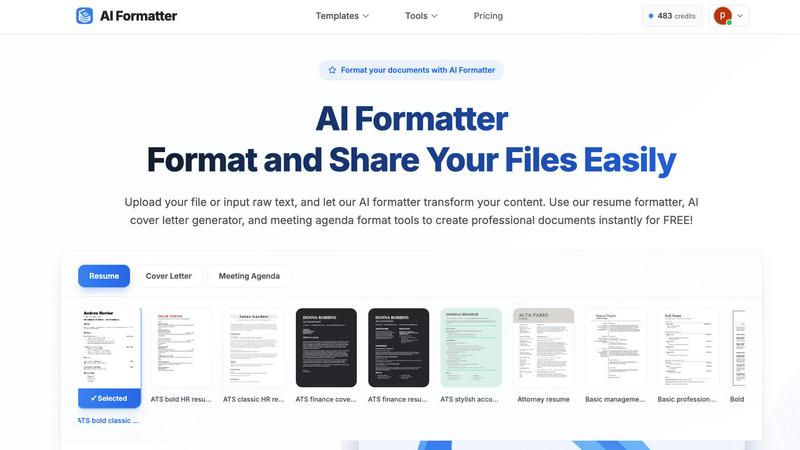
Dive into a curated collection of over 162 professional templates designed not just to look good, but to perform. Each template is engineered to be compatible with Applicant Tracking Systems (ATS), ensuring your resume or cover letter passes automated screenings. Explore categories for resumes, cover letters, meeting agendas, and invoices, giving you a strong, stylish foundation for any professional need, ready for your personal touch.
Multi-Format Input and Output Flexibility
Your content journey shouldn't be limited by file types. AI Formatter welcomes your documents as they are, supporting uploads in PDF, DOC, DOCX, and TXT formats. Once the AI has worked its magic, you retain full control. Download your newly polished document in multiple formats including Word and PDF, making it easy to share, print, or submit exactly as required, all from one seamless platform.
Real-Time Editing and Customization Suite
The transformation doesn't end with AI. After your content is formatted, an intuitive, in-browser editor awaits. This is where your discovery becomes truly personal. Tweak text, adjust layouts, change fonts and colors, and fine-tune every detail in real-time. This powerful suite ensures the final document is not just professionally formatted, but uniquely and authentically yours before you download or share it.
Use Cases of AI Formatter
The Job Seeker's Advantage
For anyone navigating the modern job market, first impressions are digital. A job seeker can upload an existing resume or paste raw bullet points into AI Formatter. By selecting an ATS-optimized resume template, they instantly transform their experience into a visually compelling narrative that is far more likely to pass automated filters and catch a recruiter's eye, turning anxiety into confident action.
Streamlining Professional Communications
Busy professionals constantly create documents like meeting agendas, project briefs, and internal reports. Instead of starting from a blank page, they can input their rough notes. AI Formatter structures the information into a clear, professional agenda format or report layout, saving significant time and ensuring consistency and polish in all internal and external communications.
Academic and Research Presentation
Students and academics often have brilliant content trapped in unstructured drafts. By using AI Formatter, they can take raw research notes, essay drafts, or thesis chapters and format them according to professional academic standards. This allows them to present their work more effectively, whether for a university submission, a conference paper, or a publication draft.
Small Business Administration
Entrepreneurs and small business owners wear many hats, including that of an administrator. Generating professional invoices, receipts, or client proposals can be time-consuming. AI Formatter's invoice and receipt generators allow them to input client and service data quickly, producing polished, brand-appropriate business documents instantly, enhancing their professional image without the overhead.
Frequently Asked Questions
What file formats can I upload to AI Formatter?
AI Formatter is designed for flexibility. You can upload your existing documents in several common formats, including PDF, DOC (Microsoft Word), DOCX, and plain TXT files. This allows you to start the formatting process from almost any document you already have, making the transition to a polished version seamless and straightforward.
How does the ATS optimization for resumes work?
Our resume templates are meticulously designed following best practices for Applicant Tracking System compatibility. This includes using clean, parsable layouts, standard section headings, and avoiding complex graphics or columns that can confuse the software. By formatting your resume with one of our optimized templates, you significantly increase its chances of being correctly read and ranked by these automated screening tools.
Is there a free version of AI Formatter?
Absolutely! AI Formatter offers a free tier designed to satisfy your curiosity and let you explore the core capabilities of the platform. You can upload documents, experiment with templates, and experience the one-click formatting magic to see how it can transform your own content before committing to any paid plan.
Can I edit my document after the AI formats it?
Yes, full creative control remains in your hands. After the AI performs its initial formatting, your document opens in a powerful, real-time editor. Here, you can change text, adjust styling, modify the layout, and customize every element to perfectly match your personal or brand preferences before finalizing and downloading the document.
Explore more in this category:
Best Productivity & Management AI tools
Similar to AI Formatter

@fuck.it - email with attitude
Private email. Pure. Secure. Exclusive. No ads, no tracking, no data selling. GDPR compliant, EU-hosted.


Leadeon
AI growth tool for X and LinkedIn: write posts in your voice, schedule at your best times, find leads on X and see what works.

Verla AI
Verla is an AI academic assistant for university and college students, combining AI essay writing, academic research, AI detection, AI humanization

Novastart
Apps and files on an infinite canvas where people and AI agents work together.

MD to Text
Convert Markdown to plain text online. Remove formatting instantly, copy readable output, and keep every conversion private in your browser.

AUTOMATER.ai
A tray helper for every AI coding tool: one searchable library of past sessions, waiting alerts and usage across 9 providers.

Clever AI Humanizer
Clever AI Humanizer is a free tool that makes AI-generated text sound more human.