

ProcessSpy
Unlock the power of macOS process monitoring with ProcessSpy, offering in-depth insights and advanced features for effortless management.
About ProcessSpy
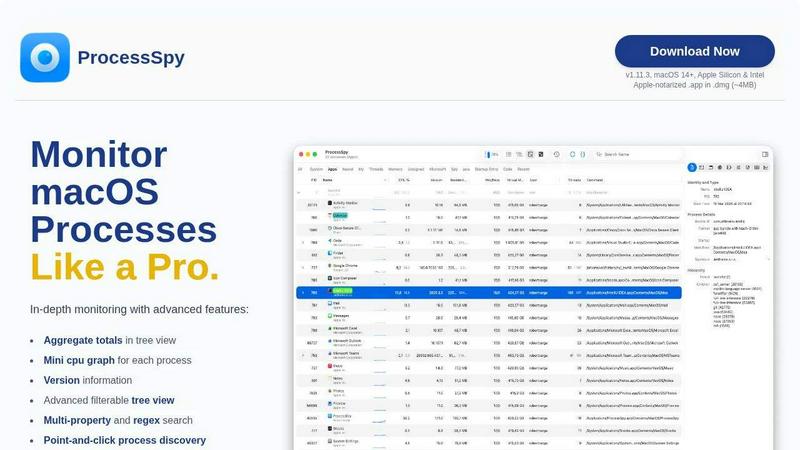
ProcessSpy is a powerful macOS application that serves as an advanced process explorer and monitor, designed specifically for users who seek deeper insights into their system's operations. Unlike the native Activity Monitor, ProcessSpy unveils the hidden intricacies of running processes, enabling users to visualize process trees, inspect open files, and analyze environment variables—all in real-time. Whether you are a developer troubleshooting applications, an IT professional managing system resources, or a curious user wanting to understand what is happening on your Mac, ProcessSpy provides the tools necessary for an informed and effective monitoring experience. With its user-friendly interface and advanced functionalities, the application enhances the standard macOS monitoring experience by delivering comprehensive details and insights that empower users to take control of their processes efficiently.
Features of ProcessSpy
Advanced Tree View
The advanced tree view in ProcessSpy offers an intricate look at running processes, allowing users to see hierarchical relationships and aggregate totals for CPU, Memory, and Threads. This feature enhances the monitoring experience by displaying real-time filtering and search capabilities, making it easier to navigate complex process trees.
Javascript Filters
With the ability to define filters in JavaScript, users can create complex conditions to sift through processes efficiently. This feature allows for tailored and precise searches, enabling users to focus on specific criteria that matter most to their troubleshooting or monitoring needs.
Multi-Property and Regex Search
ProcessSpy's quick-search functionality supports multiple properties and regular expressions, allowing users to conduct sophisticated searches. For instance, users can search for processes containing "java" in the name while specifying command-line arguments like "-Xmx," facilitating targeted insights into specific processes.
Process History Recording
This paid feature enables users to record historical values for CPU, Memory, and Threads, providing a timeline of process performance over time. Users can export this historical data to CSV, making it easier to analyze trends and patterns in resource usage or application behavior.
Use Cases of ProcessSpy
Developer Debugging
Developers can utilize ProcessSpy to debug their applications by viewing detailed command-line information, version details, and environment variables. This insight is crucial for identifying issues related to specific versions of libraries or JDKs, helping streamline the development process.
System Resource Management
IT professionals can leverage ProcessSpy to monitor resource allocation effectively. By visualizing aggregate CPU and memory usage, they can identify resource hogs and optimize system performance, ensuring that critical applications have the resources they need.
Process Discovery and Analysis
Curious users or analysts can use ProcessSpy to explore the processes running on their macOS device. The ability to see which applications are active, their startup entries, and their resource consumption empowers users to understand their system better and make informed decisions.
Historical Performance Evaluation
For users interested in tracking performance over time, the process history recording feature allows them to evaluate how applications behave under different conditions. By analyzing historical data, users can gain insights into performance trends and potential issues that may arise during peak usage times.
Frequently Asked Questions
Is ProcessSpy safe to install on my Mac?
Yes, ProcessSpy is Apple-notarized and distributed as a signed .app within a .dmg. This means it has been verified for security and is safe for use on both Intel and Apple Silicon Macs, ensuring a secure user experience.
Does ProcessSpy support older versions of macOS?
ProcessSpy is specifically designed for macOS 14 and newer versions. Users running older macOS versions will not be able to install or utilize the application effectively.
What is the license model for ProcessSpy?
The license for ProcessSpy is valid for one user across unlimited devices. It includes lifetime updates and access to new features, providing great value for users who want to stay up-to-date with the latest enhancements.
How can I access the advanced features of ProcessSpy?
To access the advanced features, users must purchase a license through Gumroad for $24.99. This one-time fee grants access to premium functionalities such as advanced process information, environment variables, and process history recording, enhancing the overall monitoring experience.
Similar to ProcessSpy

SightRadar
Face recognition API, a drop-in replacement for AWS Rekognition. Index, search, compare and detect faces, billed per photo with no subscription.

Sprite Sheet Maker
A free browser-based toolkit for creating, cutting, converting, and previewing sprite sheet animations.

stackledge
A human-vetted discovery directory for practical AI tools, SaaS apps, and custom n8n workflows, free from bot-scraped spam and dead links.


laya.tools
A free directory of 950+ projects built on Laya, the open-source decision model. Updated daily.

Forms Plugin
The #1 Native Form Builder Plugin for Framer - No Code, No Embeds, No External Platforms.


GPT Image 2 API
Generate and edit production-ready images with GPT Image 2 API using detailed prompts, references, clear text rendering, and developer-friendly workfl