

EditTextImage
Edit text in images online with perfect font, color, and perspective, no design skills needed.
About EditTextImage
EditTextImage is an online AI tool that lets you edit the text in any image file without needing Photoshop, design skills, or the original source document. Have you ever needed to change one word on a finished poster, screenshot, or product photo but realized you lost the original design file? This is the tool designed for that exact moment. You simply upload the image, type the existing text and the replacement, and the AI samples the typography straight from the pixels. This means the font, color, drop shadow, and perspective all stay intact, even for paid fonts you do not have installed on your computer. The entire process takes about 10 seconds and outputs at 2K resolution. Whether you are fixing a typo, swapping a date, or running an A/B test on a headline, EditTextImage handles it on a finished image without the source file. It is built for marketers, designers, business owners, and anyone who works with images and needs a fast, reliable way to update text. The first edit is free with no credit card required, and after that it is a one-time payment of $9.90 for 30 edits. There is no subscription, no complex software to learn, and no need to hunt down font files.
Features of EditTextImage
Pixel Perfect Text Replacement
The core feature of EditTextImage is its ability to replace text in an image while perfectly preserving every surrounding detail. Most image editors reset the font, smear the background, or warp the perspective when you try to edit text. This tool does not. The AI samples the typography directly from the image pixels, so the font, color, size, perspective, and background all remain exactly as they were. This means your edited image looks like it was always that way, with no telltale signs of manipulation.
AI Typography Sampling
The AI technology behind EditTextImage is designed to recognize and replicate typefaces directly from the image pixels. You do not need to know the font name, find a font file, or install anything. The AI analyzes the existing text, understands its characteristics including weight, spacing, and decorative elements, and then generates the replacement text to match. This works seamlessly with paid fonts, hand lettering, and custom typography that would be impossible to replicate manually.
Fast 10 Second Processing
Speed is a defining feature of this tool. The average time to edit text in an image is approximately 12 seconds. This is a dramatic improvement over traditional methods that require opening Photoshop, finding layers, matching fonts, and manually adjusting positioning. With EditTextImage, you upload, type the text change, and receive your edited image in seconds. This makes it ideal for quick fixes, last minute updates, and high volume editing workflows.
2K Resolution Output
When you edit text in an image, you need the final result to be usable for professional purposes. EditTextImage outputs at 2K resolution, ensuring your edited images are crisp, clear, and suitable for printing, publishing, or sharing online. The high resolution output means you are not sacrificing quality for convenience. Your edited images will look just as good as the originals, with no pixelation or blurring around the replaced text.
Use Cases of EditTextImage
Document Fixes and Corrections
Have you ever lost the source file for an important document and then discovered a typo? EditTextImage is perfect for this scenario. You can update invoice numbers, fix typos in contracts, or correct dates in official documents directly from a screenshot or scan. The AI preserves the original font and formatting so the corrected document looks authentic and professional. This is invaluable for business owners, administrators, and anyone who deals with finalized documents that need last minute corrections.
Poster and Flyer Updates
Event details change frequently. The date shifts, a speaker drops out, or the venue moves. When your designer is offline and you have a finished poster, EditTextImage lets you make the update directly on the image. You do not need to reopen the design file or recreate the entire layout. Simply upload the finished poster, type the old and new text, and the AI handles the rest. This saves hundreds of dollars in redesign costs every season and allows for rapid iteration on marketing materials.
App Screenshot Localization
App Store and Google Play require screenshots in multiple languages. Instead of rebuilding every UI mockup for each language, EditTextImage lets you swap languages on existing screenshots with pixel perfect accuracy. The AI preserves the app interface, button styles, and typography so your localized screenshots look native. This is a game changer for app developers, localization teams, and marketers who need to launch in multiple regions quickly and cost effectively.
E Commerce Product Image Updates
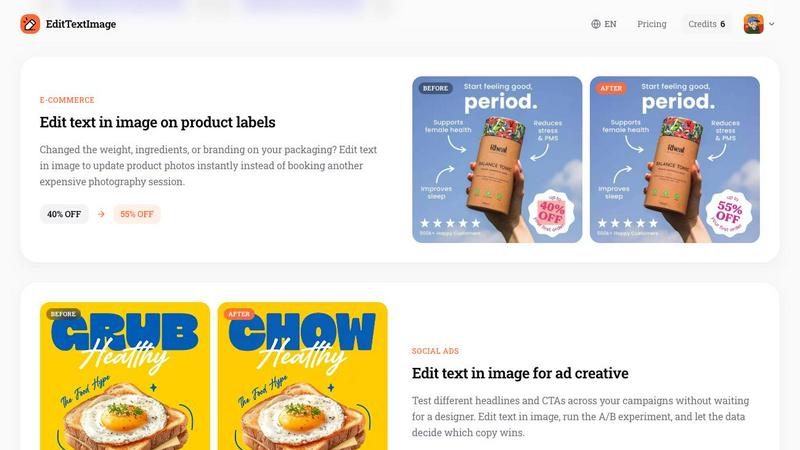
Product packaging changes frequently. You might need to update the weight, ingredients, or branding on your product photos. Instead of booking another expensive photography session or reopening complex design files, EditTextImage lets you edit text in product images instantly. The AI preserves the lighting, shadows, and perspective of the original packaging, so the updated image looks like a real product photo. This is ideal for e commerce sellers, brand managers, and marketing teams who need to keep product listings current.
Frequently Asked Questions
What types of images can I upload to EditTextImage?
EditTextImage accepts PNG, JPEG, and WebP files up to 10 MB in size. You can upload posters, screenshots, product labels, documents, social media graphics, and any other image that contains text you need to edit. The tool is designed to work with a wide variety of image types and text styles, from simple sans serif fonts to complex hand lettering and decorative typography.
Is there a free trial or do I need to pay upfront?
Yes, there is a free trial. You get 1 free credit to edit text in an image with no credit card required. You can sign in with Google and start editing immediately. After your free edit, you can purchase a one time pack of 30 credits for $9.90. There is no subscription, no recurring fees, and credits never expire. You only pay when you need to edit more images.
Can I use EditTextImage for commercial projects?
Yes, commercial use is included with your credits. You can use the edited images for marketing materials, product listings, social media ads, app store screenshots, and any other commercial purpose. The tool is designed for professionals who need to produce high quality images for their business without worrying about licensing restrictions.
What kind of text edits are not allowed on EditTextImage?
EditTextImage has strict acceptable use policies. You cannot edit images for deceptive purposes including visa or immigration submissions, fake refund or transaction proofs, or email and chat screenshots altered to falsify sender, content, or timestamp. The tool does not process IDs, passports, visa support letters, official seals, bank statements, or tampered receipts. Violations result in account termination without refund, and request logs may be shared with law enforcement.
Pricing of EditTextImage
EditTextImage uses a simple, transparent pricing model. You get 1 free credit to start editing immediately with no credit card required. After your free edit, you can purchase 30 credits for a one time payment of $9.90. There are no subscriptions, no monthly fees, and no hidden costs. Credits never expire, so you can use them whenever you need to edit text in an image. This pay as you go model is ideal for individuals and businesses who need occasional edits without committing to a recurring subscription.
Similar to EditTextImage


GPT Image 2 API
Generate and edit production-ready images with GPT Image 2 API using detailed prompts, references, clear text rendering, and developer-friendly workfl

Clawra AI
The ultimate AI Girlfriend experience: roleplay with images and videos.

Vismuse
Create polished AI images and videos from prompts or references for social posts, ads, flyers, album covers, and campaigns.

Imagine2
Private browser-based AI image generation and editing with text-to-image, targeted edits, and multi-image references.

Kogashitsuka AI
AI Image Enhancer | Unblur Photos Online for Free

StopScroll
AI YouTube thumbnail maker that generates multiple thumbnail concepts from a URL, title, or prompt.

NodeStory
One-click UGC videos, product photo sets, and reusable AI workflows, with 30+ image and video models in one studio.