

ComicsMaker
ComicsMaker turns your scene ideas into structured comic drafts, letting you plan beats, generate panels, and arrange pages right in your browser.
About ComicsMaker
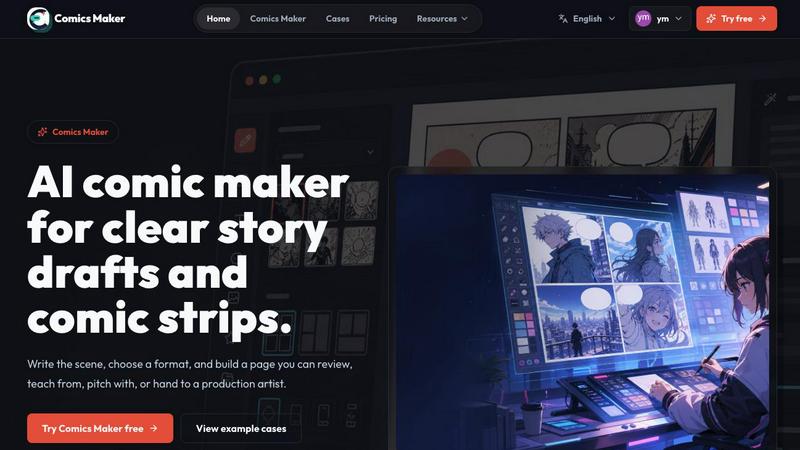
ComicsMaker is an AI comic maker and comic strip maker built for creators, educators, marketers, and teams who need visual stories fast. It turns prompts into comic panels, manga-style drafts, storyboards, and social-ready comic pages with clear control over layout, tone, reading flow, and style direction. The product is designed for anyone who has ever had a story idea but felt daunted by the blank page or the steep learning curve of traditional comic creation tools. Instead of starting from scratch, you begin with a single scene description, and the workspace helps you plan the beats, generate the panels, add dialogue, and arrange the page all within your browser. What makes ComicsMaker different is its focus on structure and planning. You are not just generating random images; you are building a coherent visual narrative. The tool encourages you to think about pacing, shot types, and character consistency before you commit to a final render. It is a discovery-oriented space where you can explore how a scene might look in a Shonen style with a dramatic mood, or a quiet character moment in a 2x2 layout. For creators, it is a rapid prototyping tool. For educators, it is a way to make lessons visual. For marketers, it is a fast route to campaign storyboards and explainer comics. The core value proposition is simple: turn one scene into an editable comic page with panel planning, generated drafts, dialogue controls, and project export, all while keeping the process exploratory and iterative.
Features of ComicsMaker
Scene to Panel Planning
ComicsMaker starts with a single scene brief. You name the character, setting, visible action, and change. This structured input forces you to think about the core elements of your story before generating anything. The tool then helps you "plan the beats," breaking your scene into a sequence of panels. You can specify the layout, such as a 2x2 grid or a 3-panel strip, and set the mood, like dramatic or lighthearted. This feature is about discovery. You are not just typing a prompt; you are architecting a narrative flow. The workspace keeps the panel count, pacing, shot type, and reading order visible, so you can see the structure of your story before you spend time on visual polish. It turns a raw idea into a simple comic structure you can keep working with.
Style Consistency and Direction
One of the biggest challenges in comic creation is maintaining a consistent look across multiple panels. ComicsMaker addresses this by letting you lock the visual direction before generating. You can use style notes, character details, and reference language to ensure every panel belongs to the same world. Whether you are going for a gritty cyberpunk aesthetic or a soft, watercolor manga look, you can set the parameters upfront. This feature is about exploration without chaos. You can experiment with different tones and styles for the same scene brief, seeing how a "whimsical" mood changes the output compared to "dramatic." It allows you to reuse character and environment notes across projects, building a library of visual elements that your team or future self can understand and build upon.
Flexible Layout and Pacing Controls
ComicsMaker offers a clean middle panel for making layout decisions. You are not locked into a single format. The tool supports single panel, 3-panel strip, 2x2 page, and vertical flow layouts. This flexibility is crucial for discovering the best way to tell your story. A quick, punchy joke might work best in a 3-panel strip, while a slow-burn emotional scene might need the real estate of a 2x2 page. The controls for size, tone, and production notes are simple and accessible. The studio keeps an empty canvas by default, ready for the next idea. This feature is about giving you the freedom to experiment with structure. You can quickly switch between layouts to see how the pacing changes, helping you understand the rhythm of your visual story before you generate the final images.
Dialogue and Caption Integration
A comic is more than just images; it is the interplay of visuals and text. ComicsMaker allows you to keep captions and dialogue close to the panel plan. After generating your panels, you can add speech bubbles, thought bubbles, and narration boxes directly into the layout. This feature is about completing the narrative. You are not just an image generator; you are a storyteller. The tool helps you check whether each panel has one clear job by seeing how the text fits with the visual. You can review pacing before generating more images, ensuring that the dialogue space is adequate and that the reading flow is logical. This integration turns a collection of generated images into a reviewable comic page that you can hand off to a teammate or an artist for further refinement.
Use Cases of ComicsMaker
Rapid Storyboarding for Campaigns
Marketers and creative teams can use ComicsMaker to draft product storyboards and campaign concepts in minutes. Instead of waiting for an illustrator, you can input a scene brief for a product reveal or a customer journey. The tool generates a structured visual sequence that you can review for clarity and pacing. This use case is about speed and iteration. You can explore multiple visual directions for the same campaign brief, experimenting with different moods and layouts to see which one tells the story most effectively. The JSON project export allows you to hand off the prompts, notes, and panels as project data to a production team or an artist, making it a powerful pre-production tool.
Classroom Visuals and Explainer Comics
Educators can use ComicsMaker to create engaging classroom visuals and explainer comics. A history lesson about a historical event can be turned into a 4-panel comic strip. A science concept can be broken down into a clear, visual sequence. This use case is about making complex ideas accessible. The tool's focus on planning and structure helps teachers think about the logical flow of information. They can start with a simple scene brief describing the key action or change, and the AI will generate a draft that can be refined with dialogue. It is a way to move from a textbook explanation to a visual story that students can more easily understand and remember.
Personal Character Moments and Manga Drafts
For creators, ComicsMaker is a tool for exploring character moments and drafting manga-style pages. You can take a quiet scene, like a "Café Encounter," and see how it translates into a 2x2 layout with a specific mood. This use case is about personal exploration and creative discovery. You can name a character, describe the setting, and define the visible action and change. The tool helps you see how that moment can be paced and framed. It is a playground for visual storytelling, allowing you to test out ideas for a larger graphic novel or simply to capture a fleeting scene that came to mind. The ability to lock the visual direction ensures that your character looks consistent from panel to panel.
Social Media Comic Strips
Content creators and social media managers can use ComicsMaker to produce ready-to-share comic pages. The tool supports social-ready formats and layouts. You can draft a short, humorous comic strip about a relatable situation or a mini-story that fits the vertical flow of a mobile screen. This use case is about speed and relevance. You can go from an idea to a reviewable comic page in a single session. The free plan includes starter credits for testing, making it easy to try out the workflow. The output is a structured comic draft that can be exported and posted directly, helping you maintain a consistent visual style across your social media presence without needing a full-time artist.
Frequently Asked Questions
How do I start creating a comic with ComicsMaker?
You start by entering a single scene brief. Describe the character, setting, visible action, and change. You can also specify the layout (like 2x2 or 3-panel strip) and the mood (like dramatic or lighthearted). The tool then helps you "plan the beats" to break your scene into a sequence of panels. After that, you generate the panels, add dialogue, and arrange the page in your browser. It is a guided, step-by-step process that moves from a raw idea to a structured draft.
Can I control the art style and character consistency?
Yes. ComicsMaker allows you to use style notes, character details, and reference language to lock the visual direction before generating. This ensures that every panel belongs to the same world and that your characters look consistent. You can experiment with different tones for the same scene brief, but the tool is designed to maintain a coherent aesthetic across your entire project.
What kind of layouts and formats are supported?
The tool supports a variety of layouts including single panel, 3-panel strip, 2x2 page, and vertical flow. This flexibility allows you to choose the best format for your story, whether it is a quick joke, a dramatic scene, or a storyboard for a mobile campaign. The studio keeps the panel count, pacing, and reading order visible so you can make informed layout decisions.
Is there a free plan to try the tool?
Yes. ComicsMaker offers a free plan that includes 10 starter credits for testing image generation. This allows you to try the workflow and see if it fits your needs before committing to a paid plan. The paid plans, such as Creator and Studio, mainly increase your monthly credits, while the core editor and JSON project export follow the same workflow across all tiers.
Pricing of ComicsMaker
ComicsMaker offers three pricing tiers to match different usage levels. The Free plan includes 10 starter credits for testing image generation, allowing you to explore the workflow without any upfront cost. The Creator plan, at $15 per month, is designed for individuals making comic strips, lessons, and social campaigns every week, providing a higher monthly credit allowance. The Studio plan, at $39 per month, is for teams producing brand comics, campaigns, and classroom content, offering the most credits for high-volume projects. All paid plans follow the same core editor workflow and include JSON project export for handing off project data.
Explore more in this category:
Similar to ComicsMaker

Bulin AI
Upload one portrait. Bulin AI puts you in the official Bulin 47 freestyle. The source video guides the moves and camera. No prompt.

EditTextPhoto
AI-powered image text editor to edit, replace, fix, or translate text in images while preserving the original font, color, size, and style.

nanobanana 21
A fast image studio for creating and editing high-quality images with accurate details, readable text, and consistent characters.

AIPetGen
AIPetGen turns a photo of your dog, cat, or other pet, or a written description, into a new picture or a short animation.

Low Quality Image
Make an image low quality or lower image quality on purpose.


TryH3 - MiniMax H3 Video Generator
Try MiniMax Hailuo H3 video generation in the browser

Image to Layers AI
Turn any image into editable transparent PNG/PSD layers with AI