
Playwriter vs Tailride
Side-by-side comparison to help you choose the right AI tool.

Playwriter
Playwriter empowers agents to control your existing Chrome browser seamlessly with full access to extensions, logins, and Playwright capabilities.
Last updated: March 18, 2026

Tailride
Discover how Tailride automates invoice capture from your inbox and portals.
Last updated: February 28, 2026
Visual Comparison
Playwriter

Tailride
Feature Comparison
Playwriter
Existing Browser Session
Playwriter uniquely connects your agents to your actual browser session, including all logins, extensions, and cookies. This eliminates the need for fresh browser instances that come with bot detection and performance limitations, allowing agents to work as if they are you.
Full Playwright API Access
With Playwriter, agents gain access to the complete Playwright API through a single execute tool. This means they can perform any Playwright action without the constraints of predefined tools, offering a flexible and powerful automation experience.
Real-Time Collaboration
Playwriter fosters collaboration by allowing you to see exactly what your agent is doing in real-time. If the agent encounters obstacles like captchas or consent walls, you can step in, solve the issues, and then let the agent resume, ensuring a smooth workflow.
Comprehensive Debugger and Editor
The built-in debugger features breakpoints and live code editing capabilities, enabling you to troubleshoot and refine agent behavior on the fly. Network interception allows for detailed monitoring and manipulation of requests, giving you greater control over the automation process.
Tailride
Inbox Scanning & Monitoring
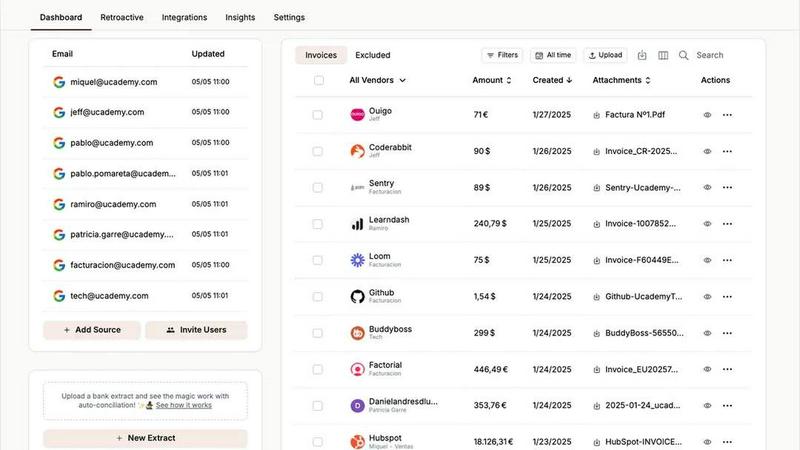
Imagine a dedicated assistant constantly watching your email traffic for financial documents. Tailride's inbox scanning connects natively to your email client (Gmail, Outlook, or any IMAP service) and automatically detects invoices and receipts, whether they're in a PDF, an image, embedded in the email body, or behind a link. It can even retroactively search through your past emails to find documents from a specific period, ensuring you can catch up on months or quarters of backlog instantly. This feature eliminates the need for manual forwarding and provides complete visibility into all incoming invoices across your entire team's connected inboxes.
Chrome Extension for Online Portals
Why log into dozens of accounts to download invoices when you can grab them all with a single click? Tailride's Chrome extension is a game-changer for extracting invoices from online services that don't automatically email them. With support for over 20 platforms including Amazon, Meta Ads, Adobe, Notion, and ChatGPT, the extension allows you to securely extract invoices directly from your account dashboards. This ensures no expense is missed, consolidating all your digital spending into one organized flow, regardless of the source.
AI-Powered Processing & Custom Rules
The real magic happens after documents are captured. Tailride's intelligent document recognition engine doesn't just extract text; it understands it. It automatically reads key data like vendor names, dates, amounts, and taxes. Furthermore, you can train Tailride with customizable AI rules to auto-categorize expenses based on your company's specific needs, assign them to projects or clients, and prepare them for your accounting software. This transforms raw documents into structured, actionable data without any manual intervention.
Seamless Integrations & Reconciliation
Capturing and organizing data is only half the battle. Tailride shines by fitting perfectly into your existing workflow. It offers direct, seamless integrations with major accounting platforms like QuickBooks and Xero, as well as cloud storage like Google Drive, allowing for automatic forwarding and filing. Crucially, its bank reconciliation features help match bank transactions with the extracted invoices, effortlessly identifying any missing documents and ensuring your books are always accurate and audit-ready.
Use Cases
Playwriter
Automated Testing
Playwriter is perfect for developers looking to automate testing processes. By allowing agents to operate within the existing browser session, you can significantly reduce setup time and ensure tests reflect real user interactions.
Data Scraping
For data analysts and researchers, Playwriter makes web scraping more efficient. Agents can navigate websites with existing logins and cookies, bypassing common barriers and collecting data seamlessly while avoiding detection.
Workflow Automation
Businesses aiming to streamline operations can utilize Playwriter to automate repetitive tasks. From filling out forms to data entry, agents can handle mundane tasks while humans focus on higher-value activities.
Educational Tools
Educators and learners can benefit from Playwriter by using it to create interactive learning tools. By enabling real-time collaboration, it allows students to explore web technologies while receiving guidance from instructors or peers.
Tailride
For Fast-Growing Startups and SMEs
Fast-growing companies are often drowning in administrative tasks. Tailride automates the entire accounts payable process, from capture to categorization. By connecting the inboxes of founders and team members, it ensures every single invoice—from SaaS subscriptions to ad spend—is automatically captured and organized. This eliminates manual work, prevents lost bills, and provides real-time visibility into cash flow, allowing the team to focus on scaling the business instead of managing paperwork.
For Accounting Firms and Bookkeepers
For accountants managing multiple clients, manual data entry is a major bottleneck. Tailride allows accounting professionals to invite their clients to connect their inboxes securely. The platform then automatically aggregates all client invoices into a centralized, organized dashboard. This streamlines the month-end close process, drastically reduces back-and-forth communication for missing documents, and enables accountants to provide higher-value advisory services instead of performing data entry.
For Teams with Physical Receipts
Businesses with employee expenses or physical purchases no longer need a messy shoebox of receipts. Team members can simply take a picture of a paper receipt and send it to Tailride via a dedicated Telegram or WhatsApp bot. The AI instantly processes the image, extracts the data, and adds it to the company's digital ledger alongside all other invoices. This simplifies expense reporting and ensures even offline spending is captured accurately and efficiently.
For Quarterly and Year-End Tax Preparation
The scramble to find every invoice from the past quarter or fiscal year for tax filings is a universal pain point. Tailride's ability to perform retroactive searches through connected email histories turns this stressful, days-long process into a task that takes minutes. You can confidently generate a complete, organized record of all expenses for any custom date range, ensuring full compliance and eliminating the fear of missing a deductible expense.
Overview
About Playwriter
Playwriter is an innovative tool designed to bridge the gap between AI agents and real-world web interactions. Unlike traditional AI agents that operate in isolated environments, often with limited functionality and high risk of bot detection, Playwriter empowers agents to leverage your actual browser session. This means your agents can work seamlessly within your logged-in environment, complete with extensions and cookies, making them far more effective for automation tasks. Ideal for developers, testers, and anyone looking to streamline web interactions, Playwriter provides a robust automation API through a single Chrome extension and CLI. With features like live debugging, network interception, and accessibility snapshots, it redefines how agents can interact with web applications, transforming repetitive tasks into efficient workflows. Whether you are automating tests, scraping data, or simply enhancing productivity, Playwriter is the tool that enhances agent capabilities while ensuring a smooth collaborative experience.
About Tailride
What if you could completely forget about the tedious, time-consuming chore of managing invoices and receipts? Tailride is an AI-powered accounting automation platform designed to do exactly that, transforming financial document chaos into effortless order. It acts as an intelligent, proactive layer for your financial operations, seamlessly connecting to the places where your documents already live. Primarily built for fast-growing companies, finance teams, and accountants managing multiple clients, Tailride's core mission is to eliminate manual data entry and the frantic, end-of-period invoice hunts that plague modern business. Its genius lies in its multi-pronged approach: it natively monitors connected email inboxes to automatically detect and extract invoices from emails and attachments, and it provides a powerful Chrome extension to pull documents directly from over 20 online platforms like Amazon, Meta Ads, and Notion. By combining intelligent document recognition with customizable AI rules for categorization and seamless integrations with tools like QuickBooks, Xero, and Google Drive, Tailride doesn't just capture data—it organizes it and prepares it for reconciliation, saving hundreds of hours every month and making the accounting process genuinely automatic.
Frequently Asked Questions
Playwriter FAQ
How does Playwriter ensure security?
Playwriter operates entirely on your local machine, meaning no data is sent to remote servers. This design prioritizes your privacy and security, allowing agents to interact with your browser without exposing sensitive information.
Is Playwriter compatible with other tools?
Yes, Playwriter works seamlessly with various MCP clients, including Cursor, Claude, and VS Code. This flexibility allows you to integrate it into your existing workflow without hassle.
Can multiple agents use Playwriter simultaneously?
Absolutely! The relay multiplexes sessions, meaning multiple agents or CLI instances can work with the same browser session concurrently. This makes it an excellent choice for collaborative environments.
What are the system requirements for Playwriter?
Playwriter requires a Chrome browser and a local setup for the extension and CLI. As it utilizes your existing browser session, the only requirement is that you have Chrome installed and configured with your necessary logins and extensions.
Tailride FAQ
How does Tailride access my emails, and is it secure?
Tailride establishes a secure, native connection to your email provider (like Gmail or Outlook) using OAuth, the same secure protocol used by many other trusted apps. This means your login credentials are never shared with Tailride. The connection is read-only for the purpose of scanning for invoices; Tailride cannot send emails, delete messages, or alter your inbox in any way. Your data is encrypted in transit and at rest, ensuring your financial information remains protected.
Can Tailride handle invoices from any country or in any language?
Yes, Tailride's AI-powered document recognition engine is designed to process invoices and receipts from a wide variety of countries and in multiple languages. It is trained to identify common invoice formats, field labels, and currency symbols globally. The platform supports languages including English, French, and German, making it a versatile tool for international businesses and teams operating across borders.
What happens if the AI misreads an invoice or assigns the wrong category?
Tailride's AI is highly accurate, but it's also built for continuous learning and user control. If an extraction error occurs or a document is miscategorized, you can easily correct it directly within the Tailride dashboard. Furthermore, you can create and refine custom AI rules based on your corrections, teaching the system your specific preferences for vendors, categories, or projects, which improves its accuracy for future, similar documents.
Can I connect multiple team members' inboxes to one Tailride account?
Absolutely. A key strength of Tailride is its ability to consolidate invoice capture across your entire organization. You can invite colleagues, department heads, or employees to connect their work email inboxes to your central Tailride account. This provides a unified, company-wide view of all incoming expenses, eliminates the problem of invoices being stuck in individual inboxes, and ensures your finance team has complete visibility without needing to chase people down.
Alternatives
Playwriter Alternatives
Playwriter is an innovative tool that falls within the automation category, designed to give AI agents the ability to control Chrome via a command-line interface (CLI) or a more user-friendly MCP. Unlike traditional AI models that struggle with web browsing due to restrictions on access and functionality, Playwriter provides a seamless experience by allowing agents to operate within your actual browser session. Users often seek alternatives to Playwriter for various reasons, such as pricing considerations, the need for specific features, or compatibility with different platforms. When exploring alternatives, it's essential to focus on key factors that align with your automation needs. Look for tools that offer robust features, ease of integration with current workflows, and an accessible user interface. Additionally, consider the level of community support and documentation available, as these aspects can significantly impact your overall experience and efficiency in automation tasks.
Tailride Alternatives
Tailride is an AI-powered accounting automation tool that falls into the business and finance software category. It specializes in streamlining bookkeeping by automatically capturing invoices and receipts from emails and web portals, then processing them with smart categorization. Users often explore alternatives for various reasons. This could be due to budget constraints, a need for different integration partners beyond QuickBooks or Xero, or a desire for features tailored to a specific industry's workflow. The search for the right tool is a natural part of finding the perfect operational fit. When evaluating other options, consider the core automation capabilities. Look at the accuracy of data extraction, the breadth of supported platforms and email providers, and the depth of integration with your existing accounting stack. The goal is to find a solution that not only captures data but truly reduces manual effort.