
Shrinkpad vs Skene
Side-by-side comparison to help you choose the right AI tool.

Shrinkpad
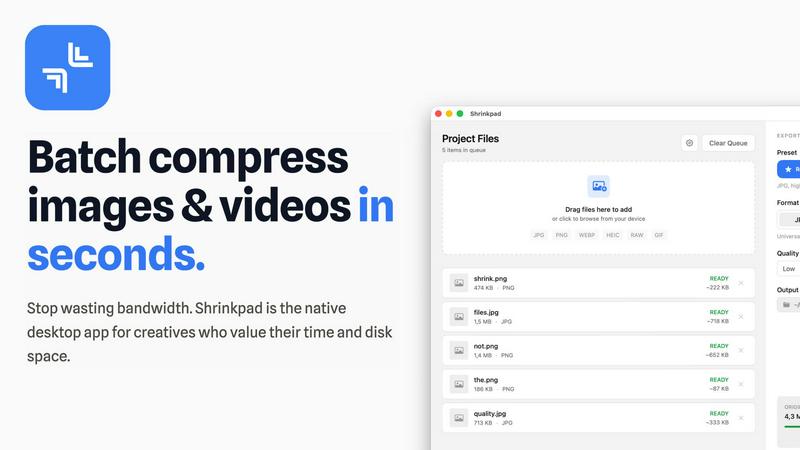
Shrinkpad quickly compresses images and videos in bulk on Mac, saving time and optimizing your creative assets.
Last updated: February 28, 2026

Skene transforms your codebase into a promptable growth engine you fully own.
Last updated: February 28, 2026
Visual Comparison
Shrinkpad
Skene

Feature Comparison
Shrinkpad
Automatic Compression Settings
Shrinkpad takes the guesswork out of image and video compression by automatically analyzing visual complexity. It applies the optimal compression ratio to each file, ensuring that you achieve excellent results without introducing artifacts, making it an essential tool for maintaining visual integrity.
Unlimited Batch Processing
With Shrinkpad, you can process thousands of assets simultaneously without the fear of crashing. Unlike web-based tools, this desktop application is built to handle massive queues effortlessly, allowing you to save time and focus on what really matters—your creative projects.
One-Drop Import Functionality
Gone are the days of dragging files in one by one. Shrinkpad allows you to drop an entire folder containing images and videos, automatically identifying and adding all supported media files to your batch list. This feature simplifies the workflow, making it seamless and efficient.
Privacy-Focused Design
All processing with Shrinkpad occurs locally on your machine, meaning your sensitive assets are never uploaded to the cloud. This privacy-first approach ensures that your data remains secure and confidential, providing peace of mind for users who prioritize data protection.
Skene
Codebase-Native Signal Detection
Skene integrates directly with your repository, performing a deep analysis of your source code to automatically detect growth signals. It scans your application's structure, understands user flows, and identifies key friction points and activation opportunities without you having to manually instrument events or define funnels. This creates a rich, contextual understanding of your product's growth potential derived from the very architecture of your software.
AI-Prompted Growth Implementation
Move beyond manual configuration. With Skene, you can instruct an AI agent to design and implement growth strategies using natural language prompts from your development environment. This allows you to rapidly prototype and deploy optimized onboarding sequences, lifecycle automations, and retention loops by simply describing the desired outcome, making sophisticated growth engineering accessible without requiring deep expertise.
Autonomous Iteration Engine
Skene operates as a continuous optimization layer. Once initial flows are established, the system autonomously runs experiments, analyzes user interaction data, and deploys improved versions of your growth loops. This creates a self-improving product where the mechanisms guiding user success evolve and refine themselves based on actual behavior, turning your app into a learning system.
Owned Growth Infrastructure
Replace brittle third-party scripts and black-box SaaS tools with code you own and control. Skene's framework integrates as a native part of your tech stack, ensuring your growth logic is version-controlled, performant, and modifiable. This eliminates data silos, preserves your application's performance, and allows your entire team—and your AI agents—to interact with and build upon your growth infrastructure.
Use Cases
Shrinkpad
Photographers
Photographers can benefit immensely from Shrinkpad's ability to batch compress high-resolution images without losing quality. This feature saves time during the editing process and ensures that their portfolios and websites load quickly, enhancing user experience.
Graphic Designers
For graphic designers working with large image files, Shrinkpad streamlines the workflow by allowing for bulk processing. This means they can export multiple assets from design software and optimize them in one go, reducing the hassle of manual adjustments.
Content Creators
Content creators, especially those producing videos, can utilize Shrinkpad to compress 4K video files efficiently. The application ensures that videos maintain their visual quality while significantly reducing file sizes, making it easier to upload to various platforms.
Web Developers
Web developers can leverage Shrinkpad to optimize images and videos for websites, improving load times and overall site performance. By using Shrinkpad, they can ensure that their media assets are web-friendly, ultimately enhancing user engagement and satisfaction.
Skene
Streamlining User Onboarding
For products struggling with low activation rates, Skene analyzes the signup and first-use journey directly from the code. It automatically identifies where users drop off and can generate, test, and deploy improved onboarding flows—like contextual guidance or progressive feature reveals—to dramatically increase the number of users who reach the "aha!" moment and realize core value.
Automating Customer Lifecycle Engagement
Instead of manually building email sequences or in-app messages, product teams can use Skene to create automated, behavior-triggered engagement loops. By understanding user actions from the codebase, Skene can prompt the implementation of nudges for feature adoption, re-engagement campaigns for inactive users, and success milestones that strengthen retention, all as native product experiences.
Optimizing for Product-Led Growth
Early-stage startups and indie developers can implement a sophisticated PLG motion without a large team. Skene acts as an automated growth co-pilot, handling the continuous cycle of identifying opportunities, hypothesizing improvements, and shipping experiments. This allows small teams to compete with the iterative power of much larger organizations by making data-driven optimization a core product function.
Reducing Friction in Key User Flows
For any application, pinpointing exactly where users encounter confusion or abandonment is challenging. Skene audits your code to visualize and understand critical user paths, such as checkout processes or complex feature workflows. It then suggests and can implement targeted optimizations to smooth out these journeys, directly improving conversion rates and user satisfaction.
Overview
About Shrinkpad
Shrinkpad is an innovative desktop application tailored for macOS users seeking a powerful yet user-friendly solution for batch compressing images and videos. This versatile tool is perfect for photographers, designers, and content creators who need to optimize media files without compromising on visual quality. Shrinkpad streamlines the process of reducing file sizes, allowing users to compress hundreds of files or entire folders in mere seconds. Its main value proposition lies in its ability to process files locally, ensuring that your data remains private and secure on your device. With support for over 50 file formats, Shrinkpad can handle a variety of media types, from high-resolution images to 4K videos, enabling professionals to maintain the quality necessary for their work while significantly improving efficiency. Whether you are looking to enhance website load times or reduce app bundle sizes, Shrinkpad is designed to meet the demands of modern creatives.
About Skene
What if your product could learn to grow itself? Skene is an AI-powered PLG (Product-Led Growth) infrastructure that fundamentally reimagines how software scales. It moves growth from being an external, manual afterthought to a core, intelligent layer of your product itself. Designed for indie developers, early-stage startups, and product-led companies, Skene is a fully automated iteration engine that allows you to scale your user base without the need to scale a dedicated, costly growth team. Its revolutionary premise is simple yet powerful: growth should be code you own, version, and prompt—not a fragile third-party script you paste into your application. By connecting directly to your codebase and IDE, Skene analyzes your source to intuitively understand user flows, detect points of friction, and identify hidden activation opportunities. It then autonomously creates, tests, and deploys optimized versions of critical growth loops for onboarding, activation, and retention. This transforms your application into a self-optimizing engine for user success, where growth mechanisms improve continuously based on real user behavior. Instead of wrestling with complex dashboards and manual A/B tests, you can simply prompt your AI agent to implement sophisticated growth strategies, making high-level optimization accessible directly from your development environment.
Frequently Asked Questions
Shrinkpad FAQ
Can I use Shrinkpad for free?
Yes, Shrinkpad offers a Free Starter plan that includes essential tools for casual use, allowing you to batch compress up to 10 files at a time.
What file formats does Shrinkpad support?
Shrinkpad supports over 50 file formats, including common image formats like JPG, PNG, WEBP, and advanced formats like RAW and HEIC, as well as major video formats such as MP4 and MOV.
Does Shrinkpad support video compression?
Absolutely! Shrinkpad is designed to handle video compression along with image files, allowing you to process both types of media together in a single batch for optimal efficiency.
How many files can I process at once?
With the Free Starter plan, you can process up to 10 files at a time. However, in the Personal and Team plans, there are no limits on the number of files you can batch compress, enabling you to work on large projects seamlessly.
Skene FAQ
How is Skene different from traditional customer experience software?
Traditional tools like tour builders or analytics platforms require manual, brittle configuration on top of your UI. They often rely on CSS selectors that break with every code deploy and create siloed data. Skene is fundamentally different; it reads your actual codebase to understand your product's structure and automatically generates and maintains growth flows. When you update your code, Skene's understanding and implementations update in tandem, eliminating constant maintenance.
How long does it take to set up Skene?
Setup is designed to be incredibly fast, taking less than 60 seconds. You simply connect your GitHub or GitLab repository with read-only access. Skene then automatically analyzes your codebase to generate initial PLG insights and flows. No initial code changes or API modifications are required to get started and see value.
Is my source code secure with Skene?
Absolutely. Security is a primary concern. Skene only requires read-only access to your repository, meaning it cannot push or modify your code. All analysis occurs within a secure, isolated environment. Your proprietary code remains yours, and the growth logic Skene helps you build is deployed as code you own within your own infrastructure.
What kind of analytics and insights does Skene provide?
Skene offers a dashboard that provides real-time analytics on user progress, flow completion rates, and engagement metrics. It goes beyond surface-level data to identify specific bottlenecks in your journeys, track time-to-value, and measure the impact of each iterative change. This provides data-driven insights to continuously optimize your onboarding and growth loops.
Alternatives
Shrinkpad Alternatives
Shrinkpad is an innovative desktop application tailored for macOS users who need a robust yet user-friendly solution for batch compressing images and videos. As a vital tool in the realms of photography, design, and content creation, it streamlines the process of reducing file sizes while preserving visual quality. Users often seek alternatives to Shrinkpad for reasons such as pricing, specific features, or compatibility with different platforms, which may not align with their unique needs or workflows. When exploring alternatives, it's essential to consider factors such as ease of use, processing speed, file format support, and privacy measures. A strong alternative should provide efficient batch processing capabilities, maintain high-quality outputs, and ensure that your data remains secure. Identifying these essential features will help you find the right tool that best fits your requirements.
Skene Alternatives
Skene is an AI-powered product-led growth infrastructure, a category of tools designed to automate and optimize user acquisition and retention directly within your product. It works by integrating with your codebase to analyze user flows and autonomously test improvements, turning your application into a self-optimizing engine. Users often explore alternatives for various reasons. Some may seek a different pricing model or a more traditional, dashboard-driven analytics approach. Others might need a solution that integrates with a specific tech stack or offers a different balance between automation and manual control. The needs of a large enterprise can differ greatly from those of an indie developer. When evaluating options, consider how deeply the tool understands your product. Does it work with surface-level events or can it derive intent from your actual code? Look at the level of automation: does it just provide insights, or can it implement and test changes? Finally, assess ownership—is the growth logic embedded in your code, or is it dependent on an external, black-box service?