
Img Editor vs Shrinkpad
Side-by-side comparison to help you choose the right AI tool.

Img Editor
Transform your ideas into stunning high-quality images in seconds with Img Editor's powerful AI image generation tools.
Last updated: February 28, 2026

Shrinkpad
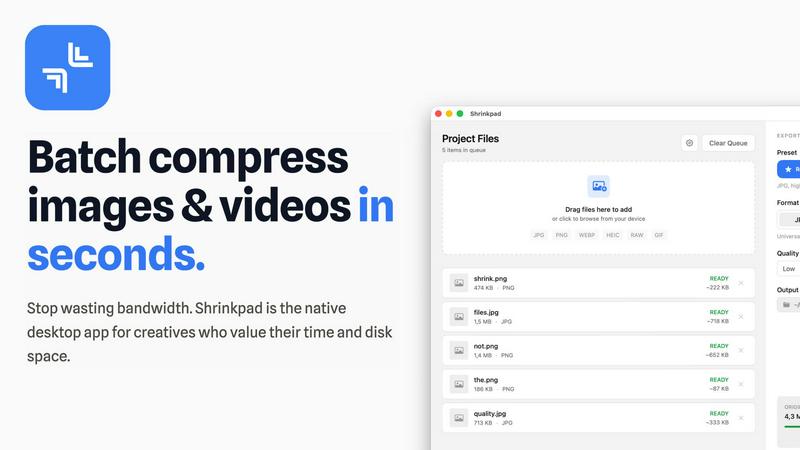
Shrinkpad quickly compresses images and videos in bulk on Mac, saving time and optimizing your creative assets.
Last updated: February 28, 2026
Visual Comparison
Img Editor

Shrinkpad
Feature Comparison
Img Editor
Text to Image Generation
Img Editor's text to image feature harnesses the power of advanced AI algorithms to convert textual descriptions into vivid images. Users simply input their creative ideas, and the platform generates high-quality visuals that capture the essence of their prompts, making it easy for anyone to create stunning digital artwork.
Image Editing Tools
The platform offers a range of intuitive image editing tools that allow users to refine and enhance their generated images. From adjusting brightness and contrast to applying filters and effects, Img Editor provides all the necessary functionalities to ensure that every image meets the user's vision.
Prompt Generator
Img Editor includes an innovative prompt generator that inspires creativity by providing users with unique and engaging ideas for their image creation. This feature is particularly useful for those experiencing creative blocks, enabling users to explore new themes and concepts effortlessly.
Community Engagement and Rewards
The Img Editor platform emphasizes community interaction by allowing users to submit their creations to a gallery for review. Approved submissions earn users additional image-generating credits, fostering a sense of belonging and encouraging collaboration among creators while enhancing their creative output.
Shrinkpad
Automatic Compression Settings
Shrinkpad takes the guesswork out of image and video compression by automatically analyzing visual complexity. It applies the optimal compression ratio to each file, ensuring that you achieve excellent results without introducing artifacts, making it an essential tool for maintaining visual integrity.
Unlimited Batch Processing
With Shrinkpad, you can process thousands of assets simultaneously without the fear of crashing. Unlike web-based tools, this desktop application is built to handle massive queues effortlessly, allowing you to save time and focus on what really matters—your creative projects.
One-Drop Import Functionality
Gone are the days of dragging files in one by one. Shrinkpad allows you to drop an entire folder containing images and videos, automatically identifying and adding all supported media files to your batch list. This feature simplifies the workflow, making it seamless and efficient.
Privacy-Focused Design
All processing with Shrinkpad occurs locally on your machine, meaning your sensitive assets are never uploaded to the cloud. This privacy-first approach ensures that your data remains secure and confidential, providing peace of mind for users who prioritize data protection.
Use Cases
Img Editor
For Artists and Illustrators
Artists and illustrators can leverage Img Editor to quickly generate preliminary sketches or inspire new projects. The instant image generation helps to visualize concepts and scenes, allowing for faster brainstorming and creative exploration.
For Marketers and Advertisers
Marketers can use Img Editor to create captivating visuals for social media campaigns, advertisements, and promotional materials. The platform's ability to produce high-quality images in seconds makes it an invaluable tool for generating content that captures audience attention.
For Educators and Students
Educators can utilize Img Editor to create engaging visual aids that enhance learning experiences. Students can also use the platform for projects, presentations, or creative assignments, enabling them to express their ideas visually without requiring extensive design skills.
For Casual Creators and Hobbyists
Casual creators and hobbyists can enjoy Img Editor as a fun and accessible way to explore their creativity. Whether crafting personalized artwork for gifts or experimenting with digital design, the platform provides an easy entry point into the world of visual creation.
Shrinkpad
Photographers
Photographers can benefit immensely from Shrinkpad's ability to batch compress high-resolution images without losing quality. This feature saves time during the editing process and ensures that their portfolios and websites load quickly, enhancing user experience.
Graphic Designers
For graphic designers working with large image files, Shrinkpad streamlines the workflow by allowing for bulk processing. This means they can export multiple assets from design software and optimize them in one go, reducing the hassle of manual adjustments.
Content Creators
Content creators, especially those producing videos, can utilize Shrinkpad to compress 4K video files efficiently. The application ensures that videos maintain their visual quality while significantly reducing file sizes, making it easier to upload to various platforms.
Web Developers
Web developers can leverage Shrinkpad to optimize images and videos for websites, improving load times and overall site performance. By using Shrinkpad, they can ensure that their media assets are web-friendly, ultimately enhancing user engagement and satisfaction.
Overview
About Img Editor
Img Editor is a groundbreaking AI-driven platform that revolutionizes the way users create images. Catering to a diverse audience that includes artists, designers, marketers, and casual creators, Img Editor allows individuals to turn their imaginative ideas into stunning visuals effortlessly. The platform stands out with its commitment to accessibility, offering users the ability to generate up to 10 high-quality images daily for free, with absolutely no hidden fees or subscription costs. This democratization of digital art creation empowers users of all skill levels to express their creativity and visual storytelling. Img Editor's advanced AI technology ensures that even those without technical expertise can produce professional-grade images in seconds. Furthermore, the platform fosters a vibrant community by encouraging users to engage and earn bonus generations through their contributions, thus amplifying the collaborative spirit of creativity.
About Shrinkpad
Shrinkpad is an innovative desktop application tailored for macOS users seeking a powerful yet user-friendly solution for batch compressing images and videos. This versatile tool is perfect for photographers, designers, and content creators who need to optimize media files without compromising on visual quality. Shrinkpad streamlines the process of reducing file sizes, allowing users to compress hundreds of files or entire folders in mere seconds. Its main value proposition lies in its ability to process files locally, ensuring that your data remains private and secure on your device. With support for over 50 file formats, Shrinkpad can handle a variety of media types, from high-resolution images to 4K videos, enabling professionals to maintain the quality necessary for their work while significantly improving efficiency. Whether you are looking to enhance website load times or reduce app bundle sizes, Shrinkpad is designed to meet the demands of modern creatives.
Frequently Asked Questions
Img Editor FAQ
How does Img Editor generate images?
Img Editor uses advanced AI algorithms to interpret text prompts and generate corresponding images, allowing users to create visuals based on their descriptions instantly.
Is there a limit to how many images I can generate?
Yes, users can generate up to 10 images daily for free. However, additional image generations can be earned through community engagement and contributions.
What kind of image editing capabilities does Img Editor offer?
Img Editor provides a variety of editing tools, including adjustments for brightness, contrast, and filters, enabling users to enhance and personalize their generated images according to their preferences.
Can I share my generated images on social media?
Absolutely! Users can easily download their generated images and share them across various social media platforms, showcasing their creativity and artistic expression to a wider audience.
Shrinkpad FAQ
Can I use Shrinkpad for free?
Yes, Shrinkpad offers a Free Starter plan that includes essential tools for casual use, allowing you to batch compress up to 10 files at a time.
What file formats does Shrinkpad support?
Shrinkpad supports over 50 file formats, including common image formats like JPG, PNG, WEBP, and advanced formats like RAW and HEIC, as well as major video formats such as MP4 and MOV.
Does Shrinkpad support video compression?
Absolutely! Shrinkpad is designed to handle video compression along with image files, allowing you to process both types of media together in a single batch for optimal efficiency.
How many files can I process at once?
With the Free Starter plan, you can process up to 10 files at a time. However, in the Personal and Team plans, there are no limits on the number of files you can batch compress, enabling you to work on large projects seamlessly.
Alternatives
Img Editor Alternatives
Img Editor is an innovative, free AI image generation platform that enables users to create stunning visuals from their ideas. By leveraging advanced AI technology, it caters to a diverse audience, including artists, designers, and marketers, who seek to bring their creative visions to life. Given the multitude of image editing and generation tools available today, users often explore alternatives for reasons such as pricing, specific features, or compatibility with their preferred platforms. When seeking alternatives, it's important to consider factors such as the quality of image outputs, the variety of tools available for both creation and editing, and the overall user experience. Additionally, community engagement features can enhance creative exploration, making them a noteworthy aspect when evaluating different options. Understanding these elements will help guide you in finding the right platform that meets your unique creative needs.
Shrinkpad Alternatives
Shrinkpad is an innovative desktop application tailored for macOS users who need a robust yet user-friendly solution for batch compressing images and videos. As a vital tool in the realms of photography, design, and content creation, it streamlines the process of reducing file sizes while preserving visual quality. Users often seek alternatives to Shrinkpad for reasons such as pricing, specific features, or compatibility with different platforms, which may not align with their unique needs or workflows. When exploring alternatives, it's essential to consider factors such as ease of use, processing speed, file format support, and privacy measures. A strong alternative should provide efficient batch processing capabilities, maintain high-quality outputs, and ensure that your data remains secure. Identifying these essential features will help you find the right tool that best fits your requirements.