
Decode This Text vs Phishly
Side-by-side comparison to help you choose the right AI tool.

Decode This Text
Decode This Text provides quick, human-like insights to clarify confusing conversations in just 30 seconds.
Last updated: February 28, 2026

Phishly
Uncover phishing threats effortlessly with Phishly, your AI-powered Chrome extension for Gmail and web browsing.
Visual Comparison
Decode This Text

Phishly
Feature Comparison
Decode This Text
The Vault
The Vault is your secure space where you can store and manage past conversations. It allows users to revisit previous analyses, ensuring you never lose track of critical insights. This feature is particularly useful for monitoring communication patterns over time, helping you navigate relationships with greater awareness.
Tone Analysis
Understanding emotional tone is key to effective communication. Decode This Text analyzes the emotional temperature of messages, determining if a conversation is friendly, sarcastic, or cold. This feature helps you grasp the underlying feelings, allowing you to respond appropriately and avoid potential misunderstandings.
Pattern Detection
Pattern Detection is an insightful feature that identifies recurring themes in your conversations. It can highlight behaviors, such as when someone consistently replies late or gives vague answers. By recognizing these patterns, users can make informed decisions on how to approach their interactions, making communication more effective.
Response Suggestions
When you're uncertain about how to reply, Decode This Text offers tailored response suggestions. Based on the analysis, you receive three options—calm, direct, or assertive—that you can choose from to convey your message confidently. This feature alleviates the stress of crafting the perfect reply, empowering you to engage more freely.
Phishly
AI-Powered Detection
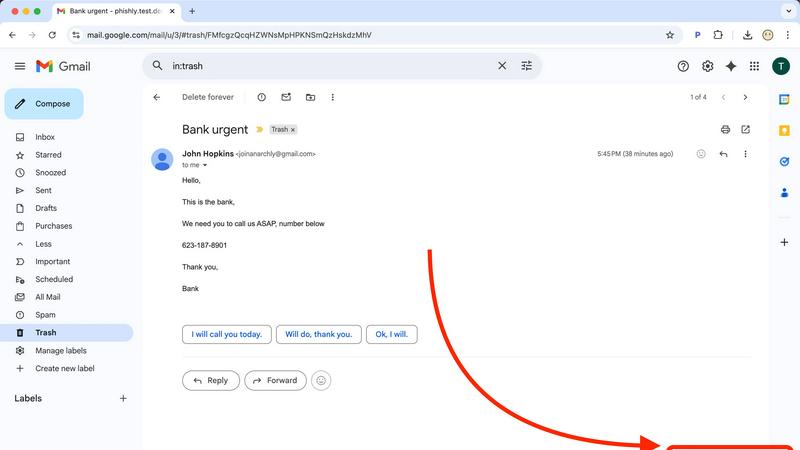
Phishly harnesses the power of artificial intelligence to analyze emails for various phishing indicators. This feature allows the platform to detect suspicious domains, urgent language, and other common tactics used by cybercriminals, ensuring comprehensive protection.
Instant Risk Assessment
Upon scanning an email, Phishly provides users with an immediate risk assessment. Each email is categorized as Safe, Medium Risk, or High Risk, allowing users to quickly gauge whether they should proceed with caution.
User Privacy Protection
Phishly values user privacy and only analyzes emails that users actively choose to scan. This emphasis on privacy ensures that personal information remains secure while the platform provides essential phishing protection.
Easy-to-Use Interface
With a user-friendly interface, Phishly is designed for individuals and small businesses that may lack technical expertise. The straightforward scanning process requires no special skills, making it accessible to everyone.
Use Cases
Decode This Text
Decoding Mysterious Texts
Imagine receiving a text that leaves you puzzled about someone's feelings or intentions. Decode This Text can clarify ambiguous messages, helping you understand if your friend is truly busy or possibly pulling away. By providing a detailed analysis, you can approach the situation with greater confidence.
Navigating Workplace Communication
In a professional setting, emails can often be terse and open to interpretation. Whether it's a one-word response or an ambiguous request, Decode This Text aids in deciphering your boss's or colleague's messages. This allows you to respond in a way that addresses their true intentions, fostering smoother workplace communication.
Enhancing Relationships with Family and Friends
When family members or friends send confusing messages, it can strain relationships. Decode This Text helps you interpret those nuances, providing insights that can lead to more meaningful conversations. By understanding the emotional context, you can strengthen your connections with loved ones.
Understanding Client Interactions
For freelancers or business owners, client communications can often feel cryptic or unclear. Decode This Text assists you in interpreting client messages, clarifying their expectations and emotions. This understanding can enhance client relationships and ensure you meet their needs effectively.
Phishly
Personal Email Safety
Individuals can use Phishly to scan suspicious emails in their personal Gmail accounts, providing peace of mind when dealing with unsolicited messages. This is particularly valuable for users who frequently receive promotional emails or communications from unknown senders.
Small Business Protection
Small business owners can leverage Phishly to protect their company email accounts from phishing attacks. By ensuring that employees can easily verify the legitimacy of emails, businesses can reduce the risk of falling victim to costly scams.
Protecting Sensitive Information
Professionals dealing with sensitive information can benefit from Phishly by scanning emails that may pose a threat to their data security. This feature is crucial for those in industries like finance or healthcare, where confidentiality is paramount.
Educating Users About Phishing
Phishly serves as an educational tool, helping users understand the signs of phishing attempts. By providing clear explanations of detected risks, users become more informed and vigilant against future email threats.
Overview
About Decode This Text
Decode This Text is a groundbreaking communication tool that deciphers the often cryptic nature of human messages, providing insights that can transform how we interpret everyday interactions. Perfect for anyone from busy professionals to those navigating personal relationships, this innovative product helps users understand the subtle nuances behind emails, texts, and conversations that might otherwise leave them confused. By simply pasting your message or describing the situation, you can expect a comprehensive analysis of the underlying emotional tone, intentions, and the best ways to respond. Decode This Text not only enhances communication skills but also fosters improved relationships by eliminating misunderstandings. With a user-friendly interface and rapid response times, it empowers users to engage confidently, reducing the anxiety of second-guessing their words and intentions.
About Phishly
Phishly is an innovative AI-powered phishing detection platform designed to provide users with a robust defense against deceptive email threats. Available as a Chrome extension for Gmail and as a web tool, Phishly empowers individuals and small businesses by enabling them to easily assess the legitimacy of emails they receive. With just a click of the "Scan with Phishly" button or by pasting suspicious email content into the website, users can instantly analyze emails for potential phishing indicators. Our sophisticated AI technology identifies red flags such as suspicious domains, urgent language, spoofed senders, and common social engineering tactics. Phishly's main value proposition lies in its ability to deliver clear risk assessments—labeling emails as Safe, Medium Risk, or High Risk—along with detailed explanations that demystify the risks. By focusing on user privacy, Phishly only analyzes emails that users explicitly choose to scan, ensuring a secure experience. Designed for those without technical knowledge, Phishly is free to use and provides instant reassurance when uncertainty arises about the legitimacy of an email.
Frequently Asked Questions
Decode This Text FAQ
How does Decode This Text maintain my privacy?
Your privacy is our priority. All messages analyzed by Decode This Text are processed anonymously, ensuring that no personal data is stored or viewed by humans. You can use the tool with peace of mind knowing your information remains confidential.
Can I use Decode This Text for multiple types of messages?
Absolutely! Decode This Text is designed to analyze a wide range of messages, from personal texts to professional emails. Whether you're decoding friendly banter or serious work communications, this tool adapts to your needs.
How quickly can I expect a response from Decode This Text?
Decode This Text prides itself on speed. Users typically receive a comprehensive analysis within 30 seconds, allowing for quick decision-making in your communications without the hassle of waiting long periods.
Is there a limit to how many messages I can analyze?
Currently, there is no set limit on the number of messages you can analyze through Decode This Text. Users can paste multiple conversations, ensuring they can gain insights from various interactions whenever needed.
Phishly FAQ
How does Phishly detect phishing emails?
Phishly uses advanced AI algorithms to analyze emails for various phishing indicators, including suspicious domains, urgent language, and spoofed senders, helping users identify potential threats.
Is Phishly free to use?
Yes, Phishly is completely free to use. Users can scan emails without any charges or hidden fees, making it an accessible tool for everyone looking for phishing protection.
Do I need technical knowledge to use Phishly?
No, Phishly is designed to be user-friendly and requires no technical expertise. Users can easily scan emails with just a click or by pasting content into the website.
How does Phishly protect my privacy?
Phishly only analyzes emails that users explicitly choose to scan, ensuring that personal information remains confidential. The platform prioritizes user privacy while delivering essential phishing detection services.