

Phishly
Uncover phishing threats effortlessly with Phishly, your AI-powered Chrome extension for Gmail and web browsing.
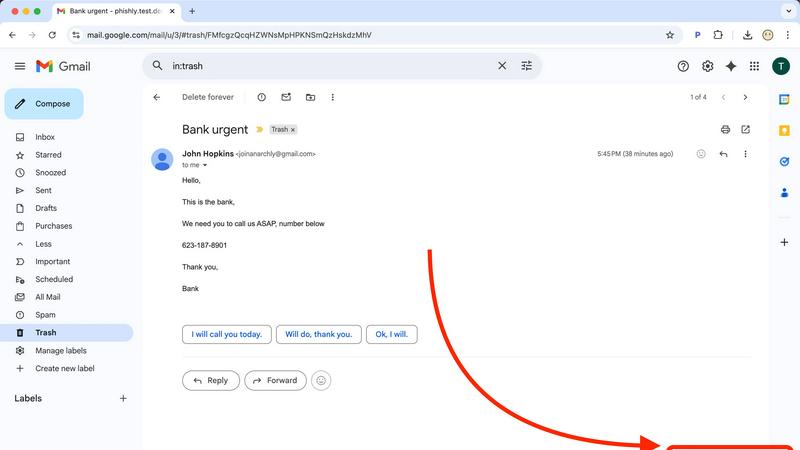
About Phishly
Phishly is an innovative AI-powered phishing detection platform designed to provide users with a robust defense against deceptive email threats. Available as a Chrome extension for Gmail and as a web tool, Phishly empowers individuals and small businesses by enabling them to easily assess the legitimacy of emails they receive. With just a click of the "Scan with Phishly" button or by pasting suspicious email content into the website, users can instantly analyze emails for potential phishing indicators. Our sophisticated AI technology identifies red flags such as suspicious domains, urgent language, spoofed senders, and common social engineering tactics. Phishly's main value proposition lies in its ability to deliver clear risk assessments—labeling emails as Safe, Medium Risk, or High Risk—along with detailed explanations that demystify the risks. By focusing on user privacy, Phishly only analyzes emails that users explicitly choose to scan, ensuring a secure experience. Designed for those without technical knowledge, Phishly is free to use and provides instant reassurance when uncertainty arises about the legitimacy of an email.
Features of Phishly
AI-Powered Detection
Phishly harnesses the power of artificial intelligence to analyze emails for various phishing indicators. This feature allows the platform to detect suspicious domains, urgent language, and other common tactics used by cybercriminals, ensuring comprehensive protection.
Instant Risk Assessment
Upon scanning an email, Phishly provides users with an immediate risk assessment. Each email is categorized as Safe, Medium Risk, or High Risk, allowing users to quickly gauge whether they should proceed with caution.
User Privacy Protection
Phishly values user privacy and only analyzes emails that users actively choose to scan. This emphasis on privacy ensures that personal information remains secure while the platform provides essential phishing protection.
Easy-to-Use Interface
With a user-friendly interface, Phishly is designed for individuals and small businesses that may lack technical expertise. The straightforward scanning process requires no special skills, making it accessible to everyone.
Use Cases of Phishly
Personal Email Safety
Individuals can use Phishly to scan suspicious emails in their personal Gmail accounts, providing peace of mind when dealing with unsolicited messages. This is particularly valuable for users who frequently receive promotional emails or communications from unknown senders.
Small Business Protection
Small business owners can leverage Phishly to protect their company email accounts from phishing attacks. By ensuring that employees can easily verify the legitimacy of emails, businesses can reduce the risk of falling victim to costly scams.
Protecting Sensitive Information
Professionals dealing with sensitive information can benefit from Phishly by scanning emails that may pose a threat to their data security. This feature is crucial for those in industries like finance or healthcare, where confidentiality is paramount.
Educating Users About Phishing
Phishly serves as an educational tool, helping users understand the signs of phishing attempts. By providing clear explanations of detected risks, users become more informed and vigilant against future email threats.
Frequently Asked Questions
How does Phishly detect phishing emails?
Phishly uses advanced AI algorithms to analyze emails for various phishing indicators, including suspicious domains, urgent language, and spoofed senders, helping users identify potential threats.
Is Phishly free to use?
Yes, Phishly is completely free to use. Users can scan emails without any charges or hidden fees, making it an accessible tool for everyone looking for phishing protection.
Do I need technical knowledge to use Phishly?
No, Phishly is designed to be user-friendly and requires no technical expertise. Users can easily scan emails with just a click or by pasting content into the website.
How does Phishly protect my privacy?
Phishly only analyzes emails that users explicitly choose to scan, ensuring that personal information remains confidential. The platform prioritizes user privacy while delivering essential phishing detection services.
Explore more in this category:
Similar to Phishly

@fuck.it - email with attitude
Private email. Pure. Secure. Exclusive. No ads, no tracking, no data selling. GDPR compliant, EU-hosted.


Novastart
Apps and files on an infinite canvas where people and AI agents work together.

MD to Text
Convert Markdown to plain text online. Remove formatting instantly, copy readable output, and keep every conversion private in your browser.

AUTOMATER.ai
A tray helper for every AI coding tool: one searchable library of past sessions, waiting alerts and usage across 9 providers.


stackledge
A human-vetted discovery directory for practical AI tools, SaaS apps, and custom n8n workflows, free from bot-scraped spam and dead links.

Kody Tools
Free collection of online developer utilities, code formatters, and digital converters designed to streamline your daily workflow.