
AECharts vs Nano Banana Pro
Side-by-side comparison to help you choose the right AI tool.

AECharts
Discover how AECharts instantly transforms your data into animated videos for compelling presentations and reports.
Last updated: April 13, 2026

Create stunning 4K images effortlessly with Nano Banana Pro's AI-powered tools for consistent character and advanced.
Last updated: February 28, 2026
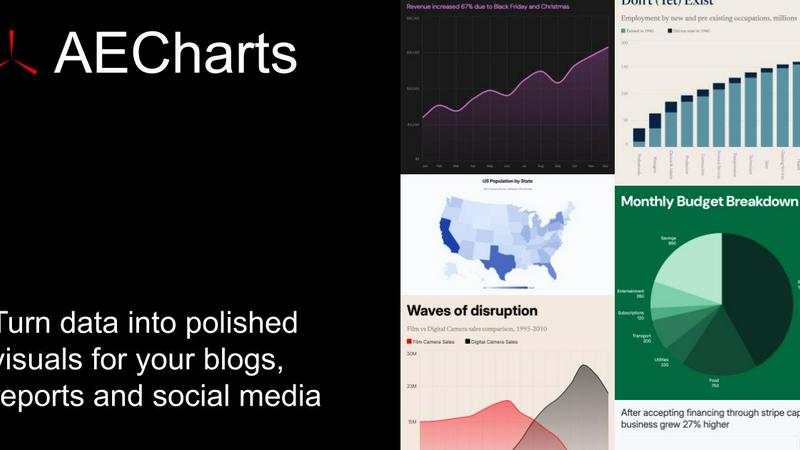
Visual Comparison
AECharts
Nano Banana Pro

Feature Comparison
AECharts
Browser-Based, No-Install Platform
Dive right into creation without any technical hurdles. AECharts runs entirely in your web browser, meaning there's no software to download, install, or update. This immediate access allows you to start exploring and building your animated charts from any computer, at any time. It removes the friction of traditional video editing suites, making professional-grade data animation an on-demand resource rather than a complex project.
Extensive Chart Library & Templates
Uncover the perfect visual for your story with a growing library of over 14 chart types. Go beyond standard bar and line charts to explore dynamic formats like bar chart races, waffle charts, treemaps, and animated numbers. Each chart type comes with a selection of pre-built, professional templates that provide a stunning starting point. These templates are fully customizable, letting you experiment with different visual styles until you find the one that makes your data sing.
Integrated Brand Kit Automation
Imagine applying your company's visual identity to every chart automatically. AECharts' Brand Kit feature allows you to set your primary colors, fonts, and logo once. Then, with a single click, every new chart you create inherits these brand elements, ensuring consistent, on-brand visuals across all your reports, presentations, and social media content. This transforms chart creation from a manual design task into a streamlined, scalable process.
Flexible Multi-Format Export
Your animated creation shouldn't be locked into a single format. AECharts provides flexible export options to fit any platform. Need a video for social media? Export an MP4. Require a still image for a report or slide deck? Download a high-resolution PNG or JPEG. The tool even offers preset aspect ratios like 16:9 for presentations, 1:1 for Instagram, and 4:5 for Reels, giving you the perfect asset for every channel without extra editing.
Nano Banana Pro
Character Consistency
Character consistency is a hallmark of Nano Banana Pro, enabling creators to maintain the same character traits across diverse images. This feature is particularly useful for artists developing series or storyboards, as it ensures continuity and coherence in character design.
15% Faster Generation
Thanks to the gemini 3 pro image preview technology, Nano Banana Pro offers image generation that is 15% faster than its competitors. This speed empowers users to iterate quickly on their designs, making it ideal for tight deadlines and rapid project turnarounds.
Image-to-Image Editing
With the Image-to-Image editing feature, users can upload existing images and reimagine them through AI prompts. This capability allows for transformations that can entirely change the scene, add new elements, or enhance existing features, making it an essential tool for creative exploration.
Enhanced Text Rendering
Nano Banana Pro provides crystal-clear text rendering within images, eliminating the frustrations of blurry or garbled letters. This feature is essential for creating high-quality posters, logos, and any project where typography plays a critical role.
Use Cases
AECharts
Social Media Content & Reels
Curious how to stop the scroll on crowded social feeds? Marketers and content creators use AECharts to transform dry metrics into eye-catching animated videos for platforms like LinkedIn, Instagram Reels, and TikTok. A bar chart race showing subscriber growth or an animated line chart illustrating sales trends can dramatically increase engagement, comments, and shares compared to static images, making data-driven storytelling a key part of social strategy.
Dynamic Business & Pitch Presentations
Founders, sales teams, and executives can elevate their presentations by embedding animated charts directly into PowerPoint or Google Slides. Instead of pointing to a stagnant graph, you can play a short video that builds the narrative step-by-step, highlighting key increases, decreases, or comparisons. This dynamic approach holds audience attention, makes complex data understandable, and adds a layer of professional polish to investor pitches and quarterly reviews.
Data Journalism & Editorial Content
Journalists and bloggers face the challenge of making statistics relatable and memorable for their readers. AECharts allows them to quickly create embeddable or shareable animated charts that illustrate trends in politics, economics, or social issues. An animated chart showing election poll changes over time or pandemic case fluctuations tells a more compelling and digestible story than a table of numbers, enhancing article depth and reader comprehension.
Internal Reporting & Team Updates
Managers and project leads can revolutionize boring spreadsheet updates. By converting weekly KPIs, project timelines, or performance metrics into a short, animated summary video, they can communicate progress more effectively in team meetings or email newsletters. This visual approach helps teams quickly grasp status, celebrate milestones, and identify areas needing attention, fostering a more data-literate and engaged workplace culture.
Nano Banana Pro
Character Design for Animation
Animators can utilize Nano Banana Pro to develop vivid character designs that maintain their look across scenes. This consistency allows for seamless animation and storytelling, enabling creators to focus more on narrative rather than character discrepancies.
Social Media Marketing
Marketers can generate eye-catching visuals for social media posts, ensuring that each image aligns with branding guidelines. The flexibility of aspect ratios allows for optimal presentation on various platforms, enhancing engagement and visibility.
Comic Strip Creation
Comic artists can leverage Nano Banana Pro to create entire strips with characters that remain consistent across panels. This feature is vital for storytelling, as it helps readers connect with the characters throughout the series.
Artistic Photo Transformations
Photographers and artists can upload their photos and use the Image-to-Image editing tools to transform them into unique pieces of art. This feature encourages artistic experimentation and the blending of different styles, leading to innovative results.
Overview
About AECharts
What if you could transform your raw spreadsheet data into a captivating, animated story in just a few clicks? AECharts is a browser-based animated chart maker designed to do exactly that, eliminating the traditional barriers of complex software, steep learning curves, and expensive design resources. It serves a simple yet powerful purpose: to turn numbers into engaging video narratives. This tool is built for anyone who needs to communicate data with clarity and impact, from marketers crafting social media reels and journalists illustrating trends to researchers presenting findings and founders pitching to investors. The core value proposition is profound accessibility. You don't need any video editing experience, design skills, or to install software. By simply uploading a spreadsheet, pasting data, or connecting a Google Sheet, you can explore a world of animated charts. Choose from over 14 types, including bar chart races, line charts, and pie charts, and watch as AECharts assembles a polished, animated video in minutes. Every element is customizable, allowing you to infuse your brand's identity through colors, fonts, and logos. The final result is a versatile MP4 video ready to boost engagement on YouTube, LinkedIn, presentations, or newsletters, making powerful data visualization as straightforward as taking a screenshot.
About Nano Banana Pro
Nano Banana Pro is a groundbreaking AI image generator that translates your creative ideas into stunning visuals. Designed for artists, designers, marketers, and storytellers, this tool harnesses advanced technology, including the gemini 3 pro image preview, to produce 4K-ready images with remarkable clarity and speed. Its unique ability to maintain character consistency across multiple scenes makes it an invaluable asset for anyone working on character design, comic strips, or branded content. Moreover, Nano Banana Pro goes beyond traditional text prompts by offering powerful Image-to-Image editing tools, allowing users to transform existing images into entirely new pieces of art. With support for 11 flexible aspect ratios and enhanced text rendering, it adapts to any project, whether you're creating social media graphics or cinematic posters. Unlock a realm of limitless creativity where technology enhances your artistic vision rather than constrains it.
Frequently Asked Questions
AECharts FAQ
What is AECharts?
AECharts is a specialized online tool designed to create animated chart videos directly from your data. It bridges the gap between simple spreadsheet charts and complex video animation software, allowing users to produce professional, engaging data visualizations as videos (MP4) or images without any prior design or editing expertise. It's a focused solution for turning numerical data into dynamic visual stories.
Do I need coding or design skills to use it?
Absolutely not. AECharts is built specifically for users with zero coding or professional design experience. The interface is intuitive and guide-driven: you pick a chart type, input your data via paste or upload, and use simple sidebar controls to customize the visuals. The platform handles all the complex animation and rendering in the background, making sophisticated outputs accessible to everyone.
Can I import data from CSV or spreadsheets?
Yes, data import is a core strength. You can seamlessly bring your existing data into AECharts by pasting it directly from Excel or Google Sheets, uploading a CSV file, or even connecting a live Google Sheet for dynamic updates. This flexibility means you don't have to manually re-enter data, allowing you to work directly with the datasets you already use and trust in your daily workflow.
What export formats are available?
AECharts supports multiple export formats to suit various needs. For video purposes, you can export your creation as an MP4 file. For static use cases, such as including in printed reports, websites, or slides, you can download high-quality PNG or JPEG images. This multi-format support ensures you have the right asset for any platform, from YouTube videos to PowerPoint slides.
Nano Banana Pro FAQ
How does Nano Banana Pro ensure character consistency across images?
Nano Banana Pro utilizes advanced multi-image understanding technology to track and maintain character traits, ensuring that your characters look the same across various scenes and contexts.
Can I use Nano Banana Pro for both personal and commercial projects?
Yes, Nano Banana Pro is designed for a wide range of users, from hobbyists to professionals, making it suitable for both personal creativity and commercial endeavors.
What formats and aspect ratios does Nano Banana Pro support?
Nano Banana Pro supports 11 aspect ratios, ranging from standard square (1:1) to ultrawide (21:9). This versatility allows users to create images tailored to different platforms and needs.
Is there a trial or free version of Nano Banana Pro available?
New users can start with 8 free credits, allowing them to explore the capabilities of Nano Banana Pro without any initial investment. This introductory offer helps users get a feel for the tool before committing to a plan.
Alternatives
AECharts Alternatives
AECharts is a browser-based animated chart maker, falling into the category of design and data visualization tools. It specializes in transforming static data into engaging video content for presentations and social media, all without requiring software installation or advanced editing skills. Users often explore alternatives for various reasons. Some may seek different pricing models or free tiers, while others need specific chart types, more advanced customization, or integration with different platforms. The need for a desktop application versus a web tool can also drive the search for a different solution. When evaluating other options, consider your core needs. Key factors include the types of charts and animations offered, export formats and quality, ease of use, and how well the tool fits into your existing workflow. The ideal alternative should not only create compelling visuals but also save you time and effort in the process.
Nano Banana Pro Alternatives
Nano Banana Pro is an innovative AI image generator that falls within the design tools category, specifically tailored for creators seeking to translate their imaginative concepts into stunning visuals. Its advanced capabilities, such as character consistency and image-to-image editing, make it particularly appealing to graphic designers, marketers, and storytellers. However, users often seek alternatives due to factors like pricing, specific feature needs, or compatibility with different platforms and workflows. When choosing an alternative, it's essential to consider the tool's image quality, ease of use, flexibility in editing options, and the ability to maintain character consistency across projects. Each user's unique requirements, such as the types of visuals they create and their budget, will significantly influence the selection process.