
MultiMMR vs StatPecker
Side-by-side comparison to help you choose the right AI tool.

MultiMMR
Discover all your SaaS revenue in one unified dashboard with real-time insights.

StatPecker
StatPecker turns your company data into quick insights and stunning visuals, empowering better decisions and.
Last updated: March 1, 2026
Visual Comparison
MultiMMR
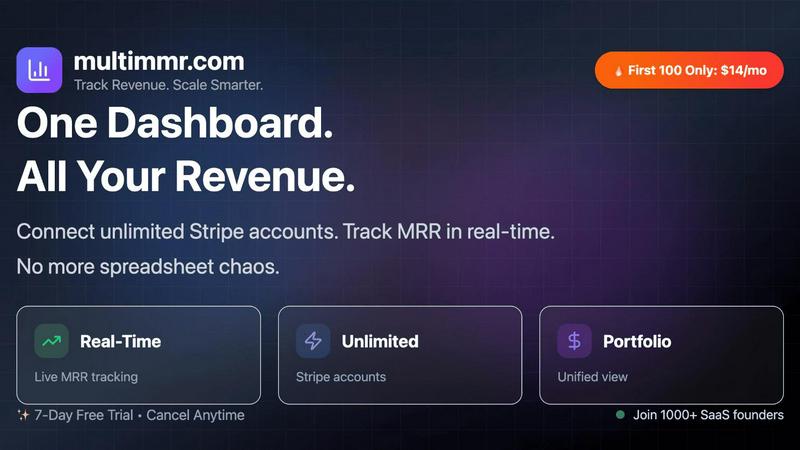
StatPecker

Feature Comparison
MultiMMR
Unified Multi-Account Dashboard
Dive into a single, cohesive view of your entire SaaS empire. Connect an unlimited number of Stripe accounts and watch as MultiMMR seamlessly consolidates all your revenue streams. This feature eliminates the need to mentally piece together data from disparate sources, presenting a clear, real-time picture of your total portfolio performance. It's the foundational shift from fragmented insight to holistic understanding.
Real-Time MRR Tracking & Analytics
Curiosity about your current financial health is satisfied instantly. Monitor your key metrics, like MRR, as they happen, not days later. This real-time tracking allows you to respond to trends, spikes, or dips with unprecedented speed. The platform provides beautiful, actionable charts that help you visualize growth, identify patterns, and move beyond guesswork to truly informed strategic decisions.
Smart Alerts & Goal Tracking
What if your dashboard could proactively whisper important changes to you? With Smart Alerts, it can. Receive instant notifications for critical events like significant MRR drops, unexpected spikes, or high-value customer churn. Paired with Goal Tracking, you can set specific MRR targets and monitor your daily progress with clear visual indicators, turning ambitious goals into a measurable, trackable journey.
Social-Ready Metrics & Secure Data
Discover the power of sharing your wins. MultiMMR allows you to create beautiful, presentation-ready screenshots of your key metrics to celebrate milestones on social media. Underpinning all this is a commitment to security. Your sensitive financial data is protected with advanced security protocols and strong encryption, ensuring your analytics are not only insightful but also completely safe.
StatPecker
Ask Your Query
With StatPecker’s intuitive interface, users can ask questions and receive instant insights from validated sources. This feature eliminates the need for complex tools and allows users to focus on their data stories rather than the intricacies of data analysis.
Publish & Embed
StatPecker makes it easy to create interactive visuals that can be seamlessly integrated into blogs, articles, and websites. This feature ensures that users can share their insights effectively, enhancing content with visually appealing graphics that captivate audiences.
Upload & Analyze CSVs
This feature allows users to upload local CSV files and extract key insights without the hassle of traditional spreadsheets. Users can analyze their data securely on their devices, making it a private and efficient way to derive meaningful conclusions from their datasets.
Download & Use Anywhere
Users can export their infographics as images, making it simple to include them in reports, presentations, and other formats. This flexibility ensures that StatPecker’s visuals can be utilized across various platforms, enhancing the reach and impact of the information presented.
Use Cases
MultiMMR
The Indie Hacker with Multiple Micro-SaaS Products
For the solo builder managing several small-scale SaaS tools, time is the most precious resource. MultiMMR automates the financial oversight across all projects, providing a quick, daily snapshot of total revenue without manual spreadsheet updates. This allows the indie hacker to focus on development and customer support, using real-time alerts to stay on top of any revenue anomalies instantly.
The Small Agency Managing Client Subscriptions
Agencies that build and manage SaaS products for clients often handle separate Stripe accounts for each. MultiMMR becomes the internal reporting hub, offering a secure way to aggregate client revenue data. This enables clear reporting to stakeholders and ensures the agency has a unified view of the recurring revenue health of its entire service portfolio.
The Startup Founder Preparing for Investor Meetings
When it's time to present to potential investors, having clean, professional, and consolidated financial data is crucial. MultiMMR provides the single source of truth, with beautiful charts that can be easily exported or screenshotted for decks. It demonstrates professionalism, command over the business metrics, and a data-driven approach to growth.
The Product Manager Tracking Feature Impact
A new feature launch should ideally move the revenue needle. By monitoring the unified dashboard after a release, product managers can correlate development efforts with real-time changes in MRR. This use case transforms financial data from an accounting function into a direct feedback loop for product strategy and iteration.
StatPecker
Content Creation
Writers and content creators can leverage StatPecker to enrich their articles with visually engaging infographics that help convey complex data clearly. This not only enhances reader engagement but also establishes credibility through data-driven storytelling.
Business Reporting
Analysts and business professionals can use StatPecker to transform raw data into insightful visuals for reports and presentations. This feature facilitates clearer communication of trends and performance metrics, enabling data-driven decision-making processes.
Educational Purposes
Educators can utilize StatPecker to create interactive educational materials that simplify complex topics for students. By visualizing data in an engaging manner, teachers can improve comprehension and retention of key concepts.
Marketing Insights
Marketers can harness StatPecker to visualize market trends and consumer behavior effectively. This enables teams to present compelling data to stakeholders, enhancing strategies with insights that drive marketing campaigns and initiatives.
Overview
About MultiMMR
Ever wondered what your entire SaaS portfolio truly looks like? If you're managing multiple projects, each with its own Stripe account, you're likely familiar with the chaotic dance of toggling between tabs and wrestling with endless spreadsheets. MultiMMR emerges as the curious explorer's solution to this modern dilemma. It's a unified financial command center designed specifically for founders, indie hackers, and small teams who operate a portfolio of SaaS products. The core mission is fascinatingly simple: to instantly sync every project's revenue data into one centralized, visually intuitive dashboard. This isn't just about aggregation; it's about transformation. MultiMMR takes raw transaction data and delivers enterprise-grade analytics, turning your combined Monthly Recurring Revenue (MRR) into beautiful, actionable charts. Imagine replacing hours of manual reporting with a single, real-time view that empowers you to make confident, data-driven decisions. By dissolving the friction of fragmented financial tracking, MultiMMR invites you to simplify your workflow and redirect your energy from administrative chaos to strategic scaling and growth.
About StatPecker
StatPecker is an innovative AI-powered tool that transforms the way individuals and teams visualize data. Designed for a diverse audience that includes content creators, analysts, marketers, and educators, StatPecker takes raw datasets and converts them into stunning infographics in seconds. This tool alleviates the burden of manual reporting and eliminates the costs associated with hiring professional designers. Its main value proposition lies in its ability to deliver insightful and interactive visuals that enhance understanding and engagement. Whether you are enriching articles, improving business reports, or creating educational content, StatPecker provides quick, credible answers that can be easily shared and published. With features that streamline data storytelling, it empowers users to make informed decisions and effectively communicate insights, making it an essential tool for anyone who works with data.
Frequently Asked Questions
MultiMMR FAQ
How many Stripe accounts can I connect?
MultiMMR is built for scale and curiosity. You can connect an unlimited number of Stripe accounts to your dashboard. Whether you have two projects or twenty, the platform is designed to consolidate all of them into one comprehensive financial view without any arbitrary limits.
Is my financial data secure with MultiMMR?
Absolutely. Security is a foundational priority. MultiMMR uses advanced security measures and strong encryption protocols to ensure all your connected Stripe data and sensitive financial information are protected. We treat your data with the same seriousness you do, providing a safe environment for your analytics.
What is included in the free trial?
The free trial offers full, unrestricted access to all of MultiMMR's core features for 7 days. This includes connecting unlimited Stripe accounts, real-time MRR tracking, smart alerts, goal tracking, and priority support. It's a complete experience designed to let you thoroughly explore how the platform can transform your workflow.
Can I track progress towards specific revenue goals?
Yes, and this is where strategy meets data. The Goal Tracking feature allows you to set specific MRR targets. Your dashboard will then display your progress with daily growth metrics and clear "on track" indicators, helping you stay motivated and informed about your journey toward your financial objectives.
StatPecker FAQ
How does StatPecker ensure data privacy?
StatPecker processes data locally on your device, which means your information remains private and secure during analysis. This feature is particularly beneficial for users concerned about data confidentiality.
Can I use StatPecker for free?
Yes, StatPecker offers a free tier that allows users to create unlimited projects, embed visuals, and conduct a limited number of AI queries and CSV uploads. This is a great way to explore the tool’s capabilities without any initial investment.
What types of files can I upload?
Users can upload CSV files of up to 50 MB to analyze their data. This allows for a wide range of data inquiries, making it easier to derive insights from various datasets.
Is StatPecker suitable for beginners?
Absolutely! StatPecker is designed with user-friendliness in mind. Its intuitive interface and straightforward features make it accessible for individuals at all skill levels, from beginners to expert analysts.