
Magic Hour vs StatPecker
Side-by-side comparison to help you choose the right AI tool.

Magic Hour
Discover a free AI studio where you can instantly create professional videos and images.
Last updated: March 4, 2026

StatPecker
StatPecker turns your company data into quick insights and stunning visuals, empowering better decisions and.
Last updated: March 1, 2026
Visual Comparison
Magic Hour

StatPecker
Feature Comparison
Magic Hour
Unified AI Studio
Imagine having a creative command center that brings over 100 specialized AI tools under one roof. Magic Hour's browser-based studio eliminates the need to juggle multiple subscriptions and complex interfaces. You can seamlessly transition from generating an AI image, to animating it into a video, to upscaling its quality and syncing lip movements—all within a cohesive workflow. This consolidation is the key to unlocking rapid experimentation and production, making advanced media creation surprisingly straightforward and efficient.
Text-to-Video & Video-to-Video
Dive into the frontier of dynamic content creation. With Text-to-Video, you can describe a scene in words—like "a serene sunset over mountain peaks"—and watch as the AI generates a unique video clip from scratch. Conversely, Video-to-Video allows you to reimagine existing footage. Ever wondered what your vlog would look like as a cyberpunk animation or a watercolor painting? Apply new artistic styles with a few clicks, breathing entirely new life into your current media library without starting from zero.
AI Face Swap & Lip Sync
Explore the power of personalization and dubbing. The Face Swap tools allow you to seamlessly replace faces in both photos and videos, opening doors for fun content, actor replacements, or personalized marketing. Coupled with advanced Lip Sync, you can make any talking photo or character accurately mouth new dialogue. This combination is perfect for creating localized ads, generating engaging social media clips with synchronized audio, or even bringing historical figures to life in educational content.
AI Image Generator & Editor
Unleash your visual imagination without needing advanced design skills. Start from a text prompt to generate original, high-quality images for any concept. Then, refine them directly within the platform using the AI Image Editor, where you can instruct changes through text commands. Need to expand a background, change an outfit color, or add an object? Simply describe what you want. This feature turns the editing process into a conversational and intuitive experience, drastically speeding up asset creation.
StatPecker
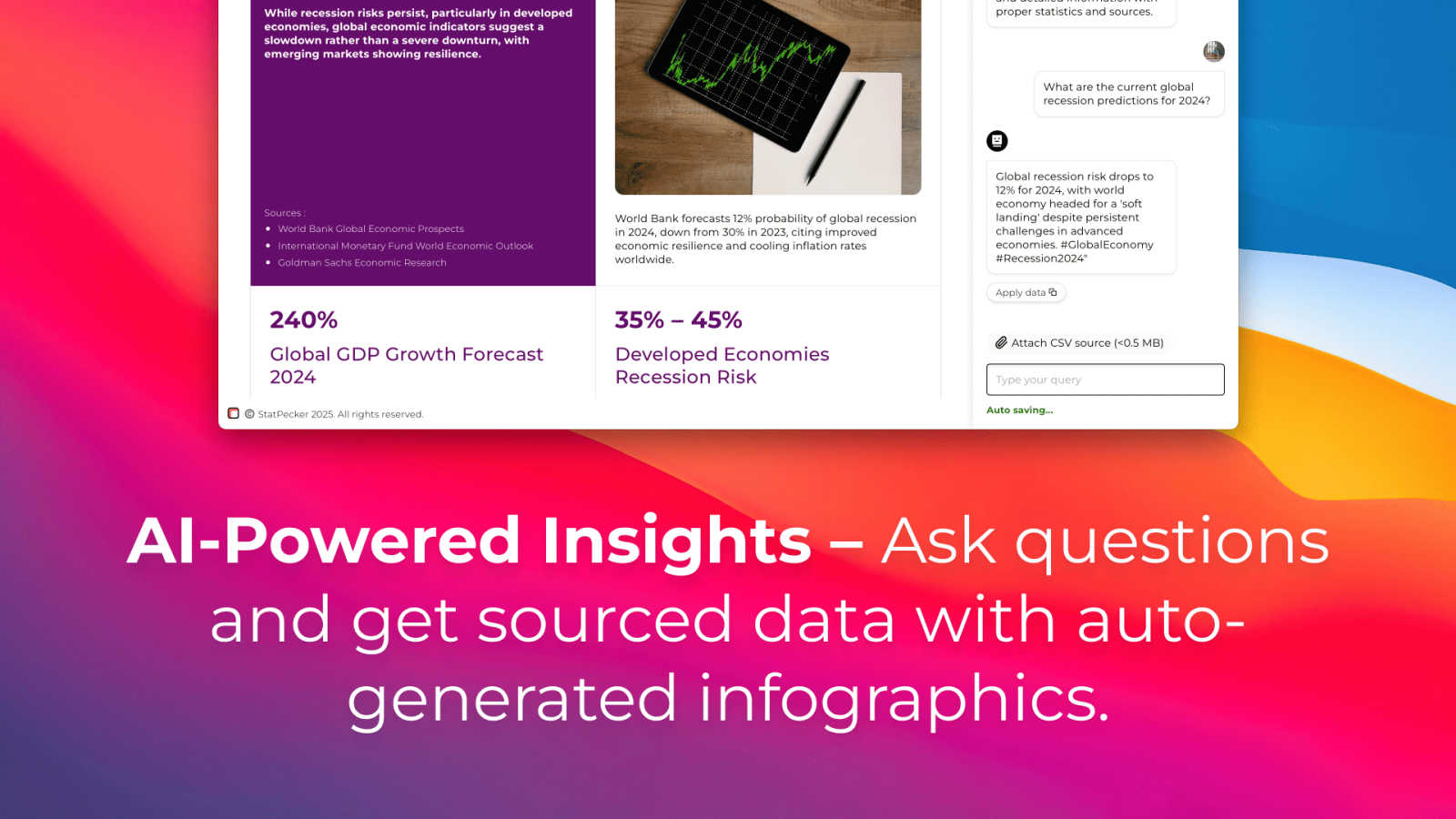
Ask Your Query
With StatPecker’s intuitive interface, users can ask questions and receive instant insights from validated sources. This feature eliminates the need for complex tools and allows users to focus on their data stories rather than the intricacies of data analysis.
Publish & Embed
StatPecker makes it easy to create interactive visuals that can be seamlessly integrated into blogs, articles, and websites. This feature ensures that users can share their insights effectively, enhancing content with visually appealing graphics that captivate audiences.
Upload & Analyze CSVs
This feature allows users to upload local CSV files and extract key insights without the hassle of traditional spreadsheets. Users can analyze their data securely on their devices, making it a private and efficient way to derive meaningful conclusions from their datasets.
Download & Use Anywhere
Users can export their infographics as images, making it simple to include them in reports, presentations, and other formats. This flexibility ensures that StatPecker’s visuals can be utilized across various platforms, enhancing the reach and impact of the information presented.
Use Cases
Magic Hour
Rapid Social Media Content Creation
For influencers, small businesses, and social media managers, Magic Hour is a content powerhouse. Quickly generate eye-catching video clips from text ideas for Reels or TikTok, apply trending visual styles to existing footage, and create personalized talking-head videos using AI headshots and lip sync. The vast library of templates ensures every post is perfectly sized for each platform, enabling creators to maintain a consistent, professional presence without a production team.
Scalable Marketing & Advertising Campaigns
Marketing teams and agencies can leverage Magic Hour to produce personalized ad variants at scale. Use the AI UGC generator and image-to-video tools to create thousands of unique assets for A/B testing. Implement face swap for localized ads featuring different spokespeople or create virtual try-on experiences. The API allows for seamless integration into live campaigns, enabling dynamic content personalization that drives higher engagement and conversion rates.
Educational & Training Material Production
Educators and corporate trainers can transform static information into engaging learning experiences. Convert text-based scripts or storyboards into explanatory videos with AI-generated visuals. Use animation and talking photos to simplify complex topics. Easily update training videos by swapping in new presenter footage or syncing new narration with lip sync, ensuring materials stay current without costly reshoots.
Creative Exploration & Prototyping
Artists, writers, and filmmakers can use Magic Hour as a digital sandbox for prototyping ideas. Visualize scenes from a script with text-to-video, experiment with different cinematic styles on a sample clip, or generate concept art and storyboards with the AI image tools. It’s an ideal platform for brainstorming, mood boarding, and presenting visual concepts quickly before committing to full-scale production.
StatPecker
Content Creation
Writers and content creators can leverage StatPecker to enrich their articles with visually engaging infographics that help convey complex data clearly. This not only enhances reader engagement but also establishes credibility through data-driven storytelling.
Business Reporting
Analysts and business professionals can use StatPecker to transform raw data into insightful visuals for reports and presentations. This feature facilitates clearer communication of trends and performance metrics, enabling data-driven decision-making processes.
Educational Purposes
Educators can utilize StatPecker to create interactive educational materials that simplify complex topics for students. By visualizing data in an engaging manner, teachers can improve comprehension and retention of key concepts.
Marketing Insights
Marketers can harness StatPecker to visualize market trends and consumer behavior effectively. This enables teams to present compelling data to stakeholders, enhancing strategies with insights that drive marketing campaigns and initiatives.
Overview
About Magic Hour
What if you could unlock a universe of creative potential without ever leaving your web browser? Welcome to Magic Hour, an all-in-one AI studio that consolidates over 100 powerful tools into a single, intuitive platform. It's designed to make professional-grade video and image creation fast, easy, and accessible to everyone. Whether you're a solo creator experimenting with new ideas, a marketer racing against a deadline, or a team needing to scale content production, Magic Hour empowers you to produce stunning visuals. Forget expensive equipment, complex software, and tedious reshoots. The core magic lies in its simplicity: start with a text prompt, an image, or a video clip, and watch as it transforms into engaging, share-ready content. From generating videos from scripts to applying new artistic styles to existing footage, personalizing with face swaps, or creating professional headshots, it streamlines the entire creative workflow. Built for rapid iteration and consistency, it's your gateway to exploring cinematic 4K scenes, maintaining brand aesthetics, and publishing perfectly sized content for any channel—all from a single, unified studio.
About StatPecker
StatPecker is an innovative AI-powered tool that transforms the way individuals and teams visualize data. Designed for a diverse audience that includes content creators, analysts, marketers, and educators, StatPecker takes raw datasets and converts them into stunning infographics in seconds. This tool alleviates the burden of manual reporting and eliminates the costs associated with hiring professional designers. Its main value proposition lies in its ability to deliver insightful and interactive visuals that enhance understanding and engagement. Whether you are enriching articles, improving business reports, or creating educational content, StatPecker provides quick, credible answers that can be easily shared and published. With features that streamline data storytelling, it empowers users to make informed decisions and effectively communicate insights, making it an essential tool for anyone who works with data.
Frequently Asked Questions
Magic Hour FAQ
Is Magic Hour really free to start?
Yes! Magic Hour offers a free tier that allows you to access and experiment with a wide range of its core AI tools, including face swap, image generation, and basic video creation. This is a fantastic way to explore the platform's capabilities. For higher-volume usage, advanced features, and commercial applications, they offer scalable paid plans and API access, but you can start creating immediately without a credit card.
What kind of files can I create with Magic Hour?
Magic Hour is designed for modern media output. You can create high-quality videos, including cinematic 4K scenes, as well as high-resolution images. The platform supports generating content in formats and aspect ratios optimized for social media platforms, advertisements, websites, and more. The built-in templates help ensure your outputs are share-ready for any specific channel or use case.
Do I need technical or design skills to use it?
Not at all. Magic Hour is built with an intuitive, user-friendly interface that prioritizes simplicity. The core interaction is often as simple as typing a text prompt or uploading a file. Guided tools and templates make the process accessible to beginners, while the depth of features and API supports the needs of advanced creators and developers.
How does the API work for developers?
The Magic Hour API provides a powerful way to integrate AI video and image generation directly into your own applications or workflows. With drop-in SDKs for popular languages like Python and Node.js, developers can make a single API call to access tools like text-to-video or image-to-video. You can install, authenticate, and start generating media in under 60 seconds, scaling from a few requests to millions with usage-based pricing.
StatPecker FAQ
How does StatPecker ensure data privacy?
StatPecker processes data locally on your device, which means your information remains private and secure during analysis. This feature is particularly beneficial for users concerned about data confidentiality.
Can I use StatPecker for free?
Yes, StatPecker offers a free tier that allows users to create unlimited projects, embed visuals, and conduct a limited number of AI queries and CSV uploads. This is a great way to explore the tool’s capabilities without any initial investment.
What types of files can I upload?
Users can upload CSV files of up to 50 MB to analyze their data. This allows for a wide range of data inquiries, making it easier to derive insights from various datasets.
Is StatPecker suitable for beginners?
Absolutely! StatPecker is designed with user-friendliness in mind. Its intuitive interface and straightforward features make it accessible for individuals at all skill levels, from beginners to expert analysts.
Alternatives
Magic Hour Alternatives
Magic Hour is a free, browser-based AI studio that consolidates a vast suite of tools for generating and editing professional videos and images. It belongs to the rapidly evolving category of AI-powered content creation platforms, designed to make high-quality visual production accessible without complex software. Even with its robust offering, users often explore alternatives for various reasons. Some may seek specialized features for a niche workflow, require a different pricing model or subscription tier, or need a platform that integrates deeply with other tools in their existing tech stack. The specific demands of a project, team size, or preferred user interface can also prompt a search for other solutions. When evaluating alternatives, it's wise to consider your primary creative goals. Look at the core AI models for video and image generation, the flexibility of the editing suite, and the quality of the final output. Also, assess the platform's ease of use, collaboration features for teams, and the overall value relative to its cost. The ideal choice aligns closely with your specific production needs and creative process.
StatPecker Alternatives
StatPecker is an innovative AI-powered tool designed to transform company data into quick insights and visually stunning infographics. It falls under the category of analytics and data visualization, catering to a diverse audience that includes content creators, analysts, marketers, and educators. Users often seek alternatives to StatPecker for various reasons, such as pricing concerns, specific feature requirements, or compatibility with different platforms. When exploring alternatives, it’s essential to consider factors like ease of use, the quality of visuals produced, integration capabilities, and the overall cost-effectiveness of the solution. When choosing an alternative, prioritize tools that not only meet your immediate data visualization needs but also offer scalability for future growth. Look for user-friendly interfaces that allow for seamless interaction and efficient data analysis, as well as robust sharing and embedding options to enhance your content's reach. Ultimately, the right alternative should empower you to communicate your data-driven insights effectively without getting bogged down in the complexities of manual reporting or design.