
Image3D AI vs Supermachine
Side-by-side comparison to help you choose the right AI tool.

Image3D AI
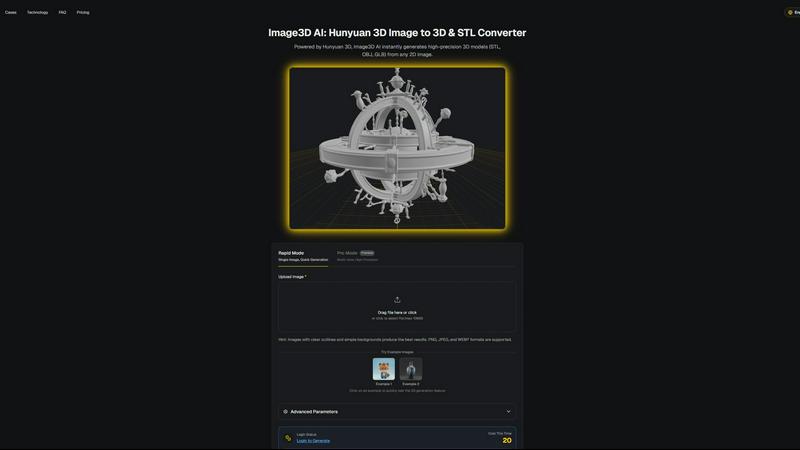
Transform any 2D image into high-precision 3D models in minutes, ideal for printing and game development.
Last updated: March 1, 2026

Supermachine
Supermachine empowers creators to effortlessly produce breathtaking, commercial-quality images and videos using over 60 innovative AI models.
Last updated: March 18, 2026
Visual Comparison
Image3D AI
Supermachine

Feature Comparison
Image3D AI
Rapid Mode
Rapid Mode allows users to generate 3D models from a single image quickly, making it ideal for logos, sketches, and simpler designs. This feature prioritizes speed without compromising the essential details needed for effective modeling, enabling creators to work efficiently.
Pro Mode
Pro Mode is designed for users seeking high precision in their 3D models. By utilizing multi-view images, this feature captures intricate details and geometries, making it perfect for complex designs such as product images or detailed character models.
Multi-format Exports
Image3D AI supports multiple export formats including STL, OBJ, and GLB, catering to various applications. This ensures that users can easily integrate their 3D assets into different platforms, whether for 3D printing, game development, or online showcases.
PBR Material Generation
The tool provides advanced PBR (Physically Based Rendering) material generation, allowing users to create realistic textures and materials for their 3D models. This feature enhances the visual quality and realism of the assets, making them suitable for high-end applications.
Supermachine
ControlNet
ControlNet is a cutting-edge feature that allows users to have precise control over their image generation process. By using this tool, creators can guide the AI to produce images that closely align with their vision, ensuring that the final outputs meet specific requirements and preferences. This feature enhances creativity and customization, making the design process more collaborative between the user and the AI.
Instruction Model
The Instruction Model is designed to understand and execute detailed commands from users. This feature allows you to articulate specific creative ideas, enabling the AI to generate visuals that are not only high-quality but also closely aligned with your intended message. This model significantly expands what you can create, making every project feel unique and personalized.
API
Supermachine offers a comprehensive API that enables developers and businesses to integrate its powerful AI capabilities into their own applications. This feature opens up new possibilities for automating creative processes and accessing the platform's vast array of AI tools directly from your own software. With the API, users can seamlessly incorporate image and video generation into their workflows, enhancing productivity and efficiency.
Video Generation
The Video Generation feature provides users with the ability to create compelling short-form videos effortlessly. With just a few clicks, you can transform ideas into captivating visual stories. This tool is especially valuable for marketers and content creators who need to produce engaging video content quickly, ensuring they can keep pace with fast-moving trends in digital media.
Use Cases
Image3D AI
Game Development
Game developers can leverage Image3D AI to rapidly produce 3D assets from concept art or sketches. The generated models, equipped with PBR materials, can be imported directly into game engines like Unity or Unreal, streamlining the asset creation process.
E-commerce
In the e-commerce sector, businesses can convert product images into interactive 3D models. These models enhance customer engagement through AR previews and provide customers with a more immersive shopping experience, ultimately boosting conversion rates.
3D Printing
For 3D printing enthusiasts, Image3D AI serves as a powerful image to STL converter. Users can create high-precision, print-ready files from their images, significantly reducing the time and effort required to produce physical prototypes.
Architecture and Design
Architects and designers can quickly generate architectural models from images, allowing them to visualize concepts without starting from scratch. This efficiency enables faster project development, helping professionals meet tight deadlines while maintaining design quality.
Supermachine
Social Media Content Creation
Social media managers can leverage Supermachine to generate eye-catching images and videos tailored for various platforms. By quickly creating visually appealing content, they can maintain an active online presence and engage their audience effectively, all while saving time and resources.
Marketing Campaigns
Marketers can utilize Supermachine to develop stunning visuals for campaigns, ensuring every advertisement stands out. The platform's ability to create tailored images and videos in seconds allows for rapid iteration and adaptation to market trends, making it an invaluable tool for any marketing team.
Artistic Exploration
Artists exploring digital mediums can experiment with Supermachine to create unique illustrations and digital art pieces. The platform encourages creativity by providing tools that simplify the design process, allowing artists to focus more on their creative expression rather than technical challenges.
Small Business Advertising
Small business owners can use Supermachine to create professional-quality ads without needing extensive design skills. By generating visually striking content quickly, they can effectively promote their products and services, increasing their visibility in a competitive market.
Overview
About Image3D AI
Image3D AI is an advanced tool that harnesses the power of artificial intelligence to transform static 2D images into intricate 3D models in seconds. Designed for a diverse audience that includes 3D printing enthusiasts, game developers, and digital artists, this innovative platform simplifies the traditionally complex process of 3D modeling. Utilizing Tencent's cutting-edge Hunyuan 3D engine, Image3D AI can generate high-fidelity assets from either a single image or a series of multi-view images. This capability not only enhances creativity but also streamlines workflows across various industries. With features such as multi-format exports and PBR material generation, Image3D AI ensures that even those without extensive 3D modeling skills can produce professional-grade models effortlessly. Its rapid generation modes cater to different needs, making it an essential tool for anyone looking to elevate their design projects.
About Supermachine
Supermachine is an innovative all-in-one creative studio that harnesses the power of artificial intelligence to empower creators across various fields. It caters to individuals of all skill levels, simplifying the traditionally complex process of generating professional-quality images and videos. Whether you are a social media manager in need of daily engaging content, a marketer designing compelling visuals for campaigns, an artist exploring the expansive realm of digital mediums, or a small business owner crafting eye-catching advertisements, Supermachine provides you with intuitive AI tools designed for maximum efficiency. The platform's core value proposition lies in its ability to deliver speed and simplicity; you can produce stunning stock photos, illustrations, thumbnails, NFTs, and short-form videos in under 15 seconds, without requiring expertise in complex prompt engineering. With over 100,000 creators generating one million images weekly, Supermachine stands out by offering a curated selection of more than 60 high-performing AI models. Rather than chasing every new release, it selectively integrates models that have proven their worth, ensuring you receive reliable and top-tier results for your projects every time.
Frequently Asked Questions
Image3D AI FAQ
What types of images work best for conversion?
High-contrast images with clear outlines and simple backgrounds yield the best results. Avoid blurry or low-light images, as they can complicate the 3D modeling process and reduce accuracy.
How long does it take to generate a 3D model?
Using Rapid Mode, users can expect to generate a 3D model in approximately 60 seconds. Pro Mode may take slightly longer due to the increased detail and precision involved in processing multi-view images.
What file formats can I export my 3D models in?
Image3D AI allows exports in multiple file formats including STL for 3D printing, OBJ for traditional 3D editing, and GLB for modern web and AR applications, ensuring compatibility with various platforms.
Is there a limit on the image file size I can upload?
Yes, the maximum file size for images uploaded to Image3D AI is 10MB. Supported formats include PNG, JPEG, and WEBP, which help optimize the conversion process for best results.
Supermachine FAQ
What types of content can I create with Supermachine?
With Supermachine, you can create a variety of content types, including stock photos, illustrations, thumbnails, NFTs, and short-form videos, all tailored to your specific needs.
Do I need to be an expert in design to use Supermachine?
No, Supermachine is designed for users of all skill levels. Its intuitive interface and powerful AI tools simplify the creative process, allowing anyone to produce professional-quality content without requiring extensive design expertise.
How many AI models does Supermachine offer?
Supermachine features a curated selection of over 60 high-performing AI models, each chosen for its proven effectiveness and utility, ensuring top-tier results for your creative projects.
Is there a trial available for new users?
Yes, Supermachine offers a 5-day trial package starting at just $5, allowing new users to explore its features and capabilities before committing to a subscription.
Alternatives
Image3D AI Alternatives
Image3D AI is a cutting-edge tool that falls under the category of design tools, specifically focused on transforming 2D images into striking 3D models. This innovative software streamlines the complex process of 3D modeling, making it accessible to a wide range of users, including digital artists, game developers, and 3D printing enthusiasts. However, many users begin searching for alternatives due to various factors such as pricing, specific feature sets, or platform compatibility needs. When exploring alternatives, it’s essential to consider several key aspects. Look for tools that offer similar capabilities in 3D model generation, including export options, material generation, and ease of use. Additionally, evaluating customer support, community resources, and integration with existing workflows can significantly enhance the overall user experience and satisfaction with the alternative solution.
Supermachine Alternatives
Supermachine is a cutting-edge creative studio that harnesses the power of artificial intelligence to help users craft impressive, commercial-ready images and videos with remarkable speed and efficiency. It falls into the design tools category, catering to a wide array of creators from social media managers to small business owners. Its user-friendly platform is designed to simplify the creative process, making it accessible for individuals with varying levels of expertise. However, users often seek alternatives to Supermachine for various reasons, including pricing structures, specific feature sets, or compatibility with their unique platform needs. When looking for an alternative, it is essential to consider factors such as ease of use, the range of available models, the quality of output, and the overall cost-effectiveness. Prioritizing these factors can help ensure that you find a solution that aligns perfectly with your creative requirements.