

Image3D AI
Transform any 2D image into high-precision 3D models in minutes, ideal for printing and game development.
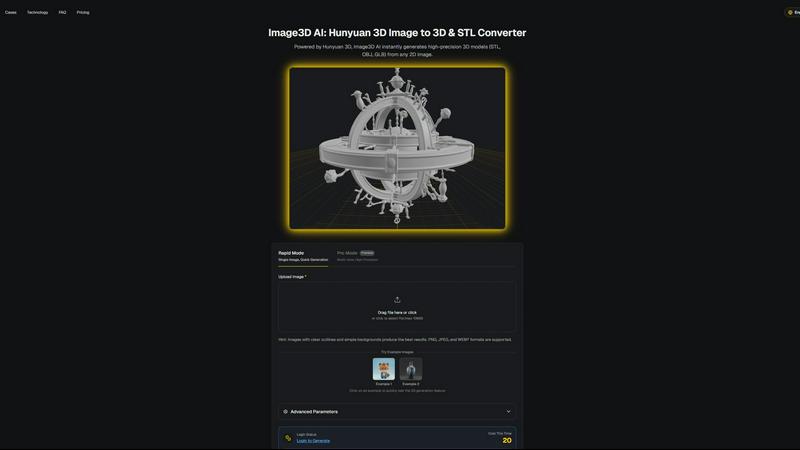
About Image3D AI
Image3D AI is an advanced tool that harnesses the power of artificial intelligence to transform static 2D images into intricate 3D models in seconds. Designed for a diverse audience that includes 3D printing enthusiasts, game developers, and digital artists, this innovative platform simplifies the traditionally complex process of 3D modeling. Utilizing Tencent's cutting-edge Hunyuan 3D engine, Image3D AI can generate high-fidelity assets from either a single image or a series of multi-view images. This capability not only enhances creativity but also streamlines workflows across various industries. With features such as multi-format exports and PBR material generation, Image3D AI ensures that even those without extensive 3D modeling skills can produce professional-grade models effortlessly. Its rapid generation modes cater to different needs, making it an essential tool for anyone looking to elevate their design projects.
Features of Image3D AI
Rapid Mode
Rapid Mode allows users to generate 3D models from a single image quickly, making it ideal for logos, sketches, and simpler designs. This feature prioritizes speed without compromising the essential details needed for effective modeling, enabling creators to work efficiently.
Pro Mode
Pro Mode is designed for users seeking high precision in their 3D models. By utilizing multi-view images, this feature captures intricate details and geometries, making it perfect for complex designs such as product images or detailed character models.
Multi-format Exports
Image3D AI supports multiple export formats including STL, OBJ, and GLB, catering to various applications. This ensures that users can easily integrate their 3D assets into different platforms, whether for 3D printing, game development, or online showcases.
PBR Material Generation
The tool provides advanced PBR (Physically Based Rendering) material generation, allowing users to create realistic textures and materials for their 3D models. This feature enhances the visual quality and realism of the assets, making them suitable for high-end applications.
Use Cases of Image3D AI
Game Development
Game developers can leverage Image3D AI to rapidly produce 3D assets from concept art or sketches. The generated models, equipped with PBR materials, can be imported directly into game engines like Unity or Unreal, streamlining the asset creation process.
E-commerce
In the e-commerce sector, businesses can convert product images into interactive 3D models. These models enhance customer engagement through AR previews and provide customers with a more immersive shopping experience, ultimately boosting conversion rates.
3D Printing
For 3D printing enthusiasts, Image3D AI serves as a powerful image to STL converter. Users can create high-precision, print-ready files from their images, significantly reducing the time and effort required to produce physical prototypes.
Architecture and Design
Architects and designers can quickly generate architectural models from images, allowing them to visualize concepts without starting from scratch. This efficiency enables faster project development, helping professionals meet tight deadlines while maintaining design quality.
Frequently Asked Questions
What types of images work best for conversion?
High-contrast images with clear outlines and simple backgrounds yield the best results. Avoid blurry or low-light images, as they can complicate the 3D modeling process and reduce accuracy.
How long does it take to generate a 3D model?
Using Rapid Mode, users can expect to generate a 3D model in approximately 60 seconds. Pro Mode may take slightly longer due to the increased detail and precision involved in processing multi-view images.
What file formats can I export my 3D models in?
Image3D AI allows exports in multiple file formats including STL for 3D printing, OBJ for traditional 3D editing, and GLB for modern web and AR applications, ensuring compatibility with various platforms.
Is there a limit on the image file size I can upload?
Yes, the maximum file size for images uploaded to Image3D AI is 10MB. Supported formats include PNG, JPEG, and WEBP, which help optimize the conversion process for best results.
Similar to Image3D AI

Seedance 2.5 Free
Create polished AI videos from text or images online with Seedance 2.5 Free.

Presentation Intelligence
AI-native presentation and visual content platform that turns prompts, documents, images, videos, and data into polished, shareable decks.


StopScroll
AI YouTube thumbnail maker that generates multiple thumbnail concepts from a URL, title, or prompt.

IsThisAIImage
Free AI image checker: upload a photo for AI-generated and deepfake scores, a clear verdict, and optional generator hints.

Merge Two Photos
Merge two photos free in your browser: side by side, stacked, overlay, or AI. Download a clean PNG, no watermark.

HubVanta AI
HubVanta AI helps creators generate images and videos with advanced AI tools for visual content workflows.