
Image3D AI vs Proofapp
Side-by-side comparison to help you choose the right AI tool.

Image3D AI
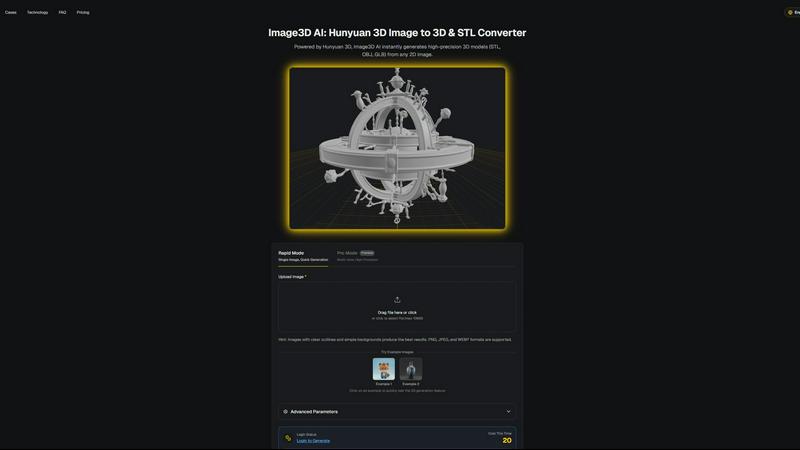
Transform any 2D image into high-precision 3D models in minutes, ideal for printing and game development.
Last updated: March 1, 2026

Proofapp
Transform feedback into visual comments on your website, streamlining collaboration and reducing miscommunication.
Last updated: March 4, 2026
Visual Comparison
Image3D AI
Proofapp

Feature Comparison
Image3D AI
Rapid Mode
Rapid Mode allows users to generate 3D models from a single image quickly, making it ideal for logos, sketches, and simpler designs. This feature prioritizes speed without compromising the essential details needed for effective modeling, enabling creators to work efficiently.
Pro Mode
Pro Mode is designed for users seeking high precision in their 3D models. By utilizing multi-view images, this feature captures intricate details and geometries, making it perfect for complex designs such as product images or detailed character models.
Multi-format Exports
Image3D AI supports multiple export formats including STL, OBJ, and GLB, catering to various applications. This ensures that users can easily integrate their 3D assets into different platforms, whether for 3D printing, game development, or online showcases.
PBR Material Generation
The tool provides advanced PBR (Physically Based Rendering) material generation, allowing users to create realistic textures and materials for their 3D models. This feature enhances the visual quality and realism of the assets, making them suitable for high-end applications.
Proofapp
Visual Commenting
With Proofapp, users can click anywhere on a screenshot to leave contextual feedback. This eliminates confusion over vague comments like "top left, under the nav," allowing for precise communication regarding design adjustments.
Multi-Breakpoint Testing
Proofapp automatically captures screenshots at both desktop and mobile breakpoints. This feature ensures that all aspects of a website are reviewed, providing a comprehensive understanding of how the design performs across devices.
Real-time Collaboration
Experience seamless teamwork as comments from your team appear in real-time. This feature enables users to reply, resolve issues, and track progress collectively, fostering an efficient and responsive workflow.
Secure Share Links
Generate secure, expirable links to share projects with clients easily. While clients can view and comment on designs, they do not need to create an account, making it straightforward for everyone involved in the project.
Use Cases
Image3D AI
Game Development
Game developers can leverage Image3D AI to rapidly produce 3D assets from concept art or sketches. The generated models, equipped with PBR materials, can be imported directly into game engines like Unity or Unreal, streamlining the asset creation process.
E-commerce
In the e-commerce sector, businesses can convert product images into interactive 3D models. These models enhance customer engagement through AR previews and provide customers with a more immersive shopping experience, ultimately boosting conversion rates.
3D Printing
For 3D printing enthusiasts, Image3D AI serves as a powerful image to STL converter. Users can create high-precision, print-ready files from their images, significantly reducing the time and effort required to produce physical prototypes.
Architecture and Design
Architects and designers can quickly generate architectural models from images, allowing them to visualize concepts without starting from scratch. This efficiency enables faster project development, helping professionals meet tight deadlines while maintaining design quality.
Proofapp
Freelancers
Freelancers can leverage Proofapp to present their work professionally while efficiently collecting feedback from clients. By utilizing visual comments, they can save time on revisions and focus on delivering high-quality projects.
Small Development Teams
For small dev teams, Proofapp streamlines the client approval process without the burden of enterprise pricing. This allows teams to maintain productivity and keep projects moving forward with clear and actionable feedback.
Design Teams
Design teams benefit from precise visual feedback pinned right where it matters. This organized method of communication helps to reduce design revisions and enhances the overall quality of the final product.
Marketing Teams
Marketing teams can visually review landing pages and campaigns with their entire team. By using Proofapp, they ensure that all members are aligned on project goals and can provide instant feedback on visual elements.
Overview
About Image3D AI
Image3D AI is an advanced tool that harnesses the power of artificial intelligence to transform static 2D images into intricate 3D models in seconds. Designed for a diverse audience that includes 3D printing enthusiasts, game developers, and digital artists, this innovative platform simplifies the traditionally complex process of 3D modeling. Utilizing Tencent's cutting-edge Hunyuan 3D engine, Image3D AI can generate high-fidelity assets from either a single image or a series of multi-view images. This capability not only enhances creativity but also streamlines workflows across various industries. With features such as multi-format exports and PBR material generation, Image3D AI ensures that even those without extensive 3D modeling skills can produce professional-grade models effortlessly. Its rapid generation modes cater to different needs, making it an essential tool for anyone looking to elevate their design projects.
About Proofapp
Proofapp is an innovative visual feedback and website review platform designed to streamline collaboration among designers, developers, and their clients. By enabling users to upload any website URL, Proof automatically captures high-quality screenshots for both desktop and mobile views. This intuitive tool allows reviewers to pin comments directly on the design, engage in threaded discussions, attach necessary files, and mark feedback as resolved—all without requiring an account. Proofapp stands out with features like real-time notifications, Slack integration, and support for multiple pages, making it ideal for freelancers gathering client input or agencies managing numerous projects. By transforming feedback into a visual and organized format, Proofapp eliminates the chaos of scattered emails and ambiguous revision notes, enhancing productivity and ensuring actionable insights.
Frequently Asked Questions
Image3D AI FAQ
What types of images work best for conversion?
High-contrast images with clear outlines and simple backgrounds yield the best results. Avoid blurry or low-light images, as they can complicate the 3D modeling process and reduce accuracy.
How long does it take to generate a 3D model?
Using Rapid Mode, users can expect to generate a 3D model in approximately 60 seconds. Pro Mode may take slightly longer due to the increased detail and precision involved in processing multi-view images.
What file formats can I export my 3D models in?
Image3D AI allows exports in multiple file formats including STL for 3D printing, OBJ for traditional 3D editing, and GLB for modern web and AR applications, ensuring compatibility with various platforms.
Is there a limit on the image file size I can upload?
Yes, the maximum file size for images uploaded to Image3D AI is 10MB. Supported formats include PNG, JPEG, and WEBP, which help optimize the conversion process for best results.
Proofapp FAQ
How does Proofapp improve feedback communication?
Proofapp enhances feedback communication by allowing users to leave visual comments directly on screenshots. This ensures that all feedback is contextual and eliminates misunderstandings that often arise from written communication.
Do clients need an account to provide feedback?
No, clients can provide feedback through secure share links without needing to create an account. This simplifies the feedback process and encourages more timely input from clients.
What security features does Proofapp offer?
Proofapp includes enterprise-level security features, such as role-based permissions and audit logs. This ensures that sensitive data is handled securely, giving users peace of mind while collaborating with clients.
Is there a free trial available for Proofapp?
Yes, Proofapp offers a generous free trial that allows users full access for 60 days without a credit card required. This trial enables potential users to explore the platform's capabilities before committing to a subscription.
Alternatives
Image3D AI Alternatives
Image3D AI is a cutting-edge tool that falls under the category of design tools, specifically focused on transforming 2D images into striking 3D models. This innovative software streamlines the complex process of 3D modeling, making it accessible to a wide range of users, including digital artists, game developers, and 3D printing enthusiasts. However, many users begin searching for alternatives due to various factors such as pricing, specific feature sets, or platform compatibility needs. When exploring alternatives, it’s essential to consider several key aspects. Look for tools that offer similar capabilities in 3D model generation, including export options, material generation, and ease of use. Additionally, evaluating customer support, community resources, and integration with existing workflows can significantly enhance the overall user experience and satisfaction with the alternative solution.
Proofapp Alternatives
Proofapp is a visual feedback and website review platform designed to enhance collaboration between designers, developers, and their clients. By capturing screenshots of both desktop and mobile views, it allows users to provide targeted feedback directly on the designs. This tool falls under the category of design tools, enabling teams to streamline their review processes and manage feedback effectively. Users often seek alternatives to Proofapp for various reasons, including pricing structures, specific feature sets, or platform compatibility. When exploring alternatives, it's essential to consider factors such as ease of use, integration capabilities, and the ability to handle multi-page projects. Finding a solution that meets your unique workflow needs can significantly enhance your design review process and improve overall efficiency.