
dmaya vs Image3D AI
Side-by-side comparison to help you choose the right AI tool.

dmaya
dMaya is an AI design platform that streamlines UI creation, client collaboration, and code export for teams and agencies.
Last updated: April 13, 2026

Image3D AI
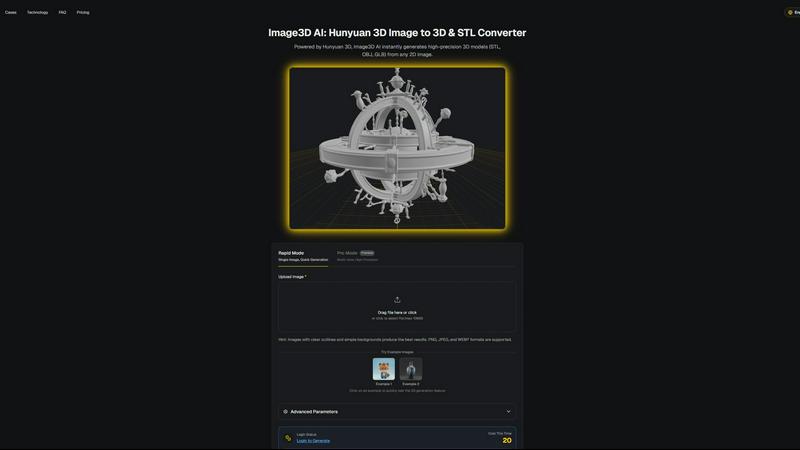
Transform any 2D image into high-precision 3D models in minutes, ideal for printing and game development.
Last updated: March 1, 2026
Visual Comparison
dmaya
Image3D AI
Feature Comparison
dmaya
AI-Powered Design Generation
dMaya leverages advanced AI technology to convert plain language descriptions into intricate, production-ready UI designs within moments. This feature eliminates lengthy design processes, enabling teams to focus on creativity rather than technicalities.
Multi-Screen Canvas
The platform offers an infinite canvas where users can simultaneously work on desktop and mobile frames. This feature enhances productivity by allowing drag-and-drop functionality, zooming, and organization, similar to Figma, but with the added efficiency of AI assistance.
Built for Teams & Collaboration
Designed with teamwork in mind, dMaya allows users to invite team members, share projects with clients, and leave comments in real-time. Role-based access ensures that everyone involved can contribute effectively while maintaining focus on their specific tasks.
Client Presentation Mode
With dMaya’s interactive preview feature, users can share polished designs with clients through a single, account-free link. This facilitates immediate feedback collection and iteration, streamlining the approval process and making it easier to align with client expectations.
Image3D AI
Rapid Mode
Rapid Mode allows users to generate 3D models from a single image quickly, making it ideal for logos, sketches, and simpler designs. This feature prioritizes speed without compromising the essential details needed for effective modeling, enabling creators to work efficiently.
Pro Mode
Pro Mode is designed for users seeking high precision in their 3D models. By utilizing multi-view images, this feature captures intricate details and geometries, making it perfect for complex designs such as product images or detailed character models.
Multi-format Exports
Image3D AI supports multiple export formats including STL, OBJ, and GLB, catering to various applications. This ensures that users can easily integrate their 3D assets into different platforms, whether for 3D printing, game development, or online showcases.
PBR Material Generation
The tool provides advanced PBR (Physically Based Rendering) material generation, allowing users to create realistic textures and materials for their 3D models. This feature enhances the visual quality and realism of the assets, making them suitable for high-end applications.
Use Cases
dmaya
Agencies
Agencies can leverage dMaya to generate design concepts quickly during discovery calls, significantly enhancing their pitch processes. By presenting multiple design directions in just hours, they can win more clients and streamline their workflow.
Product Teams
Product teams benefit from dMaya by exploring various UI directions before committing engineering resources. This allows for enhanced collaboration across design, product, and engineering disciplines, reducing the discrepancies between designed output and actual builds.
Freelancers
Freelancers can utilize dMaya to expand their project capacity without extending their working hours. By generating high-quality designs swiftly, they can manage more clients simultaneously, thus increasing their revenue potential.
Startups
Startups can capitalize on dMaya's rapid design capabilities to iterate on their product ideas quickly. With the ability to present concepts to stakeholders and gather feedback without delays, startups can pivot and adapt their offerings based on real-time insights.
Image3D AI
Game Development
Game developers can leverage Image3D AI to rapidly produce 3D assets from concept art or sketches. The generated models, equipped with PBR materials, can be imported directly into game engines like Unity or Unreal, streamlining the asset creation process.
E-commerce
In the e-commerce sector, businesses can convert product images into interactive 3D models. These models enhance customer engagement through AR previews and provide customers with a more immersive shopping experience, ultimately boosting conversion rates.
3D Printing
For 3D printing enthusiasts, Image3D AI serves as a powerful image to STL converter. Users can create high-precision, print-ready files from their images, significantly reducing the time and effort required to produce physical prototypes.
Architecture and Design
Architects and designers can quickly generate architectural models from images, allowing them to visualize concepts without starting from scratch. This efficiency enables faster project development, helping professionals meet tight deadlines while maintaining design quality.
Overview
About dmaya
dMaya is a revolutionary design platform specifically crafted for agencies, teams, and freelancers who prioritize visual design before diving into code. It empowers users to generate professional-quality UI designs from simple text descriptions, allowing for a seamless transition from concept to execution. With dMaya, you can describe your project, whether it's a SaaS dashboard, an e-commerce flow, or a mobile app, and receive polished screens in mere seconds. The platform stands out by facilitating iterative conversations with an AI agent, enabling instant adjustments to colors, layouts, typography, and sections. This design-first approach ensures that teams can catch potential issues early, align collaboratively, and secure client approvals rapidly. With its design tokens feature, consistency across all screens is maintained effortlessly. Once designs are finalized, users can export them as clean HTML, CSS, and JavaScript code, ready to be handed off to any coding agent like Cursor or Claude Code for development in frameworks such as React or Flutter. This unique workflow allows teams to present confidently, approve efficiently, and ship products faster than ever.
About Image3D AI
Image3D AI is an advanced tool that harnesses the power of artificial intelligence to transform static 2D images into intricate 3D models in seconds. Designed for a diverse audience that includes 3D printing enthusiasts, game developers, and digital artists, this innovative platform simplifies the traditionally complex process of 3D modeling. Utilizing Tencent's cutting-edge Hunyuan 3D engine, Image3D AI can generate high-fidelity assets from either a single image or a series of multi-view images. This capability not only enhances creativity but also streamlines workflows across various industries. With features such as multi-format exports and PBR material generation, Image3D AI ensures that even those without extensive 3D modeling skills can produce professional-grade models effortlessly. Its rapid generation modes cater to different needs, making it an essential tool for anyone looking to elevate their design projects.
Frequently Asked Questions
dmaya FAQ
How does dMaya generate designs from text descriptions?
dMaya employs sophisticated AI algorithms that interpret your plain language descriptions and translate them into comprehensive, production-ready UI designs almost instantaneously. This allows for a streamlined design process.
Can I collaborate with team members in dMaya?
Yes, dMaya is built for collaboration. You can invite team members to your projects, share designs for feedback, and even leave comments, facilitating a more integrated workflow that enhances team productivity.
What happens after I get client approval?
Once you receive client approval on your designs, you can easily export them as clean code in HTML, CSS, and JavaScript formats. This code can then be handed off to any coding agent for further development in your chosen framework.
Is there a limit to the number of screens I can design at once?
No, dMaya provides an infinite canvas that allows you to work on multiple screens across different devices simultaneously. This flexibility enhances your design capabilities and supports comprehensive project development.
Image3D AI FAQ
What types of images work best for conversion?
High-contrast images with clear outlines and simple backgrounds yield the best results. Avoid blurry or low-light images, as they can complicate the 3D modeling process and reduce accuracy.
How long does it take to generate a 3D model?
Using Rapid Mode, users can expect to generate a 3D model in approximately 60 seconds. Pro Mode may take slightly longer due to the increased detail and precision involved in processing multi-view images.
What file formats can I export my 3D models in?
Image3D AI allows exports in multiple file formats including STL for 3D printing, OBJ for traditional 3D editing, and GLB for modern web and AR applications, ensuring compatibility with various platforms.
Is there a limit on the image file size I can upload?
Yes, the maximum file size for images uploaded to Image3D AI is 10MB. Supported formats include PNG, JPEG, and WEBP, which help optimize the conversion process for best results.
Alternatives
dmaya Alternatives
dMaya is an innovative AI vibe design platform tailored for agencies, teams, and freelancers who seek to streamline the design phase before diving into coding. By utilizing AI to generate professional UI designs from simple text descriptions, dMaya enables users to create polished screens quickly and efficiently. This unique approach not only enhances collaboration but also allows for rapid iteration and feedback, making it an indispensable tool for modern design workflows. Users often explore alternatives when they encounter limitations in pricing, feature sets, or platform compatibility. The need for a solution that better fits their specific requirements can arise from various factors such as budget constraints, desired functionalities, or the desire for a more intuitive user experience. When considering alternatives, it's essential to evaluate the features that matter most to your team, including ease of use, collaboration capabilities, and the ability to export designs seamlessly into code.
Image3D AI Alternatives
Image3D AI is a cutting-edge tool that falls under the category of design tools, specifically focused on transforming 2D images into striking 3D models. This innovative software streamlines the complex process of 3D modeling, making it accessible to a wide range of users, including digital artists, game developers, and 3D printing enthusiasts. However, many users begin searching for alternatives due to various factors such as pricing, specific feature sets, or platform compatibility needs. When exploring alternatives, it’s essential to consider several key aspects. Look for tools that offer similar capabilities in 3D model generation, including export options, material generation, and ease of use. Additionally, evaluating customer support, community resources, and integration with existing workflows can significantly enhance the overall user experience and satisfaction with the alternative solution.