
DocuExtractor vs Perkoon
Side-by-side comparison to help you choose the right AI tool.

DocuExtractor
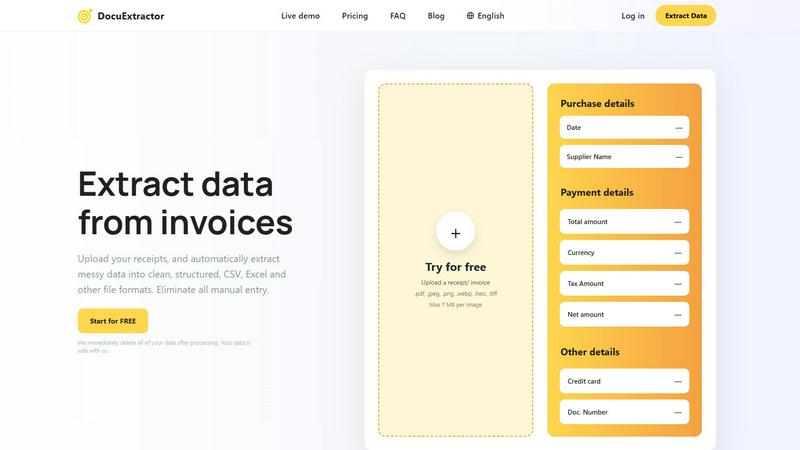
Transform messy receipts and invoices into organized, structured data effortlessly with DocuExtractor's AI-powered tool.
Last updated: February 28, 2026

Experience free and unlimited peer-to-peer file transfers with Perkoon, no signup needed and your files stay private.
Last updated: March 4, 2026
Visual Comparison
DocuExtractor
Perkoon

Feature Comparison
DocuExtractor
Advanced Data Extraction
DocuExtractor employs sophisticated algorithms to automatically extract essential data from various document types, including receipts and invoices. This feature ensures high accuracy and significantly reduces the time spent on data entry.
Batch Upload Capability
Users can upload multiple documents simultaneously, allowing for efficient processing of numerous files at once. This batch upload feature makes it easy to handle high volumes of documents without sacrificing speed or accuracy.
Instant Data Conversion
With DocuExtractor, data extraction happens in seconds. Users can quickly download their extracted information in structured CSV or Excel format, enabling a faster workflow and immediate access to crucial financial data.
Multilingual Support
DocuExtractor supports over 45 languages, automatically detecting the language of the documents being processed. This feature broadens its usability for global teams and ensures that language barriers do not impede productivity.
Perkoon
Peer-to-Peer (P2P) File Transfer
Perkoon’s flagship feature allows users to send files directly between browsers without relying on a central server. This method eliminates size limits, making it possible to transfer large files for free while ensuring privacy and security since the data never passes through Perkoon’s servers.
Encrypted Cloud Storage
For instances when recipients are offline, Perkoon offers encrypted cloud storage that temporarily holds files until they can be accessed. This feature is paid but is designed to cover the operational costs of running the servers, ensuring that your files are safe and secure.
AI Integration
Perkoon is built for the AI age, offering native tools that allow AI agents to interact directly with the service. This eliminates the need for screen scraping, allowing for more efficient automation and smoother file transfers, making it an ideal solution for developers and tech enthusiasts.
Simple Command Line Interface (CLI)
For advanced users, Perkoon provides a straightforward CLI tool that enables seamless integration with various applications and systems. This feature allows users to transfer files using command line instructions, catering to those who prefer a more technical approach to file management.
Use Cases
DocuExtractor
Streamlining Accounting Processes
Accountants can leverage DocuExtractor to simplify the management of financial documents. By quickly converting invoices and receipts into structured data, they can focus on analysis rather than data entry.
Improving Bookkeeping Efficiency
Bookkeepers can save significant time by using DocuExtractor to handle their document processing needs. The automatic extraction of data allows them to maintain accurate records while minimizing manual tasks.
Automating Expense Management
Finance teams can utilize DocuExtractor for expense management by efficiently processing receipts and invoices. This automation leads to faster reimbursement processes and better tracking of expenditures.
Enhancing Audit Preparations
During audit preparations, professionals can rely on DocuExtractor to gather and organize financial documents swiftly. This ensures that all necessary information is readily accessible, simplifying the audit process.
Perkoon
Collaborative Projects
Perkoon is perfect for teams working on collaborative projects who need to share large files quickly and efficiently. The P2P transfer method allows team members to send and receive files in real-time, enhancing productivity and teamwork.
Remote Work
For remote workers, Perkoon simplifies the process of sharing files with colleagues and clients. Whether sending presentations, reports, or large datasets, users can rely on Perkoon to deliver their files securely and without delay.
Academic Research
Researchers can utilize Perkoon to share large datasets or documents with collaborators without worrying about size limitations or data privacy. The secure transfer methods ensure that sensitive information remains confidential.
Content Creation
Content creators, such as video editors or graphic designers, benefit from Perkoon’s ability to transfer large media files swiftly. The lack of size limits enables creatives to collaborate on projects without the hassle of file compression or quality loss.
Overview
About DocuExtractor
DocuExtractor is a powerful intelligent document converter designed to streamline the tedious task of manual data entry for professionals in the finance sector. Whether you are an accountant, bookkeeper, or part of a finance team, DocuExtractor helps transform chaotic piles of receipts, invoices, and bank statements into structured, ready-to-use data with just a few clicks. Utilizing advanced Optical Character Recognition (OCR) technology combined with deep learning and artificial intelligence, DocuExtractor automatically extracts crucial information like dates, supplier names, totals, and document numbers from uploaded files. The extracted data is then converted into impeccably structured CSV or Excel formats, making it easy for users to import it into accounting software or perform further analysis. With DocuExtractor, you can reclaim hours of time each week, achieve near-perfect accuracy, and rest assured knowing your data is secure with automatic deletion after processing. Experience a workflow where the only manual step is the initial upload, and elevate your document management process to new heights.
About Perkoon
Perkoon is a revolutionary file transfer service that prioritizes simplicity, privacy, and user empowerment. Designed for a wide array of users, from casual file sharers to tech-savvy professionals, Perkoon provides a refreshing alternative to traditional file transfer methods that often come laden with restrictions and hidden costs. Its primary value proposition lies in its commitment to offering a truly free peer-to-peer (P2P) file transfer solution without compromising on user experience. With no size limits and no mandatory sign-ups, Perkoon allows users to transfer files directly between browsers, ensuring that data remains private and secure. When recipients are offline, Perkoon offers a paid cloud storage option that securely holds files until they are ready to be accessed. With built-in AI tools and automation capabilities, Perkoon is designed for the modern age, making it a versatile choice for anyone looking to share files effortlessly and without the baggage of conventional services.
Frequently Asked Questions
DocuExtractor FAQ
How does DocuExtractor ensure data security?
DocuExtractor prioritizes user data security by automatically deleting all processed data after extraction. This guarantees that sensitive information remains confidential and secure.
What types of documents can be processed with DocuExtractor?
DocuExtractor can process a variety of document types, including receipts, invoices, PDF files, and images in formats such as JPG, PNG, and TIFF. This versatility makes it suitable for numerous financial documentation needs.
Is there a limit to the number of documents I can upload at once?
No, DocuExtractor allows users to upload documents in batches, meaning you can process multiple files simultaneously without any limit on the number of documents, enhancing efficiency.
What file formats are supported for uploads?
Users can upload documents in various formats, including .pdf, .jpeg, .png, .webp, .heic, and .tiff, with a maximum file size of 7 MB per image. This wide range of supported formats caters to different user needs.
Perkoon FAQ
How does Perkoon keep my files private?
Perkoon ensures your files remain private by using P2P technology for transfers, meaning your data never touches their servers. For cloud transfers, files are encrypted, adding an extra layer of security.
What happens if the recipient is offline?
If the recipient is offline, Perkoon will hold the file securely in encrypted cloud storage until the recipient is available to access it. This feature is part of the paid offering.
Can I use Perkoon on any browser?
Perkoon works best on Chrome, Edge, and Brave, which have no limitations. Users of Firefox and Safari may experience some restrictions, so it is advisable to use compatible browsers for optimal performance.
How can I earn extra storage with Perkoon?
You can share your unique referral link with others. When they sign up and transfer files, both you and the new user earn extra cloud storage, making it a mutually beneficial arrangement.
Alternatives
DocuExtractor Alternatives
DocuExtractor is an innovative tool designed to transform chaotic financial documents like receipts and invoices into structured, usable data effortlessly. This software falls under the productivity and management category, targeting professionals such as accountants, bookkeepers, and finance teams who wish to streamline their document handling processes. Users often seek alternatives due to concerns about pricing, desired features, or compatibility with various platforms. When searching for an alternative, it's essential to consider factors such as the software's extraction accuracy, range of supported document formats, ease of integration with existing workflows, and overall user experience. Evaluating these aspects will ensure you find a solution that aligns with your specific needs and enhances your productivity.
Perkoon Alternatives
Perkoon is a user-friendly file transfer service that falls under the category of productivity and management tools. It offers a refreshingly straightforward approach to sharing files, utilizing peer-to-peer technology to facilitate direct transfers without the need for sign-ups or artificial limitations. Users often seek alternatives to Perkoon for various reasons, including specific feature requirements, pricing structures, or compatibility with different platforms. As you explore your options, consider factors such as ease of use, privacy policies, transfer speed, and whether the service aligns with your specific needs for file management. When selecting an alternative to Perkoon, it's essential to prioritize your requirements and values. Look for services that maintain a strong focus on user privacy, provide reliable transfer speeds, and offer flexibility in terms of file size limits. Additionally, consider how well the platform integrates with your existing tools and workflows, as a seamless user experience can significantly enhance productivity. By keeping these aspects in mind, you can find an option that best suits your file transfer needs.