

DocuExtractor
Transform messy receipts and invoices into organized, structured data effortlessly with DocuExtractor's AI-powered tool.
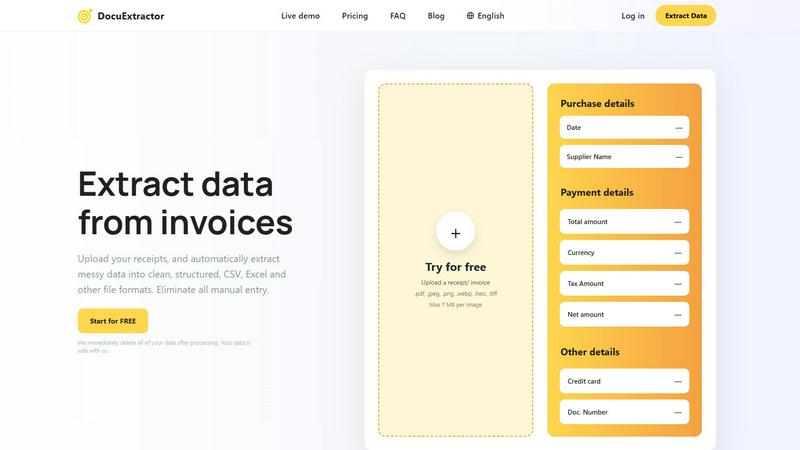
About DocuExtractor
DocuExtractor is a powerful intelligent document converter designed to streamline the tedious task of manual data entry for professionals in the finance sector. Whether you are an accountant, bookkeeper, or part of a finance team, DocuExtractor helps transform chaotic piles of receipts, invoices, and bank statements into structured, ready-to-use data with just a few clicks. Utilizing advanced Optical Character Recognition (OCR) technology combined with deep learning and artificial intelligence, DocuExtractor automatically extracts crucial information like dates, supplier names, totals, and document numbers from uploaded files. The extracted data is then converted into impeccably structured CSV or Excel formats, making it easy for users to import it into accounting software or perform further analysis. With DocuExtractor, you can reclaim hours of time each week, achieve near-perfect accuracy, and rest assured knowing your data is secure with automatic deletion after processing. Experience a workflow where the only manual step is the initial upload, and elevate your document management process to new heights.
Features of DocuExtractor
Advanced Data Extraction
DocuExtractor employs sophisticated algorithms to automatically extract essential data from various document types, including receipts and invoices. This feature ensures high accuracy and significantly reduces the time spent on data entry.
Batch Upload Capability
Users can upload multiple documents simultaneously, allowing for efficient processing of numerous files at once. This batch upload feature makes it easy to handle high volumes of documents without sacrificing speed or accuracy.
Instant Data Conversion
With DocuExtractor, data extraction happens in seconds. Users can quickly download their extracted information in structured CSV or Excel format, enabling a faster workflow and immediate access to crucial financial data.
Multilingual Support
DocuExtractor supports over 45 languages, automatically detecting the language of the documents being processed. This feature broadens its usability for global teams and ensures that language barriers do not impede productivity.
Use Cases of DocuExtractor
Streamlining Accounting Processes
Accountants can leverage DocuExtractor to simplify the management of financial documents. By quickly converting invoices and receipts into structured data, they can focus on analysis rather than data entry.
Improving Bookkeeping Efficiency
Bookkeepers can save significant time by using DocuExtractor to handle their document processing needs. The automatic extraction of data allows them to maintain accurate records while minimizing manual tasks.
Automating Expense Management
Finance teams can utilize DocuExtractor for expense management by efficiently processing receipts and invoices. This automation leads to faster reimbursement processes and better tracking of expenditures.
Enhancing Audit Preparations
During audit preparations, professionals can rely on DocuExtractor to gather and organize financial documents swiftly. This ensures that all necessary information is readily accessible, simplifying the audit process.
Frequently Asked Questions
How does DocuExtractor ensure data security?
DocuExtractor prioritizes user data security by automatically deleting all processed data after extraction. This guarantees that sensitive information remains confidential and secure.
What types of documents can be processed with DocuExtractor?
DocuExtractor can process a variety of document types, including receipts, invoices, PDF files, and images in formats such as JPG, PNG, and TIFF. This versatility makes it suitable for numerous financial documentation needs.
Is there a limit to the number of documents I can upload at once?
No, DocuExtractor allows users to upload documents in batches, meaning you can process multiple files simultaneously without any limit on the number of documents, enhancing efficiency.
What file formats are supported for uploads?
Users can upload documents in various formats, including .pdf, .jpeg, .png, .webp, .heic, and .tiff, with a maximum file size of 7 MB per image. This wide range of supported formats caters to different user needs.
Explore more in this category:
Similar to DocuExtractor


IZIPAY
IZIPAY is a virtual and physical crypto card service that lets users top up with digital assets and pay online like with a regular card.


PerPageFax
PerPageFax lets you send a fax online from any browser for a flat $0.50 per page — no account, no subscription, no fax machine.

Venduris
Venduris is a renewal intelligence platform that gives mid-size companies control over SaaS & AI contract renewals before leverage disappears.

OctoWatch DLP
Track staff & time. Free trial. Cloud/on-prem.