
DocuExtractor vs Dokta
Side-by-side comparison to help you choose the right AI tool.

DocuExtractor
Transform messy receipts and invoices into organized, structured data effortlessly with DocuExtractor's AI-powered tool.
Last updated: February 28, 2026

Discover how Dokta uses AI to instantly read and manage your invoices, quotes, and payments in one place.
Last updated: April 4, 2026
Visual Comparison
DocuExtractor
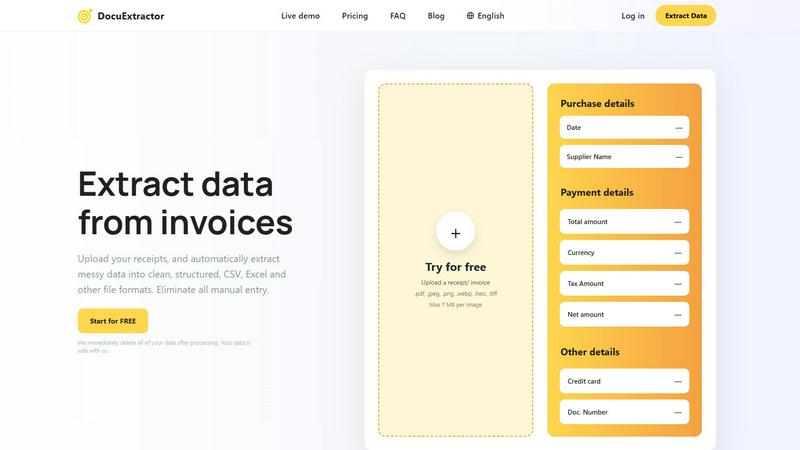
Dokta

Feature Comparison
DocuExtractor
Advanced Data Extraction
DocuExtractor employs sophisticated algorithms to automatically extract essential data from various document types, including receipts and invoices. This feature ensures high accuracy and significantly reduces the time spent on data entry.
Batch Upload Capability
Users can upload multiple documents simultaneously, allowing for efficient processing of numerous files at once. This batch upload feature makes it easy to handle high volumes of documents without sacrificing speed or accuracy.
Instant Data Conversion
With DocuExtractor, data extraction happens in seconds. Users can quickly download their extracted information in structured CSV or Excel format, enabling a faster workflow and immediate access to crucial financial data.
Multilingual Support
DocuExtractor supports over 45 languages, automatically detecting the language of the documents being processed. This feature broadens its usability for global teams and ensures that language barriers do not impede productivity.
Dokta
Instant AI Document Analysis
Dokta's foundation is its lightning-fast AI analysis. Simply drag and drop any document—invoice, quote, contract—and within 60 seconds, the system automatically performs OCR and uses AI to classify the document type, extract critical data like amounts, due dates, and client details, and structure it all within your dashboard. This eliminates manual data entry, ensuring your financial records are accurate and up-to-date from the moment a document arrives.
Automated Invoicing & Online Quotes
Move beyond static PDF generators. Dokta allows you to create professional invoices and quotes in clicks. For freelancers on day-rate contracts, it can even automate monthly invoicing. A standout feature is the ability to send quotes with an online acceptance link; once a client approves, you can convert that quote into a finalized invoice with a single click, streamlining the entire proposal-to-payment workflow seamlessly.
Real-Time Cash Flow & Anomaly Detection
Gain immediate insight into your financial health with a clear, visual dashboard. Dokta tracks invoiced revenue, collected cash, outstanding payments, and VAT liabilities over a 12-month period. Beyond visibility, it acts as a guardian by detecting potential document anomalies, such as duplicate invoices, inconsistent VAT numbers, missing numbering, or suspicious changes to supplier IBANs, helping to protect your business from errors and fraud.
Intelligent Client Database & Payment Tracking
Dokta automatically builds and enriches your contact list from the documents you process, using SIRET numbers to pull in official business details. It assigns a payment score to each client based on history and enables automated, polite payment reminders for overdue invoices. This transforms your documents from isolated files into a dynamic network of client intelligence, helping you manage relationships and improve cash collection.
Use Cases
DocuExtractor
Streamlining Accounting Processes
Accountants can leverage DocuExtractor to simplify the management of financial documents. By quickly converting invoices and receipts into structured data, they can focus on analysis rather than data entry.
Improving Bookkeeping Efficiency
Bookkeepers can save significant time by using DocuExtractor to handle their document processing needs. The automatic extraction of data allows them to maintain accurate records while minimizing manual tasks.
Automating Expense Management
Finance teams can utilize DocuExtractor for expense management by efficiently processing receipts and invoices. This automation leads to faster reimbursement processes and better tracking of expenditures.
Enhancing Audit Preparations
During audit preparations, professionals can rely on DocuExtractor to gather and organize financial documents swiftly. This ensures that all necessary information is readily accessible, simplifying the audit process.
Dokta
The Freelance Developer or IT Consultant
For freelancers working on Time & Materials contracts, administrative overhead is a distraction. Dokta automates the entire billing cycle: it can generate monthly invoices automatically based on the contract terms, track when they are paid, and send follow-ups for late payments. This allows the developer to focus purely on coding while ensuring their cash flow is managed proactively and professionally.
The Creative Project Freelancer
Graphic designers, writers, and other project-based creatives can streamline their client journey from pitch to payment. They use Dokta to create and send visually appealing quotes with online acceptance. Once approved, the quote becomes a billable invoice instantly. The platform then tracks the project's payment status, manages deadlines, and automates reminders, ensuring they get paid for their creative work without awkward conversations.
The Auto-Entrepreneur / Micro-Entrepreneur
Solo entrepreneurs under France's auto-entrepreneur regime need simplicity and compliance. Dokta helps by generating conforming invoices, tracking income against the URSSAF ceiling, and sending alerts for contribution deadlines. It provides a clear, real-time view of earnings and tax liabilities, eliminating guesswork and stress around declarations and helping them stay focused on growing their business.
The Growing Small Business
As a small business scales, document chaos can stifle growth. Dokta serves as a centralized command center for all financial documents—from supplier invoices to client contracts. It provides a unified view of cash flow, automates accounts payable/receivable tasks, flags financial discrepancies, and maintains a clean, exportable record for accountants, enabling better financial control and decision-making.
Overview
About DocuExtractor
DocuExtractor is a powerful intelligent document converter designed to streamline the tedious task of manual data entry for professionals in the finance sector. Whether you are an accountant, bookkeeper, or part of a finance team, DocuExtractor helps transform chaotic piles of receipts, invoices, and bank statements into structured, ready-to-use data with just a few clicks. Utilizing advanced Optical Character Recognition (OCR) technology combined with deep learning and artificial intelligence, DocuExtractor automatically extracts crucial information like dates, supplier names, totals, and document numbers from uploaded files. The extracted data is then converted into impeccably structured CSV or Excel formats, making it easy for users to import it into accounting software or perform further analysis. With DocuExtractor, you can reclaim hours of time each week, achieve near-perfect accuracy, and rest assured knowing your data is secure with automatic deletion after processing. Experience a workflow where the only manual step is the initial upload, and elevate your document management process to new heights.
About Dokta
What if your business documents could manage themselves? Dokta is an AI-powered document management platform designed to transform administrative chaos into automated clarity, specifically for the modern solo professional and small business. It acts as an intelligent central nervous system for your paperwork, handling everything from invoices and quotes to contracts and payment tracking. At its core, Dokta's powerful AI engine can read, classify, and extract key data from any uploaded document—be it a photo, scan, or PDF—in under 60 seconds. This isn't just about storage; it's about actionable intelligence. The platform automates the entire document lifecycle: creating professional invoices, sending online quotes for acceptance, tracking cash flow in real-time, and even sending polite payment reminders. It proactively builds your client database, flags anomalies like duplicate invoices or changed IBANs, and exports clean data for your accountant. For freelancers, consultants, auto-entrepreneurs, and SMBs tired of lost files and manual data entry, Dokta offers a compelling promise: reclaim your Sundays and put your documents to work for you, all within a secure, GDPR-compliant platform hosted in Europe.
Frequently Asked Questions
DocuExtractor FAQ
How does DocuExtractor ensure data security?
DocuExtractor prioritizes user data security by automatically deleting all processed data after extraction. This guarantees that sensitive information remains confidential and secure.
What types of documents can be processed with DocuExtractor?
DocuExtractor can process a variety of document types, including receipts, invoices, PDF files, and images in formats such as JPG, PNG, and TIFF. This versatility makes it suitable for numerous financial documentation needs.
Is there a limit to the number of documents I can upload at once?
No, DocuExtractor allows users to upload documents in batches, meaning you can process multiple files simultaneously without any limit on the number of documents, enhancing efficiency.
What file formats are supported for uploads?
Users can upload documents in various formats, including .pdf, .jpeg, .png, .webp, .heic, and .tiff, with a maximum file size of 7 MB per image. This wide range of supported formats caters to different user needs.
Dokta FAQ
How does Dokta's AI analysis work?
You simply upload a document (PDF, photo, or scan) to the platform. Dokta first uses Optical Character Recognition to read the text. Then, its AI engine, powered by Claude from Anthropic, classifies the document type and intelligently extracts key structured data like the total amount, due date, client or supplier name, and tax information. This entire process is completed in under 60 seconds, populating your dashboard with actionable information.
Is my data secure with Dokta?
Absolutely. Dokta prioritizes security and compliance. All data is encrypted using AES-256 standards. The platform is fully GDPR compliant, and its servers are hosted exclusively in Europe on Amazon Web Services in Paris. This ensures that your sensitive business and client data remains under strict European data protection regulations.
What happens if I exceed my document limit?
Dokta operates on a tiered subscription model based on the number of documents you can process per month. If you are on a paid plan and approach your limit, you will be notified. You can then choose to upgrade your plan to a higher tier with a larger document allowance to continue using the service uninterrupted.
Can I try Dokta for free?
Yes, Dokta offers a free "Découverte" tier to get started. This plan allows you to process up to 15 documents per month (with a 5-page maximum per document), use the free invoice generator, and maintain an unlimited client database without requiring a credit card. It's a full-featured trial designed to let you explore the core automation capabilities risk-free.
Alternatives
DocuExtractor Alternatives
DocuExtractor is an innovative tool designed to transform chaotic financial documents like receipts and invoices into structured, usable data effortlessly. This software falls under the productivity and management category, targeting professionals such as accountants, bookkeepers, and finance teams who wish to streamline their document handling processes. Users often seek alternatives due to concerns about pricing, desired features, or compatibility with various platforms. When searching for an alternative, it's essential to consider factors such as the software's extraction accuracy, range of supported document formats, ease of integration with existing workflows, and overall user experience. Evaluating these aspects will ensure you find a solution that aligns with your specific needs and enhances your productivity.
Dokta Alternatives
Dokta is an AI-powered document management platform designed to automate the administrative workflow for freelancers, solo entrepreneurs, and small to medium-sized businesses. It belongs to the category of smart business tools that focus on streamlining document creation, tracking, and organization, turning scattered files into a structured, actionable system. Users often explore alternatives for a variety of reasons. Perhaps a business has outgrown a plan's document limits, requires integrations with other specific software, or needs a different pricing structure. Others might be looking for a platform hosted in a different region or one that offers a particular niche feature not covered by a generalist tool. When evaluating other options, it's wise to consider your core needs. Key factors include the volume of documents you process, the specific types of documents you use most, your budget, and any critical integrations with accounting or communication tools you already rely on. The goal is to find a solution that not only automates tasks but also fits seamlessly into your existing business rhythm.