
Cosy vs Zovo
Side-by-side comparison to help you choose the right AI tool.

Discover how Cosy automates Slack onboarding and fosters member connections effortlessly.
Last updated: February 28, 2026

Unlock 20 essential privacy-first Chrome extensions for developers and writers with Zovo, all under one simple.
Last updated: February 28, 2026
Visual Comparison
Cosy
Zovo

Feature Comparison
Cosy
Automated Onboarding Sequences
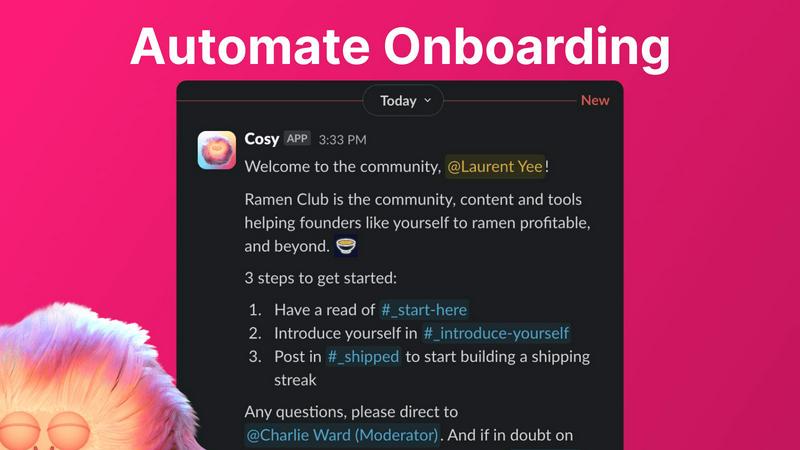
Imagine welcoming every new member personally, regardless of when they join. Cosy allows you to create and automate up to ten distinct welcome DM sequences that can be sent from you, a team member, or the Cosy bot itself. You have full control, customizing messages with the member's name, links, and emojis, and setting precise time delays—from immediate greetings to follow-ups months in the future. This ensures no one falls through the cracks, providing a warm, consistent first touchpoint that saves you hours of manual effort and makes members feel valued from day one, even while you sleep.
Smart Member Introductions
What if meaningful connections could happen on autopilot? Cosy grows engagement by automatically introducing opted-in community members to each other via direct messages. You customize the cadence—every 1, 2, 3, or 4 weeks—and the introductory message template. Introductions happen in a three-person DM with the Cosy bot, allowing you to jumpstart the conversation. The system randomly pairs members to enhance serendipity while intelligently avoiding recent matches, fostering a web of relationships that strengthens your community's fabric without any manual intervention.
Searchable Member Directory
How do members discover who's who without leaving Slack? Cosy creates a simple, searchable directory right within your workspace. You can define up to ten custom profile fields—from text entries to multiple-choice options—and prompt members to fill them out via a gentle nudge from the Cosy bot. Members can then search for keywords or filter profiles to find the right people, expertise, or interests. This tool transforms your member list from names into known colleagues, making your community more discoverable and tightly knit.
Content Highlights & Moderation
Ever curious which conversations are truly resonating? Cosy surfaces your community's most valuable content instantly with simple slash commands. Use /most-engaged-messages to find top posts in a channel, or /most-engaged-messages-all to see highlights across all public channels. The /unreplied-messages command helps you spot posts needing attention. Furthermore, Cosy helps maintain a healthy environment by instantly flagging potentially abusive or spam messages, allowing you to nurture positive discussions and keep the community space safe and engaging.
Zovo
Privacy-First Design
Zovo is committed to user privacy. Every extension operates entirely on your device without any data leaving for external servers. This means no tracking, data collection, or risk of data breaches, allowing users to browse with confidence.
Community-Driven Development
Users have a voice in Zovo's development process. By submitting feature requests and voting on upcoming tools, members actively shape the roadmap, ensuring that the most sought-after features are prioritized and developed first.
Comprehensive Suite of Tools
With 20 different extensions available, Zovo provides a one-stop solution for all your browser needs. Whether you require a JSON formatter, clipboard manager, or session manager, Zovo has the tools to enhance your productivity without compromising on privacy.
Seamless Installation and Use
Getting started with Zovo is incredibly easy. Users can install any extension from the Chrome Web Store without needing an account. Core features are available immediately, with optional upgrades for those who desire additional capabilities.
Use Cases
Cosy
Scaling Community Onboarding
For growing communities, personally welcoming dozens or hundreds of new members each week is impossible. Cosy automates this critical first impression, delivering timely, personalized welcome messages and resources. This ensures every member receives a consistent, informative, and warm introduction, dramatically improving retention and freeing community leaders to engage in deeper, strategic work instead of repetitive administrative tasks.
Fostering Member-Led Engagement
Passive communities often struggle with low interaction. Cosy actively fosters connections by automatically introducing members with shared interests or complementary roles. This creates a self-perpetuating cycle of engagement where members build their own networks, start new conversations, and collaborate, reducing the burden on moderators to constantly spark discussion and leading to a more vibrant, member-driven ecosystem.
Building a Discoverable Network
In large Slack workspaces, valuable expertise and connections remain hidden. Cosy’s member directory solves this by making every member’s skills, interests, and roles searchable. A new member looking for a mentor, a founder seeking beta testers, or a developer needing advice can quickly find the right person, transforming your Slack from a chat app into a powerful, internal networking and knowledge-sharing platform.
Identifying & Amplifying Quality Content
Great insights can get lost in busy channels. Community managers can use Cosy’s content highlight features to easily identify the most engaging discussions, insightful questions, or popular announcements. This allows them to amplify this quality content, recognize contributing members, and guide future conversations, ensuring the community's best ideas get the visibility they deserve and set a positive tone for interaction.
Zovo
Enhancing Writing Skills
BeLikeNative is perfect for students or professionals who want to improve their writing skills. With one-keystroke rewrites available in 80 languages, users can effortlessly craft messages that resonate with native fluency, making communication more effective.
Streamlining Workflows
Tab Suspender Pro and Clipboard History Pro are ideal for busy professionals. These tools help manage open tabs and history efficiently, reducing memory usage and improving productivity by allowing quick access to previously copied items.
Simplifying Data Management
JSON Formatter Pro is a game-changer for developers and data analysts. It provides an easy way to format and validate JSON data, making it simpler to read and debug, thereby saving time and reducing errors during the development process.
Customizing User Experience
With features like Focus Mode and custom themes, Zovo allows users to personalize their browsing experience. Whether you want to minimize distractions or change the aesthetic of your browser, Zovo provides the tools to create a workspace tailored to your preferences.
Overview
About Cosy
Have you ever looked at your Slack workspace and wondered about its hidden potential? What if the channels buzzing with activity could evolve into something deeper—a genuine community where members feel connected, supported, and engaged from the moment they arrive? Cosy is the key to unlocking that potential. It’s a powerful, Slack-native toolkit designed to transform your workspace from a simple communication hub into a thriving, self-sustaining ecosystem. Built for community managers, founders, and team leaders, Cosy tackles the manual, repetitive tasks that drain your time—like onboarding new members and fostering connections—through intelligent automation. The core proposition is profound yet simple: foster genuine relationships and unlock deeper engagement without ever asking your members to leave the familiar environment of Slack. By automating personalized welcome sequences, facilitating serendipitous introductions, building a searchable member directory, and highlighting your most valuable content, Cosy injects warmth and intentionality into your digital space. It handles the operational heavy lifting, freeing you to focus on strategy, culture, and meaningful conversations, ultimately turning your Slack into the vibrant, connected community you've always imagined.
About Zovo
Zovo is a comprehensive suite of 20 innovative Chrome extensions meticulously crafted by a solo developer with over a decade of experience in software development. With a remarkable track record of earning over $400K on Upwork and maintaining a 100% success rate, Zovo is designed for anyone looking to enhance their browsing experience while prioritizing privacy. The flagship extension, BeLikeNative, empowers over 3,300 users to write like native speakers, providing one-keystroke rewrites across 80 languages. The suite includes useful tools like Tab Suspender Pro, JSON Formatter Pro, Clipboard History Pro, and more, ensuring that users can manage their browser tasks efficiently. With a strong commitment to user privacy, Zovo guarantees that no data leaves your device, making it a safe choice for anyone concerned about data harvesting. Users actively participate in shaping the roadmap by voting on features, while new extensions are released monthly, often with early access for members. Zovo is not just a product; it's a community-driven platform where your needs drive development.
Frequently Asked Questions
Cosy FAQ
How does the automated onboarding work?
When a new member joins your Slack workspace, Cosy can automatically send them a sequence of direct messages according to your configuration. You can create up to 10 distinct sequences with fully customizable messages and set time delays—from immediately to minutes, hours, or even months later. The messages can appear to come from you, a team member, or the Cosy bot, ensuring a personalized welcome for every joiner, 24/7.
Are member introductions opt-in?
Yes, member participation in the automated introductions feature is entirely opt-in. Community members must choose to be part of the matching pool. For those who opt in, Cosy will introduce them to another randomly selected member on a cadence you set (e.g., every 1-4 weeks), while avoiding recent matches to ensure fresh connections.
Where can members access the Member Directory?
Members can access the searchable directory in two ways: by opening the Cosy app within Slack or by using the /member-directory slash command in any public channel. This command provides a quick link to the directory, allowing members to easily search for others based on profile keywords or filter for completed profiles.
What happens if a member replies to an automated DM?
If your onboarding or introduction messages are configured to be sent from you or a team member (not the Cosy bot), the recipient can reply just like in a normal DM conversation, and you will receive their reply in your Slack DMs. If messages are sent from the Cosy bot, the bot does not currently respond to replies, keeping the interaction simple and straightforward.
Zovo FAQ
How does Zovo ensure my privacy?
Zovo operates with a strict privacy-first policy. All extensions run locally on your device, meaning no data is collected or transmitted to external servers, ensuring your browsing habits remain private.
Can I request new features for Zovo?
Absolutely! Users can submit feature requests directly to the developer. Every request is read and considered, with the most popular suggestions prioritized for development.
Are there free features available?
Yes, Zovo offers a range of core features for free. Users can access essential functionalities without any cost, with the option to upgrade to Pro for additional features when desired.
How can I communicate with the developer?
Communication with the developer is straightforward. You can reach out directly via email or through the Zovo Discord community. There are no bots involved, ensuring personalized support for any questions or issues.
Alternatives
Cosy Alternatives
Cosy is a Slack-native automation tool in the productivity and management category, designed to save community managers time by handling onboarding and fostering member connections. It transforms a Slack workspace into a more engaged and self-sustaining community. Users often explore alternatives for various reasons. These can include budget constraints, a need for different or more advanced features, or a requirement to manage communities on platforms other than Slack. The search for the right tool is a journey of finding the perfect fit for a community's unique scale and goals. When evaluating options, consider the core problems you need to solve. Look for solutions that align with your primary platform, offer the automation depth you require, and provide a user experience that feels intuitive for both you and your members. The goal is to find a tool that handles the operational heavy lifting while amplifying your community's unique culture.
Zovo Alternatives
Zovo is a suite of 20 privacy-first Chrome extensions tailored for developers and writers. With tools like JSON Formatter and Tab Suspender, it enhances productivity while ensuring user data is protected. Created by a seasoned developer with extensive experience, Zovo stands out for its commitment to privacy and user-driven development. Users often seek alternatives to Zovo for various reasons, including budget constraints, specific feature requirements, or compatibility with their preferred platforms. When searching for an alternative, it’s essential to consider factors such as pricing structures, the availability of essential features, user reviews, and overall security practices to ensure a seamless transition and continued productivity.