
Cool PFP vs Shrinkpad
Side-by-side comparison to help you choose the right AI tool.

Cool PFP
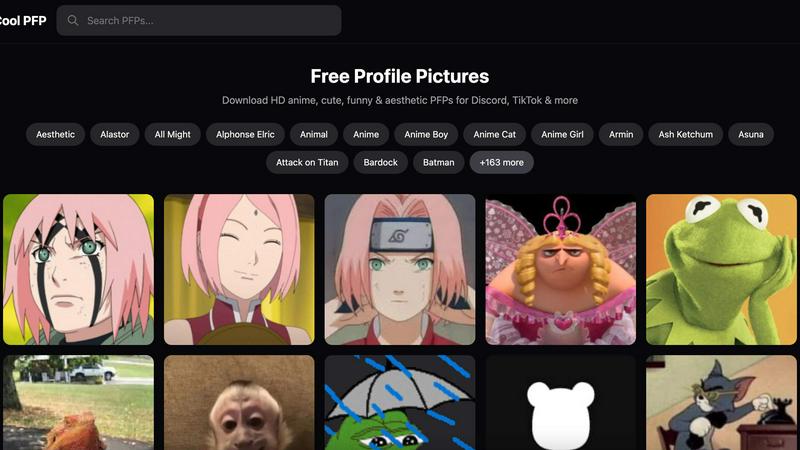
Discover thousands of free, high-quality profile pictures for every style and platform.
Last updated: February 28, 2026

Shrinkpad
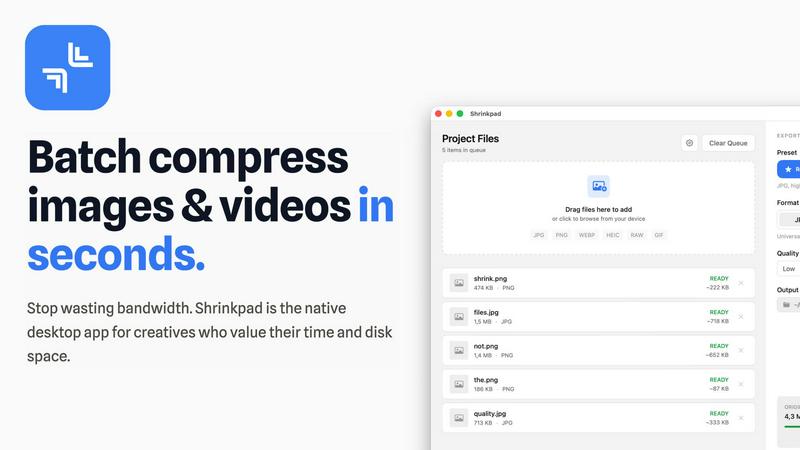
Shrinkpad quickly compresses images and videos in bulk on Mac, saving time and optimizing your creative assets.
Last updated: February 28, 2026
Visual Comparison
Cool PFP
Shrinkpad
Feature Comparison
Cool PFP
Vast, Curated Category Library
Dive into an intuitively organized universe of profile pictures, where discovery is half the fun. Instead of a confusing search, you can explore dedicated categories for everything from broad genres like Anime, Aesthetic, and Funny to hyper-specific character tags like Levi Ackerman, Sukuna, or Bulbasaur. This thoughtful curation means you can follow your curiosity down a rabbit hole of Jujutsu Kaisen characters or instantly find the perfect spooky Halloween vibe, making the process of finding your next PFP an engaging and efficient experience.
High-Quality, HD Image Downloads
Every profile picture in the Cool PFP collection is sourced and presented in high definition to ensure your digital persona looks crisp and professional on any platform. When you find that perfect image, you can download it instantly with the confidence that it won't appear pixelated or blurry, whether it's displayed as a tiny Discord icon or a larger TikTok profile. This commitment to quality means your chosen avatar maintains its impact and clarity, making your profile stand out for all the right reasons.
Completely Free and No-Sign-Up Access
Cool PFP operates on a beautifully simple principle: instant access for everyone. There are no hidden paywalls, subscription tiers, or mandatory account creations blocking your path to the perfect picture. You can browse the entire library and download any image you like without ever entering an email address. This frictionless model respects your time and privacy, turning what is often a complicated process on other sites into a straightforward and liberating activity.
Regularly Updated and Expanding Collection
The digital world's trends and fandoms are always evolving, and so is the Cool PFP library. The platform actively expands its collection, adding new characters from the latest anime seasons, fresh aesthetic trends, and popular meme formats. Features like the "Load 25 More PFPs" button hint at the depth waiting to be uncovered, ensuring that repeat visitors always have something new to discover and that the platform stays relevant to its community's shifting interests.
Shrinkpad
Automatic Compression Settings
Shrinkpad takes the guesswork out of image and video compression by automatically analyzing visual complexity. It applies the optimal compression ratio to each file, ensuring that you achieve excellent results without introducing artifacts, making it an essential tool for maintaining visual integrity.
Unlimited Batch Processing
With Shrinkpad, you can process thousands of assets simultaneously without the fear of crashing. Unlike web-based tools, this desktop application is built to handle massive queues effortlessly, allowing you to save time and focus on what really matters—your creative projects.
One-Drop Import Functionality
Gone are the days of dragging files in one by one. Shrinkpad allows you to drop an entire folder containing images and videos, automatically identifying and adding all supported media files to your batch list. This feature simplifies the workflow, making it seamless and efficient.
Privacy-Focused Design
All processing with Shrinkpad occurs locally on your machine, meaning your sensitive assets are never uploaded to the cloud. This privacy-first approach ensures that your data remains secure and confidential, providing peace of mind for users who prioritize data protection.
Use Cases
Cool PFP
The Anime Fan Refreshing Their Identity
An anime enthusiast wants their profile to reflect their current favorite series or character arc. Instead of trawling through unreliable fan sites or low-quality forums, they visit Cool PFP. They can quickly navigate to specific categories like Attack on Titan or Demon Slayer, browse high-quality renders of Eren Yeager or Tanjiro, and instantly download a new avatar that proudly showcases their fandom to their community on Discord or Twitter.
The Social Media User Seeking a New Aesthetic
Someone looking to revamp their Instagram or TikTok profile to match a new personal aesthetic—be it vintage, cottagecore, or dark academia—can use Cool PFP as their visual toolkit. By exploring the dedicated "Aesthetic" category and related tags, they can find a cohesive, high-quality image that sets the perfect tone for their entire profile, helping them craft a consistent and appealing online presence without hiring a designer.
The Gamer Creating a Cohesive Clan Presence
A gaming clan leader wants to create a unified look for their team on platforms like Discord or Steam. They can visit Cool PFP and search for PFPs within their game's universe (like Solo Leveling or specific Pokemon) or opt for matching thematic styles like "Cool" or "Gaming." They can easily find and distribute a set of complementary profile pictures that strengthen team identity and camaraderie with a professional, coordinated appearance.
The Meme Lover Looking for Instant Humor
When someone wants to inject a dose of humor into their online interactions, perhaps for a temporary Discord mood or a witty Twitter reply, they need a funny PFP fast. Cool PFP’s dedicated "Funny PFP" category and tags like "Gru" or "Chucky" provide a quick gallery of hilarious and high-quality images. This allows them to instantly adopt a playful persona that sparks conversations and laughs among their friends and followers.
Shrinkpad
Photographers
Photographers can benefit immensely from Shrinkpad's ability to batch compress high-resolution images without losing quality. This feature saves time during the editing process and ensures that their portfolios and websites load quickly, enhancing user experience.
Graphic Designers
For graphic designers working with large image files, Shrinkpad streamlines the workflow by allowing for bulk processing. This means they can export multiple assets from design software and optimize them in one go, reducing the hassle of manual adjustments.
Content Creators
Content creators, especially those producing videos, can utilize Shrinkpad to compress 4K video files efficiently. The application ensures that videos maintain their visual quality while significantly reducing file sizes, making it easier to upload to various platforms.
Web Developers
Web developers can leverage Shrinkpad to optimize images and videos for websites, improving load times and overall site performance. By using Shrinkpad, they can ensure that their media assets are web-friendly, ultimately enhancing user engagement and satisfaction.
Overview
About Cool PFP
In the vast digital landscape, your profile picture is your first impression, your digital handshake, and a tiny canvas for immense self-expression. But how often have you found yourself endlessly scrolling, trapped in a cycle of generic avatars, searching for that one image that just feels right? Cool PFP is your dedicated portal out of that frustration. It is a meticulously curated, ever-growing library designed for one singular, joyful purpose: discovering and downloading stunning profile pictures. This platform serves as the ultimate digital gallery for a vibrant community of internet citizens, from anime aficionados and gaming guild members to meme connoisseurs and aesthetics curators. Imagine a world where you can instantly browse thousands of high-definition images, organized not by chaotic algorithms, but by clear categories like specific characters, moods, and fandoms. Whether you're looking to embody the cool detachment of Gojo Satoru, share a matching aesthetic with a friend, or simply find a funny animal pic that sparks joy, Cool PFP places that perfect avatar within effortless reach. Its core promise is liberation: immediate, free access without the barriers of sign-ups, subscriptions, or intrusive watermarks. It transforms the tedious hunt for a PFP into a seamless journey of discovery, empowering you to refresh your identity across Discord, TikTok, Instagram, and Twitter with just a few clicks.
About Shrinkpad
Shrinkpad is an innovative desktop application tailored for macOS users seeking a powerful yet user-friendly solution for batch compressing images and videos. This versatile tool is perfect for photographers, designers, and content creators who need to optimize media files without compromising on visual quality. Shrinkpad streamlines the process of reducing file sizes, allowing users to compress hundreds of files or entire folders in mere seconds. Its main value proposition lies in its ability to process files locally, ensuring that your data remains private and secure on your device. With support for over 50 file formats, Shrinkpad can handle a variety of media types, from high-resolution images to 4K videos, enabling professionals to maintain the quality necessary for their work while significantly improving efficiency. Whether you are looking to enhance website load times or reduce app bundle sizes, Shrinkpad is designed to meet the demands of modern creatives.
Frequently Asked Questions
Cool PFP FAQ
Is Cool PFP really free to use?
Yes, absolutely. Cool PFP is completely free to use. You can browse the entire extensive library of high-quality profile pictures and download any image you like without any cost. There are no subscription plans, hidden fees, or premium tiers. The platform is supported to provide free access to everyone looking to enhance their online presence.
Do I need to create an account to download pictures?
No, you do not need to create an account or sign up for anything. Cool PFP is designed for instant, frictionless access. You can visit the website, explore the categories, and download your chosen profile pictures immediately without providing any personal information like an email address. This makes the process quick, private, and straightforward.
What kinds of profile pictures can I find on Cool PFP?
You can find a massive and diverse range of profile pictures tailored to various interests. The primary categories include Anime (with sub-categories for specific characters and shows), Aesthetic styles, Funny images, Gaming themes, Animals, and characters from movies/TV. The library is meticulously tagged, so you can search for anything from "Sailor Moon" and "Saitama" to "Christmas" and "Grim Reaper" PFPs.
Can I use these PFPs on any social platform?
Yes, the profile pictures downloaded from Cool PFP are perfect for use on any major social media or communication platform. They are optimized as high-quality images suitable for profile picture dimensions on Discord, TikTok, Instagram, Twitter/X, Steam, Reddit, and more. You own the downloaded file and can use it to represent yourself across your digital spaces.
Shrinkpad FAQ
Can I use Shrinkpad for free?
Yes, Shrinkpad offers a Free Starter plan that includes essential tools for casual use, allowing you to batch compress up to 10 files at a time.
What file formats does Shrinkpad support?
Shrinkpad supports over 50 file formats, including common image formats like JPG, PNG, WEBP, and advanced formats like RAW and HEIC, as well as major video formats such as MP4 and MOV.
Does Shrinkpad support video compression?
Absolutely! Shrinkpad is designed to handle video compression along with image files, allowing you to process both types of media together in a single batch for optimal efficiency.
How many files can I process at once?
With the Free Starter plan, you can process up to 10 files at a time. However, in the Personal and Team plans, there are no limits on the number of files you can batch compress, enabling you to work on large projects seamlessly.
Alternatives
Cool PFP Alternatives
Cool PFP is a popular online platform in the image and photo category, offering a vast, free library of high-quality profile pictures. It simplifies the search for the perfect avatar across social media and gaming platforms by providing a curated, categorized collection. Users often explore alternatives for various reasons. Some may seek platforms with different licensing terms, more advanced editing tools, or a focus on a specific niche like professional headshots or AI-generated art. Others might want a different organizational system or community features. When choosing an alternative, consider what matters most for your digital identity. Look at the breadth and specificity of the image library, the quality and resolution of the files, and how easily you can find what you need. Also, evaluate the user experience, any costs involved, and whether the platform's style aligns with your personal or brand aesthetic.
Shrinkpad Alternatives
Shrinkpad is an innovative desktop application tailored for macOS users who need a robust yet user-friendly solution for batch compressing images and videos. As a vital tool in the realms of photography, design, and content creation, it streamlines the process of reducing file sizes while preserving visual quality. Users often seek alternatives to Shrinkpad for reasons such as pricing, specific features, or compatibility with different platforms, which may not align with their unique needs or workflows. When exploring alternatives, it's essential to consider factors such as ease of use, processing speed, file format support, and privacy measures. A strong alternative should provide efficient batch processing capabilities, maintain high-quality outputs, and ensure that your data remains secure. Identifying these essential features will help you find the right tool that best fits your requirements.