
Coloring Book Engine vs Image3D AI
Side-by-side comparison to help you choose the right AI tool.

Coloring Book Engine
Transform your ideas into stunning coloring books with an all-in-one toolkit for effortless creation and publishing.
Last updated: February 28, 2026

Image3D AI
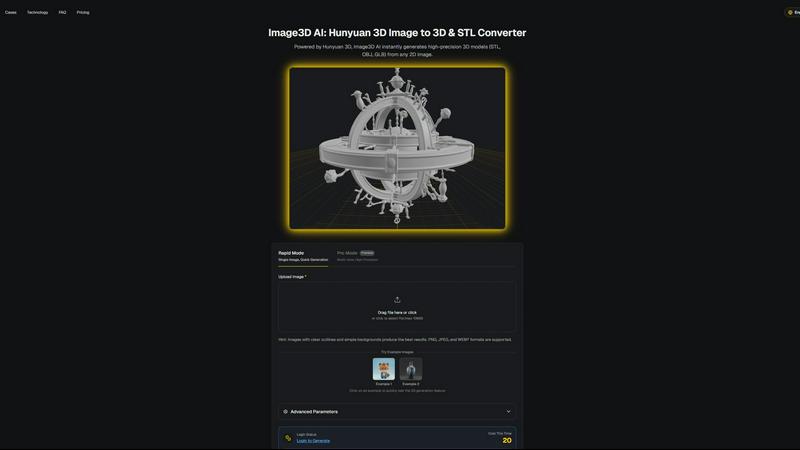
Transform any 2D image into high-precision 3D models in minutes, ideal for printing and game development.
Last updated: March 1, 2026
Visual Comparison
Coloring Book Engine

Image3D AI
Feature Comparison
Coloring Book Engine
Bring Your Own Key (BYOK) AI Integration
With BYOK AI integration, users can leverage their own API keys for AI functionalities, eliminating the need for ongoing subscriptions. This feature provides flexibility and control over costs, allowing creators to work without the pressure of monthly fees.
Batch Workflow Optimization
CBE supports a highly optimized batch workflow, allowing users to generate multiple pages and organize their projects efficiently. This feature enables creators to scale their efforts from a single idea to an entire series seamlessly, all within one user-friendly workspace.
KDP-Ready Exports
The software handles all technical specifications required for publishing on platforms like Kindle Direct Publishing. This ensures that users can confidently upload their files without the worry of formatting errors or other potential setbacks.
Real-World Color Palettes
CBE offers previews that reflect realistic color palettes, matching how people typically color rather than just displaying screen colors. This feature enhances the overall user experience and helps in creating more engaging and relatable coloring pages.
Image3D AI
Rapid Mode
Rapid Mode allows users to generate 3D models from a single image quickly, making it ideal for logos, sketches, and simpler designs. This feature prioritizes speed without compromising the essential details needed for effective modeling, enabling creators to work efficiently.
Pro Mode
Pro Mode is designed for users seeking high precision in their 3D models. By utilizing multi-view images, this feature captures intricate details and geometries, making it perfect for complex designs such as product images or detailed character models.
Multi-format Exports
Image3D AI supports multiple export formats including STL, OBJ, and GLB, catering to various applications. This ensures that users can easily integrate their 3D assets into different platforms, whether for 3D printing, game development, or online showcases.
PBR Material Generation
The tool provides advanced PBR (Physically Based Rendering) material generation, allowing users to create realistic textures and materials for their 3D models. This feature enhances the visual quality and realism of the assets, making them suitable for high-end applications.
Use Cases
Coloring Book Engine
Independent Artists
Independent artists can use CBE to transform their unique illustrations into marketable coloring books. The intuitive design tools and AI capabilities streamline the creation process, allowing them to focus on their artistry while efficiently producing high-quality products.
Publishing Teams
Teams within publishing houses can take advantage of CBE to collaborate on coloring book projects. The software's batch workflow and project organization features facilitate teamwork, making it easier for multiple contributors to work on different sections of a book simultaneously.
Educational Institutions
Schools and educational organizations can utilize CBE to create instructional coloring books that engage students in learning activities. The ability to produce custom books tailored to specific subjects makes it a valuable resource for educators.
Social Media Influencers
Influencers looking to expand their brand can leverage CBE to create and distribute coloring books that resonate with their audience. Additionally, the tool allows for the creation of engaging coloring videos to share on platforms like TikTok and Instagram, enhancing their online presence.
Image3D AI
Game Development
Game developers can leverage Image3D AI to rapidly produce 3D assets from concept art or sketches. The generated models, equipped with PBR materials, can be imported directly into game engines like Unity or Unreal, streamlining the asset creation process.
E-commerce
In the e-commerce sector, businesses can convert product images into interactive 3D models. These models enhance customer engagement through AR previews and provide customers with a more immersive shopping experience, ultimately boosting conversion rates.
3D Printing
For 3D printing enthusiasts, Image3D AI serves as a powerful image to STL converter. Users can create high-precision, print-ready files from their images, significantly reducing the time and effort required to produce physical prototypes.
Architecture and Design
Architects and designers can quickly generate architectural models from images, allowing them to visualize concepts without starting from scratch. This efficiency enables faster project development, helping professionals meet tight deadlines while maintaining design quality.
Overview
About Coloring Book Engine
Coloring Book Engine (CBE) is an innovative desktop-based toolkit designed for creators who aspire to launch their own coloring book businesses. This powerful software is geared towards individuals and teams, streamlining the entire process of producing commercial-quality coloring books from initial concept to finished product. Unlike traditional tools that only generate PDFs, CBE provides a comprehensive solution that allows users to design pages, create promotional videos, and prepare print-ready exports specifically for platforms like Kindle Direct Publishing (KDP). With its unique Bring Your Own Key (BYOK) AI integration, CBE empowers creators to select their preferred AI models, ensuring greater privacy and cost management without the hassle of subscription fees. Whether you are an independent artist or part of a larger publishing team, CBE enhances your creative workflow, making the journey from idea to published book smoother and more accessible than ever before.
About Image3D AI
Image3D AI is an advanced tool that harnesses the power of artificial intelligence to transform static 2D images into intricate 3D models in seconds. Designed for a diverse audience that includes 3D printing enthusiasts, game developers, and digital artists, this innovative platform simplifies the traditionally complex process of 3D modeling. Utilizing Tencent's cutting-edge Hunyuan 3D engine, Image3D AI can generate high-fidelity assets from either a single image or a series of multi-view images. This capability not only enhances creativity but also streamlines workflows across various industries. With features such as multi-format exports and PBR material generation, Image3D AI ensures that even those without extensive 3D modeling skills can produce professional-grade models effortlessly. Its rapid generation modes cater to different needs, making it an essential tool for anyone looking to elevate their design projects.
Frequently Asked Questions
Coloring Book Engine FAQ
Is Coloring Book Engine a desktop app or a cloud service?
Coloring Book Engine is a desktop application that runs locally on your computer, ensuring that most tasks are performed without relying on cloud services. This design prioritizes user privacy and data security.
What exactly does it speed up for coloring book creators?
CBE accelerates the entire process of coloring book creation, from ideation and sketching to final production. It integrates AI for idea generation and utilizes GPU acceleration for efficient coloring and layout, significantly reducing the time required to complete a project.
Can I use this tool without AI?
Yes, CBE offers an optional AI-Free Workflow that allows creators to use their hand-crafted art without AI assistance. This gives artists the freedom to maintain their unique style while benefiting from the software's organizational and production capabilities.
Do I need to add my own AI keys (BYOK)?
While using CBE, you have the option to integrate your own AI keys for enhanced functionality. This BYOK approach allows for greater customization and control over the AI tools you choose to employ, but it is not mandatory for using the software.
Image3D AI FAQ
What types of images work best for conversion?
High-contrast images with clear outlines and simple backgrounds yield the best results. Avoid blurry or low-light images, as they can complicate the 3D modeling process and reduce accuracy.
How long does it take to generate a 3D model?
Using Rapid Mode, users can expect to generate a 3D model in approximately 60 seconds. Pro Mode may take slightly longer due to the increased detail and precision involved in processing multi-view images.
What file formats can I export my 3D models in?
Image3D AI allows exports in multiple file formats including STL for 3D printing, OBJ for traditional 3D editing, and GLB for modern web and AR applications, ensuring compatibility with various platforms.
Is there a limit on the image file size I can upload?
Yes, the maximum file size for images uploaded to Image3D AI is 10MB. Supported formats include PNG, JPEG, and WEBP, which help optimize the conversion process for best results.
Alternatives
Coloring Book Engine Alternatives
Coloring Book Engine is a powerful desktop-based toolkit designed for creators aiming to launch their own coloring book businesses. Positioned within the design tools category, it offers a comprehensive solution that guides users from idea generation to the final publication of commercial-quality coloring books. Users often seek alternatives to Coloring Book Engine for various reasons, such as pricing concerns, differing feature sets, or specific platform compatibility needs. When exploring alternatives, it's essential to consider factors like ease of use, production capabilities, and the flexibility of design options to ensure that the chosen tool aligns well with individual creative goals and workflows.
Image3D AI Alternatives
Image3D AI is a cutting-edge tool that falls under the category of design tools, specifically focused on transforming 2D images into striking 3D models. This innovative software streamlines the complex process of 3D modeling, making it accessible to a wide range of users, including digital artists, game developers, and 3D printing enthusiasts. However, many users begin searching for alternatives due to various factors such as pricing, specific feature sets, or platform compatibility needs. When exploring alternatives, it’s essential to consider several key aspects. Look for tools that offer similar capabilities in 3D model generation, including export options, material generation, and ease of use. Additionally, evaluating customer support, community resources, and integration with existing workflows can significantly enhance the overall user experience and satisfaction with the alternative solution.