
Blueberry vs Shrinkpad
Side-by-side comparison to help you choose the right AI tool.

Blueberry
Blueberry is an AI-native Mac workspace that combines your editor, terminal, and browser for seamless product building.
Last updated: February 28, 2026

Shrinkpad
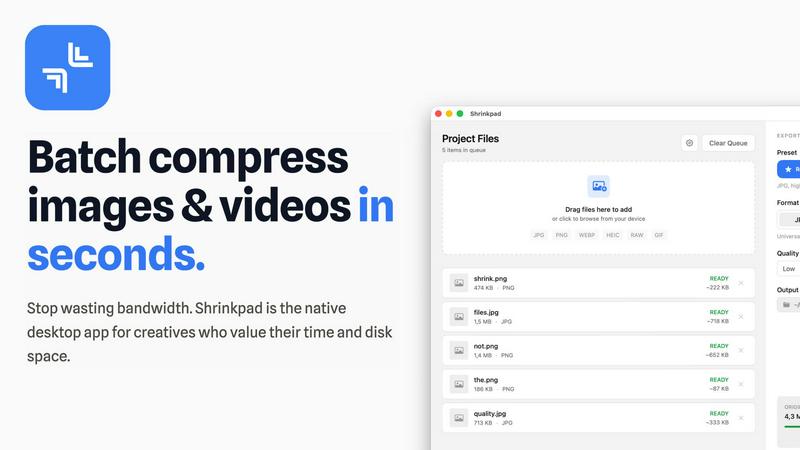
Shrinkpad quickly compresses images and videos in bulk on Mac, saving time and optimizing your creative assets.
Last updated: February 28, 2026
Visual Comparison
Blueberry

Shrinkpad
Feature Comparison
Blueberry
Unified AI-Native Workspace
Blueberry consolidates your editor, terminal, and browser into one seamless, distraction-free window. This isn't just about putting panels side-by-side; it's about creating a cohesive environment where each component is aware of the others. The integrated design ensures that your workflow remains fluid, eliminating the cognitive load of managing multiple applications and allowing you to ship products faster from a single, powerful hub designed for modern development.
Live AI Context via MCP
This is the core intelligence of Blueberry. Its built-in MCP server acts as the nervous system, giving your connected AI model (like Claude or Codex) real-time, read-only access to your entire workspace context. The AI can see your open files, monitor terminal output, and observe the live browser preview simultaneously. This creates a paradigm shift where your AI assistant has full situational awareness, enabling it to provide accurate, context-rich suggestions and answers without you ever needing to manually provide snippets or screenshots.
Pinned Apps & Visual Context
Extend your workspace's intelligence beyond code. Blueberry allows you to dock essential web apps like GitHub, Linear, Figma, or PostHog directly within the interface. These pinned apps load with your project and share context with your AI. Furthermore, you can provide visual context by capturing screenshots or using an element selector directly from the preview browser, allowing your AI to understand UI issues or design intentions at a glance.
Professional-Grade Editor & Multi-Device Preview
You don't compromise on editing power. Blueberry includes a full-featured code editor with syntax highlighting, multi-cursor support, find/replace, and Git integration. Alongside it, the preview browser isn't basic—it offers built-in views for desktop, tablet, and mobile screens. This lets you instantly see how your application renders and behaves across different devices without leaving your workspace, ensuring what you build delights every user.
Shrinkpad
Automatic Compression Settings
Shrinkpad takes the guesswork out of image and video compression by automatically analyzing visual complexity. It applies the optimal compression ratio to each file, ensuring that you achieve excellent results without introducing artifacts, making it an essential tool for maintaining visual integrity.
Unlimited Batch Processing
With Shrinkpad, you can process thousands of assets simultaneously without the fear of crashing. Unlike web-based tools, this desktop application is built to handle massive queues effortlessly, allowing you to save time and focus on what really matters—your creative projects.
One-Drop Import Functionality
Gone are the days of dragging files in one by one. Shrinkpad allows you to drop an entire folder containing images and videos, automatically identifying and adding all supported media files to your batch list. This feature simplifies the workflow, making it seamless and efficient.
Privacy-Focused Design
All processing with Shrinkpad occurs locally on your machine, meaning your sensitive assets are never uploaded to the cloud. This privacy-first approach ensures that your data remains secure and confidential, providing peace of mind for users who prioritize data protection.
Use Cases
Blueberry
Rapid Prototyping & Iteration
When speed is essential, Blueberry accelerates the build-measure-learn loop. You can write code, see changes live in the preview, debug terminal output, and ask your AI for implementation advice or bug fixes—all without switching contexts. This tight integration is perfect for quickly mocking up features, experimenting with new libraries, or iterating on UI components based on immediate visual feedback.
AI-Powered Debugging & Explanation
Stuck on a cryptic error in the terminal or complex logic in your route handler? Simply ask your AI assistant. Because it sees the exact error output and the relevant code files, it can diagnose issues with remarkable accuracy. You can also ask "how does this file work?" and receive an explanation grounded in the actual codebase, turning debugging from a frustrating hunt into an interactive learning session.
Cross-Platform UI Development
Building responsive web applications requires constant checking across screen sizes. With Blueberry's integrated multi-device preview, you can write a CSS rule and immediately toggle between desktop, tablet, and phone views to verify its effect. This seamless context switch ensures your UI is robust and responsive from the very first line of styling, streamlining the front-end development process.
Onboarding & Codebase Exploration
New to a project? Use Blueberry as your exploration companion. Open the repository, and let your AI assistant tour you through the codebase. Ask questions like "What's the main data flow here?" or "How is authentication handled?" The AI, with its live access to the entire file structure and code, can provide specific, guided answers, dramatically reducing the time it takes to understand and contribute to a new codebase.
Shrinkpad
Photographers
Photographers can benefit immensely from Shrinkpad's ability to batch compress high-resolution images without losing quality. This feature saves time during the editing process and ensures that their portfolios and websites load quickly, enhancing user experience.
Graphic Designers
For graphic designers working with large image files, Shrinkpad streamlines the workflow by allowing for bulk processing. This means they can export multiple assets from design software and optimize them in one go, reducing the hassle of manual adjustments.
Content Creators
Content creators, especially those producing videos, can utilize Shrinkpad to compress 4K video files efficiently. The application ensures that videos maintain their visual quality while significantly reducing file sizes, making it easier to upload to various platforms.
Web Developers
Web developers can leverage Shrinkpad to optimize images and videos for websites, improving load times and overall site performance. By using Shrinkpad, they can ensure that their media assets are web-friendly, ultimately enhancing user engagement and satisfaction.
Overview
About Blueberry
What if your entire development environment could think alongside you? Blueberry is an AI-native product development platform for macOS that reimagines the modern builder's workspace. It elegantly unifies the three core tools—a sophisticated code editor, a powerful terminal, and a live preview browser—into a single, focused application. This eliminates the constant, distracting juggle of windows and applications, allowing you to maintain deep focus on creating and shipping web applications. Designed for modern product builders, from indie hackers to engineering teams, Blueberry's true magic lies in its context-aware AI integration. By connecting to models like Claude, Gemini, or Codex via its built-in MCP (Model Context Protocol) server, your AI assistant gains a live, holistic view of your entire project: the code you're writing, the terminal output, and the real-time browser preview. This means you can stop the tedious copy-pasting of context and start having meaningful, informed conversations with AI that understands exactly what you're building, as you build it. It's more than a tool; it's a collaborative partner for your development flow.
About Shrinkpad
Shrinkpad is an innovative desktop application tailored for macOS users seeking a powerful yet user-friendly solution for batch compressing images and videos. This versatile tool is perfect for photographers, designers, and content creators who need to optimize media files without compromising on visual quality. Shrinkpad streamlines the process of reducing file sizes, allowing users to compress hundreds of files or entire folders in mere seconds. Its main value proposition lies in its ability to process files locally, ensuring that your data remains private and secure on your device. With support for over 50 file formats, Shrinkpad can handle a variety of media types, from high-resolution images to 4K videos, enabling professionals to maintain the quality necessary for their work while significantly improving efficiency. Whether you are looking to enhance website load times or reduce app bundle sizes, Shrinkpad is designed to meet the demands of modern creatives.
Frequently Asked Questions
Blueberry FAQ
What is MCP and why is it important?
MCP stands for Model Context Protocol, an open standard developed by Anthropic. It's crucial because it provides a secure, structured way for AI models to access tools and data. In Blueberry, the built-in MCP server safely exposes your workspace's context (files, terminal, browser) to AI models. This means the AI operates with a rich, real-time understanding of your project without ever needing direct access to your system, ensuring both powerful assistance and security.
Is Blueberry just for web development?
While Blueberry is explicitly designed as a premier platform for building web applications, its core features are beneficial for many software projects. The unified workspace and AI context are powerful for any development task that involves writing code, running commands, and needing live feedback. However, its optimized preview browser and web-focused workflow make it particularly exceptional for full-stack and front-end web development.
Can I use my own AI API keys?
Yes, Blueberry is model-agnostic. While it showcases integrations with popular models like Claude, Gemini, and Codex, it is designed to connect to any AI model that supports the MCP standard. You can configure it to use your preferred model by providing your own API keys and endpoints, giving you the flexibility to choose the AI assistant that best fits your workflow and budget.
Is Blueberry really free?
Yes, Blueberry is currently 100% free during its beta period. The team is focused on gathering feedback and refining the product with its early community of users. There is no indication of specific future pricing plans in the provided materials, but the product is completely free to download and use for macOS while it remains in beta.
Shrinkpad FAQ
Can I use Shrinkpad for free?
Yes, Shrinkpad offers a Free Starter plan that includes essential tools for casual use, allowing you to batch compress up to 10 files at a time.
What file formats does Shrinkpad support?
Shrinkpad supports over 50 file formats, including common image formats like JPG, PNG, WEBP, and advanced formats like RAW and HEIC, as well as major video formats such as MP4 and MOV.
Does Shrinkpad support video compression?
Absolutely! Shrinkpad is designed to handle video compression along with image files, allowing you to process both types of media together in a single batch for optimal efficiency.
How many files can I process at once?
With the Free Starter plan, you can process up to 10 files at a time. However, in the Personal and Team plans, there are no limits on the number of files you can batch compress, enabling you to work on large projects seamlessly.
Alternatives
Blueberry Alternatives
Blueberry is a macOS application designed for developers, specifically within the integrated development environment (IDE) category. It consolidates the essential tools of an editor, terminal, and browser into a single, unified workspace to streamline workflow and reduce context switching. Users often explore alternatives for various practical reasons. These can include budget constraints, the need for cross-platform compatibility beyond macOS, or a desire for different feature sets, integrations, or user interface philosophies. The search for the right tool is a personal journey in optimizing one's development environment. When evaluating alternatives, consider your core needs. Key factors include the depth of native integrations, support for your preferred programming languages and frameworks, the overall user experience, and how well the tool facilitates the specific workflow you aim to enhance, whether it's AI-assisted coding, web development, or system operations.
Shrinkpad Alternatives
Shrinkpad is an innovative desktop application tailored for macOS users who need a robust yet user-friendly solution for batch compressing images and videos. As a vital tool in the realms of photography, design, and content creation, it streamlines the process of reducing file sizes while preserving visual quality. Users often seek alternatives to Shrinkpad for reasons such as pricing, specific features, or compatibility with different platforms, which may not align with their unique needs or workflows. When exploring alternatives, it's essential to consider factors such as ease of use, processing speed, file format support, and privacy measures. A strong alternative should provide efficient batch processing capabilities, maintain high-quality outputs, and ensure that your data remains secure. Identifying these essential features will help you find the right tool that best fits your requirements.