
AI Formatter vs Outbid
Side-by-side comparison to help you choose the right AI tool.

Discover how AI effortlessly transforms your raw text into polished, professional documents.
Last updated: March 1, 2026

Discover Upwork jobs instantly and send AI-crafted proposals to win more freelance work.
Last updated: March 19, 2026
Visual Comparison
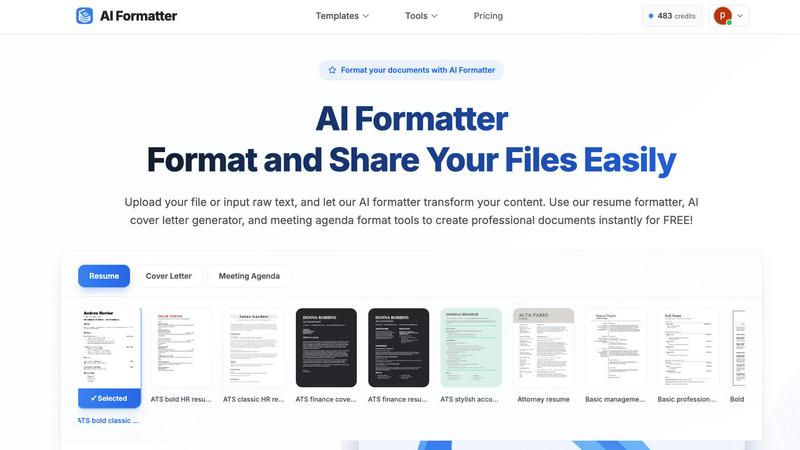
AI Formatter
Outbid

Feature Comparison
AI Formatter
Intelligent One-Click Formatting
Imagine uploading a plain text file or a messy draft and, with a single action, seeing it reborn as a professionally structured document. AI Formatter's core engine intelligently analyzes your content's context and structure, applying perfect formatting, consistent styling, and logical organization automatically. This eliminates guesswork and manual adjustments, allowing you to focus purely on your message while the tool handles the visual presentation.
Vast Library of ATS-Optimized Templates
Dive into a curated collection of over 162 professional templates designed not just to look good, but to perform. Each template is engineered to be compatible with Applicant Tracking Systems (ATS), ensuring your resume or cover letter passes automated screenings. Explore categories for resumes, cover letters, meeting agendas, and invoices, giving you a strong, stylish foundation for any professional need, ready for your personal touch.
Multi-Format Input and Output Flexibility
Your content journey shouldn't be limited by file types. AI Formatter welcomes your documents as they are, supporting uploads in PDF, DOC, DOCX, and TXT formats. Once the AI has worked its magic, you retain full control. Download your newly polished document in multiple formats including Word and PDF, making it easy to share, print, or submit exactly as required, all from one seamless platform.
Real-Time Editing and Customization Suite
The transformation doesn't end with AI. After your content is formatted, an intuitive, in-browser editor awaits. This is where your discovery becomes truly personal. Tweak text, adjust layouts, change fonts and colors, and fine-tune every detail in real-time. This powerful suite ensures the final document is not just professionally formatted, but uniquely and authentically yours before you download or share it.
Outbid
24/7 Real-Time Monitoring & Alerts
Imagine a tool that never sleeps, constantly scanning the Upwork job board for new opportunities that match your profile. Outbid does exactly that, checking for new postings every 60 seconds, day and night. When a relevant job is found, you receive an instant notification via Telegram. This feature ensures you're among the very first to know, turning what is often a waiting game into an active, immediate opportunity, long before most freelancers even see the listing.
AI-Powered Proposal Generation
Gone are the days of staring at a blank page. For every job alert, Outbid's AI crafts a personalized proposal draft. It intelligently analyzes the job description and cross-references it with your skills and bio to generate a relevant, persuasive starting point. This isn't generic copy; it's a tailored first draft designed to capture a client's attention, which you can then quickly copy, tweak to add your personal touch, and submit—all in a matter of moments.
Smart & Customizable Filtering
Not every job is worth your time, and Outbid understands that. Its sophisticated filtering system allows you to fine-tune exactly what you see. You can set filters based on required skills, client budget ranges, experience level, and even "quiet hours" to pause notifications when you're unavailable. This ensures your alerts are high-quality and relevant, helping you focus only on the opportunities that are truly a good fit for your expertise and goals.
War Room Strategy Mode
For highly competitive listings where standing out is critical, Outbid offers a strategic edge with its War Room mode. This advanced feature allows you to input custom instructions and guidelines for the AI. You can command it to emphasize certain aspects of your experience, adopt a specific tone, or highlight particular achievements. You can also regenerate proposals on the fly to test different angles, giving you a tactical advantage in crowded job posts.
Use Cases
AI Formatter
The Job Seeker's Advantage
For anyone navigating the modern job market, first impressions are digital. A job seeker can upload an existing resume or paste raw bullet points into AI Formatter. By selecting an ATS-optimized resume template, they instantly transform their experience into a visually compelling narrative that is far more likely to pass automated filters and catch a recruiter's eye, turning anxiety into confident action.
Streamlining Professional Communications
Busy professionals constantly create documents like meeting agendas, project briefs, and internal reports. Instead of starting from a blank page, they can input their rough notes. AI Formatter structures the information into a clear, professional agenda format or report layout, saving significant time and ensuring consistency and polish in all internal and external communications.
Academic and Research Presentation
Students and academics often have brilliant content trapped in unstructured drafts. By using AI Formatter, they can take raw research notes, essay drafts, or thesis chapters and format them according to professional academic standards. This allows them to present their work more effectively, whether for a university submission, a conference paper, or a publication draft.
Small Business Administration
Entrepreneurs and small business owners wear many hats, including that of an administrator. Generating professional invoices, receipts, or client proposals can be time-consuming. AI Formatter's invoice and receipt generators allow them to input client and service data quickly, producing polished, brand-appropriate business documents instantly, enhancing their professional image without the overhead.
Outbid
The Time-Strapped Professional
For established freelancers juggling multiple client projects, constantly checking Upwork for new leads is impractical. Outbid acts as their automated business development assistant. It handles the tedious monitoring work, ensuring they never miss a high-potential job that fits their niche. They can maintain their current workload while confidently knowing new opportunities are being captured, allowing them to grow their business without sacrificing billable hours.
The Upwork Newcomer
Starting on a competitive platform like Upwork can be daunting, especially when it comes to writing proposals that win. A newcomer can use Outbid as a guided onboarding tool. The instant alerts help them understand what kinds of jobs are being posted in real-time, while the AI-generated proposals serve as an educational template. They learn effective proposal structure and language by example, building confidence and increasing their chances of landing that crucial first client.
The Niche Specialist
Freelancers in specialized fields often find that perfect jobs are rare and get snapped up quickly. A specialist can configure Outbid's smart filters to track very specific keywords and budget thresholds. When that ideal, high-value project appears, they are notified instantly. Being first to apply with a professionally drafted, relevant proposal positions them as the obvious expert, dramatically increasing their win rate for premium work.
The Freelancer Seeking Consistency
For those looking to build a steady pipeline of work, sporadic job hunting leads to feast-or-famine cycles. This freelancer uses Outbid to systemize their lead generation. With reliable, filtered alerts coming in daily, they can apply to a consistent number of quality jobs each week. This disciplined, proactive approach, powered by speed and ready-made proposals, helps them build momentum and achieve a more stable, predictable income stream.
Overview
About AI Formatter
What if the barrier between a rough idea and a polished, professional document was just a single click away? AI Formatter, developed by Sun Sky LLC, is your invitation to discover exactly that. This innovative, cloud-based platform is designed to transform the tedious chore of manual formatting into an effortless, almost magical, act of creation. At its heart, AI Formatter is an intelligent document transformation engine. It empowers a wide spectrum of users—from the ambitious job seeker crafting their first resume to the busy executive preparing a critical report, from academics structuring research to small businesses generating invoices—to simply upload raw text or existing files. Watch with curiosity as the AI instantly restructures your content into visually stunning, ATS-optimized layouts tailored for success. The promise is compelling: achieve a 95%+ pass rate with automated applicant tracking systems while reclaiming precious hours lost to formatting drudgery. With a discovery-driven approach, the tool encourages you to experiment with over 100 professional templates for resumes, cover letters, meeting agendas, and more, each fully customizable in a real-time editor. Starting with a generous free tier, AI Formatter demystifies professional document creation, turning what was once a daunting chore into an accessible and exciting discovery of what your content can truly become.
About Outbid
What if you could discover the perfect Upwork job the moment it's posted, with a compelling proposal already written for you? Outbid is the innovative tool that transforms this scenario from a hopeful thought into your daily reality. Built by freelancers for freelancers, it operates as your personal 24/7 scout on the Upwork marketplace. The core mission is disarmingly simple yet profoundly powerful: to get you to the front of the application line. By continuously monitoring new job postings and sending instant alerts directly to your Telegram, Outbid ensures you can apply within 60 seconds. This isn't just about speed; it's about strategic advantage. Each alert comes paired with an AI-generated proposal draft, meticulously tailored to match the specific job description and your unique skill set. This combination of lightning-fast notification and ready-to-submit content is designed for freelancers at any stage—from the busy veteran who can't afford to refresh their feed constantly to the newcomer unsure how to craft a winning proposal. Outbid invites you to explore a more efficient, proactive approach to freelancing, where you spend less time hunting and more time winning.
Frequently Asked Questions
AI Formatter FAQ
What file formats can I upload to AI Formatter?
AI Formatter is designed for flexibility. You can upload your existing documents in several common formats, including PDF, DOC (Microsoft Word), DOCX, and plain TXT files. This allows you to start the formatting process from almost any document you already have, making the transition to a polished version seamless and straightforward.
How does the ATS optimization for resumes work?
Our resume templates are meticulously designed following best practices for Applicant Tracking System compatibility. This includes using clean, parsable layouts, standard section headings, and avoiding complex graphics or columns that can confuse the software. By formatting your resume with one of our optimized templates, you significantly increase its chances of being correctly read and ranked by these automated screening tools.
Is there a free version of AI Formatter?
Absolutely! AI Formatter offers a free tier designed to satisfy your curiosity and let you explore the core capabilities of the platform. You can upload documents, experiment with templates, and experience the one-click formatting magic to see how it can transform your own content before committing to any paid plan.
Can I edit my document after the AI formats it?
Yes, full creative control remains in your hands. After the AI performs its initial formatting, your document opens in a powerful, real-time editor. Here, you can change text, adjust styling, modify the layout, and customize every element to perfectly match your personal or brand preferences before finalizing and downloading the document.
Outbid FAQ
How fast are the alerts?
Outbid is engineered for speed, scanning the Upwork job board every 60 seconds. When a job matching your filters is posted, an alert is sent to your Telegram typically within 60 seconds of it going live. This ultra-fast notification is what gives you the critical advantage to be one of the first applicants, a key factor in getting noticed by clients.
Do I need to be tech-savvy to use Outbid?
Not at all. Outbid is designed for simplicity and ease of use. The entire setup happens within Telegram, a familiar messaging app. You simply message the bot, add your skills and a short bio—a process that takes under two minutes. From there, everything is automated. There's no complex software to install or technical configuration required.
Can I customize the AI-generated proposals?
Absolutely. The AI-generated proposals are intended as a powerful first draft, not a final product. You are encouraged to copy the text and then tweak, edit, and personalize it before submitting on Upwork. For greater control, the War Room Strategy Mode (available in Pro plans) allows you to give the AI custom instructions to shape the proposals according to your specific strategy.
Is Outbid affiliated with Upwork?
No, Outbid is an independent tool built by freelancers to help other freelancers succeed on the Upwork platform. It is not officially affiliated with, endorsed by, or partnered with Upwork.com. It operates as a separate service that monitors publicly available job postings to provide value-added alerts and assistance to its users.
Alternatives
AI Formatter Alternatives
AI Formatter is a cloud-based productivity tool that transforms raw text and documents into professionally formatted layouts using artificial intelligence. It belongs to the document creation and formatting category, helping users save time and achieve polished results for resumes, business documents, and more. Users often explore alternatives for various reasons. Some may seek different pricing models or a more specific feature set that better matches their workflow. Others might require offline functionality, integration with certain platforms, or simply wish to compare the capabilities of different intelligent formatting tools available on the market. When evaluating an alternative, consider the core intelligence of the formatting engine and the quality of its output. Look for a tool that not only offers a wide selection of professional templates but also provides real-time editing and customization. Security for your documents and a transparent, discovery-friendly approach to trying the service are also key factors to weigh in your decision.
Outbid Alternatives
Outbid is a productivity tool designed to help freelancers win more work on Upwork. It operates in the category of job alert and proposal automation, acting as a dedicated scout that monitors the platform and sends instant opportunities directly to you. Users often explore alternatives for various reasons. Some may be looking for different pricing models or a specific feature set that better matches their workflow. Others might need integration with platforms beyond Upwork or simply prefer a different user interface or notification method. When evaluating other tools, consider your core needs. Key factors include the speed and reliability of alerts, the quality and customizability of automated proposals, and the overall value for the investment. The right tool should feel like a seamless extension of your business strategy, saving you time while improving your competitive edge.