
AI Formatter vs HeyVid
Side-by-side comparison to help you choose the right AI tool.
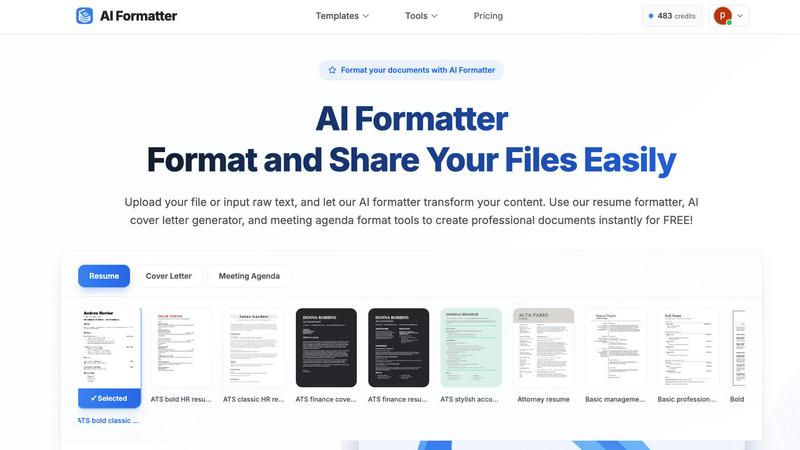
Discover how AI effortlessly transforms your raw text into polished, professional documents.
Last updated: March 1, 2026

Discover how HeyVid AI instantly transforms your ideas into stunning videos and images with top AI models.
Last updated: April 4, 2026
Visual Comparison
AI Formatter
HeyVid

Feature Comparison
AI Formatter
Intelligent One-Click Formatting
Imagine uploading a plain text file or a messy draft and, with a single action, seeing it reborn as a professionally structured document. AI Formatter's core engine intelligently analyzes your content's context and structure, applying perfect formatting, consistent styling, and logical organization automatically. This eliminates guesswork and manual adjustments, allowing you to focus purely on your message while the tool handles the visual presentation.
Vast Library of ATS-Optimized Templates
Dive into a curated collection of over 162 professional templates designed not just to look good, but to perform. Each template is engineered to be compatible with Applicant Tracking Systems (ATS), ensuring your resume or cover letter passes automated screenings. Explore categories for resumes, cover letters, meeting agendas, and invoices, giving you a strong, stylish foundation for any professional need, ready for your personal touch.
Multi-Format Input and Output Flexibility
Your content journey shouldn't be limited by file types. AI Formatter welcomes your documents as they are, supporting uploads in PDF, DOC, DOCX, and TXT formats. Once the AI has worked its magic, you retain full control. Download your newly polished document in multiple formats including Word and PDF, making it easy to share, print, or submit exactly as required, all from one seamless platform.
Real-Time Editing and Customization Suite
The transformation doesn't end with AI. After your content is formatted, an intuitive, in-browser editor awaits. This is where your discovery becomes truly personal. Tweak text, adjust layouts, change fonts and colors, and fine-tune every detail in real-time. This powerful suite ensures the final document is not just professionally formatted, but uniquely and authentically yours before you download or share it.
HeyVid
Unified AI Model Hub
HeyVid's most defining feature is its aggregation of top-tier AI models into one central dashboard. Instead of juggling multiple subscriptions and interfaces, you can explore and switch between leading video generators like Kling AI, Veo 3.1, and Sora 2, and image creators like Midjourney and Stable Diffusion. This hub allows for direct comparison and empowers you to choose the perfect model for your specific creative need, whether it's cinematic quality, speed, or a particular artistic style, all from a single platform.
Multi-Modal Generation Engine
The platform supports a full spectrum of generative AI workflows, fueling endless creative exploration. You can transform text descriptions into vivid videos or still images, animate and bring existing images to life through image-to-video, and refine or completely restyle pictures using image-to-image technology. This multi-modal approach means any asset can be a starting point for something new, allowing you to build upon ideas iteratively and discover unexpected creative directions.
Professional-Grade Customization Controls
Beyond simple generation, HeyVid provides granular controls for professionals seeking specific outcomes. For video creation, you can fine-tune parameters like resolution (up to 4K), aspect ratio for different platforms, and even use a seed number for reproducible results. Optional features like custom watermarking and auto-translation of prompts ensure your content is branded and accessible, giving you the tools to produce work that meets high production standards.
Integrated Creative Workflow Tools
HeyVid is designed as a complete creative studio, not just a generator. It streamlines the entire content creation process by integrating complementary AI tools directly into the workflow. This includes AI voice generation for narration, AI music creation for scoring, and features that assist with storyboarding and script ideation. This holistic environment allows you to conceive, produce, and finalize projects without ever leaving the platform, dramatically simplifying project management.
Use Cases
AI Formatter
The Job Seeker's Advantage
For anyone navigating the modern job market, first impressions are digital. A job seeker can upload an existing resume or paste raw bullet points into AI Formatter. By selecting an ATS-optimized resume template, they instantly transform their experience into a visually compelling narrative that is far more likely to pass automated filters and catch a recruiter's eye, turning anxiety into confident action.
Streamlining Professional Communications
Busy professionals constantly create documents like meeting agendas, project briefs, and internal reports. Instead of starting from a blank page, they can input their rough notes. AI Formatter structures the information into a clear, professional agenda format or report layout, saving significant time and ensuring consistency and polish in all internal and external communications.
Academic and Research Presentation
Students and academics often have brilliant content trapped in unstructured drafts. By using AI Formatter, they can take raw research notes, essay drafts, or thesis chapters and format them according to professional academic standards. This allows them to present their work more effectively, whether for a university submission, a conference paper, or a publication draft.
Small Business Administration
Entrepreneurs and small business owners wear many hats, including that of an administrator. Generating professional invoices, receipts, or client proposals can be time-consuming. AI Formatter's invoice and receipt generators allow them to input client and service data quickly, producing polished, brand-appropriate business documents instantly, enhancing their professional image without the overhead.
HeyVid
Startup Pitch & Crowdfunding Videos
For entrepreneurs, HeyVid unlocks the ability to create compelling, professional-grade pitch videos without a production studio. You can generate dynamic visuals that illustrate your product's future, craft a resonant brand story, and produce crowdfunding campaign content that builds excitement and trust. This empowers startups to present polished, investor-ready narratives that clearly communicate vision and potential, all while maintaining full creative control.
Agile Social Media & Marketing Content
Digital marketers and content creators can use HeyVid to stay agile and prolific. The tool is perfect for rapidly generating a variety of assets: eye-catching ad creatives, engaging short-form videos for TikTok or Reels, customized thumbnails for YouTube, and visuals for email campaigns or landing pages. This speed and versatility allow teams to test more ideas, capitalize on trends quickly, and maintain a consistent, high-quality visual presence across all channels.
Interactive Educational & Training Material
Educators and corporate trainers can transform static information into engaging learning experiences. HeyVid facilitates the creation of animated explainer videos, step-by-step tutorial content, and dynamic presentations that capture and retain audience attention. Complex concepts can be visualized easily, making training materials more effective and accessible, whether for online courses, internal team onboarding, or client-facing documentation.
Rapid Prototyping & Conceptual Visualization
Developers, designers, and product teams can leverage HeyVid for rapid prototyping and concept communication. Generate demo videos for new app features, create visual documentation for APIs, or produce mockups for client presentations. This allows for faster iteration cycles, clearer communication of ideas before full-scale production, and the ability to visually explore "what-if" scenarios during the planning and development phases.
Overview
About AI Formatter
What if the barrier between a rough idea and a polished, professional document was just a single click away? AI Formatter, developed by Sun Sky LLC, is your invitation to discover exactly that. This innovative, cloud-based platform is designed to transform the tedious chore of manual formatting into an effortless, almost magical, act of creation. At its heart, AI Formatter is an intelligent document transformation engine. It empowers a wide spectrum of users—from the ambitious job seeker crafting their first resume to the busy executive preparing a critical report, from academics structuring research to small businesses generating invoices—to simply upload raw text or existing files. Watch with curiosity as the AI instantly restructures your content into visually stunning, ATS-optimized layouts tailored for success. The promise is compelling: achieve a 95%+ pass rate with automated applicant tracking systems while reclaiming precious hours lost to formatting drudgery. With a discovery-driven approach, the tool encourages you to experiment with over 100 professional templates for resumes, cover letters, meeting agendas, and more, each fully customizable in a real-time editor. Starting with a generous free tier, AI Formatter demystifies professional document creation, turning what was once a daunting chore into an accessible and exciting discovery of what your content can truly become.
About HeyVid
What if you could explore the frontier of AI-powered creativity without needing a different tool for every task? HeyVid is your all-in-one portal to this new world, a comprehensive creative studio designed to generate high-quality videos and images with remarkable speed and simplicity. It acts as a unified gateway to the most powerful AI models available today, putting technologies like Sora 2, Veo 3.1, Midjourney, and Flux AI at your fingertips within a single, intuitive interface. This platform is built for a curious and diverse audience: from entrepreneurs dreaming up their next pitch video to marketers crafting compelling ad campaigns, educators developing engaging course content, and social media creators producing daily visuals. The core value proposition is profound: democratizing professional-grade content creation. HeyVid streamlines the entire workflow, from initial idea to final polished asset, eliminating complex software and steep learning curves. It invites you to experiment, iterate, and bring your vision to life faster than ever before, making advanced AI generation accessible, fast, and straightforward for everyone.
Frequently Asked Questions
AI Formatter FAQ
What file formats can I upload to AI Formatter?
AI Formatter is designed for flexibility. You can upload your existing documents in several common formats, including PDF, DOC (Microsoft Word), DOCX, and plain TXT files. This allows you to start the formatting process from almost any document you already have, making the transition to a polished version seamless and straightforward.
How does the ATS optimization for resumes work?
Our resume templates are meticulously designed following best practices for Applicant Tracking System compatibility. This includes using clean, parsable layouts, standard section headings, and avoiding complex graphics or columns that can confuse the software. By formatting your resume with one of our optimized templates, you significantly increase its chances of being correctly read and ranked by these automated screening tools.
Is there a free version of AI Formatter?
Absolutely! AI Formatter offers a free tier designed to satisfy your curiosity and let you explore the core capabilities of the platform. You can upload documents, experiment with templates, and experience the one-click formatting magic to see how it can transform your own content before committing to any paid plan.
Can I edit my document after the AI formats it?
Yes, full creative control remains in your hands. After the AI performs its initial formatting, your document opens in a powerful, real-time editor. Here, you can change text, adjust styling, modify the layout, and customize every element to perfectly match your personal or brand preferences before finalizing and downloading the document.
HeyVid FAQ
What AI models are available on HeyVid?
HeyVid provides access to a constantly updated selection of leading AI models. For video generation, this includes top performers like Veo 3.1, Sora 2, Kling AI, Runway, and Pika. For image creation, you can choose from models such as Midjourney, Flux AI, DALL-E, Stable Diffusion, and Ideogram. This centralized hub allows you to experiment with different model strengths without managing multiple separate accounts.
How does the credit system work?
HeyVid operates on a credit-based system, where generating content consumes a certain number of credits based on factors like the model used, video length, and output resolution (e.g., 720p vs. 4K). The platform offers various subscription plans that provide a monthly allotment of credits. This flexible system lets you pay for what you use, with higher-tier plans offering more credits and access to premium models like Veo 3.1 and Sora 2.
Can I use HeyVid for commercial projects?
Yes, content generated through HeyVid can typically be used for commercial purposes, including in marketing materials, social media, products, and client work. It is always advisable to review the specific terms of service for the latest licensing details, but the platform is built to support professional creators, entrepreneurs, and businesses in creating assets for public and commercial use.
Do I need any prior video editing experience?
Absolutely not. HeyVid is designed to be intuitive and accessible for users of all skill levels. The process is built around simple text prompts and straightforward selection menus. You do not need knowledge of traditional video editing software. The AI handles the complex rendering and composition, allowing you to focus purely on your creative idea and guiding it with descriptive text.
Alternatives
AI Formatter Alternatives
AI Formatter is a cloud-based productivity tool that transforms raw text and documents into professionally formatted layouts using artificial intelligence. It belongs to the document creation and formatting category, helping users save time and achieve polished results for resumes, business documents, and more. Users often explore alternatives for various reasons. Some may seek different pricing models or a more specific feature set that better matches their workflow. Others might require offline functionality, integration with certain platforms, or simply wish to compare the capabilities of different intelligent formatting tools available on the market. When evaluating an alternative, consider the core intelligence of the formatting engine and the quality of its output. Look for a tool that not only offers a wide selection of professional templates but also provides real-time editing and customization. Security for your documents and a transparent, discovery-friendly approach to trying the service are also key factors to weigh in your decision.
HeyVid Alternatives
HeyVid is an all-in-one AI video and image generator, falling squarely into the productivity and management software category. It promises a fast, simple, and professional way to create high-quality visual content, streamlining what can often be a complex creative process. Users often explore alternatives for a variety of reasons. Perhaps they need a different pricing model or a free tier to test capabilities. Others might seek more specialized features, a different user interface, or integration with their existing workflow platforms. The search for the right tool is a natural part of finding the perfect fit for one's unique creative and professional needs. When evaluating other options, consider your primary goals. Are you focused on video generation, image creation, or a balanced mix? Think about the level of control you desire, the learning curve you can manage, and how the tool will slot into your daily routine. The ideal alternative should feel like a natural extension of your workflow, unlocking new possibilities.