

SubtitlesFast
Create stunning animated subtitles for your videos in minutes with SubtitlesFast, the ultimate editing tool for.
About SubtitlesFast
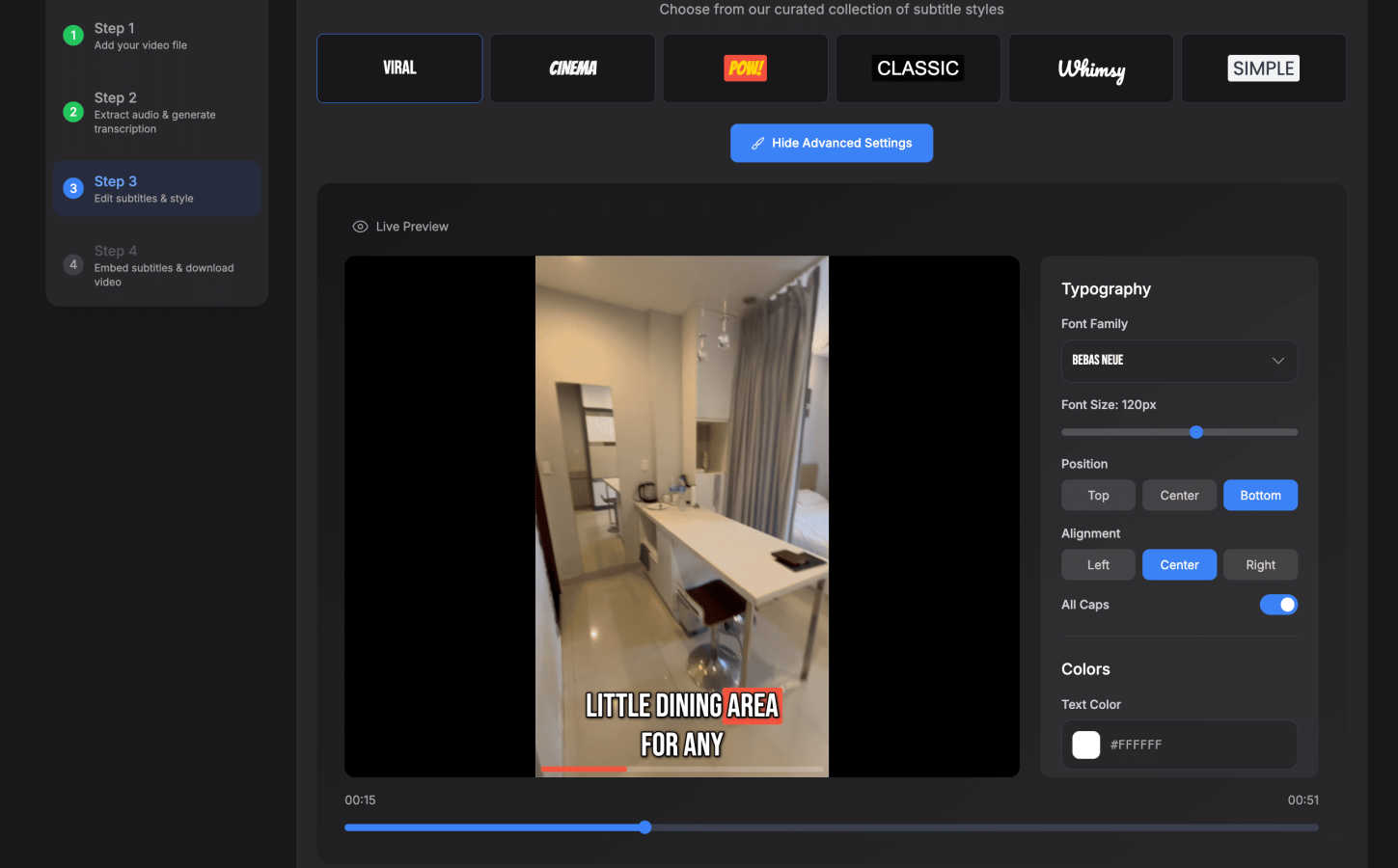
SubtitlesFast is a cutting-edge, browser-based video editing tool designed to transform raw video clips into polished content with astonishing speed and ease. Built specifically for content creators, vloggers, and marketers active on platforms like TikTok, YouTube, Instagram, and X, SubtitlesFast redefines the process of adding professional, animated subtitles to videos. By leveraging advanced AI technology for auto-transcription in over 50 languages, this tool makes subtitle creation not only accessible but also visually engaging. With a focus on a seamless workflow, users can upload, customize, and publish their videos in under five minutes, reclaiming valuable time that can be better spent on content creation. What sets SubtitlesFast apart is its simplicity, eliminating the complexities associated with traditional video editing software. Whether you're a seasoned creator or just starting out, SubtitlesFast promises a no-fuss experience that enhances engagement and accessibility, making it an essential tool for anyone striving to make their videos stand out.
Features of SubtitlesFast
Auto-Transcription
SubtitlesFast automatically transcribes your video audio into text, supporting over 50 languages. This feature ensures that your subtitles are generated quickly and accurately, allowing you to focus on the creative aspects of your video without worrying about manual transcription.
Customizable Animated Styles
With over 30 animated styles to choose from, SubtitlesFast offers a library that allows users to customize the look of their subtitles. This feature helps to enhance the visual appeal of your videos, making them more engaging and ensuring they resonate with your audience.
One-Click Export
Once your subtitles are ready, exporting your video is a breeze with the one-click export feature. Subtitles are burned directly into the video, making it instantly ready for posting on platforms like TikTok, YouTube, and Instagram, without any hassles or additional steps.
User-Friendly Interface
SubtitlesFast features a straightforward, intuitive interface that allows users to edit their videos without a steep learning curve. Whether you're adding text, images, or music, the simple editor empowers you to create content quickly and efficiently, making it accessible for everyone.
Use Cases of SubtitlesFast
Daily Vloggers
For daily vloggers, SubtitlesFast is a game changer. It streamlines the process of adding subtitles, allowing creators to publish their content quickly and maintain a consistent posting schedule without compromising quality.
Social Media Marketers
Social media marketers can leverage SubtitlesFast to create engaging content that captures attention. With professional subtitles, videos become more accessible, increasing viewer retention and engagement across various platforms.
Podcasters
Podcasters looking to expand their reach can use SubtitlesFast to create video clips from their audio content. By adding subtitles, they enhance accessibility for hearing-impaired audiences and engage viewers who prefer watching over listening.
Educators and Trainers
Educators can utilize SubtitlesFast to create instructional videos that are more inclusive. By providing subtitles, they ensure that their content is accessible to all learners, catering to diverse learning preferences and needs.
Frequently Asked Questions
How does SubtitlesFast ensure transcription accuracy?
SubtitlesFast uses advanced AI technology to transcribe audio into text, ensuring high accuracy across over 50 languages. Continuous updates to the AI model help improve transcription quality over time.
Can I customize the subtitles after they are generated?
Yes, SubtitlesFast allows you to customize the subtitles after they have been generated. You can change the font, color, and animation style to match your video's theme and branding.
Is there a trial version available for SubtitlesFast?
Absolutely! SubtitlesFast offers a free trial with no watermarks, allowing you to test its features and capabilities before committing to a subscription.
What types of videos can I create with SubtitlesFast?
You can create various types of videos with SubtitlesFast, including vlogs, promotional videos, educational content, and social media clips. The tool is designed to cater to the needs of diverse creators across different platforms.
Similar to SubtitlesFast

@fuck.it - email with attitude
Private email. Pure. Secure. Exclusive. No ads, no tracking, no data selling. GDPR compliant, EU-hosted.


Leadeon
AI growth tool for X and LinkedIn: write posts in your voice, schedule at your best times, find leads on X and see what works.

Riff
Riff writes replies, DMs and posts with Gemini Nano inside Chrome. Runs on your computer, no account or API key, and never posts for you.


Novastart
Apps and files on an infinite canvas where people and AI agents work together.
