

Subclip
Discover how Subclip lets you edit, caption, and dub videos with AI voice cloning in one browser.
About Subclip
Subclip is an AI-powered video editor designed to fundamentally change how creators, marketers, educators, and content teams approach video production. It was built on a simple, almost radical premise: that editing video should feel as intuitive and fluid as editing a text document. Instead of wrestling with complex timelines and scrubbing through hours of raw footage, Subclip lets you edit your video by simply dragging and editing a transcript. This document-like approach is the core of its magic. The platform leverages a suite of advanced AI tools to automate the most tedious parts of video editing. You can clone your own voice and use it to re-record parts of your video, remove awkward silences and filler words with a single click, auto-generate stunningly accurate subtitles in 48+ languages, and even dub your entire video into 21+ languages while perfectly preserving your original tone, emotion, and the background music. Subclip is for everyone from solo YouTubers and podcasters looking to reclaim their time, to course creators wanting to reach a global audience, to agencies and freelancers who need to increase their output without increasing their workload. It promises to reclaim up to 80% of the time typically spent on manual video editing, replacing the "old way" of grinding through footage with a streamlined, AI-driven workflow that handles transcription, clipping, captioning, dubbing, and even scheduling. It is a browser-based platform that removes the complexity of traditional tools, allowing you to focus on storytelling and creation rather than technical hurdles. Whether you are aiming to create viral clips, produce professional courses, or manage a team's content calendar, Subclip positions itself as a comprehensive, all-in-one solution for the modern video creator.
Features of Subclip
Rough Cut Editing with Text Transcript
This feature is the heart of Subclip's innovative approach. Instead of cutting and trimming video on a traditional timeline, you edit a text transcript of your video. You can highlight words, sentences, or paragraphs in the transcript and delete them, and the corresponding video segments are instantly removed from your timeline. This allows for lightning-fast rough cuts, where you can trim mistakes, remove long pauses, or rearrange the flow of your narrative as easily as editing a Google Doc. The timeline updates automatically, saving you from the tedious manual rework that plagues traditional editors. For advanced users, you can even export the edited timeline as a .fcpxml file to continue refining your project in professional software like DaVinci Resolve, Final Cut Pro, or Adobe Premiere Pro.
AI Clipping for Viral Moments
Subclip’s intelligence engine goes beyond simple cuts. It actively scans your long-form content to identify the most engaging segments. By analyzing factors like high-energy moments, punchlines, key emotional shifts, and audience retention patterns, it automatically suggests clips that are most likely to perform well on social media. Each clip is given a "Viral Score," an "Engagement" rating, and a "Retention" percentage, giving you data-driven insights into which parts of your video are the strongest. This feature transforms the painstaking process of searching for shareable moments into a simple, automated discovery process, allowing you to repurpose long-form content into short, high-retention clips for platforms like YouTube Shorts, TikTok, and Instagram Reels in minutes.
AI Dubbing with Voice Clone
Subclip breaks down language barriers without sacrificing your personal brand. With this feature, you can translate your video into over 21 languages. But it doesn't just add a generic voiceover; it uses AI voice cloning to replicate your unique voice, tone, and emotional inflection. The result is a dubbed video that sounds like you are speaking the language naturally. Crucially, Subclip is engineered to preserve the original background music and sound effects during the dubbing process, ensuring the final product maintains its intended atmosphere and production value. This is a powerful tool for educators, coaches, and content creators who want to expand their global audience without the time and expense of hiring multiple voice actors.
One-Click Unlimited Captions and Subtitles
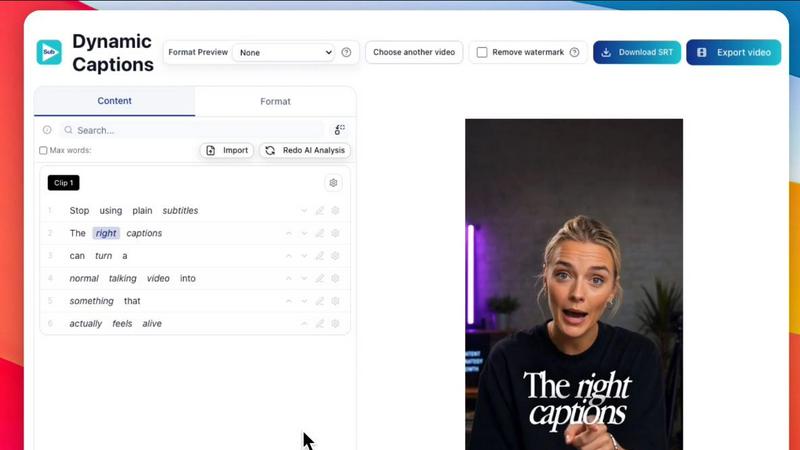
Captions are no longer an afterthought but a core part of the creation process in Subclip. The platform offers one-click, dynamic auto-captioning that generates highly accurate subtitles in over 48 languages. The "Unlimited" aspect is key, as there are no caps on the number of subtitle exports or video minutes you can transcribe, even on the free tier. You can then customize the text style, font, and formatting to match your brand. This feature is critical for accessibility, boosting viewer engagement (especially on social media where many watch without sound), and improving search engine optimization for your video content.
Use Cases of Subclip
For Creators and Podcasters
Long-form podcasters and YouTubers often spend hours trying to find the best moments to clip and share on social media. Subclip’s AI Clipping feature automates this process, scanning your episode for high-energy segments, punchlines, and key insights. You can quickly generate multiple short clips with a high "Viral Score," add stunning auto-captions, and schedule them directly to platforms like YouTube and X (Twitter). This allows creators to repurpose a single hour-long podcast into dozens of shareable assets, dramatically increasing their reach and viewership with zero manual effort.
For Coaches and Online Educators
For a coach or educator who has recorded a course or a series of training videos, the goal is often to reach as many students as possible. Subclip’s AI Dubbing with Voice Clone is a game-changer here. You can take your entire course library and dub it into 20+ languages, all while preserving your own voice, tone, and teaching style. This removes the major barrier of language for international students and creates a more personal and effective learning experience. Combined with the ability to remove silences and filler words, the final course content is polished, professional, and globally accessible.
For Vloggers and Social Media Content Creators
Vloggers need to produce content quickly and consistently. Subclip streamlines the entire post-production workflow. You can upload your raw footage, use the transcript editor to cut out boring parts or mistakes in seconds, and then add B-Roll, background audio, or voiceovers. With one click, you can remove background noise, enhance vocal clarity, and generate auto-captions tailored for different social media formats (16:9, 9:16, 1:1). The final, polished video can be exported instantly, saving vloggers hours of work on every single video and allowing them to focus on capturing their next adventure.
For Agencies and Freelancers
Agencies and freelancers handle a high volume of client work and need to maximize efficiency. Subclip offers unlimited transcription and export, which removes the fear of hitting project caps. Team collaboration features allow multiple editors to share projects, leave feedback, and work together in a single workspace, similar to a Google Doc. The ability to export edited timelines directly to professional NLEs like DaVinci Resolve or Premiere Pro means that Subclip can fit seamlessly into an existing high-end workflow, acting as a powerful first pass tool that drastically reduces the time billed for rough cuts and captioning, ultimately increasing profit margins.
Frequently Asked Questions
Can I edit my video directly by editing the text?
Yes, this is Subclip's primary feature. You can edit the video by simply editing the generated transcript, just like you would a text document. Deleting a word or sentence from the transcript removes that corresponding section of video from your timeline, making the rough cut process incredibly fast and intuitive.
Does the AI dubbing feature preserve my voice and background music?
Absolutely. When you use Subclip's AI dubbing to translate your video, it creates a voice clone that mimics your unique tone, pitch, and emotional inflection. It is also specifically engineered to preserve the original background music and sound effects, ensuring the dubbed version maintains the same professional quality and atmosphere as the original.
Are there any limits on transcription or subtitle exports?
No, Subclip offers unlimited local transcription and subtitle generation. You can transcribe as many video minutes as you need and export unlimited subtitles, even on the free tier. This "unlimited" model is a core part of their value proposition, removing the anxiety of running out of credits mid-project.
What languages are supported for transcription and dubbing?
Subclip supports local transcription in over 48 languages, allowing you to generate subtitles for a global audience. For AI dubbing with voice cloning, you can translate your video into over 21 languages, including major languages like English, Spanish, French, German, and many more.
Pricing of Subclip
Subclip operates on a Freemium pricing model. They offer a free tier that provides access to core features like unlimited transcription and subtitle generation, allowing users to test the platform without any upfront cost. For users who need more advanced features, such as AI dubbing, voice cloning, and enhanced export options, they offer affordable paid plans. Specific pricing for these paid tiers is not detailed in the provided content, but the model is designed to be accessible for individual creators and scalable for professional teams.
Similar to Subclip

EasyInterview
AI phone-screens applicants, returns a ranked shortlist.


Oravaa
Oravaa's human-sounding Voice AI scales your phone operations by handling 24/7 support, qualifying leads, and automating outreach.

Hush Touch | Voice-to-Text for MacOS
Transform your dictation experience with Hush Touch, the smart offline voice-to-text app for Mac that learns your.

Glossa
Break language barriers in your church with Glossa's real-time AI translation in 100+ languages for just $5/hour.

Bantr: Offline & Unlimited TTS for Mac
Experience unlimited offline text-to-speech on your Mac with Bantr, ensuring privacy and natural-sounding voices.

KaiCalls
Discover how your AI phone agent answers calls and captures leads around the clock.

Vowen
Vowen seamlessly converts your voice into productive tasks, making dictation and voice commands effortless and private.