

ShadowLock
ShadowLock reveals which unapproved AI tools access your data and lets you stop them instantly.
About ShadowLock
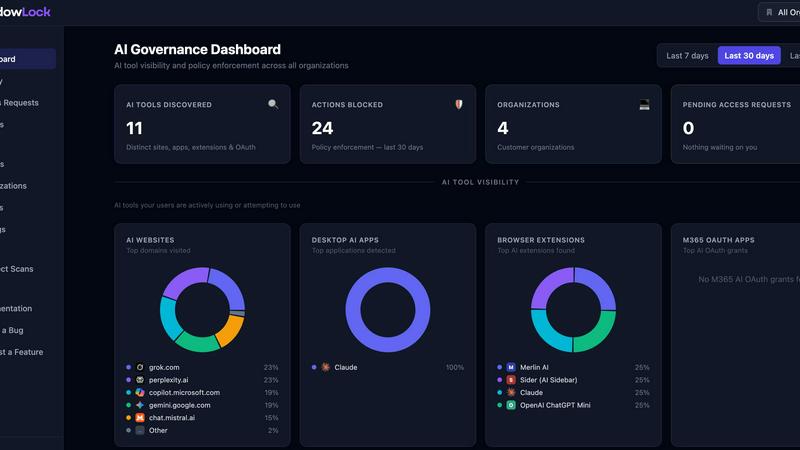
ShadowLock is a shadow AI detection and governance platform designed specifically for Managed Service Providers (MSPs) and internal IT teams who need real-time visibility and control over how employees use artificial intelligence tools. The platform addresses a growing blind spot in traditional endpoint management: unapproved AI usage that happens through browser extensions, desktop AI applications, local large language models like Ollama, and personal accounts on public AI services. What makes ShadowLock particularly compelling is its multi-layered approach to coverage. A browser extension intercepts and classifies risky pastes and data submissions to AI websites, a Windows agent silently deploys via existing RMM tools to block desktop AI apps and scan for unauthorized extensions, and a multi-tenant dashboard provides audit-ready reporting across every client from a single pane of glass. The platform is built with privacy as a core principle, meaning no keystroke logging occurs and zero content is transmitted to external servers. For MSPs worried about liability when clients experience AI-related data incidents, ShadowLock closes the gap between "not our job" and "you should have known." It covers over 100 AI tools, services, and desktop apps, giving organizations the power to see what AI tools are in use, classify the sensitivity of data being shared, and enforce granular policies before sensitive information leaves the endpoint.
Features of ShadowLock
Browser Extension for Real-Time Intervention
The browser extension acts as an intelligent gatekeeper that intercepts pastes, file uploads, and sensitive data typed directly into AI prompts across popular platforms like ChatGPT, Claude, and Gemini. It self-configures automatically once the endpoint agent is installed, so there is no manual setup required for end users. The extension classifies content in real time, applying your organization's data-sharing policies with clear, user-facing messages that explain why an action was blocked or allowed. This gives IT teams confidence that sensitive data like customer records, credentials, or confidential documents never reaches unapproved AI tools.
Silent Endpoint Agent for Windows
The Windows agent deploys silently through your existing RMM solution, requiring zero user interaction or disruption to daily workflows. Once installed, it continuously monitors for AI activity, scans installed browser extensions, detects local AI applications like Ollama and LM Studio, and locks down the AI features built into Chromium-based browsers including Chrome, Edge, Brave, and Firefox. The agent operates entirely in the background, providing persistent protection without alert fatigue or user resistance, making it ideal for MSPs managing diverse client environments.
Multi-Tenant Governance Dashboard
The centralized dashboard gives MSPs and IT teams a single pane of glass to audit, approve, or block AI controls across every client organization. From this interface, you can see which AI tools are being used, how much sensitive data is being shared, and which users or departments are generating the most risk. The dashboard generates audit-ready reports that satisfy compliance requirements for HIPAA, GDPR, CCPA, and other privacy frameworks. Policy changes propagate instantly to all endpoints, allowing rapid response to emerging threats or new AI tool releases.
Microsoft 365 AI App Detection Scanner
ShadowLock includes a dedicated scanner that connects to each client's Microsoft 365 tenant to detect AI applications and Copilot features embedded within approved SaaS tools. This addresses a critical blind spot where employees activate AI writing assistants, meeting transcription services, or data analysis features inside Microsoft apps without any security review. The scanner identifies which AI features are in use, which accounts have access, and whether sensitive data is being processed through unapproved channels, giving IT teams complete visibility into the embedded AI surface.
Use Cases of ShadowLock
Preventing HIPAA Violations from Public AI Tools
Healthcare organizations face significant risk when employees paste protected health information into public AI chatbots like ChatGPT or Claude without a Business Associate Agreement in place. ShadowLock intercepts these actions in real time, blocking the submission of ePHI and alerting the user to the policy violation. The platform provides audit trails that demonstrate compliance efforts, which is critical for avoiding HIPAA penalties even when no actual breach occurs. MSPs serving healthcare clients can deploy ShadowLock across all endpoints with minimal disruption to clinical workflows.
Governing AI Use Across Multiple Client Organizations
MSPs managing dozens or hundreds of client environments need a unified approach to AI governance that scales without adding headcount. ShadowLock's multi-tenant dashboard allows MSPs to define baseline policies that apply across all clients, then customize controls for organizations with specific compliance requirements like HIPAA or GDPR. The silent deployment via existing RMM tools means no truck rolls or end-user training sessions are needed. This use case directly addresses the liability gap where clients expect their MSP to have visibility into AI risks even when traditional endpoint controls miss them.
Protecting Intellectual Property in Development Teams
Software development teams frequently use AI coding assistants like GitHub Copilot and Cursor that have broad file access to source code repositories. When proprietary code or credentials are submitted to these tools, trade secret protections can be weakened and intellectual property risks increase. ShadowLock detects these tools in use, classifies the sensitivity of code being shared, and enforces policies that prevent high-risk submissions. Development teams maintain productivity while legal and security teams gain confidence that intellectual property remains protected.
Responding to AI-Related Incidents with Defensible Data
When an organization discovers sensitive data may have been exposed through an AI tool, the first question is always "what happened?" Without prior visibility, incident response teams cannot determine which tool was used, which account was involved, or what specific data was shared. ShadowLock provides the historical audit trail needed to answer these questions definitively, enabling proper triage, notifications, and regulatory compliance. This defensibility is crucial for organizations subject to breach notification laws where incomplete answers can lead to additional scrutiny and penalties.
Frequently Asked Questions
Does ShadowLock capture keystrokes or transmit my content?
No. ShadowLock is designed with privacy as a core principle. The platform does not perform any keystroke logging, and zero content is transmitted to external servers. The browser extension only classifies content locally on the endpoint to determine whether a policy violation is occurring, and only metadata about the classification result is sent to the dashboard for reporting purposes. Your actual data never leaves the device.
How does ShadowLock deploy across multiple client environments?
ShadowLock deploys silently through your existing RMM solution with zero user interaction required. The Windows agent can be pushed to endpoints using your preferred RMM tool, and it self-configures once installed. The browser extension deploys automatically alongside the agent, so there is no need for manual installation or user training. This makes it practical for MSPs to deploy across hundreds or thousands of endpoints without dedicated engineering resources.
What AI tools and services does ShadowLock detect and govern?
ShadowLock currently detects and governs over 100 AI tools, services, and desktop applications, and the list continues to grow. This includes public AI chatbots like ChatGPT, Claude, and Gemini, AI browser extensions like sidebar assistants and email rewriters, desktop AI apps including Claude Desktop, ChatGPT app, Ollama, and LM Studio, AI coding assistants like GitHub Copilot and Cursor, and meeting transcription AI tools like Otter.ai and Fireflies. The platform also detects embedded AI features within approved SaaS applications through the Microsoft 365 scanner.
Can ShadowLock block AI usage entirely or only monitor it?
ShadowLock gives you full control over whether to monitor, warn, or block AI usage. The platform supports granular policy enforcement at the tool level, user level, and data sensitivity level. You can choose to block specific AI tools entirely, warn users when they attempt to share sensitive data, or simply monitor usage for audit purposes. Policies are configured through the multi-tenant dashboard and apply in real time across all endpoints, giving you the flexibility to implement the governance approach that matches your organization's risk tolerance and compliance requirements.
Similar to ShadowLock


Labrynth AI
AI regulatory intelligence platform that turns complex requirements into cited, audit-ready outputs.

Built2Win AI Indexing
AI‑ready websites, WebAgentScan SaaS, and Indexing Pack. MCP, A2A, llms.txt — hand‑coded PHP, complete ownership, flat‑fee, free quote.


JsonTranslate
Translate JSON, Markdown, and TXT files while preserving keys, nested paths, and project structure.


Wisegrid
Spreadsheet-native work management with AI formulas, dashboards, automation, reporting, and project views for growing teams.