

poseup
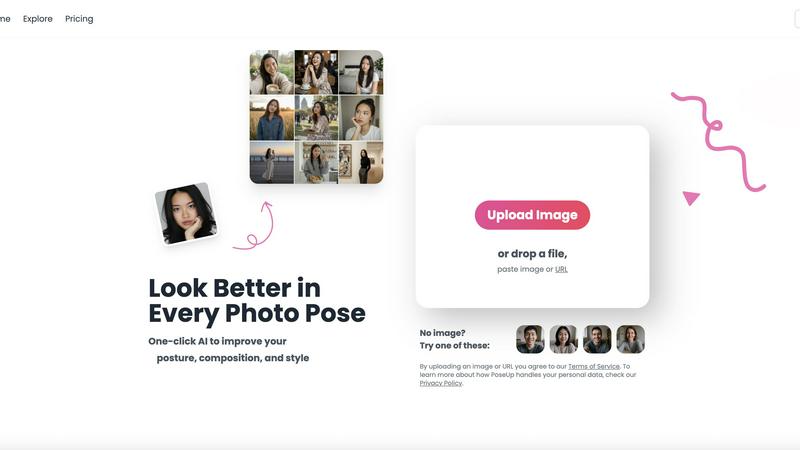
Elevate your photos effortlessly with PoseUp, the AI tool that perfects posture and composition in an instant.
About poseup
Poseup is an innovative AI-driven photography enhancement platform designed to transform your images into professional-quality photographs with ease. By leveraging cutting-edge artificial intelligence technologies, Poseup analyzes the key elements of a great photo, including pose, posture, and composition. This user-friendly tool empowers everyone, from social media enthusiasts and content creators to individuals preparing for family portraits or professional headshots, to achieve stunning results without requiring any technical skills. The main value proposition of Poseup is its ability to democratize high-quality photo outcomes, enabling users to receive instant, AI-generated feedback and enhancements. Imagine being able to retroactively adjust a slouched shoulder or awkward arm placement, all with a single click. Poseup turns everyday moments into extraordinary images that you will love to share, making it a must-have tool for anyone looking to enhance their photography game effortlessly.
Features of poseup
One-Click Photo Enhancement
With Poseup's one-click enhancement feature, users can instantly improve their photos without any prior knowledge of photography. This feature simplifies the process of achieving professional-looking results by automatically optimizing poses, posture, and composition.
AI Pose Correction
Poseup's advanced AI technology analyzes your photos to identify and correct undesirable poses. Whether it’s correcting a slumped shoulder or repositioning an arm, this feature ensures that every subject looks their best, making it perfect for casual and professional settings alike.
Composition Optimization
The platform not only enhances poses but also optimizes the overall composition of your images. Poseup provides intelligent suggestions for better balance and visual appeal, transforming ordinary snapshots into captivating works of art that stand out.
Support for Multiple Formats
Poseup supports a variety of image formats including JPG, PNG, WEBP, and HEIC, allowing users the flexibility to upload their preferred file type. With a size limit of up to 5MB per image, users can easily enhance their photos without worrying about format compatibility.
Use Cases of poseup
Social Media Content Creation
For social media managers and influencers, Poseup is an invaluable tool that helps create eye-catching visuals. By enhancing photos, users can engage their audience more effectively, ensuring their posts receive the attention they deserve.
Professional Headshots
Individuals preparing for job applications or networking events can use Poseup to create stunning professional headshots. The AI-driven enhancements ensure that every detail is optimized, projecting confidence and professionalism in every image.
Family Portraits
Families looking to capture special moments can rely on Poseup to enhance their portraits effortlessly. With the ability to adjust poses and improve composition, every family member will look their best, creating cherished memories to be shared for years.
Fitness and Wellness Photography
Fitness enthusiasts and trainers can utilize Poseup to enhance their workout photos, showcasing proper form and posture. This feature is especially beneficial for creating promotional content for personal training services or fitness classes.
Frequently Asked Questions
How does Poseup enhance my photos?
Poseup uses advanced AI algorithms to analyze your photos and automatically improve aspects like pose, posture, and composition, providing a professional touch to your images with just one click.
Can I use Poseup for professional photography?
Absolutely! Poseup is designed for both amateurs and professionals, making it an excellent tool for anyone looking to enhance their photography skills and achieve higher-quality results effortlessly.
What file formats does Poseup support?
Poseup supports multiple image formats including JPG, PNG, WEBP, and HEIC, allowing you to upload and enhance your photos regardless of the format used.
Is there a limit to the file size I can upload?
Yes, Poseup allows uploads of images up to 5MB in size. This ensures that the platform can process your images quickly and efficiently while maintaining high-quality results.
Explore more in this category:
Similar to poseup

GPT Image 2 API
Generate and edit production-ready images with GPT Image 2 API using detailed prompts, references, clear text rendering, and developer-friendly workfl

Clawra AI
The ultimate AI Girlfriend experience: roleplay with images and videos.

Imagine2
Private browser-based AI image generation and editing with text-to-image, targeted edits, and multi-image references.

NodeStory
One-click UGC videos, product photo sets, and reusable AI workflows, with 30+ image and video models in one studio.

IsThisAIImage
Free AI image checker: upload a photo for AI-generated and deepfake scores, a clear verdict, and optional generator hints.


Best Face Swap
Best Face Swap lets you explore frame-consistent face replacement for photos, videos, and GIFs with dedicated workflows for free, NSFW, and multiple.

SALBCALC Crack Analyzer
Snap a photo of any concrete crack and discover instantly if it's a simple DIY fix or a call-your-engineer emergency.