

JustPDF
Discover a privacy-first PDF toolkit that works entirely in your browser, so your files never leave your device.
About JustPDF
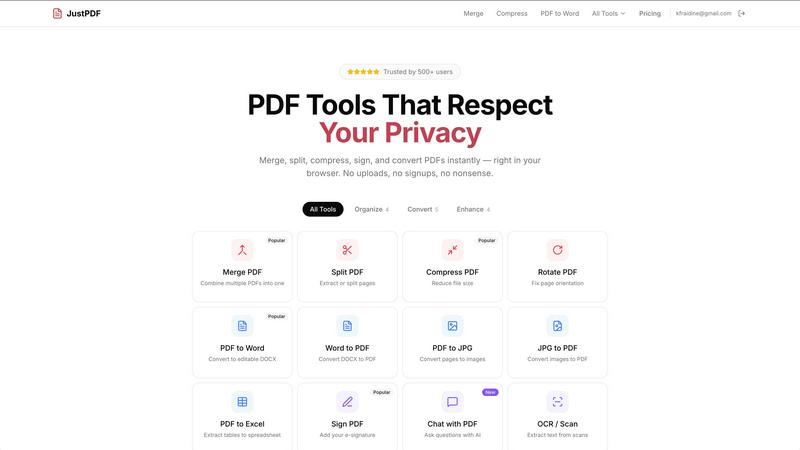
What if you could handle all your PDF tasks without ever wondering where your sensitive documents travel? JustPDF offers a fascinating answer. It's a comprehensive suite of 17 professional-grade PDF tools that operates on a fundamentally different principle: complete client-side processing. Unlike conventional online services like Smallpdf or iLovePDF that require uploading files to remote servers, JustPDF leverages the power of your own browser. Using advanced JavaScript and WebAssembly, every operation—from merging and compressing to converting and signing—is executed locally on your device. This means your files, whether they're confidential contracts, personal tax forms, or unpublished manuscripts, never leave your computer. You can even verify this remarkable privacy feature by opening your browser's Developer Tools and watching the Network tab remain silent. Designed for privacy-conscious individuals, students under FERPA regulations, professionals handling sensitive data, and anyone tired of upload limits and watermarks, JustPDF delivers powerful functionality with unparalleled security and convenience, directly in your web browser.
Features of JustPDF
100% Browser-Based Processing
The core, revolutionary feature of JustPDF is its complete reliance on your device's resources. All 17 tools are powered by JavaScript and WebAssembly modules that run entirely within your browser tab. This architecture ensures zero file uploads to external servers. Your data processing journey starts and ends on your machine, providing a level of privacy and security that is both transparent and verifiable, making it a truly trustworthy digital workshop for your documents.
Comprehensive PDF Toolkit
JustPDF isn't just a one-trick pony; it's a full-fledged PDF utility belt. It bundles 17 distinct tools covering organization, conversion, and advanced manipulation. You can merge multiple documents, split or extract specific pages, compress file sizes, rotate pages, flatten forms for security, and even unlock password-protected PDFs. This extensive collection means you can handle nearly any PDF task without needing to juggle between different websites or software.
AI-Powered Document Interaction
Moving beyond traditional editing, JustPDF incorporates modern AI capabilities with its "Chat with PDF" feature. This allows you to interact with your documents conversationally. Imagine uploading a lengthy report and simply asking the AI to summarize key points, find specific data, or explain complex sections. This tool transforms static PDFs into interactive sources of information, saving immense time on manual review and analysis.
Privacy-First Design & FERPA Compliance
Built from the ground up for data sovereignty, JustPDF's design philosophy prioritizes user privacy. The fact that files never leave the browser is its strongest endorsement. This makes it an ideal solution for educational environments, as it is explicitly FERPA-compliant, allowing students and educators to process academic records and submissions without privacy concerns. It also operates offline once loaded, ensuring functionality anywhere.
Use Cases of JustPDF
Handling Sensitive Business Contracts
Legal and business professionals frequently deal with confidential agreements and proposals. Using JustPDF to merge, sign, compress, or convert these documents ensures that sensitive information never traverses the internet to a third-party server. This mitigates risk and provides peace of mind, knowing that proprietary terms and client details remain exclusively on the user's secured device throughout the entire editing process.
Student and Academic Workflow
A student compiling a research portfolio from various sources can use JustPDF to merge articles, convert lecture slides to PDF, and compress the final submission to meet upload limits. Its FERPA compliance is crucial here, as it safely handles documents containing student IDs and grades. The offline capability also means last-minute edits can be made anywhere, even without an internet connection.
Preparing Digital Application Packages
When applying for jobs, visas, or grants, applicants often need to assemble a precise package of documents (resumes, certificates, letters) into a single, professional PDF. JustPDF allows for easy merging and compression to meet strict file size requirements. The "Sign PDF" feature lets applicants add digital signatures to forms, completing the entire application preparation chain privately and efficiently.
Archiving and Organizing Personal Documents
For personal organization, one might need to convert stacks of scanned photos (JPG, WebP, HEIC) into a searchable PDF archive, or turn a PDF receipt into an Excel sheet for expense tracking. JustPDF's conversion tools make this seamless. The local processing is particularly valuable for personal tax documents, medical records, and family photos, keeping this private data completely under the user's control.
Frequently Asked Questions
How can I be sure my files are not uploaded?
You can conclusively verify this by using your browser's built-in Developer Tools. Before starting any operation, open the DevTools (usually F12), navigate to the "Network" tab, and then perform your PDF task in JustPDF. You will observe no network activity related to your file upload. All processing spikes will be in the "CPU" or "Performance" tabs, confirming the work is happening locally on your machine.
What does "works offline" mean?
Once you load the JustPDF website in your browser, the core application and all its tool engines are cached locally. This means you can close your internet connection after the initial page load and still use all 17 tools. Your documents are processed using your computer's hardware without needing to communicate with any online server, enabling true offline functionality for tasks like merging or compressing PDFs on the go.
Is there a daily limit on the free tier?
Yes, the free tier of JustPDF allows for 3 operations per day. An "operation" is counted each time you successfully complete a task with one of the 17 tools, such as compressing one PDF or merging several into one. This limit refreshes daily. For unlimited usage, a Pro subscription is available starting at a low monthly cost.
What is the "Chat with PDF" AI feature?
This innovative feature allows you to interact with the content of your PDF document using natural language. After uploading a PDF, you can ask questions directly about its content. The AI will analyze the text and provide answers, summaries, or extract specific information. It's designed to help you quickly understand long documents, find key details without manual searching, and interact with your files in a conversational, intuitive way.
Pricing of JustPDF
JustPDF operates on a freemium model designed for accessibility. Users can start immediately without creating an account, enjoying 3 free operations per day across any of the 17 tools. For power users requiring unlimited access, the Pro subscription starts at an affordable $4 per month. This subscription removes the daily limit, providing unrestricted use of all features, making it a cost-effective solution for regular PDF manipulation needs.
Explore more in this category:
Similar to JustPDF

Novastart
Apps and files on an infinite canvas where people and AI agents work together.

MD to Text
Convert Markdown to plain text online. Remove formatting instantly, copy readable output, and keep every conversion private in your browser.

AUTOMATER.ai
A tray helper for every AI coding tool: one searchable library of past sessions, waiting alerts and usage across 9 providers.

stackledge
A human-vetted discovery directory for practical AI tools, SaaS apps, and custom n8n workflows, free from bot-scraped spam and dead links.

Kody Tools
Free collection of online developer utilities, code formatters, and digital converters designed to streamline your daily workflow.

What's on the menu
Smart translate any restaurant menu

Forms Plugin
The #1 Native Form Builder Plugin for Framer - No Code, No Embeds, No External Platforms.

Product Launch Checklist
A free launch checklist for SaaS, apps, AI tools and more. Every step says why it matters and when you can skip it.