

Interhubz
Discover how Interhubz seamlessly syncs Intercom chats into clean HubSpot timeline entries.
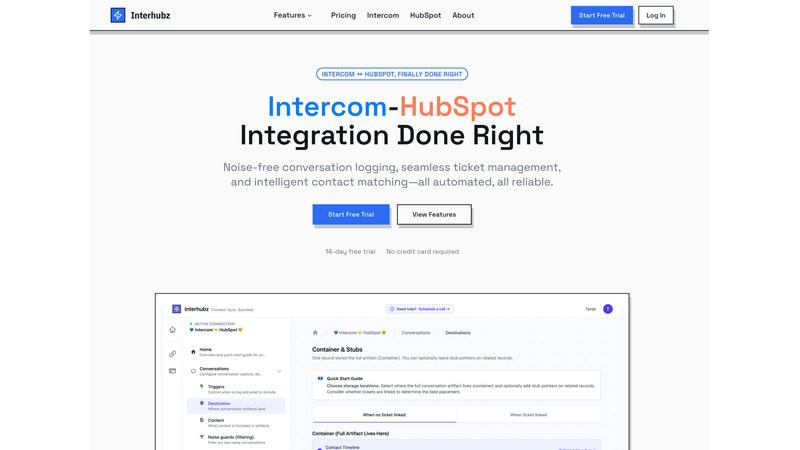
About Interhubz
What if the bridge between your support and sales teams wasn't a chaotic, noisy mess of data? Interhubz is a specialized integration built to answer that exact question, reimagining the connection between Intercom and HubSpot. It's designed for teams where customer conversations begin in Intercom but the full relationship picture lives in HubSpot. The core mission is to eliminate the timeline pollution, manual work, and context loss that plague standard integrations. Instead of flooding your HubSpot contact records with 8+ fragmented entries for every single Intercom message or update, Interhubz consolidates an entire conversation into one intelligently formatted note. This includes the full transcript, any attachments, and a direct link back to the source. It goes beyond simple syncing with intelligent contact matching to prevent duplicates, bi-directional ticket management to keep statuses in sync, and smart noise guards that filter out bot chats and spam. For operators and leaders who need reliable, automated sync without the chaos, Interhubz provides a clean, structured, and truly useful flow of information between two critical business hubs.
Features of Interhubz
One Rich Note Per Conversation
This foundational feature transforms how conversations appear in HubSpot. Instead of a cluttered timeline with separate entries for every message, tag change, and assignment, Interhubz creates a single, beautifully formatted note for each Intercom conversation. This note contains the complete transcript, a summary, all file attachments, and a deep link back to the original chat. It turns a flood of data into one readable, actionable artifact, allowing sales and customer success teams to instantly grasp the full context without sifting through noise.
Intelligent Contact & Company Matching
Interhubz employs advanced algorithms to seamlessly match Intercom contacts with existing HubSpot records, intelligently preventing duplicate entries. It looks beyond just email, utilizing phone numbers and custom unique properties you define to find the right match. This ensures that every conversation is logged to the correct person and company record in your CRM, building a complete and accurate history without manual intervention or data corruption.
Bi-Directional Ticket Spine
This feature creates a powerful, two-way link between Intercom conversations and HubSpot tickets. With a single click from within the Intercom inbox, agents can create a corresponding HubSpot ticket. Once linked, the ticket's stage and owner sync in real-time between both platforms. If a status changes in HubSpot, it updates in Intercom, and vice-versa, eliminating the manual copy-pasting and ensuring both teams are always looking at the same, up-to-date information.
Embedded Inbox App with Noise Guards
Interhubz brings HubSpot's power directly into the Intercom workspace. The embedded inbox app allows support agents to view relevant HubSpot contact and company data, link records, and create tickets without ever switching tabs. Coupled with configurable Noise Guards, it automatically filters out low-value interactions—like bot-only chats, auto-closed conversations, or spam—based on criteria like message count or duration, ensuring only meaningful conversations populate your CRM.
Use Cases of Interhubz
Streamlining Handoffs from Support to Sales
When a support conversation reveals a sales opportunity, the handoff is critical. Interhubz ensures the sales team receives a complete, clean narrative in HubSpot—not a jumble of messages. The single rich note provides immediate context, the contact is matched accurately, and a linked ticket can be created to track the opportunity, making the transition seamless and informed.
Maintaining a Clean CRM for Customer Success
Customer Success Managers rely on a pristine CRM to understand account health. Interhubz protects the HubSpot timeline by filtering out automated bot interactions and spam, while consolidating legitimate support chats into structured notes. This gives CSMs a clear, undistorted view of the customer's journey and recent issues without wading through irrelevant data.
Enabling Support-Led Growth Insights
For teams analyzing support data to drive product and marketing decisions, data quality is paramount. Interhubz ensures every logged conversation in HubSpot is a complete, usable record. This reliable data stream allows for accurate reporting on common issues, customer sentiment, and feature requests, turning the support hub into a valuable source of business intelligence.
Empowering Support Agents with Context
Agents shouldn't have to hunt for information. The Interhubz inbox app surfaces the contact's company size, deal stage, past tickets, and other key HubSpot data right inside Intercom. This empowers agents to provide personalized, efficient support based on the full commercial relationship, not just the isolated conversation in front of them.
Frequently Asked Questions
How does Interhubz prevent duplicate contacts in HubSpot?
Interhubz uses a sophisticated, multi-layered matching logic. It first attempts to match an Intercom contact to a HubSpot record by email address. If no email match is found, it will then try matching by phone number. Finally, you can configure it to use custom unique identifiers or properties that you define in both systems. This process ensures a contact is only created in HubSpot if a genuine match cannot be found, maintaining a clean and duplicate-free database.
Can I control which Intercom conversations sync to HubSpot?
Absolutely. This is the primary function of the Noise Guards feature. You can configure filters to block conversations based on specific criteria. Common settings include excluding conversations with only bot messages, those that were auto-closed, or chats that had fewer than a minimum number of messages or lasted under a certain duration. This gives you full control to ensure only valuable human interactions are logged in your CRM.
What happens if a ticket status is updated in HubSpot?
With the Bi-Directional Ticket Spine feature, the sync works both ways. When a linked HubSpot ticket's stage or owner is updated, Interhubz automatically pushes that change back to the corresponding Intercom conversation. This updates the conversation's state and assignee in Intercom, ensuring both your support and sales teams are always aligned without any manual updating required.
Is technical expertise required to set up Interhubz?
Not at all. Interhubz is designed for a quick, code-free setup using OAuth connections. You simply authorize the app with both your Intercom and HubSpot accounts. The configuration steps, like setting matching rules and noise filters, are managed through an intuitive dashboard with smart defaults. Most teams can have the integration fully operational and syncing data in under 10 minutes.
Explore more in this category:
Similar to Interhubz

AutoGeo
A GEO SEO platform for creating, reviewing, publishing, and distributing multilingual content optimized for AI search visibility.

amaze.directory
A directory of AI tools where a person used each one first.

benchmark.directory
No sponsored listings, no affiliate ordering, no paid tier. 146 AI tools we bought, used, and reported on in public.

saasgrow.ai
No sponsored slots, no paid placement. Just SaaS growth tools that passed screening, sorted into categories you can browse.

Tools Network
New AI tools drop every day — Tools Network makes sure you never miss the ones that matter.


UseWok
Done-for-You SaaS Visibility for Search & AI | UseWok