

Easymotion - AI Motion Graphic Generator
Turn hours of motion graphics work into minutes by chatting with AI to create polished animations, maps, and social videos from scratch or your own.
About Easymotion - AI Motion Graphic Generator
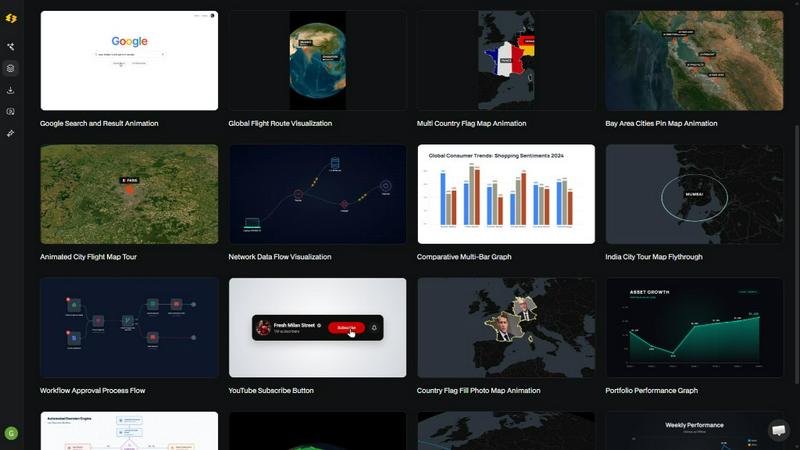
What if you could create a polished, professional motion graphic video just by describing it? That is the core promise of Easymotion, an AI-powered motion graphics generator and map animation platform designed for content creators, video editors, startup founders, and marketers. It transforms ideas, static visuals, and even raw data into animated videos without requiring you to master complex timeline-based editing software like After Effects. The platform supports a wide range of motion graphics, including SaaS product promos, animated flowcharts, dynamic data charts, UI explainers, interactive quizzes, and other visual storytelling formats. It also functions as a specialized map animation maker for flight routes, location pins, flag fill highlights, and geographic narratives. You can start from a simple text prompt, or upload images, spreadsheets, and PDFs to generate animation-ready scenes. Once your animation is generated, you can refine it through a conversational chat interface, adjusting colors, pacing, labels, layout, and visual style. Easymotion includes a premium template library for those who prefer a head start, allowing you to customize proven layouts for your brand or campaign. When your video is ready, you can export it as an MP4 or MOV file, including videos with transparent backgrounds for seamless integration into editing workflows, social content, product marketing, presentations, and client deliverables. It supports multiple aspect ratios, including 16:9 for YouTube, 9:16 for TikTok and Instagram Reels, 1:1 for square posts, and 4:5 for feed-friendly vertical formats. Built for speed and simplicity, Easymotion is the browser-based tool for anyone who needs to create motion graphics, map animations, and reusable video assets in minutes, not hours.
Features of Easymotion - AI Motion Graphic Generator
AI-Powered Chat-Based Animation Creation
The heart of Easymotion is its conversational AI interface. Instead of wrestling with keyframes, layers, and complex timelines, you simply describe the animation you want in plain English. The AI interprets your request and generates a complete, animated video scene. You can then refine the output by chatting further, asking the AI to adjust colors, change the pacing, update labels, modify the layout, or alter the overall visual style. This turns the entire animation workflow into a dialogue, making it accessible to anyone regardless of their technical editing skills.
Static Image and Data to Animation
Easymotion breathes life into static assets. You can upload an image, and the AI will analyze its content and add stunning motion effects, transforming a flat design into a dynamic visual. For data-driven storytelling, the platform allows you to upload CSV or XLSX files. The AI automatically parses your spreadsheet data and generates beautiful, animated charts and graphs. This feature is a game-changer for turning boring reports and static data into engaging, scroll-stopping video content that communicates insights more effectively.
Specialized Map Animation Maker
This feature sets Easymotion apart as a dedicated tool for geographic storytelling. You can create captivating map animations with ease, visualizing flight routes between cities, dropping location pins with custom labels, highlighting countries or regions with flag fills, and building multi-stop travel routes. The AI handles the map rendering and animation curves, allowing you to produce professional-quality geographic visuals for travel content, logistics explanations, business expansion stories, or global data presentations in a fraction of the time traditional methods require.
Versatile Export and Aspect Ratio Support
Easymotion is built for the modern multi-platform content creator. It supports exporting finished videos in both MP4 and MOV formats. A critical feature for professional editors is the ability to export with a transparent background (alpha channel), allowing you to drop the animation directly into video editing software like Premiere Pro or DaVinci Resolve without any additional masking. Furthermore, the platform offers quick aspect ratio presets for every major social platform: 16:9 for YouTube, 9:16 for TikTok and Instagram Reels, 1:1 for square posts, and 4:5 for feed-friendly vertical formats, ensuring your content is ready to publish anywhere.
Use Cases of Easymotion - AI Motion Graphic Generator
Social Media Video Creation for Creators
YouTubers, TikTokers, and Instagram creators can drastically accelerate their content production. Instead of spending hours in After Effects for a single video, they can use Easymotion to generate animated social media promos, explainer clips, and visual hooks by simply typing a prompt. For example, a travel creator can quickly produce a map animation showing their flight route, while a tech reviewer can animate a chart comparing product specs. This speed allows creators to post more frequently, grow their channels faster, and focus on storytelling rather than technical execution.
Rapid Campaign Production for Marketers
Marketing teams often face tight deadlines and a bottleneck of waiting on designers. Easymotion empowers marketers to create and iterate on video assets themselves. They can generate animated product demos, launch promos, or data-driven campaign recaps in minutes. The chat-based editing allows for instant feedback and changes, enabling teams to ship campaigns the same day. This self-serve capability keeps the content on-brand and responsive to real-time marketing needs without the back-and-forth emails with a design department.
Data Visualization for Storytellers and Analysts
Data storytellers and analysts who want their insights to stand out can use Easymotion to turn static charts into animated narratives. By uploading a spreadsheet, they can instantly generate animated bar charts, line graphs, and pie charts that reveal data points sequentially. This dynamic approach is far more engaging than a static image on a slide deck or social feed. It helps explain complex trends, growth metrics, or survey results in a way that captures attention and drives higher engagement, making data more accessible and impactful for a general audience.
Client Deliverables for Freelancers and Agencies
Freelance video editors and small agencies can use Easymotion as a powerful productivity tool to handle more projects. They can quickly create motion graphic assets for client presentations, social media packages, or explainer videos. The ability to export with a transparent background allows these assets to be seamlessly integrated into larger editing projects. By using Easymotion for the heavy lifting of motion graphics, professionals can take on more clients, deliver projects faster, and focus their creative energy on higher-level editing and storytelling tasks.
Frequently Asked Questions
How does the AI motion graphics generation process work?
The process is designed to be simple and intuitive. First, you describe the animation you want in plain English, like "Create a social media promo video for my coffee shop." You can also start by uploading an image, a spreadsheet, or a PDF. Second, the AI generates an initial animation. You can then refine the result using chat commands to adjust colors, timing, map styles, or text labels. The AI handles all the technical aspects, like keyframes and animation curves. Finally, once you are satisfied, you export your completed video as an MP4 or with a transparent background for use in other software.
What types of videos can I create with Easymotion?
You can create a wide variety of professional motion graphics. This includes social media videos for platforms like TikTok, Instagram, and YouTube. You can create animated map visuals like flight routes and location pins, turn static images into dynamic animations, and convert spreadsheet data into animated charts and graphs. The platform also supports creating product promos for SaaS tools, animated flowcharts for processes, and UI explainers. The template library offers a starting point for many of these formats, including maps, charts, and social media layouts.
Can I edit the animation after the AI generates it?
Yes, extensive editing is a core feature. After the AI generates your animation, you can edit it by chatting with the AI. You can ask it to change the color palette, adjust the pacing or speed of the animation, modify labels and text, rearrange the layout, or change the overall visual style. This iterative chat-based editing process gives you full creative control without needing to manually manipulate a timeline or keyframes, making it easy to tailor the final output to your exact specifications.
What export options and aspect ratios are available?
Easymotion offers flexible export options to fit various workflows. You can export your finished animation as an MP4 file for direct use on social media or websites, or as a MOV file. A key professional feature is the ability to export with a transparent background (alpha channel), which allows you to drop the video directly into other editing software like Adobe Premiere Pro without any background removal. The platform supports multiple aspect ratios, including 16:9 for landscape content, 9:16 for vertical videos, 1:1 for square posts, and 4:5 for feed-friendly vertical formats.
Explore more in this category:
Similar to Easymotion - AI Motion Graphic Generator

CloneWebsite
Clone any webpage pixel-perfect, export HTML/CSS/ZIP or React/Vue components.

ImageAgent
Create and edit AI images through conversation, using text or reference images and refining results in chat.

GenX
All-in-one AI workspace to generate images, videos, and audio with multiple leading AI models.

Bloom
An adaptive AI tutor that turns topics or your materials into courses, lessons, and answers tailored to how you learn.

AppIconGenerator
Generate iOS and Android app icons from any image and export all platform sizes for free.


Budgetpixel AI
Create AI images, videos, music, and designs in one workspace with multiple models, powerful editing tools, and API access.

CADCraft
Free open-source 2D CAD in Rust with precise drafting, DWG/DXF support, and MCP/JSON/CLI automation for AI agents.