

Dreamflow
Dreamflow empowers you to visually build real apps with AI while retaining seamless access to the underlying code.
About Dreamflow
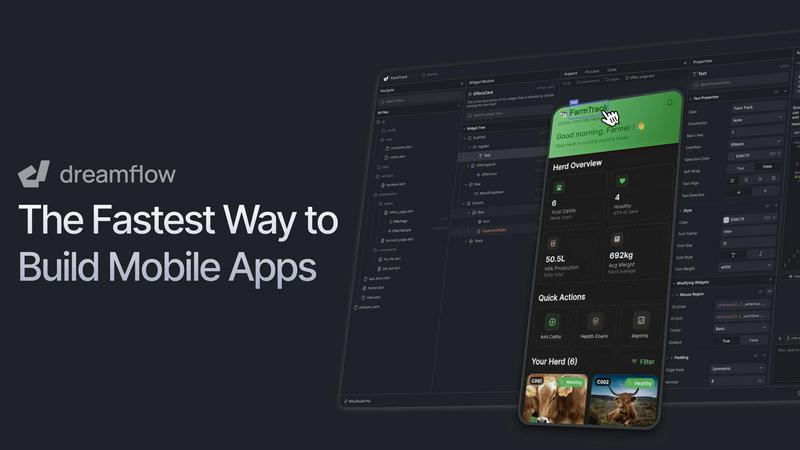
Dreamflow is a groundbreaking visual AI builder that transforms the way we create mobile applications. Imagine going from a fleeting idea to a polished, store-ready product all within a single, seamless environment. This innovative platform caters to a diverse audience, including entrepreneurs with ambitious visions, designers who prioritize precision, and developers who demand granular control. The core value proposition of Dreamflow lies in its uniquely synchronized workflow, allowing users to start by simply describing their app idea in natural language. The intelligent AI agent then assists in the crafting process, facilitating a smooth transition to a powerful visual editor for fine-tuning. Moreover, users can dive deep into clean, standards-compliant Flutter code when necessary. By maintaining perfect synchronization among all these surfaces—prompt, visual, and code—Dreamflow eradicates the traditional limitations of no-code tools and mere prototypes. This means you benefit from AI-assisted generation, intuitive visual design, and the confidence of scalable, exportable code ready for publication on various platforms like the App Store, Google Play, or the web.
Features of Dreamflow
Tri-Surface Editing
Dreamflow offers a revolutionary tri-surface editing experience that allows users to switch seamlessly between AI prompts, visual canvas, and code. This unique feature ensures that all changes made on one surface are instantly reflected on the others, maintaining a fluid and cohesive workflow.
AI-Powered Generation
Harness the power of an intelligent AI that is context-aware and understands best practices in app development. Dreamflow’s AI not only helps generate features but also scaffolds them in the right way, ensuring that your application is built with efficiency and quality.
Responsive Design Capabilities
Create robust, responsive applications that adapt to any device size, thanks to Dreamflow’s Flutter framework. With just a few clicks, you can deploy your app to major platforms including the App Store, Google Play, and the web, making distribution easier than ever.
Backend Integrations
Dreamflow simplifies backend integration by providing out-of-the-box support for Firebase and Supabase. This means you can build full-stack applications that are scalable from day one, without the hassle of complex backend setups.
Use Cases of Dreamflow
Rapid MVP Development
Entrepreneurs can leverage Dreamflow to transform their app ideas into Minimum Viable Products (MVPs) in minutes. The combination of AI assistance and visual design allows for quick iterations and testing in the market, bringing ideas to life faster than ever.
Collaborative Design and Development
Designers and developers can work in tandem using Dreamflow's tri-surface editing. Designers can visualize their concepts while developers can refine the code, ensuring that everyone is on the same page throughout the development process.
Educational Tools Creation
Educators can utilize Dreamflow to create interactive learning applications without needing extensive programming knowledge. By describing their educational concepts in natural language, they can build applications that enhance learning experiences.
Startups and Small Businesses
Small businesses can benefit from Dreamflow by allowing them to develop custom applications tailored to their unique needs. With quick deployment and scalable solutions, startups can efficiently meet their customers' demands and stay competitive.
Frequently Asked Questions
What platforms can I deploy my app on using Dreamflow?
With Dreamflow, you can deploy your applications to major platforms like the App Store, Google Play, and the web with just a few clicks, making it easy to reach your audience.
Do I need coding experience to use Dreamflow?
No, Dreamflow is designed for users of all skill levels. You can start with natural language descriptions and utilize the visual editor, while also having the option to dive into the code as needed.
How does the AI assist in the app creation process?
Dreamflow’s AI is context-aware and understands best practices, enabling it to generate features intelligently. This helps scaffold your application efficiently, reducing development time and enhancing quality.
What type of backend integrations does Dreamflow support?
Dreamflow supports Firebase and Supabase integrations out of the box, allowing you to build full-stack applications that scale easily from the beginning, without complex backend setups.
Explore more in this category:
Similar to Dreamflow

Wordy
Learn languages with real movie and TV show clips.

Forms Plugin
The #1 Native Form Builder Plugin for Framer - No Code, No Embeds, No External Platforms.

Bolt Scraper
Bolt Scraper lets you uncover hidden business leads across Google Maps, Facebook, and more with effortless precision.

Formly
Formly lets you create, publish, and analyze forms through any AI agent, then fine-tune every detail in a visual editor.

MECH AI
MECH AI is your pocket-sized automotive expert, providing instant diagnostics, repair advice, and parts recommendations for any vehicle.

No Code Website Builder
Discover premium no-code templates for websites and apps so you can launch in days without writing any code.

Biovelt
Biovelt is a free Link-in-Bio tool that lets you share unlimited links, track performance, and customize your page effortlessly.

Miget
Miget offers a flat-rate plan to deploy unlimited apps and services in under 40 seconds, eliminating surprise costs and per-service fees.