

CustomTattoo AI
Turn your tattoo ideas into realistic on-skin previews you can take straight to your artist.
About CustomTattoo AI
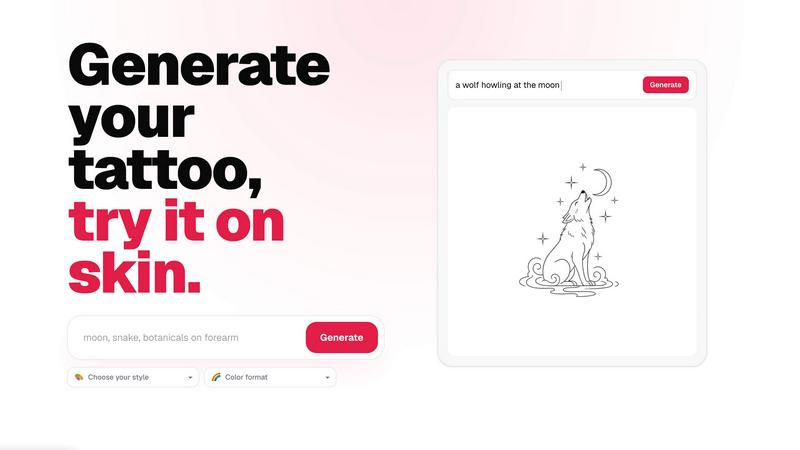
CustomTattoo AI is a purpose-built, AI-powered platform designed to transform the way people plan, visualize, and commit to their next tattoo. It serves as a complete digital studio for anyone exploring tattoo ideas, from first-time clients feeling the initial spark of inspiration to seasoned enthusiasts looking to refine a complex concept. At its core, the product allows users to describe their tattoo idea in plain language, choose from a vast array of artistic styles and color formats, and instantly generate multiple, unique design concepts. The true breakthrough lies in its on-skin preview feature, which lets you see exactly how a generated design will look and sit on your own body, using a photo of the desired placement area. This eliminates the guesswork and anxiety associated with permanent ink, allowing for confident decision-making before ever stepping into a studio. CustomTattoo AI is more than just a generator; it is a comprehensive tool for exploration and communication. Users can save their favorite designs to a personal library, compare different styles side-by-side, test various placements, and ultimately develop a clear, artist-ready visual direction. The platform is especially valuable for bridging the gap between a vague idea and a concrete reference, ensuring that both the client and the tattoo artist share a precise vision. By providing endless stylistic possibilities, realistic previews, and a structured workflow, CustomTattoo AI empowers users to take control of their creative journey, reduce the risk of regret, and walk into their appointment with absolute clarity and confidence.
Features of CustomTattoo AI
AI-Powered Tattoo Generator
The core engine of the platform transforms your descriptive ideas into tangible, high-quality tattoo concepts. Simply type in the subject, desired placement, and overall mood of your tattoo, and the AI processes your request to generate unique design options. You can refine your vision by selecting from a wide range of tattoo directions, such as gothic blackwork, traditional, minimalist, or watercolor, and choose your preferred color format, like black and grey, full color, or selective accents. This feature allows for rapid exploration of creative possibilities, turning abstract thoughts into visual reality in seconds.
On-Skin Try-On Preview
This is the platform's standout feature, designed to eliminate uncertainty before you commit to permanent ink. After generating a design, you can upload a photo of the specific body part where you plan to get the tattoo, such as your forearm, shoulder, or calf. The AI then realistically renders the design onto your skin in that photo, accounting for body contours and curvature. This allows you to assess the scale, placement, and overall aesthetic in a lifelike context, helping you decide if the design truly fits your body and personal style.
Personal Design Library
CustomTattoo AI provides a dedicated space for you to organize and manage all your generated tattoo concepts. As you explore different styles, variations, and placements, you can save your favorite designs to a personal library. This feature enables you to easily compare multiple options side-by-side, track your evolving preferences, and revisit ideas at any time. It serves as a curated collection of possibilities, making it simple to narrow down your choices and build a strong visual brief for your artist.
Artist-Ready Direction Output
The platform is engineered to produce outputs that are not just for personal inspiration but are directly useful for professional tattoo artists. The generated designs, combined with the on-skin preview, create a clear and detailed reference. You can present these visuals to your artist, showing them exactly what you want in terms of style, composition, and placement. This feature streamlines the consultation process, reduces the potential for miscommunication, and ensures that you and your artist are aligned before the first needle touches your skin.
Use Cases of CustomTattoo AI
First-Time Tattoo Exploration
For individuals who have never gotten a tattoo and are unsure where to start, CustomTattoo AI provides a risk-free environment for discovery. They can begin with a simple idea, like a crescent moon and botanicals, and generate various interpretations in different styles. The on-skin preview is especially crucial here, as it helps a first-timer understand how a design will look on their body, building confidence and reducing the fear of making a permanent mistake before they ever book an appointment.
Refining a Vague Concept
Many people have a general feeling or theme in mind for a tattoo but lack the visual vocabulary to articulate it. A user might think of a "gothic dragon with wide wings" but not know which artistic style suits them best. This platform allows them to input that core idea and then experiment with different directions, such as gothic blackwork, neo-traditional, or illustrative. They can see how the same subject transforms across styles, helping them pinpoint the exact aesthetic they are drawn to.
Testing Placement and Scale
Deciding where on the body a tattoo should go and how large it should be is a critical decision. Using the try-on preview, a user can upload photos of their arm, leg, or back and place a generated design in various spots. They can move it, resize it, and see how it interacts with their body's natural lines. This use case helps prevent the common regret of a design that is too small for a large area or a design that doesn't flow well with the body's musculature.
Preparing for an Artist Consultation
Instead of walking into a tattoo studio with a handful of Pinterest images and a vague description, a user can arrive with a clear, AI-generated design and a preview of it on their own skin. This provides the tattoo artist with an unambiguous reference point for style, composition, and placement. The user can confidently discuss modifications, knowing they have a solid foundation. This use case transforms the consultation from a guessing game into a collaborative refinement of a nearly finalized concept.
Frequently Asked Questions
Is CustomTattoo AI free to try?
Yes, you can start using CustomTattoo AI for free. When you sign up for an account, you are automatically given 3 free credits. These credits allow you to generate your first tattoo designs and use the on-skin preview feature without any initial payment. This is designed to let you test the platform's capabilities and see if it meets your needs before you commit to any purchase. No credit card is required to claim these free credits.
How does the on-skin preview work?
The on-skin preview is a simple and powerful tool. After the AI generates a tattoo design for you, you will be prompted to upload a clear photo of the body part where you want the tattoo. The platform's AI then analyzes the photo, mapping the contours and curves of your skin. It intelligently places the generated design onto that specific area, adjusting its perspective and shading to create a realistic preview of how the tattoo would look on your actual body.
Will there be hidden subscriptions?
No, there are no hidden subscriptions with CustomTattoo AI. The platform operates on a straightforward credit-based system. You start with 3 free credits. If you wish to generate more designs or use the preview feature beyond your initial credits, you can purchase additional credit packs. There are no recurring monthly or annual fees that you need to worry about. You only pay for the credits you use, giving you full control over your spending.
Can I take the design to my tattoo artist?
Absolutely. The designs and previews generated by CustomTattoo AI are intended to be used as a reference for your tattoo artist. The platform is built to help you create a clear and artist-ready direction. You can save your final design and the on-skin preview to show your artist. This provides them with a precise understanding of the style, composition, and placement you want, making the consultation and design process much more efficient and accurate.
Similar to CustomTattoo AI

Seedance 2.5 Free
Create polished AI videos from text or images online with Seedance 2.5 Free.

Presentation Intelligence
AI-native presentation and visual content platform that turns prompts, documents, images, videos, and data into polished, shareable decks.


StopScroll
AI YouTube thumbnail maker that generates multiple thumbnail concepts from a URL, title, or prompt.

IsThisAIImage
Free AI image checker: upload a photo for AI-generated and deepfake scores, a clear verdict, and optional generator hints.

Merge Two Photos
Merge two photos free in your browser: side by side, stacked, overlay, or AI. Download a clean PNG, no watermark.

HubVanta AI
HubVanta AI helps creators generate images and videos with advanced AI tools for visual content workflows.