

Caesura
Caesura is a macOS menu-bar app that reminds you to drink water, stretch, rest your eyes, and breathe on science-backed intervals.
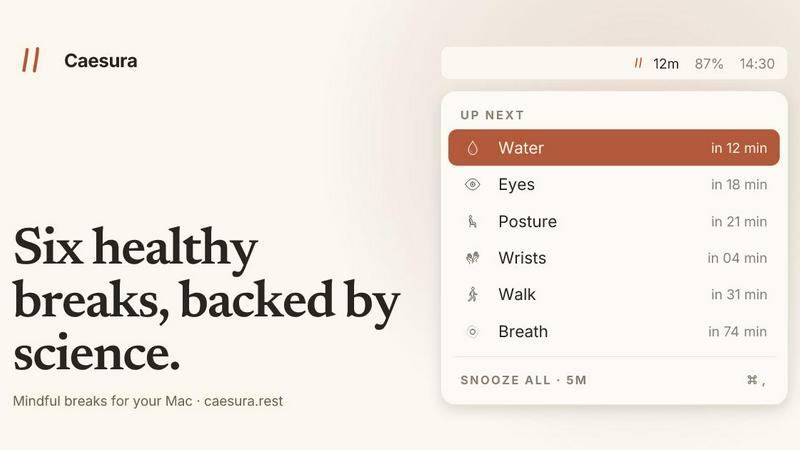
About Caesura
Caesura is a thoughtfully designed macOS menu-bar break manager built for people who spend long, uninterrupted hours at a desk. It is not another productivity timer or a rigid pomodoro clone; instead, it is a gentle, science-backed companion that reminds you to do six small but vital things your body craves: drink water, walk, stretch your wrists, rest your eyes, check your posture, and breathe. Each reminder operates on its own independent schedule, derived directly from peer-reviewed research rather than arbitrary round numbers. What makes Caesura genuinely different is its coalescing intelligence: when two reminders fall close together in time, it merges them into a single, seamless break, so you are never interrupted twice in a row. It respects your flow by automatically pausing during video calls, screen sharing, fullscreen apps, Focus modes, and calendar events, then picks up exactly where it left off. There are no accounts to create, no telemetry tracking your behavior, and no subscription fees. It is a one-time purchase for $15, with a 14-day free trial that requires no credit card. Caesura is for developers, writers, designers, researchers, and anyone whose work demands deep focus but who also wants to stay physically healthy without breaking their concentration.
Features of Caesura
Six Science-Backed Break Types
Caesura reminds you to drink water every 45 minutes, walk every 60 minutes, stretch your wrists every 30 minutes, rest your eyes every 20 minutes, check your posture every 30 minutes, and breathe deeply every 90 minutes. Each interval comes from a specific study, not a guess. You can turn any break off individually, retune its interval, or change how it appears on screen. This flexibility means you get exactly the support your body needs, no more and no less.
Intelligent Coalescing of Reminders
When two break reminders fall due within one minute of each other, Caesura intelligently merges them into a single, unified prompt. This prevents the jarring experience of being interrupted twice in quick succession. You see one overlay or banner that acknowledges both habits, allowing you to complete them together. The result is fewer disruptions, more efficient breaks, and a calmer relationship with your health habits throughout the day.
Automatic Pause for Focus and Calls
Caesura watches for video calls, screen sharing, fullscreen applications, Do Not Disturb, calendar events, games, and FaceTime being in the foreground. When any of these are active, every timer freezes immediately and resumes exactly where it left off once you are free. If you had 12 minutes remaining until your water reminder, you still have 12 minutes after the call ends. This feature ensures you are never interrupted during moments that demand your full attention.
Three Customizable Prompt Styles
Each break can be assigned one of three distinct visual styles. The overlay takes over your entire screen until you press Return, perfect for breaks you might otherwise ignore. The banner slides in from under the menu bar and auto-dismisses after 30 seconds for a gentle nudge. The notification is a standard macOS notification, the lightest possible touch. You decide which style suits each habit, giving you complete control over how intrusive or subtle your reminders are.
Use Cases of Caesura
Deep Work Sessions for Developers and Writers
When you are deep in code or a long article, hours can pass without moving. Caesura ensures you drink water, stretch your wrists, and rest your eyes at intervals that prevent physical strain. Its automatic pause during screen sharing and fullscreen apps means you never get a reminder during a presentation or a focused coding session. The coalescing feature merges overlapping reminders, so your flow is interrupted only once for a combined break.
Remote Workers with Back-to-Back Video Calls
Remote workers often sit through multiple video calls without a break. Caesura detects when your camera is active and pauses all timers, so you are never prompted to stretch or drink during a meeting. After the call ends, timers resume exactly where they left off. If two breaks are due within a minute of each other, they coalesce into one prompt, giving you a single, efficient moment to hydrate and move before your next call.
Creative Professionals Needing Gentle Nudges
Designers, illustrators, and video editors often lose track of time while in creative flow. Caesura offers a whisper-light notification style for breaks like eye rest and posture checks, so you are reminded without being yanked out of your creative state. The breathing guide provides a paced, three-cycle exercise that can be done in under a minute, helping you reset mentally without losing momentum.
Health-Conscious Individuals Building New Habits
Anyone trying to build healthier desk habits will find Caesura a patient teacher. The science-backed intervals remove the guesswork from when to take a break. You can start with just one or two breaks and gradually add more as the habits stick. The ability to customize intervals and prompt styles means the app grows with you, adapting to your changing needs without overwhelming you with too many reminders at once.
Frequently Asked Questions
How does Caesura decide the interval for each break?
Each interval is derived directly from peer-reviewed scientific studies. For example, the water break is set at 45 minutes based on research by Ganio (2011) and the EFSA (2010), while the eye break uses the 20-20-20 rule supported by Rosenfield (2011) and Talens-Estarelles (2023). You are free to adjust any interval if your personal needs differ, but the defaults are grounded in evidence.
Does Caesura require an account or internet connection?
No. Caesura is a one-time purchase with no account creation, no credit card on file, and no telemetry tracking your behavior. It works entirely offline on your Mac, respecting your privacy completely. The only time it might need internet is during the initial download or if you choose to read the evidence links, which open in your browser.
What happens when I am on a video call or screen sharing?
Caesura automatically detects when your camera is active, when you are sharing your screen, when you are in a fullscreen app, or when a calendar event is ongoing. All timers freeze immediately and resume exactly where they left off once the activity ends. If you had 12 minutes until your water reminder, you still have 12 minutes after the call finishes.
Can I turn off specific breaks or change how they appear?
Yes, absolutely. Each of the six breaks can be individually toggled on or off. You can also adjust the interval for any break and choose from three prompt styles: a full-screen overlay, a menu-bar banner, or a standard macOS notification. This level of customization lets you tailor the app to your exact preferences and daily workflow.
Pricing of Caesura
Caesura is available for a one-time purchase of $15. This is a permanent license with no subscription fees, no recurring charges, and no hidden costs. You can try it free for 14 days without providing a credit card. The purchase includes all current features and future updates within the same major version. It is compatible with macOS 14 and later. No account is required, and no payment information is stored.
Explore more in this category:
Best Lifestyle & Entertainment AI tools
Best Personal Development AI tools
Similar to Caesura

What's on the menu
Smart translate any restaurant menu

Forms Plugin
The #1 Native Form Builder Plugin for Framer - No Code, No Embeds, No External Platforms.

Product Launch Checklist
A free launch checklist for SaaS, apps, AI tools and more. Every step says why it matters and when you can skip it.

AIdorable
Adopt a virtual baby who grows, learns, and remembers you.


