
TemplateFox vs TrafficClaw
Side-by-side comparison to help you choose the right AI tool.

TemplateFox
Effortlessly design and automate dynamic PDF generation with TemplateFox's intuitive API and no-code integrations.
Last updated: February 28, 2026

TrafficClaw
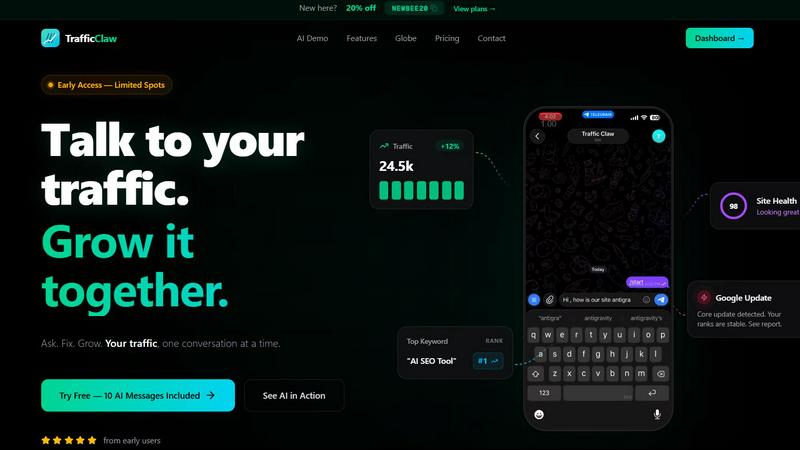
TrafficClaw is your AI analyst that answers questions about your real SEO and traffic data to help you grow.
Last updated: April 13, 2026
Visual Comparison
TemplateFox

TrafficClaw
Feature Comparison
TemplateFox
Intuitive Drag-and-Drop Editor
TemplateFox features an intuitive drag-and-drop editor that enables you to create beautiful templates effortlessly. This visual interface allows users to add elements like text, images, and tables without needing any coding knowledge, making document creation accessible to everyone.
Dynamic Data Binding
Harness the power of dynamic data binding with TemplateFox. This feature allows you to inject various data points into your templates seamlessly. Whether it involves names, addresses, or prices, everything updates automatically, ensuring that your documents are always accurate and up-to-date.
Adaptive Tables
With TemplateFox, your tables can grow in size as your data expands. This feature is particularly useful for invoices or reports that may vary in length. Whether you have 3 items or 300, the tables adapt fluidly, spanning multiple pages if necessary, which keeps your documents organized and professional.
Automatic QR Codes & Barcodes
TemplateFox simplifies the process of incorporating QR codes and barcodes into your documents. Generated on the fly from your data, these codes are scanner-ready and support various formats, such as Code128 and EAN-13, making your documents not only aesthetically pleasing but also functional.
TrafficClaw
AI Chat Analyst
This is the heart of TrafficClaw. Move beyond static reports and interact with your data using natural language. Ask complex questions like "Why did my traffic drop last Tuesday?" or "What are my top underperforming pages?" The AI analyst scours your connected GA4 and Search Console data to deliver instant, evidence-based verdicts and actionable recommendations, complete with supporting charts and insights, all within a conversational chat interface.
SEO Intelligence Suite
Proactively manage your search presence with a suite of automated SEO tools. TrafficClaw continuously monitors for critical issues like keyword gaps where competitors rank but you don't, content decay as older posts lose traction, and keyword cannibalization where your own pages compete against each other. It also includes an AEO (Answer Engine Optimization) engine to help optimize your content for AI-driven search experiences, keeping you ahead of evolving search trends.
Integrated Analytics Dashboard
Consolidate your key metrics into a single, real-time overview. Stop switching tabs between different platforms. This dashboard brings together live visitor counts, traffic trend visualizations, bounce rates, conversion funnel data, and top referrers. It provides a unified, configurable view of your site's health and performance, making it effortless to spot trends and anomalies at a glance.
Live Visitor Globe & Embed
Visualize your global audience in real-time with an interactive 3D globe. This feature plots live visitor activity by country directly on your TrafficClaw dashboard. Uniquely, you can also generate an embed code to showcase this live globe on your own public website, displaying anonymized visitor locations and activity feeds without needing to install any additional tracking scripts.
Use Cases
TemplateFox
Event Management
Imagine managing a large event where hundreds of attendees require personalized certificates. With TemplateFox, you can automate the generation of unique certificates in seconds, allowing you to focus on the event itself rather than the paperwork.
E-commerce Invoicing
For e-commerce businesses, maintaining consistent and professional invoicing is crucial. TemplateFox allows you to create customizable invoice templates that can automatically populate with customer data, ensuring seamless and accurate transactions with minimal effort.
Educational Institutions
Schools and universities can benefit from TemplateFox by automating the creation of diplomas and certificates of achievement. This not only saves time but also enhances the professionalism and branding of the institution’s documents.
Logistics and Shipping
In the logistics sector, TemplateFox can be utilized to generate packing slips and shipping labels that are customized for each order. This ensures that your documents are always aligned with current shipping details, improving operational efficiency and customer satisfaction.
TrafficClaw
Diagnosing Sudden Traffic Drops
When your analytics show an unexpected traffic decline, instead of manually cross-referencing data for hours, you can directly ask the AI analyst "What caused my traffic drop on March 15th?" It will analyze your data, pinpoint the cause—such as a Google core update impacting specific pages, a technical crawl error, or a drop in ranking for a key keyword—and provide a step-by-step fix.
Uncovering Content Optimization Opportunities
Discover which pieces of your existing content have the most potential for improvement. Ask the AI to "find blog posts with declining traffic but high historical authority." It will identify candidates for content refresh, suggest new keyword targets from its gap analysis, and can even help generate updated copy or optimal internal linking structures to revive their performance.
Monitoring Site Health Proactively
Use TrafficClaw as an early warning system. The integrated site audit tool continuously checks page-level performance, Core Web Vitals, and technical SEO factors. You can ask for a summary of critical issues or set up alerts for when health scores dip, allowing you to fix problems like slow page speed or broken links before they significantly impact user experience and rankings.
Demonstrating Real-Time Audience Engagement
For agencies, creators, or businesses wanting to showcase their live reach, the embeddable visitor globe provides a powerful visual tool. Embed it on a landing page, portfolio, or during a live stream to visually demonstrate active, global engagement in real time, adding a layer of social proof and dynamism to your public-facing presence.
Overview
About TemplateFox
TemplateFox is an innovative SaaS platform that revolutionizes the way businesses and developers create professional documents. Designed for users who may not have extensive technical skills, TemplateFox allows you to automate the generation of PDFs with ease. At the heart of this platform is a user-friendly, visual drag-and-drop editor that empowers you to design stunning templates for a variety of documents, including invoices, certificates, reports, and more, without the need for any HTML or CSS expertise. The real brilliance of TemplateFox lies in its ability to connect design prowess with automation capabilities. By leveraging a simple API call or popular no-code tools like Zapier, users can generate thousands of personalized, data-driven PDFs in mere seconds. This means that whether you need to send out unique certificates after an event or streamline an entire invoicing workflow, TemplateFox ensures that your documents maintain perfect brand consistency. With a generous offering of 100 free PDFs per month, TemplateFox is an ideal solution for indie hackers, developers, and businesses looking to enhance their document processes and explore new efficiencies in automated workflows.
About TrafficClaw
Ever stared at a sudden traffic dip in your analytics, feeling lost in a sea of graphs that offer no answers? TrafficClaw transforms that confusion into a clear, actionable conversation. It's an AI-powered command center that connects directly to your Google Analytics 4 and Search Console data, allowing you to simply ask questions about your traffic and get intelligent, data-backed verdicts. Instead of piecing together clues from disparate tools, you engage with an AI analyst that examines your real performance, identifies root causes like keyword cannibalization or content decay, and provides specific fixes. Built for website owners, marketers, and developers who crave clarity, TrafficClaw consolidates analytics, SEO intelligence, site audits, and content tools into one intuitive interface. The core promise is profound yet simple: stop guessing why your traffic changes and start having a dialogue that drives measurable growth, all powered by your own data.
Frequently Asked Questions
TemplateFox FAQ
How does TemplateFox handle data integration?
TemplateFox offers robust integration capabilities through its API and no-code platforms like Zapier. This allows users to connect various data sources seamlessly, ensuring that your templates are always populated with the latest information.
Is it possible to customize the templates?
Absolutely! TemplateFox provides a fully customizable template editor where you can adjust every component, including colors, sizes, and positions, allowing for a unique touch that aligns with your brand identity.
Can I use TemplateFox without coding skills?
Yes! TemplateFox is designed for users of all skill levels. Its drag-and-drop editor and no-code integrations make it easy for anyone to create and automate PDF generation without writing a single line of code.
What types of documents can I create with TemplateFox?
TemplateFox supports the creation of a wide range of professional documents, including invoices, certificates, reports, shipping labels, and more. This versatility makes it an ideal tool for various industries and use cases.
TrafficClaw FAQ
How does TrafficClaw access my data?
TrafficClaw uses secure, read-only Google OAuth to connect to your Google Analytics 4 and Search Console accounts. This means we never see your password, and our access is limited to viewing your analytics data only. Your data remains in your Google account and is not sold or used to train public AI models.
What kind of questions can I ask the AI Analyst?
You can ask virtually any question about your website's performance and SEO. This includes diagnostic questions ("Why did my conversions drop?"), exploratory queries ("What are my top keyword opportunities this month?"), comparative analysis ("How does my mobile traffic compare to desktop?"), and requests for specific actions ("Generate meta descriptions for my top 5 pages.").
Is there a setup or configuration required?
Setup is designed to be virtually instant. After signing in with Google, TrafficClaw auto-detects your connected GA4 properties and Search Console sites. Your dashboard and AI chat are populated with insights immediately, requiring no manual configuration, tag installation, or complex settings to start getting answers.
Can I use the live globe on any website?
Yes, the interactive visitor globe can be embedded on any website or CMS that supports iframes, such as WordPress, Webflow, or a custom-coded site. You simply copy the provided iframe code snippet and paste it into your site's HTML. It pulls real-time data from your connected GA4 property without requiring any additional tracking code on your site.
Alternatives
TemplateFox Alternatives
TemplateFox is a powerful SaaS platform designed for productivity and management, enabling users to visually create templates and automate PDF generation without the need for complex coding. With its intuitive drag-and-drop editor, it appeals to a wide range of users, from indie hackers to established businesses seeking efficient document solutions. However, users often explore alternatives due to various factors such as pricing structures, feature sets, or specific platform needs that may not be fully met by TemplateFox. When choosing an alternative, it's essential to assess compatibility with your existing workflows, the flexibility of features offered, and the overall cost-effectiveness to ensure you find a solution that aligns with your operational goals.
TrafficClaw Alternatives
TrafficClaw is an AI assistant for SEO and analytics, designed to let you ask direct questions about your traffic and get actionable answers from your connected data sources like GA4 and Search Console. It belongs to the growing category of conversational analytics tools that aim to simplify complex data interpretation. Users often explore alternatives for various reasons, such as budget constraints, the need for different feature sets, or compatibility with other platforms in their tech stack. Some may seek tools with broader integrations, more advanced reporting, or a different approach to data visualization. When evaluating other options, consider the core ability to translate raw data into clear insights. Look for robust data source connections, the intelligence of the analysis provided, and how seamlessly the tool fits into your existing workflow. The goal is to move from static graphs to dynamic, understandable guidance for your website's performance.