
SimpleDraw vs vaethat
Side-by-side comparison to help you choose the right AI tool.

SimpleDraw
Effortlessly create accurate floor plans and room layouts online with SimpleDraw's intuitive web-based drawing tool.
Last updated: March 1, 2026

vaethat
Discover the AI that upscales and refines your architectural renders with specialized precision.
Last updated: February 28, 2026
Visual Comparison
SimpleDraw
vaethat

Feature Comparison
SimpleDraw
Floor Plan Mode
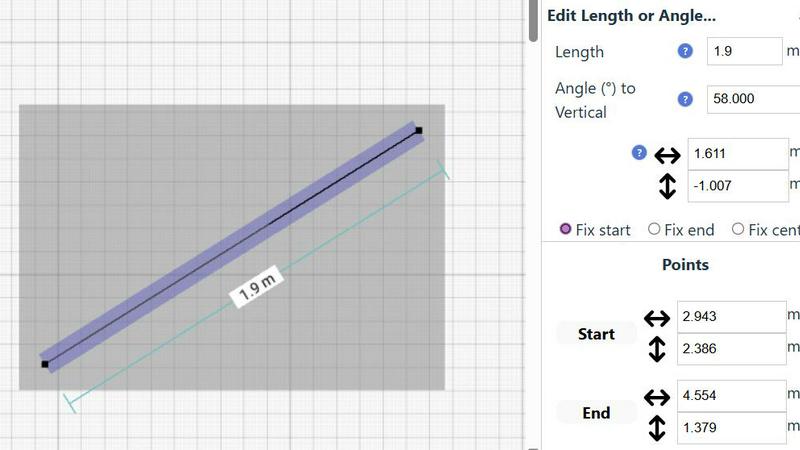
The Floor Plan Mode is a specialized feature designed to facilitate the creation of accurate floor plans for various spaces like rooms, apartments, and houses. With just a single click, you can draw walls and add essential elements such as windows and doors, while real-time measurements provide feedback as you adjust your design.
Smart Alignment System
This innovative system enhances your drawing experience by assisting you in positioning points and lines with pinpoint accuracy. As you move your mouse, SimpleDraw visually indicates the optimal placement for your lines or points, ensuring that everything aligns perfectly. For greater precision, you can zoom in and adjust your elements with ease.
Flexible Zoom and Variable Precision
With SimpleDraw, you can effortlessly zoom in and out to focus on any part of your drawing. The alignment precision adapts based on your zoom level, allowing you to control the detail as needed. This feature is particularly useful when fine-tuning intricate designs or layouts.
Comprehensive Measurement System
SimpleDraw offers a robust measurement system that lets you display and control measurements according to your preferences, with options for both metric and US units. Contextual measurements are dynamically shown as you work, helping you maintain accuracy in your drawings and ensuring that everything is just as you envisioned.
vaethat
Specialized Archviz AI Engine
At the heart of vaethat is an AI model trained exclusively on architectural visualization. This means it doesn't just see pixels; it understands context like building geometry, material properties, and natural lighting. The result is enhancement that feels authentic to the scene, intelligently boosting realism in vegetation, character integration, and material surfaces without the generic, over-processed look common in general AI tools.
Multi-Image Workspace & Batch Processing
Why enhance images one by one when you can process an entire project at once? vaethat's Multi-Image Workspace allows you to drag and drop entire folders of renders. You can save sessions, apply consistent enhancement settings across multiple images, and upscale everything in a single operation. This feature is a game-changer for managing large archviz projects, ensuring visual consistency and saving immense amounts of time.
Preset-Based, No-Prompt Enhancement
vaethat eliminates the complexity and trial-and-error of slider adjustments and text prompts. The process is refreshingly straightforward: upload your render, select a specialized preset designed for archviz, and let the AI work. This "no wasted time, no wasted credits" approach provides predictable, high-quality results instantly, allowing you to focus on design rather than tool tweaking.
Design-Intent Preservation & Cleanup
A powerful enhancer must also be a faithful guardian of your original vision. vaethat is engineered to maintain the core composition and design of your render while it works. It simultaneously performs crucial cleanup, reducing noise and rendering artifacts like fireflies or grain, resulting in a polished, presentation-ready image that remains unmistakably yours.
Use Cases
SimpleDraw
Kitchen and Bathroom Renovations
Planning a renovation project for your kitchen or bathroom? SimpleDraw allows you to create accurate floor plans that help visualize layouts before you start any physical work. This ensures that all elements fit perfectly in your intended design.
Room Layouts and Furniture Planning
Before purchasing new furniture, use SimpleDraw to design layouts for your bedroom, living room, or office. This feature allows you to see how different pieces will fit within your space, ultimately saving time and money by preventing ill-suited purchases.
House and Apartment Plans
For homeowners and real estate professionals alike, SimpleDraw enables the creation of complete floor plans suitable for home projects or rental listings. This feature helps in space planning, making it easier to understand how to utilize every inch of your property effectively.
Community-Driven Feature Development
With SimpleDraw, users can actively participate in the development of the platform by providing feedback and suggesting improvements. Engaging with the community through Discord allows you to influence future features, making it a tool that evolves based on real user needs.
vaethat
Finalizing Client Presentation Deccks
Before a crucial client meeting, you need your renders to be immaculate. vaethat can quickly process a full set of project images, enhancing sharpness, material definition, and lighting balance to create a cohesive and professionally stunning presentation deck that communicates design value with maximum impact and clarity.
Enhancing Portfolio Pieces
For visualizers and architects building their portfolio, every image must stand out. vaethat helps refine key project renders, bringing out fine textures in wood and concrete, adding depth to landscaping, and ensuring characters look naturally integrated. This elevates the overall perceived quality and realism of your portfolio, attracting better clients and opportunities.
Speeding Up Post-Production Workflow
Manual post-processing in Photoshop can be time-consuming. vaethat integrates as a powerful first step, handling global enhancements like upscaling, noise reduction, and base lighting adjustments automatically. This frees up valuable time for artists to focus on creative compositing and detailed touch-ups rather than repetitive corrective tasks.
Improving Renders from Real-Time Engines
Renders from real-time visualization tools like Enscape or Lumion are fast but can sometimes lack fine detail and material sophistication. vaethat is perfect for giving these images an extra layer of polish, enhancing texture clarity, refining edges, and boosting overall realism to bridge the gap between speedy previews and final-quality imagery.
Overview
About SimpleDraw
SimpleDraw is a cutting-edge online tool tailored for individuals ranging from casual users to professionals who are keen on creating precise and accurate scale drawings effortlessly. This versatile platform caters to a variety of needs, whether you're initiating a DIY home project, planning a room renovation, or designing an entirely new layout. SimpleDraw empowers users by providing a user-friendly interface that eliminates the need for prior CAD experience, making it accessible for everyone—from homeowners to hobbyists. The standout feature of SimpleDraw is its completely free service, allowing users to dive into their drawing projects without the hassle of login or registration. This means you can start crafting detailed floor plans and technical drawings instantly. With SimpleDraw, you enjoy the convenience and precision of digital tools while retaining the simplicity and familiarity of traditional pen and paper methods, making it an essential resource for anyone looking to visualize their space.
About vaethat
What if the final step in your architectural visualization workflow could be as simple as a single click, yet produce results that feel meticulously hand-crafted? Welcome to vaethat, a specialized AI tool designed to solve a very specific challenge: elevating 3D architectural renders from good to breathtakingly realistic. Unlike general-purpose AI image enhancers that require guesswork and prompts, vaethat is built from the ground up for archviz professionals. It acts as an intelligent post-production assistant, trained exclusively on architectural visualization imagery. This deep specialization allows it to intuitively understand the nuances of buildings, materials, and lighting. Its core mission is to upscale and enhance your renders while faithfully preserving your original design intent. Imagine uploading a render and receiving back a version with dramatically improved clarity, sharper details, more defined materials, and balanced lighting—all without introducing unwanted artifacts or altering the composition. For architects, 3D artists, and visualization studios, vaethat unlocks a new level of efficiency and quality, transforming presentation-ready images for client decks, portfolios, and approvals with unprecedented speed and consistency.
Frequently Asked Questions
SimpleDraw FAQ
How do I start drawing with SimpleDraw?
You can start drawing immediately by visiting the SimpleDraw website. There's no need for sign-up or software installation, allowing you to dive right into your project.
Is SimpleDraw suitable for beginners?
Absolutely! SimpleDraw is designed to be user-friendly, requiring no prior CAD experience. Its intuitive interface makes it accessible for beginners while offering powerful features for advanced users.
Can I save my drawings?
While SimpleDraw is a free online tool, the ability to save drawings may depend on your browser settings. It is advisable to download or take screenshots of your work as a backup.
What types of measurements can I use in SimpleDraw?
SimpleDraw provides a comprehensive measurement system that allows you to choose between metric and standard US units. You can also customize which measurements are displayed as you create your drawings.
vaethat FAQ
How does vaethat differ from manual editing or general AI enhancers?
Manual editing requires significant skill and time for consistent results. General AI enhancers are trained on all image types and often require prompts and tweaking, risking unnatural effects on architectural elements. vaethat is specialized; it applies archviz-specific intelligence automatically, delivering consistent, context-aware enhancements that preserve design intent without the manual labor or guesswork.
What software is vaethat compatible with?
vaethat is renderer-agnostic. It works seamlessly with images exported from any major software, including V-Ray, Corona, Lumion, Enscape, 3ds Max, SketchUp, Blender, and more. You simply upload your final rendered image file (like PNG or JPG), and vaethat processes it independently of the source application.
Does vaethat use my uploaded renders to train its AI models?
No. According to the provided content, vaethat does not use your architectural renders to train its AI models. Your project data and images remain confidential and are not used for further model training, protecting your intellectual property and client privacy.
What is the typical processing time for an image?
Processing is very fast, typically taking just seconds per image. The exact speed can depend on the image resolution and server load, but the platform is built for efficiency, allowing for rapid batch processing of entire projects so you can iterate and deliver without delay.
Alternatives
SimpleDraw Alternatives
SimpleDraw is an innovative web-based tool designed for creating precise scale drawings and detailed floor plans. It caters to a diverse audience, from casual users embarking on DIY projects to professionals in need of accurate technical drawings. Given its user-friendly nature and free access model, many users may seek alternatives to explore different features or platforms that better align with their project requirements, budget considerations, or specific functionality needs. When searching for an alternative, it’s essential to consider factors such as ease of use, available features, pricing structure, and compatibility with various devices. --- [{"question": "What is SimpleDraw?", "answer": "SimpleDraw is an online tool that allows users to create precise scale drawings and floor plans effortlessly."}, {"question": "Who is SimpleDraw for?", "answer": "SimpleDraw is designed for everyone, including homeowners, hobbyists, and professionals looking to create accurate technical drawings."}, {"question": "Is SimpleDraw free?", "answer": "Yes, SimpleDraw offers a free service with no login or registration required."}, {"question": "What are the main features of SimpleDraw?", "answer": "The main features of SimpleDraw include accurate scale drawing capabilities, a specialized floor plan creator, a smart alignment system, and comprehensive measurement tools."}]
vaethat Alternatives
Vaethat is an AI-powered tool in the design software category, specifically built for architectural visualization professionals. It focuses on intelligently upscaling and refining 3D renders to enhance clarity and realism for final presentations. Users often explore alternatives for various practical reasons. This could be due to budget constraints, a need for different feature sets like broader image editing capabilities, or compatibility with specific operating systems and existing software workflows. The search for the right tool is a natural part of optimizing one's creative process. When evaluating other options, key considerations include the core AI enhancement capabilities for architectural imagery, the ease of integrating into a current pipeline, and the value offered for the investment. The ideal solution should not only improve image quality but also fit seamlessly into how you work, saving time while elevating your final output.