
Renderly vs TrafficClaw
Side-by-side comparison to help you choose the right AI tool.

Renderly
Discover how Renderly transforms code into thousands of personalized videos at enterprise scale.
Last updated: February 28, 2026

TrafficClaw
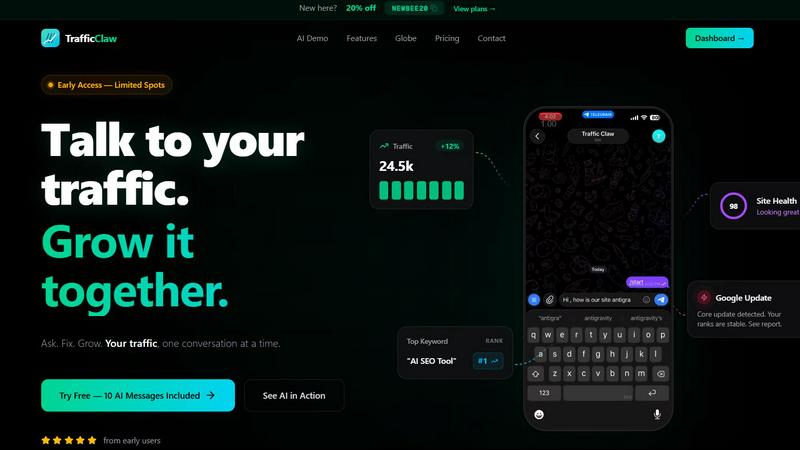
TrafficClaw is your AI analyst that answers questions about your real SEO and traffic data to help you grow.
Last updated: April 13, 2026
Visual Comparison
Renderly

TrafficClaw
Feature Comparison
Renderly
Programmatic Video Generation API
The heart of Renderly is its robust, RESTful API that allows developers to generate videos entirely through code. You can trigger video renders, check job statuses, and manage workflows programmatically. This API-first design means you can integrate dynamic video creation directly into your applications, CRMs, or data pipelines. It supports webhooks for asynchronous processing and comes with comprehensive SDKs, making it seamless to embed powerful video generation capabilities into any tech stack, from a simple web app to a complex enterprise system.
JSON-Configurable Template System
Renderly uses a powerful template system where video designs are defined and controlled using JSON configuration. Developers and designers can create a master template with placeholder variables for text, images, and other assets. Then, for each render, you simply pass a unique JSON object to the API, and Renderly swaps in the content to produce a distinct video. This allows for incredible flexibility and dynamic content generation, enabling the creation of thousands of personalized videos from a single template design.
Enterprise-Grade Scalable Infrastructure
Built on a cloud-native platform, Renderly's infrastructure is engineered for high-volume workloads. It features auto-scaling capabilities that automatically handle spikes in demand, whether you're rendering one video or one hundred thousand concurrently. This ensures consistent performance and reliability, backed by a 99.9% uptime SLA. You never have to worry about provisioning servers or managing rendering queues; the platform scales effortlessly with your business needs.
Transparent Credit-Based Pricing
Renderly operates on a transparent, pay-per-render credit system. This model means you only pay for the video seconds you actually generate, leading to potential savings of up to 90% compared to fixed-fee or subscription-based competitors. The pricing is designed to be clear, with volume discounts available for high-throughput enterprise customers. This approach provides cost predictability and aligns expenses directly with usage and value.
TrafficClaw
AI Chat Analyst
This is the heart of TrafficClaw. Move beyond static reports and interact with your data using natural language. Ask complex questions like "Why did my traffic drop last Tuesday?" or "What are my top underperforming pages?" The AI analyst scours your connected GA4 and Search Console data to deliver instant, evidence-based verdicts and actionable recommendations, complete with supporting charts and insights, all within a conversational chat interface.
SEO Intelligence Suite
Proactively manage your search presence with a suite of automated SEO tools. TrafficClaw continuously monitors for critical issues like keyword gaps where competitors rank but you don't, content decay as older posts lose traction, and keyword cannibalization where your own pages compete against each other. It also includes an AEO (Answer Engine Optimization) engine to help optimize your content for AI-driven search experiences, keeping you ahead of evolving search trends.
Integrated Analytics Dashboard
Consolidate your key metrics into a single, real-time overview. Stop switching tabs between different platforms. This dashboard brings together live visitor counts, traffic trend visualizations, bounce rates, conversion funnel data, and top referrers. It provides a unified, configurable view of your site's health and performance, making it effortless to spot trends and anomalies at a glance.
Live Visitor Globe & Embed
Visualize your global audience in real-time with an interactive 3D globe. This feature plots live visitor activity by country directly on your TrafficClaw dashboard. Uniquely, you can also generate an embed code to showcase this live globe on your own public website, displaying anonymized visitor locations and activity feeds without needing to install any additional tracking scripts.
Use Cases
Renderly
Personalized Marketing & Sales Videos
Imagine sending a video email where the recipient's name, company logo, and a specific product offer are seamlessly integrated into the footage. Renderly enables the mass generation of hyper-personalized video content for sales outreach, onboarding sequences, and customer win-backs. By pulling data from a CRM, each customer receives a unique video that feels individually crafted, dramatically increasing engagement and conversion rates at scale.
Automated Social Media Content Creation
For brands and agencies managing multiple social channels, creating fresh, platform-specific content is a constant challenge. Renderly can automate the production of bulk social media videos. A template can be designed for Instagram Stories, TikTok clips, or LinkedIn ads, and then populated with daily trending topics, new product features, or user-generated content feeds, outputting hundreds of formatted videos ready for publishing without manual editing.
Data-Driven Reporting & Visualization
Transform dry spreadsheets and analytics dashboards into engaging video summaries. Renderly can pull data from business intelligence tools to generate weekly performance reports, animated KPI summaries, or investor updates. Charts, graphs, and key metrics are brought to life with motion graphics, making complex data easily digestible and shareable in a compelling video format that static reports cannot match.
E-learning & Dynamic Training Materials
Educational platforms and corporate training programs can use Renderly to create customized learning modules. A single course template can be dynamically populated with different case studies, learner names, or region-specific information. This allows for scalable production of tailored training videos, certification summaries, or interactive educational content that adapts to the viewer, enhancing the learning experience.
TrafficClaw
Diagnosing Sudden Traffic Drops
When your analytics show an unexpected traffic decline, instead of manually cross-referencing data for hours, you can directly ask the AI analyst "What caused my traffic drop on March 15th?" It will analyze your data, pinpoint the cause—such as a Google core update impacting specific pages, a technical crawl error, or a drop in ranking for a key keyword—and provide a step-by-step fix.
Uncovering Content Optimization Opportunities
Discover which pieces of your existing content have the most potential for improvement. Ask the AI to "find blog posts with declining traffic but high historical authority." It will identify candidates for content refresh, suggest new keyword targets from its gap analysis, and can even help generate updated copy or optimal internal linking structures to revive their performance.
Monitoring Site Health Proactively
Use TrafficClaw as an early warning system. The integrated site audit tool continuously checks page-level performance, Core Web Vitals, and technical SEO factors. You can ask for a summary of critical issues or set up alerts for when health scores dip, allowing you to fix problems like slow page speed or broken links before they significantly impact user experience and rankings.
Demonstrating Real-Time Audience Engagement
For agencies, creators, or businesses wanting to showcase their live reach, the embeddable visitor globe provides a powerful visual tool. Embed it on a landing page, portfolio, or during a live stream to visually demonstrate active, global engagement in real time, adding a layer of social proof and dynamism to your public-facing presence.
Overview
About Renderly
What if you could generate a video as easily as you generate a PDF? Renderly is a video infrastructure platform that makes this vision a reality, transforming the complex, manual process of video rendering into a simple, automated API call. At its core, Renderly is a programmatic video generation platform designed for developers and creators who need to produce video content at scale. It serves a fascinating niche, bridging the gap between dynamic data and compelling visual storytelling. Imagine feeding a JSON payload with text, images, and data points into an API and receiving a fully rendered, personalized video in return. This is the powerful automation Renderly provides. It's built for enterprises, marketing teams, and software developers who are bogged down by the limitations of manual video editing or the complexities of building in-house rendering solutions. The main value proposition is clear: unprecedented scalability, significant cost reduction (up to 90% compared to competitors), and a developer-first experience. By offering a template-driven system where videos are defined by configurable JSON, Renderly empowers businesses to create thousands of unique videos for use cases like personalized marketing campaigns, data-driven reports, bulk social media content, and dynamic motion graphics, all without ever opening a traditional video editor.
About TrafficClaw
Ever stared at a sudden traffic dip in your analytics, feeling lost in a sea of graphs that offer no answers? TrafficClaw transforms that confusion into a clear, actionable conversation. It's an AI-powered command center that connects directly to your Google Analytics 4 and Search Console data, allowing you to simply ask questions about your traffic and get intelligent, data-backed verdicts. Instead of piecing together clues from disparate tools, you engage with an AI analyst that examines your real performance, identifies root causes like keyword cannibalization or content decay, and provides specific fixes. Built for website owners, marketers, and developers who crave clarity, TrafficClaw consolidates analytics, SEO intelligence, site audits, and content tools into one intuitive interface. The core promise is profound yet simple: stop guessing why your traffic changes and start having a dialogue that drives measurable growth, all powered by your own data.
Frequently Asked Questions
Renderly FAQ
What kind of inputs does the Renderly API accept?
The Renderly API primarily accepts JSON payloads that define the video to be rendered. This JSON references a pre-built template and provides the dynamic variables for that specific render, such as text strings, image URLs, colors, and timing information. You can also manage assets through the platform. The API is designed to be flexible, allowing you to trigger renders from any system that can send an HTTP POST request with the correct data structure.
How does the template system work for creating videos?
Templates are the blueprints for your videos. You first design a video composition using Renderly's online tools or by defining its structure in JSON. This template includes layers for text, images, videos, and shapes, along with their animations and timing. Placeholder variables are set within this template. When you call the render API, you provide a data object that fills these placeholders, generating a unique video. This separates design from data, enabling mass personalization.
Is Renderly suitable for real-time or live video generation?
Renderly is optimized for asynchronous, on-demand video generation rather than real-time streaming. The rendering process, while fast, takes time to process frames and encode the final video file. It's perfect for use cases where videos are generated in response to an event (like a user action or a data update) and then delivered via a link or download shortly after, such as for personalized welcome videos or automated report generation.
What measures are in place for security and reliability?
Renderly is built as an enterprise-grade platform with a strong focus on security and reliability. The infrastructure boasts a 99.9% uptime SLA. From a security perspective, it features SOC 2 compliance, data encryption in transit and at rest, strict access controls, and comprehensive audit logging. This ensures that your video data and rendering jobs are handled with the highest standards of operational security and availability.
TrafficClaw FAQ
How does TrafficClaw access my data?
TrafficClaw uses secure, read-only Google OAuth to connect to your Google Analytics 4 and Search Console accounts. This means we never see your password, and our access is limited to viewing your analytics data only. Your data remains in your Google account and is not sold or used to train public AI models.
What kind of questions can I ask the AI Analyst?
You can ask virtually any question about your website's performance and SEO. This includes diagnostic questions ("Why did my conversions drop?"), exploratory queries ("What are my top keyword opportunities this month?"), comparative analysis ("How does my mobile traffic compare to desktop?"), and requests for specific actions ("Generate meta descriptions for my top 5 pages.").
Is there a setup or configuration required?
Setup is designed to be virtually instant. After signing in with Google, TrafficClaw auto-detects your connected GA4 properties and Search Console sites. Your dashboard and AI chat are populated with insights immediately, requiring no manual configuration, tag installation, or complex settings to start getting answers.
Can I use the live globe on any website?
Yes, the interactive visitor globe can be embedded on any website or CMS that supports iframes, such as WordPress, Webflow, or a custom-coded site. You simply copy the provided iframe code snippet and paste it into your site's HTML. It pulls real-time data from your connected GA4 property without requiring any additional tracking code on your site.
Alternatives
Renderly Alternatives
Renderly is a video infrastructure platform in the automation and programmatic video generation category. It empowers users to create thousands of videos through code, an API, or an online editor, moving beyond manual rendering for personalized content and data-driven motion graphics. Users often explore alternatives for various reasons. These can include budget constraints, the need for different feature sets like more advanced editing or specific integrations, or simply a preference for a different user experience or platform ecosystem. The search for the right tool is a natural part of finding the perfect workflow fit. When evaluating alternatives, consider your core needs. Key factors often include the primary use case, such as social media clips versus complex data visualizations, the importance of API depth versus a no-code interface, scalability for large batches, and of course, the overall pricing structure that aligns with your project volume.
TrafficClaw Alternatives
TrafficClaw is an AI assistant for SEO and analytics, designed to let you ask direct questions about your traffic and get actionable answers from your connected data sources like GA4 and Search Console. It belongs to the growing category of conversational analytics tools that aim to simplify complex data interpretation. Users often explore alternatives for various reasons, such as budget constraints, the need for different feature sets, or compatibility with other platforms in their tech stack. Some may seek tools with broader integrations, more advanced reporting, or a different approach to data visualization. When evaluating other options, consider the core ability to translate raw data into clear insights. Look for robust data source connections, the intelligence of the analysis provided, and how seamlessly the tool fits into your existing workflow. The goal is to move from static graphs to dynamic, understandable guidance for your website's performance.