
RemoveTexts vs TinyFast
Side-by-side comparison to help you choose the right AI tool.

RemoveTexts
RemoveTexts is an AI tool that effortlessly erases text from images in seconds, making your visuals clean and professional without any design skills.
Last updated: March 11, 2026

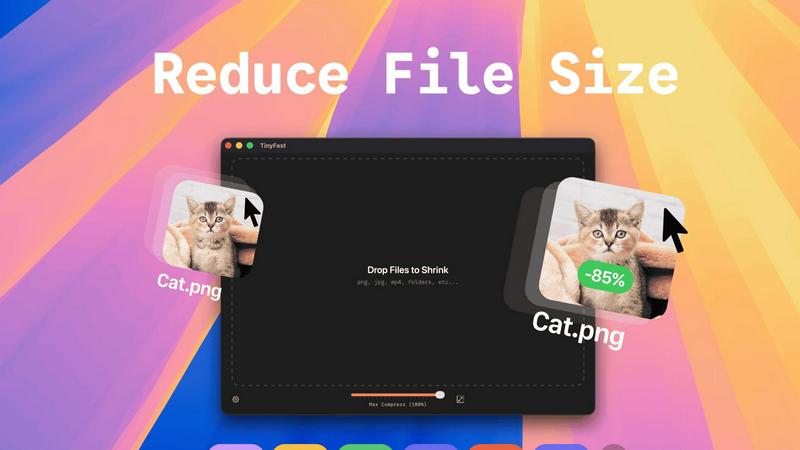
Discover how TinyFast privately shrinks your files on Mac with a simple drag and drop.
Last updated: February 28, 2026
Visual Comparison
RemoveTexts

TinyFast
Feature Comparison
RemoveTexts
Paint to Remove
This feature allows users to have precise control over the text removal process. Simply use the brush tool to paint over specific text areas, and the AI will expertly erase only those sections, ensuring a clean and tailored result that meets your exact needs.
Auto Remove All
With the Auto Remove All feature, users can enjoy the convenience of one-click removal of every text element in an image. The AI intelligently detects and removes all text, making it ideal for users who want to streamline their editing process without compromising on quality.
Edit & Replace Text
RemoveTexts offers an innovative Edit & Replace Text feature, enabling users to change existing text in images while matching the original style. This functionality is perfect for creators who want to customize visuals without starting from scratch, preserving the aesthetics of the original design.
Remove Objects
The Remove Objects feature goes beyond text removal, allowing users to erase unwanted items, logos, or visual elements from their images. This capability is particularly useful for e-commerce sellers or anyone looking to enhance their imagery by eliminating distractions.
TinyFast
Blazing-Fast Local Compression
Discover the speed of processing files directly on your machine's hardware. TinyFast utilizes optimized native engines to shrink even large video and image files in mere seconds. There's no waiting for uploads to distant servers or downloads back to your device. This local approach means compression begins the instant you drop a file, turning what used to be a minutes-long ordeal into a task that finishes almost as soon as it starts, all while keeping your CPU busy instead of your internet connection.
100% Private & Secure Processing
Explore true digital privacy where your sensitive files are concerned. With TinyFast, every compression task happens entirely on your Mac. Whether you're working under an NDA, handling confidential client assets, or simply value your privacy, you can rest assured that your files never travel to the cloud or an external server. This "privacy by design" philosophy ensures that you are the only one who ever has access to your original and compressed files, providing unparalleled peace of mind.
Universal File Format Support
Delve into a tool that doesn't limit your creativity. TinyFast supports an extensive range of common file types, making it a versatile hub for all your compression needs. It seamlessly handles images (PNG, JPG, HEIC, WebP, GIF, SVG), videos (MP4, MOV, M4V), documents (PDF, DOCX), audio (MP3), and even code files (JS, CSS, JSON). This universal support means you can consolidate your workflow around a single, reliable tool instead of juggling multiple specialized websites or applications.
Simple Drag-and-Drop & Batch Processing
Experience a workflow so intuitive it feels effortless. TinyFast's entire interface is built around the simple action of dragging and dropping. You can drop a single file or an entire folder onto the app, and it will intelligently process everything in batch. This minimizes steps and eliminates complex settings for basic tasks, allowing you to compress dozens of files as easily as one. It’s designed to get out of your way and let you focus on your work, not on the tool.
Use Cases
RemoveTexts
E-commerce Product Photos
For online sellers, having clean and professional product images is crucial. RemoveTexts helps e-commerce professionals effortlessly remove watermarks or distracting text from their photos, ensuring that their products stand out and attract potential buyers.
Social Media Content Creation
Marketers and social media managers can utilize RemoveTexts to create visually appealing content by removing unwanted text from images. Whether it is cleaning up memes or removing captions from screenshots, the tool allows for polished visuals that engage audiences effectively.
Legal Document Redaction
Legal professionals often need to redact sensitive information from documents. RemoveTexts provides a fast and reliable solution for removing text from scanned images, ensuring confidentiality while preserving the document's overall presentation.
Personal Photo Editing
Everyday users can leverage RemoveTexts for personal photo editing needs, such as removing date stamps from vacation pictures or eliminating unwanted text from family photos. The tool makes it easy for anyone to enhance their memories without needing advanced editing skills.
TinyFast
Preparing Assets for Web Development
Curious about optimizing your website's performance? Developers and web designers can use TinyFast to quickly compress images, SVGs, CSS, and JavaScript files locally before deployment. This reduces page load times without ever risking the exposure of proprietary code or design assets to third-party online services, ensuring a faster and more secure development cycle.
Securing Confidential Client Deliverables
What if you need to send a large project file but it contains sensitive information? Freelancers and agencies can leverage TinyFast to compress large video edits, high-resolution design mockups, or signed PDF contracts directly on their Mac. Since files stay local, they maintain client confidentiality and comply with data protection requirements while easily meeting email attachment size limits.
Streamlining Content Creation Workflows
Ever feel bogged down by huge video files from your camera? Content creators, bloggers, and social media managers can drag their raw MP4 or MOV footage into TinyFast for rapid compression before editing or uploading to platforms. This saves precious storage space, speeds up editing software performance, and reduces upload times, all while keeping unpublished content private.
Managing Personal Media Libraries
Exploring ways to free up space on your Mac? Anyone with a growing library of photos (HEIC, JPEG) and home videos can use TinyFast to efficiently reduce file sizes without noticeable quality loss. This allows you to archive more memories on your device or backup drives and makes sharing family videos via message or email a quick and simple task.
Overview
About RemoveTexts
RemoveTexts is a cutting-edge AI-powered image editing tool designed to simplify the process of removing unwanted text from images. It caters to a diverse range of users, including designers, marketers, and everyday individuals who need to enhance their visuals without the hassle of complex software like Photoshop. The primary value proposition of RemoveTexts lies in its ability to deliver quick, seamless, and professional-grade results in mere seconds. By harnessing the power of advanced generative AI, the platform can effortlessly eliminate various text elements such as watermarks, captions, date stamps, and branded overlays, all while maintaining the integrity of the original background. With no design skills required, users can confidently navigate the intuitive interface and achieve high-quality edits with just a few clicks. The tool supports multiple languages, making it accessible to a global audience, and has already garnered a loyal user base of over 100,000 creators and professionals worldwide.
About TinyFast
Have you ever wondered what it would be like to compress a file without the tedious upload wait or the nagging worry about where your data ends up? TinyFast is the answer to that curiosity, a native macOS application built for the modern creator who values both speed and sovereignty over their digital assets. At its core, TinyFast is a powerful, local file compressor that handles a vast array of formats—from images like PNG and WebP to videos like MP4 and MOV, and even documents like PDFs. It’s designed specifically for developers, designers, and content creators who find themselves constantly needing to shrink files for emails, websites, or client deliveries. The magic lies in its simplicity and privacy: your files never leave your Mac. By processing everything locally, TinyFast eliminates the security risks and delays associated with online tools, offering a compression experience that is not only blisteringly fast but also completely confidential. It transforms a typically multi-step, uncertain process into a simple drag-and-drop action, empowering you to reclaim time and maintain full control over your work.
Frequently Asked Questions
RemoveTexts FAQ
How does RemoveTexts work?
RemoveTexts leverages advanced AI technology to analyze surrounding pixels and intelligently reconstruct the background after removing text. This deep learning inpainting technique ensures that the removed areas blend seamlessly with the original image.
Is there a limit on the image size I can upload?
Yes, RemoveTexts supports image uploads of up to 10 MB. You can upload images in JPG, PNG, or WebP formats, making it versatile for various visual content needs.
Can I use RemoveTexts for commercial purposes?
Absolutely! RemoveTexts is designed for both personal and commercial use, making it ideal for professionals and businesses looking to enhance their visual content without the need for extensive design skills.
What types of text removal does RemoveTexts support?
RemoveTexts can remove a wide range of text types, including watermarks, captions, subtitles, and branded overlays. The AI-powered tool ensures that all text elements are erased while maintaining the quality of the surrounding image.
TinyFast FAQ
Is TinyFast really free to use?
Yes, TinyFast offers a fully-featured free tier forever. You can compress up to 5 files per day at no cost, which is perfect for trying out the app or handling light, occasional compression tasks. This allows you to thoroughly explore its speed and privacy benefits before deciding if you need the unlimited capability of a paid plan.
What happens to my files during compression?
This is where TinyFast's core philosophy shines: absolutely nothing leaves your computer. The entire compression process is executed locally on your Mac's processor. Your original file is read, an optimized version is created, and both remain solely on your device. There is no upload, no cloud processing, and no external server involvement at any stage.
What file formats does TinyFast support?
TinyFast supports a wide and practical range of formats. This includes images (PNG, JPEG, TIFF, HEIC, WebP, GIF, BMP, SVG), videos (MP4, MOV, M4V), documents (PDF, DOCX), audio (MP3), and even code files (JS, CSS, JSON). This broad compatibility makes it a single, universal tool for most common compression needs across different projects.
Can I compress multiple files at once?
Absolutely! TinyFast is built for efficiency and supports both single-file and batch processing. You can drag and drop an entire folder filled with supported files into the app, and it will automatically compress them all in one go. This batch functionality is a huge time-saver when preparing multiple assets for a project or cleaning up a directory of large files.
Alternatives
RemoveTexts Alternatives
RemoveTexts is an innovative AI-powered tool designed to effortlessly remove unwanted text from images in mere seconds, placing it firmly within the image and photo editing category. Users often seek alternatives to RemoveTexts due to factors such as pricing, specific feature sets, or compatibility with different platforms. Finding the right alternative involves evaluating aspects like ease of use, the quality of output, available languages, and how well the tool integrates with existing workflows. When searching for an alternative, consider the tool's ability to handle various image types, the precision of text removal, and additional features like object removal or text editing capabilities. It's also essential to assess user reviews and the overall reputation of the tool to ensure it meets your specific needs and expectations.
TinyFast Alternatives
TinyFast is a macOS application that excels in the category of local file optimization tools. It's designed for users who need to quickly and privately shrink images, videos, and PDFs directly on their computer with a simple drag-and-drop action. People often explore other options for various reasons. Some may be seeking a different pricing model or a free tier, while others require support for additional file formats or specific advanced editing features. Platform compatibility is another key driver, as users on Windows or those needing web-based access will naturally look beyond a Mac-only solution. When evaluating other tools, consider your core needs. Prioritize whether absolute local privacy is essential or if you're comfortable with cloud processing for potentially greater compression. Also, assess the balance between automation and manual control—do you want a set-it-and-forget-it tool or one that offers granular settings for each file type?