
dmaya vs Refbox
Side-by-side comparison to help you choose the right AI tool.

dmaya
dMaya is an AI design platform that streamlines UI creation, client collaboration, and code export for teams and agencies.
Last updated: April 13, 2026

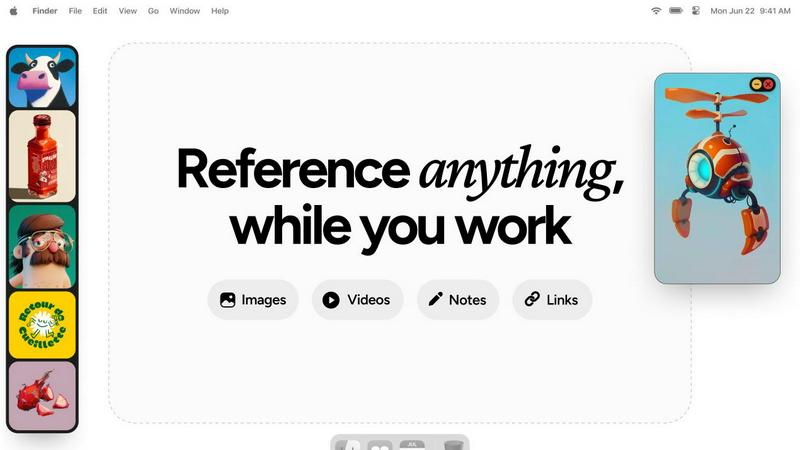
Refbox keeps your reference images and notes effortlessly accessible above your workspace for streamlined creativity.
Last updated: February 28, 2026
Visual Comparison
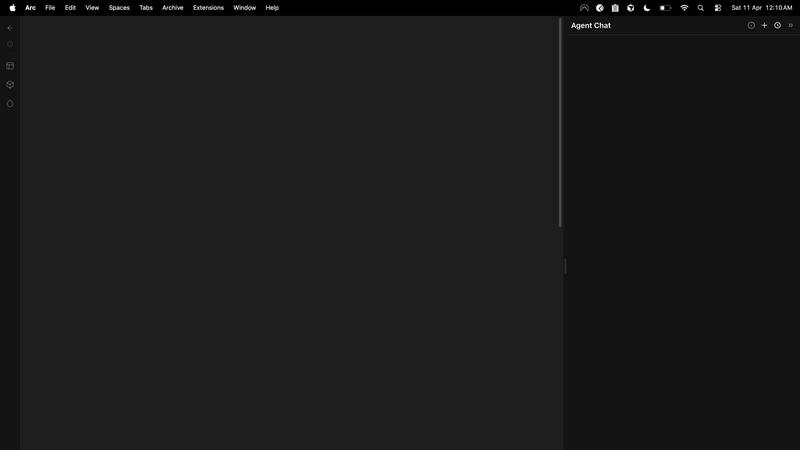
dmaya
Refbox
Feature Comparison
dmaya
AI-Powered Design Generation
dMaya leverages advanced AI technology to convert plain language descriptions into intricate, production-ready UI designs within moments. This feature eliminates lengthy design processes, enabling teams to focus on creativity rather than technicalities.
Multi-Screen Canvas
The platform offers an infinite canvas where users can simultaneously work on desktop and mobile frames. This feature enhances productivity by allowing drag-and-drop functionality, zooming, and organization, similar to Figma, but with the added efficiency of AI assistance.
Built for Teams & Collaboration
Designed with teamwork in mind, dMaya allows users to invite team members, share projects with clients, and leave comments in real-time. Role-based access ensures that everyone involved can contribute effectively while maintaining focus on their specific tasks.
Client Presentation Mode
With dMaya’s interactive preview feature, users can share polished designs with clients through a single, account-free link. This facilitates immediate feedback collection and iteration, streamlining the approval process and making it easier to align with client expectations.
Refbox
Floating Reference Frames
Refbox allows you to create resizable, floating frames that can be positioned over any application. This means your references remain visible, ensuring that your focus is never compromised while you work.
Infinite Canvas
With Refbox, you can see all your references on an infinite canvas. This unique feature allows you to flip through items like a slideshow, making it easier to compare different visuals side by side without losing track of your workflow.
Auto-Hide Functionality
The auto-hide feature lets you minimize distractions by keeping the Refbox out of sight until you need it. This way, you can concentrate on your primary task without unnecessary clutter on your screen.
GIF Playback and Pixel Rendering
Refbox enhances your creative process with GIF playback that allows you to step through each frame. Additionally, the pixel rendering feature ensures that your pixel art is displayed accurately, helping you maintain precision in your work.
Use Cases
dmaya
Agencies
Agencies can leverage dMaya to generate design concepts quickly during discovery calls, significantly enhancing their pitch processes. By presenting multiple design directions in just hours, they can win more clients and streamline their workflow.
Product Teams
Product teams benefit from dMaya by exploring various UI directions before committing engineering resources. This allows for enhanced collaboration across design, product, and engineering disciplines, reducing the discrepancies between designed output and actual builds.
Freelancers
Freelancers can utilize dMaya to expand their project capacity without extending their working hours. By generating high-quality designs swiftly, they can manage more clients simultaneously, thus increasing their revenue potential.
Startups
Startups can capitalize on dMaya's rapid design capabilities to iterate on their product ideas quickly. With the ability to present concepts to stakeholders and gather feedback without delays, startups can pivot and adapt their offerings based on real-time insights.
Refbox
Graphic Design
Graphic designers can utilize Refbox to keep their reference images, color palettes, and typography samples at hand. This reduces the time spent searching for inspiration, allowing for a more fluid design process.
UI/UX Development
UI/UX developers benefit from Refbox by having immediate access to design guidelines, user flows, and inspiration quotes. This helps streamline their workflow and maintain consistency across projects.
Animation
Animators can use Refbox to pin reference videos and character sheets, ensuring they can easily access inspiration and maintain continuity in their animations without disrupting their creative flow.
Concept Art Creation
Concept artists can leverage Refbox to gather mood boards, sketches, and color schemes in one place. This facilitates quick access to visual resources, enhancing creativity and efficiency during the concept development phase.
Overview
About dmaya
dMaya is a revolutionary design platform specifically crafted for agencies, teams, and freelancers who prioritize visual design before diving into code. It empowers users to generate professional-quality UI designs from simple text descriptions, allowing for a seamless transition from concept to execution. With dMaya, you can describe your project, whether it's a SaaS dashboard, an e-commerce flow, or a mobile app, and receive polished screens in mere seconds. The platform stands out by facilitating iterative conversations with an AI agent, enabling instant adjustments to colors, layouts, typography, and sections. This design-first approach ensures that teams can catch potential issues early, align collaboratively, and secure client approvals rapidly. With its design tokens feature, consistency across all screens is maintained effortlessly. Once designs are finalized, users can export them as clean HTML, CSS, and JavaScript code, ready to be handed off to any coding agent like Cursor or Claude Code for development in frameworks such as React or Flutter. This unique workflow allows teams to present confidently, approve efficiently, and ship products faster than ever.
About Refbox
Refbox is an innovative floating reference application designed specifically for creative professionals who seek to maintain their focus while working. Imagine the frustration of constantly switching between folders and browser tabs to access inspiration. Refbox solves this problem by providing an always-visible workspace on your desktop where you can pin images, videos, GIFs, and notes. This powerful tool helps you keep your visual references within arm's reach, allowing you to concentrate on your projects in programs like Photoshop, Blender, or Figma. It's perfect for illustrators, 3D artists, animators, UI/UX designers, and concept artists. With Refbox, you transform your desktop into a dynamic mood board, enhancing both speed and accuracy in your work. The core value proposition of Refbox is straightforward yet impactful: it offers seamless access to your creative inspirations, effectively eliminating distractions and enabling a deeper state of focus. By keeping your reference materials readily visible, you can create more efficiently and effectively, making Refbox an essential tool for any creative workflow.
Frequently Asked Questions
dmaya FAQ
How does dMaya generate designs from text descriptions?
dMaya employs sophisticated AI algorithms that interpret your plain language descriptions and translate them into comprehensive, production-ready UI designs almost instantaneously. This allows for a streamlined design process.
Can I collaborate with team members in dMaya?
Yes, dMaya is built for collaboration. You can invite team members to your projects, share designs for feedback, and even leave comments, facilitating a more integrated workflow that enhances team productivity.
What happens after I get client approval?
Once you receive client approval on your designs, you can easily export them as clean code in HTML, CSS, and JavaScript formats. This code can then be handed off to any coding agent for further development in your chosen framework.
Is there a limit to the number of screens I can design at once?
No, dMaya provides an infinite canvas that allows you to work on multiple screens across different devices simultaneously. This flexibility enhances your design capabilities and supports comprehensive project development.
Refbox FAQ
How does Refbox improve my workflow?
Refbox enhances your workflow by providing a dedicated space for reference materials, eliminating the need to switch between multiple tabs and windows, thereby fostering a more focused and productive environment.
Can I use Refbox with multiple applications?
Yes, Refbox is designed to float above any application, so you can use it seamlessly with tools like Photoshop, Blender, Figma, and more, keeping your references accessible no matter what software you are using.
Is Refbox suitable for all types of creatives?
Absolutely! Refbox is built for various creative professionals including illustrators, graphic designers, 3D artists, and animators. Its versatility makes it a valuable tool for anyone who relies on visual inspiration.
What types of media can I pin in Refbox?
You can pin a variety of media types in Refbox, including images, videos, GIFs, and notes. This allows you to create a comprehensive reference library that suits your specific creative needs.
Alternatives
dmaya Alternatives
dMaya is an innovative AI vibe design platform tailored for agencies, teams, and freelancers who seek to streamline the design phase before diving into coding. By utilizing AI to generate professional UI designs from simple text descriptions, dMaya enables users to create polished screens quickly and efficiently. This unique approach not only enhances collaboration but also allows for rapid iteration and feedback, making it an indispensable tool for modern design workflows. Users often explore alternatives when they encounter limitations in pricing, feature sets, or platform compatibility. The need for a solution that better fits their specific requirements can arise from various factors such as budget constraints, desired functionalities, or the desire for a more intuitive user experience. When considering alternatives, it's essential to evaluate the features that matter most to your team, including ease of use, collaboration capabilities, and the ability to export designs seamlessly into code.
Refbox Alternatives
Refbox is a floating application designed specifically for creative professionals, allowing them to keep reference images and notes visible above any workspace. This innovative tool enables users to maintain their creative flow without the disruption of constantly switching between windows. As creatives explore their options, they often seek alternatives to Refbox for various reasons, including pricing, additional features, or compatibility with different platforms. When searching for a suitable alternative, it's essential to consider factors such as user interface, ease of access to reference materials, and the ability to manage various types of media and notes. Ultimately, the goal is to find a solution that enhances productivity and maintains focus, allowing for a seamless integration of inspiration into the creative process.