
Outbid vs securememo.app
Side-by-side comparison to help you choose the right AI tool.

Discover Upwork jobs instantly and send AI-crafted proposals to win more freelance work.
Last updated: March 19, 2026
securememo.app
Discover a private, open-source memo service that encrypts everything on your device.
Visual Comparison
Outbid

securememo.app
Feature Comparison
Outbid
24/7 Real-Time Monitoring & Alerts
Imagine a tool that never sleeps, constantly scanning the Upwork job board for new opportunities that match your profile. Outbid does exactly that, checking for new postings every 60 seconds, day and night. When a relevant job is found, you receive an instant notification via Telegram. This feature ensures you're among the very first to know, turning what is often a waiting game into an active, immediate opportunity, long before most freelancers even see the listing.
AI-Powered Proposal Generation
Gone are the days of staring at a blank page. For every job alert, Outbid's AI crafts a personalized proposal draft. It intelligently analyzes the job description and cross-references it with your skills and bio to generate a relevant, persuasive starting point. This isn't generic copy; it's a tailored first draft designed to capture a client's attention, which you can then quickly copy, tweak to add your personal touch, and submit—all in a matter of moments.
Smart & Customizable Filtering
Not every job is worth your time, and Outbid understands that. Its sophisticated filtering system allows you to fine-tune exactly what you see. You can set filters based on required skills, client budget ranges, experience level, and even "quiet hours" to pause notifications when you're unavailable. This ensures your alerts are high-quality and relevant, helping you focus only on the opportunities that are truly a good fit for your expertise and goals.
War Room Strategy Mode
For highly competitive listings where standing out is critical, Outbid offers a strategic edge with its War Room mode. This advanced feature allows you to input custom instructions and guidelines for the AI. You can command it to emphasize certain aspects of your experience, adopt a specific tone, or highlight particular achievements. You can also regenerate proposals on the fly to test different angles, giving you a tactical advantage in crowded job posts.
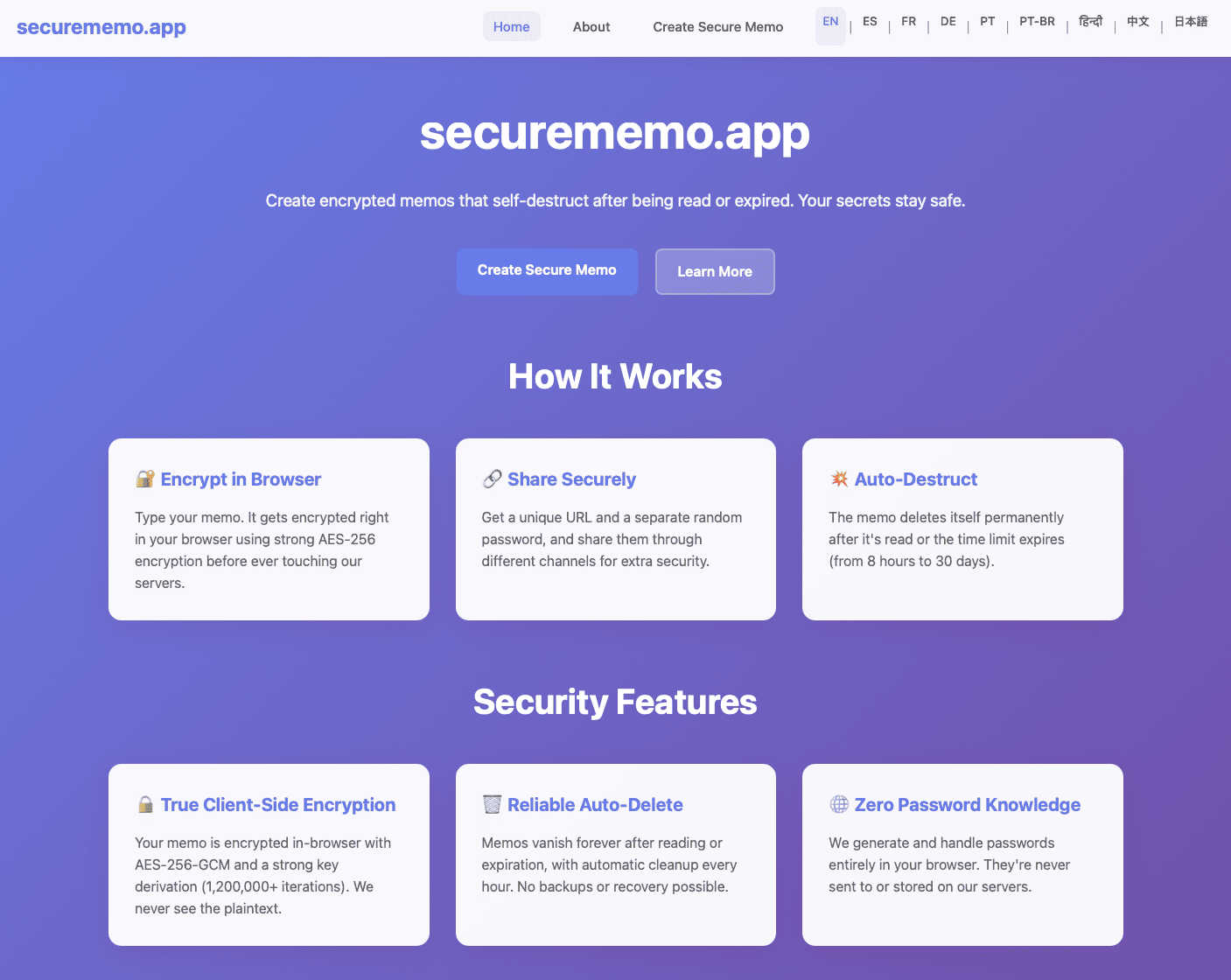
securememo.app
Client-Side Encryption
This is the foundational pillar of securememo.app's security. When you create a memo, the encryption process happens entirely within your own web browser using robust algorithms. Your sensitive text is transformed into unreadable ciphertext on your computer or phone before it ever travels over the internet to securememo.app's servers. This means the service never handles your unencrypted, plain-text data. Even if someone were to intercept the data in transit or access the servers, they would only ever see encrypted gibberish, making your information completely inaccessible to outside parties, including the service providers themselves.
Self-Destructing Notes
Each memo you create is designed to be ephemeral. Once you generate a shareable link, the note is programmed to automatically and permanently delete itself after it has been read by the recipient. This creates a one-time-view experience, ensuring the information does not persist indefinitely on any server. It's like a digital message that burns after reading, significantly reducing the risk of your sensitive data being exposed in a future data breach or being accidentally left accessible in a forgotten inbox.
Password-Protected Sharing with Zero Knowledge
Sharing is a two-key process that maximizes security. When you create a memo, the app generates a strong, random password entirely on your device. To access the note, a recipient needs both the unique link and this exact password. Crucially, the password is never sent to or stored by securememo.app's servers. You must share it through a separate, secure channel (like a Signal message or in person). This "zero-knowledge" design means the platform has no ability to decrypt your memos, as it never possesses the key, placing complete control and responsibility for the password squarely in your hands.
No-Account Anonymity & Ease of Use
Prioritizing privacy and simplicity, securememo.app requires no sign-up, no email address, and no personal information to use. You can immediately start creating and sharing encrypted notes from any modern browser. This barrier-free approach not only makes the service incredibly quick and easy to use but also enhances your anonymity. There is no digital trail linking you to the memos you create, allowing for truly discreet communication without the friction of account creation or management.
Use Cases
Outbid
The Time-Strapped Professional
For established freelancers juggling multiple client projects, constantly checking Upwork for new leads is impractical. Outbid acts as their automated business development assistant. It handles the tedious monitoring work, ensuring they never miss a high-potential job that fits their niche. They can maintain their current workload while confidently knowing new opportunities are being captured, allowing them to grow their business without sacrificing billable hours.
The Upwork Newcomer
Starting on a competitive platform like Upwork can be daunting, especially when it comes to writing proposals that win. A newcomer can use Outbid as a guided onboarding tool. The instant alerts help them understand what kinds of jobs are being posted in real-time, while the AI-generated proposals serve as an educational template. They learn effective proposal structure and language by example, building confidence and increasing their chances of landing that crucial first client.
The Niche Specialist
Freelancers in specialized fields often find that perfect jobs are rare and get snapped up quickly. A specialist can configure Outbid's smart filters to track very specific keywords and budget thresholds. When that ideal, high-value project appears, they are notified instantly. Being first to apply with a professionally drafted, relevant proposal positions them as the obvious expert, dramatically increasing their win rate for premium work.
The Freelancer Seeking Consistency
For those looking to build a steady pipeline of work, sporadic job hunting leads to feast-or-famine cycles. This freelancer uses Outbid to systemize their lead generation. With reliable, filtered alerts coming in daily, they can apply to a consistent number of quality jobs each week. This disciplined, proactive approach, powered by speed and ready-made proposals, helps them build momentum and achieve a more stable, predictable income stream.
securememo.app
Sharing Sensitive Login Credentials
Instead of sending a password over email or an insecure chat, you can use securememo.app to share it safely. Place the username and password in an encrypted memo, generate the link, and share the link and the auto-generated password via different channels (e.g., link in Slack, password via text message). The recipient gets one-time access, and the credentials are then wiped from the server, preventing them from being discovered later in a compromised email account.
Submitting Anonymous Tips or Feedback
For individuals who need to report sensitive information to journalists, organizations, or HR departments anonymously, this tool is ideal. A whistleblower or source can compose their message, share the secure link, and communicate the password through an anonymous method. The recipient can read the information once, and the memo self-destructs, leaving no evidence on the server that could be subpoenaed or leaked, protecting the source's identity.
Sending Private Drafts or Confidential Documents
Writers, lawyers, or business professionals can share early drafts, contract clauses, or strategic plans with colleagues or clients without fear of the document being stored on a third-party server in an unencrypted form. The self-destruct feature ensures the draft is only available for a single viewing session, encouraging focused review and preventing uncontrolled distribution of sensitive work-in-progress materials.
Secure One-Time Communication for Events
Organizers of private events, surprise parties, or sensitive meetings can distribute key details like addresses, entry codes, or itineraries to a select group. By using securememo.app, they ensure that the information is encrypted and can only be accessed by those who have both the link and the separately shared password, and that it disappears after being read, keeping the details confidential until the last moment.
Overview
About Outbid
What if you could discover the perfect Upwork job the moment it's posted, with a compelling proposal already written for you? Outbid is the innovative tool that transforms this scenario from a hopeful thought into your daily reality. Built by freelancers for freelancers, it operates as your personal 24/7 scout on the Upwork marketplace. The core mission is disarmingly simple yet profoundly powerful: to get you to the front of the application line. By continuously monitoring new job postings and sending instant alerts directly to your Telegram, Outbid ensures you can apply within 60 seconds. This isn't just about speed; it's about strategic advantage. Each alert comes paired with an AI-generated proposal draft, meticulously tailored to match the specific job description and your unique skill set. This combination of lightning-fast notification and ready-to-submit content is designed for freelancers at any stage—from the busy veteran who can't afford to refresh their feed constantly to the newcomer unsure how to craft a winning proposal. Outbid invites you to explore a more efficient, proactive approach to freelancing, where you spend less time hunting and more time winning.
About securememo.app
Imagine a digital space where your most sensitive thoughts, passwords, or confidential details can exist for just a moment, shared with absolute certainty that no one else—not even the platform itself—can ever peek inside. This is the core promise of securememo.app, a fascinating tool that redefines ephemeral and private communication. At its heart, it's a privacy-first memo service that allows you to create and share encrypted notes that self-destruct after being read, all directly from your web browser without any software installation. The magic lies in its architecture: everything you type is encrypted on your own device before a single byte of data is sent to a server. This client-side encryption model ensures that your data is technically impossible for anyone else to decipher, creating a true "zero-knowledge" environment. It's designed for anyone who values discretion—journalists sharing leads, professionals exchanging login credentials, whistleblowers submitting tips, or even individuals planning a surprise party. By eliminating the need for user accounts, securememo.app not only simplifies the process to a few clicks but also fiercely protects your anonymity. Available in over 20 languages, it invites a global audience to explore a more secure way of passing information, turning a simple memo into a digital secret that vanishes without a trace.
Frequently Asked Questions
Outbid FAQ
How fast are the alerts?
Outbid is engineered for speed, scanning the Upwork job board every 60 seconds. When a job matching your filters is posted, an alert is sent to your Telegram typically within 60 seconds of it going live. This ultra-fast notification is what gives you the critical advantage to be one of the first applicants, a key factor in getting noticed by clients.
Do I need to be tech-savvy to use Outbid?
Not at all. Outbid is designed for simplicity and ease of use. The entire setup happens within Telegram, a familiar messaging app. You simply message the bot, add your skills and a short bio—a process that takes under two minutes. From there, everything is automated. There's no complex software to install or technical configuration required.
Can I customize the AI-generated proposals?
Absolutely. The AI-generated proposals are intended as a powerful first draft, not a final product. You are encouraged to copy the text and then tweak, edit, and personalize it before submitting on Upwork. For greater control, the War Room Strategy Mode (available in Pro plans) allows you to give the AI custom instructions to shape the proposals according to your specific strategy.
Is Outbid affiliated with Upwork?
No, Outbid is an independent tool built by freelancers to help other freelancers succeed on the Upwork platform. It is not officially affiliated with, endorsed by, or partnered with Upwork.com. It operates as a separate service that monitors publicly available job postings to provide value-added alerts and assistance to its users.
securememo.app FAQ
How does securememo.app ensure my data is private?
Privacy is ensured through client-side encryption and a zero-knowledge architecture. Your memo is encrypted on your device before it leaves your browser. The decryption key (password) is generated locally and never sent to our servers. We only store the encrypted data, which is mathematically impossible for us to read without the password, which we never have. Your data's privacy is cryptographically guaranteed.
What happens if someone guesses the password to my memo?
The password generated by securememo.app is a long, random string of characters designed to be extremely resistant to guessing (brute-force) attacks. It is practically impossible to guess. The security of the memo ultimately depends on you sharing this password through a secure channel. If you share the link and password together in an insecure way, the memo's security is compromised.
Can I access a memo after it has been read and self-destructed?
No. The core function of a self-destructing note is that it is permanently and immediately deleted from the server after the first successful decryption and viewing. There is no way to recover a memo after it has been read. This is a deliberate security feature to ensure ephemerality.
Do I need to install any software to use securememo.app?
No installation is required. securememo.app is a web application that runs directly in your modern web browser (like Chrome, Firefox, or Safari). You can access it from any device with an internet connection and a browser, making it highly accessible and convenient for spontaneous, secure sharing without any software commitments.